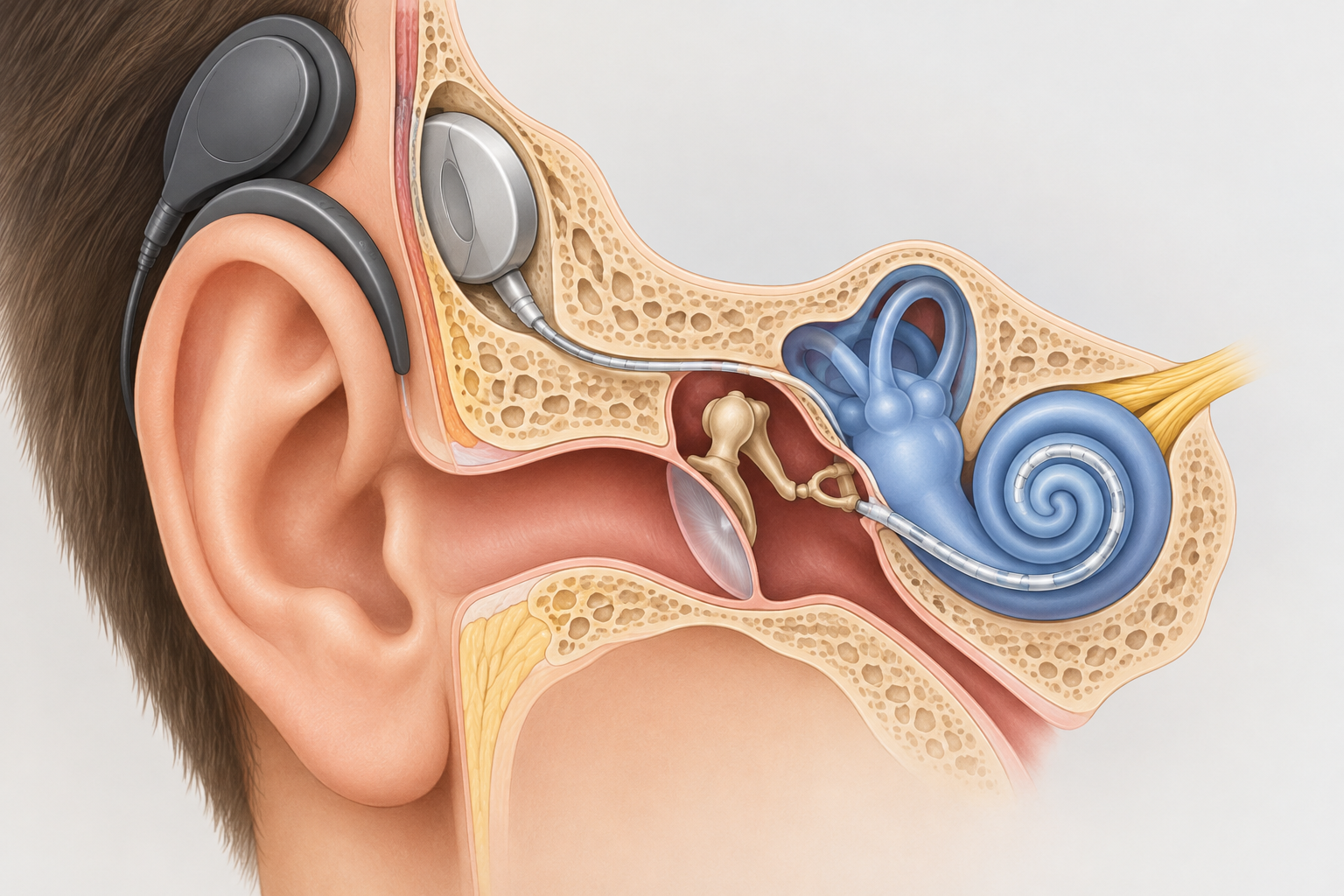
Cochlear implant surgery is usually a 1.5 to 3 hour operation done under general anesthesia through a small cut behind your ear. Most adults go home the same day or the next morning and are back to light routines within about a week. The implant is not switched on until a follow-up visit, often 2 to 4 weeks later.
Last updated: October 30, 2026. This is general information, not medical advice. Your surgeon’s instructions always come first.
TypeSurgery, general anesthesia
Operating timeAbout 1.5 to 3 hours
Hospital staySame day or overnight
Back to light routinesAbout 1 week
Implant switched onOften 2 to 4 weeks
Before surgery: what happens first
You don’t book this operation the way you book a hearing test. A cochlear implant team first checks whether you are a candidate. Expect hearing tests with well-fitted hearing aids, speech recognition testing, and a CT or MRI scan of your inner ear.
Your surgeon also reviews your general health for anesthesia. In the US, the CDC recommends that people getting cochlear implants be up to date on pneumococcal vaccines, because implant recipients have a higher risk of bacterial meningitis. Ask for your vaccines early, since some need to be given at least two weeks before surgery.
You will also choose a device. Three manufacturers make FDA-approved implants in the US: Cochlear (Nucleus), Advanced Bionics and MED-EL. Your surgeon may recommend one based on your anatomy, the MRI compatibility you need, and which processor features matter to you.
The cochlear surgery procedure, step by step
Every surgeon’s technique differs slightly. This is the general sequence most hospitals describe.
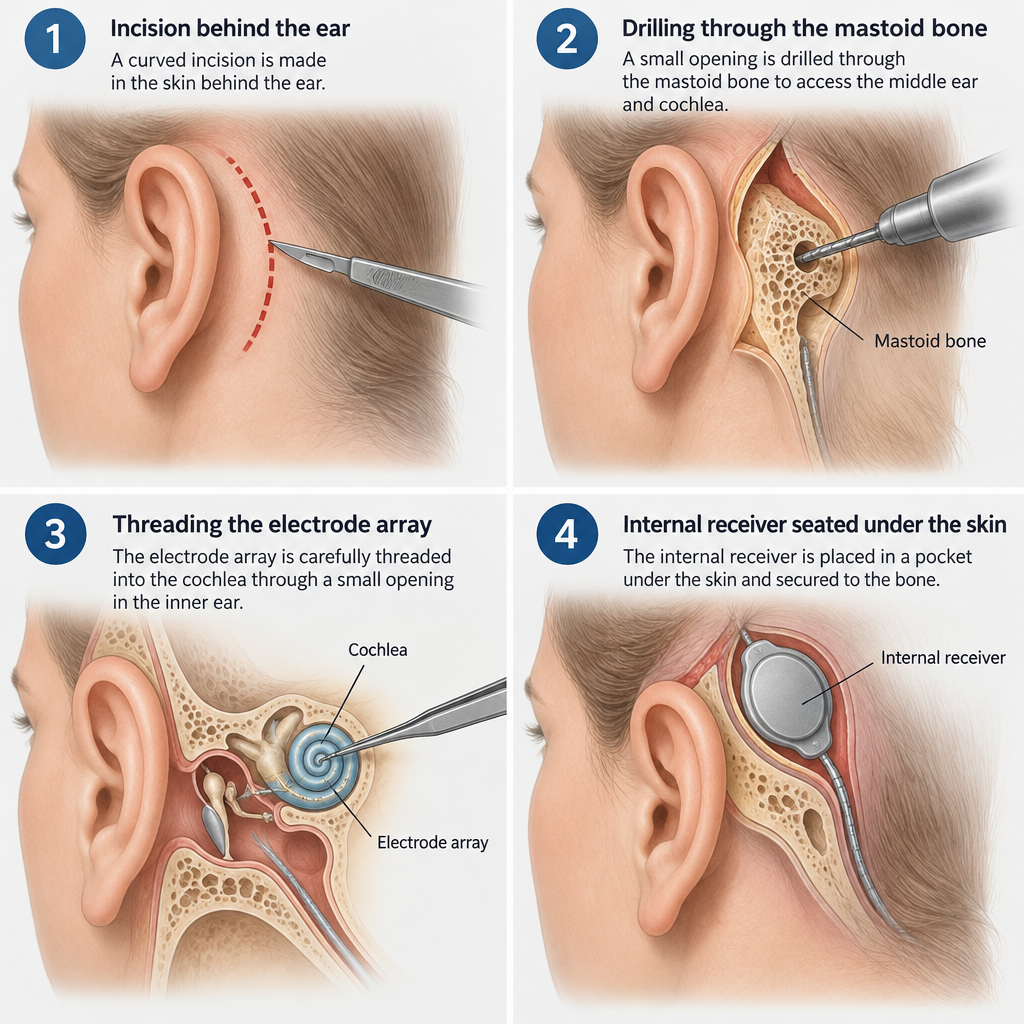
What happens in the operating room
You are given general anesthesia, so you are asleep throughout.
A small area of hair behind the ear may be shaved, and a curved incision is made.
The surgeon drills through the mastoid bone behind the ear to reach the middle ear.
A shallow bed or snug pocket is made under the skin for the internal receiver.
The electrode array is threaded into the cochlea, usually through the round window.
The team tests the implant’s electrodes and your auditory nerve response while you sleep.
The incision is closed and covered with a pressure dressing.
Throughout the operation, the team monitors your facial nerve, which runs close to the surgical route. Some hospitals take an X-ray afterward to confirm the electrode’s position.
Insights a surgeon will usually share
Surgeons often stress two points. The first is that the operation is on bone and the inner ear, not the brain. The second is that many teams now use “soft” insertion techniques and thinner electrodes to try to preserve whatever natural low-pitch hearing you still have. Preservation isn’t guaranteed, so ask your surgeon for their own results.
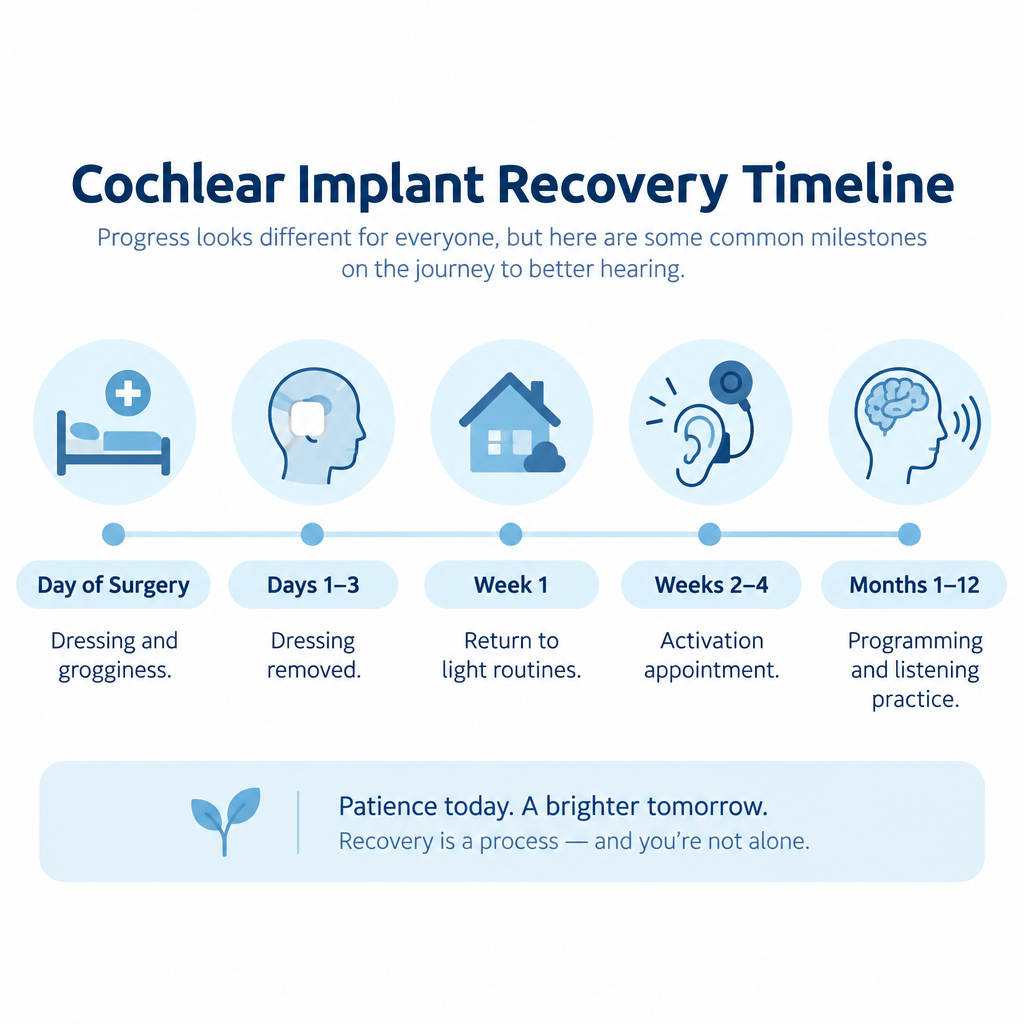
Recovery timeline
When
What is typical
Day of surgery
Grogginess, ear pressure, a head dressing, mild to moderate pain
Days 1 to 3
Dressing removed, some dizziness, tenderness behind the ear
Week 1
Most adults return to desk work and light activity
Weeks 1 to 2
Stitches removed or dissolving, swelling fading
Weeks 2 to 4
Activation appointment at many centers
Months 1 to 12
Repeated programming visits and listening practice
In the first weeks, you may notice a few side effects:
Dizziness or imbalance often settles within days, though some people feel it for longer.
Taste changes, such as a metallic taste on one side of the tongue, happen because a small taste nerve runs through the middle ear.
Numbness around the ear may last for weeks.
Tinnitus can change, either for better or worse.
Keep the incision dry until your team clears it. You will also be told to avoid heavy lifting, contact sports and blowing your nose hard for a few weeks.
Hearing tip
Before activation, you’ll hear little or nothing on the implanted side. Turn on closed captioning for TV and video calls, and set up telecommunications relay service for phone calls so you don’t miss anything important.
See a professional
Call your surgeon promptly for fever, spreading redness, fluid from the wound, facial weakness, a stiff neck or a severe headache. If you notice sudden hearing loss in your other ear, treat it as a medical emergency.
Hearing with your new device
Activation is when an audiologist attaches the external sound processor and programs it. First sounds are often described as beeps, robotic voices or high-pitched chatter. That is normal. Your brain needs time to adapt to electrical hearing.
Most people improve noticeably over the first 3 to 6 months, and many keep improving for a year or more. Daily listening practice speeds this up. Some newer processors support Bluetooth streaming, and a few are ready for Auracast broadcast audio, which helps in venues that offer it.
Questions for your surgeon
How many implant operations do you perform each year?
Will this be outpatient, or should I plan to stay overnight?
What are your rates of infection, facial nerve injury and device failure?
How likely is it that I’ll keep some natural hearing?
Is my device safe for MRI scans, and with what precautions?
When will activation happen, and how many programming visits come after?
Supporting your child
Children can receive implants from as young as 9 months, depending on the device and their hearing loss. The operation itself is similar to the adult version. Younger children usually bounce back from surgery quickly, but they need close supervision so they don’t knock or scratch the incision.
Prepare your child with simple, honest words about a “sleepy medicine” and a bandage. Bring a favorite toy. Many families keep using sign language alongside spoken language during the early months, and you should plan for regular speech and listening therapy afterward.
FAQ
How serious is cochlear implant surgery?
It is a well-established operation with a low rate of serious complications. It still carries real risks: infection, dizziness, taste changes, facial nerve injury, meningitis and device failure. Most of these are uncommon, and facial nerve injury is rare.
How painful is cochlear implant surgery?
Most people describe aching, pressure and tenderness behind the ear rather than severe pain. It is usually managed with over-the-counter pain relief or a short course of prescription medication. Discomfort typically eases within a few days.
Is cochlear implant surgery major surgery?
It involves general anesthesia and drilling through bone, so it is a significant operation. Even so, it is often done as a same-day or overnight procedure, and recovery is shorter than many people expect.
How long does it take to fully recover from cochlear implant surgery?
The incision usually heals within 2 to 4 weeks, and most adults resume normal activities within one to two weeks. Learning to hear with the implant is a separate process that unfolds over months, often a year or longer.
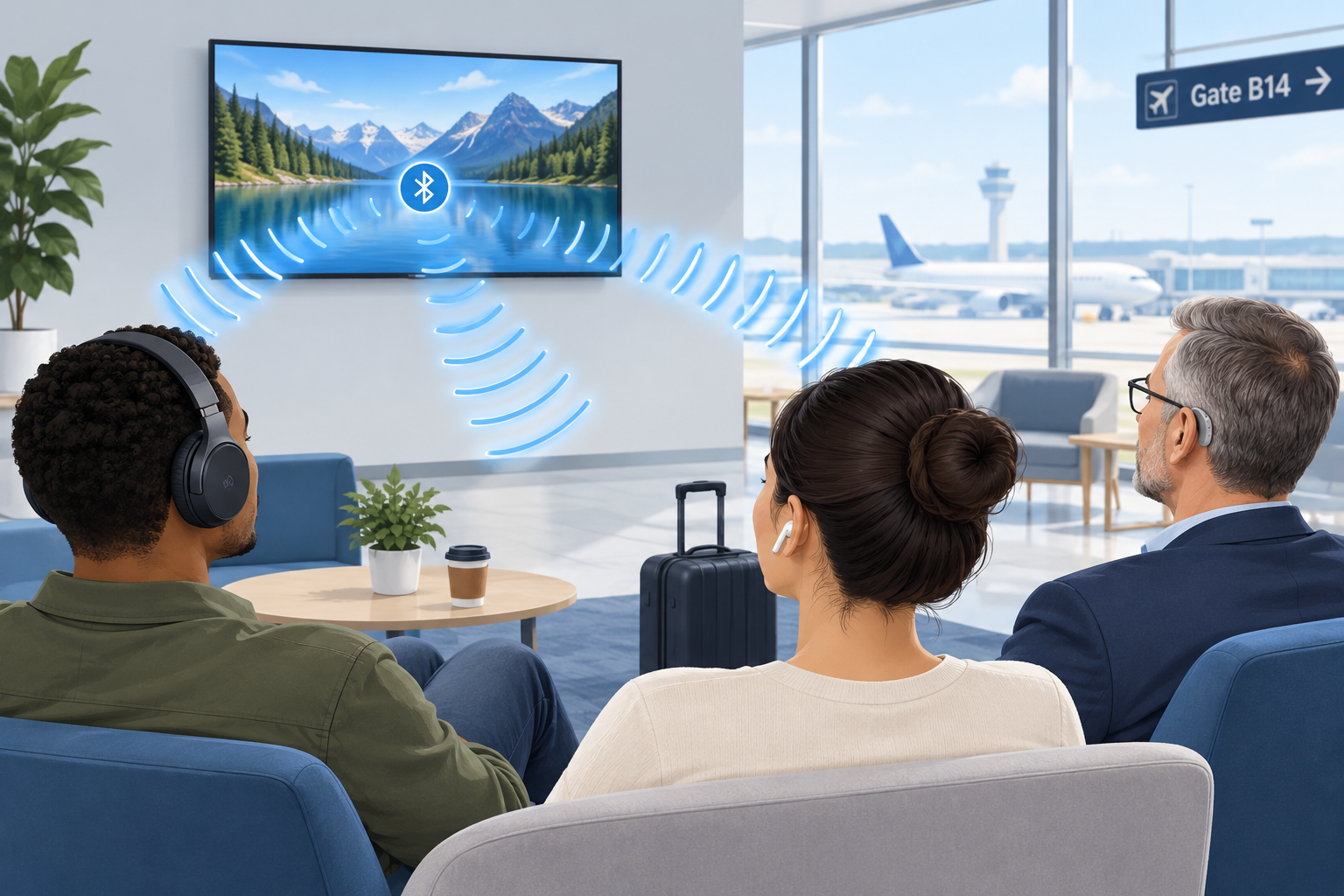
Auracast is a Bluetooth feature that lets one audio source, such as a TV, a PA system or a phone, broadcast sound to an unlimited number of nearby earbuds, headphones and hearing aids at the same time. For people with hearing loss, it means you can stream a gate announcement, a lecture or a gym TV directly into your own hearing aids, with your own settings, without borrowing a receiver or wearing a neckloop.
Last updated: October 29, 2026
TypeBluetooth broadcast audio
Built onBluetooth LE Audio
Listeners per streamUnlimited
Introduced2022 by Bluetooth SIG
Best forVenues, TVs, sharing
What is Auracast?
Auracast is the consumer name the Bluetooth Special Interest Group (SIG) gave to broadcast audio in June 2022. The SIG is the industry body that writes the Bluetooth standards, so Auracast is an open standard rather than one company’s product. Any manufacturer can build it into a device.
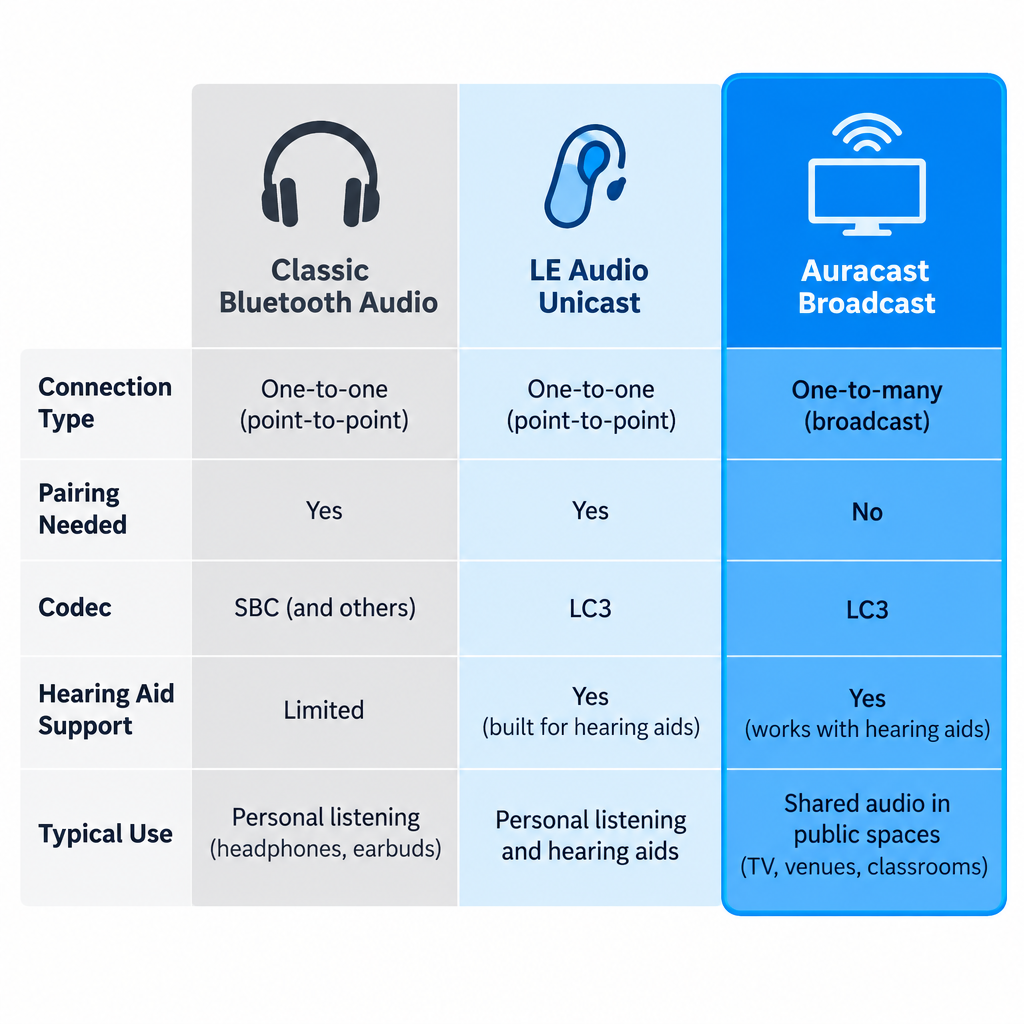
It runs on Bluetooth LE Audio, the newer generation of Bluetooth audio the SIG announced in 2020. Classic Bluetooth audio, the kind most of us have used for years, connects one source to one listening device in a private pairing. Auracast removes that limit. A transmitter sends out a stream, and anyone with a compatible receiver in range can tune in, much like picking a station on a radio.
The SIG frames Auracast around three everyday uses:
Share your audio: two or more people listen to the same phone or tablet on their own earbuds or hearing aids.
Unmute your world: silent TVs in bars, gyms, airports and waiting rooms broadcast their sound to anyone who wants it.
Hear your best: venues such as theaters, lecture halls, places of worship and conference centers stream speech directly to visitors’ hearing devices.
That third category is the one with the biggest implications for people who are hard of hearing. It could eventually replace a lot of the clunky assistive listening hardware venues hand out today.
How Auracast broadcast works
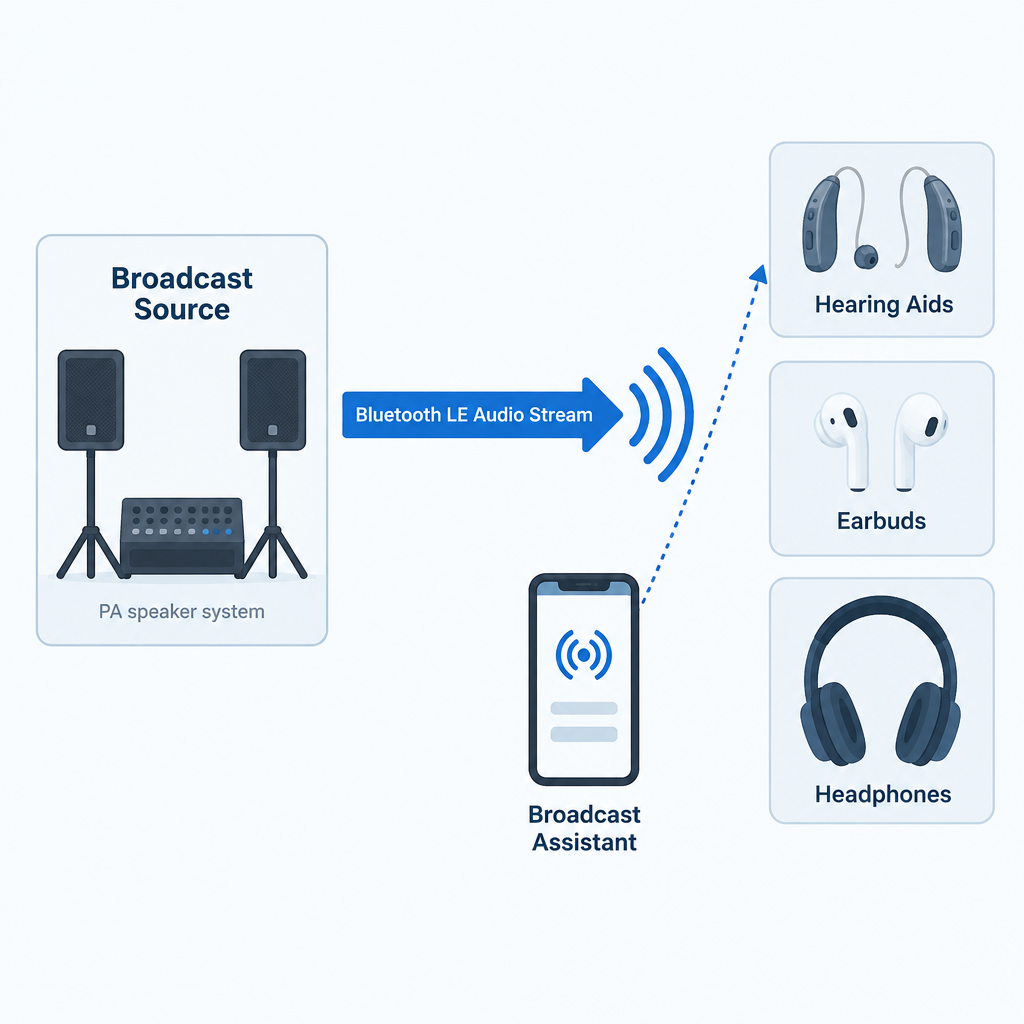
An Auracast setup has three roles. Sometimes one device plays two of them.
The broadcast source transmits the audio. This might be a smart TV, a dedicated transmitter connected to a venue’s sound system, a laptop or a phone.
The receiver (sink) plays the audio. That’s your earbuds, headphones, speaker or LE Audio hearing aids.
The broadcast assistant helps you find and join a stream. Hearing aids have no screen, so your phone, smartwatch or the hearing aid maker’s app scans for nearby broadcasts, shows you a list, and tells your hearing aids which one to lock onto.
Each broadcast advertises a name, such as “Gate B12” or “Main Hall English”. A broadcast can be open, so anyone can join, or encrypted with a broadcast code, which works like a Wi-Fi password. A hotel conference room or a private tour group would use the encrypted option. Venues can also post a QR code that you scan to join the right stream with the code already filled in.
The technical pieces underneath
If you want to understand why Auracast works when older Bluetooth couldn’t do this, these are the building blocks inside the LE Audio specifications.
Component
What it does
Why it matters to you
LC3 codec
Compresses audio efficiently at low data rates
Clear speech with less battery drain
Isochronous channels
Deliver time-synchronized audio streams
Left and right ears stay in sync; lip sync holds up
Broadcast Isochronous Stream (BIS)
Carries one-to-many audio
No pairing limit on listeners
Broadcast Audio Scan Service (BASS)
Lets an assistant device tell a receiver what to join
Your phone picks the stream for your hearing aids
Public Broadcast Profile (PBP)
Sets baseline quality rules for public streams
Any compliant device can play a public broadcast
Hearing Access Profile (HAP)
Standardizes LE Audio for hearing aids
Hearing aids work across brands of phones
The LC3 codec deserves a special mention. In the SIG’s listening tests, LC3 delivered better quality than the old SBC codec at roughly half the data rate. Lower data rates mean lower power use, which is a big deal for small hearing aid batteries that have to last a full day. LC3 supports sampling rates from 8 kHz up to 48 kHz, so a broadcast can be tuned for speech or for full-range music.
Auracast Bluetooth vs. classic Bluetooth
People often search for “Bluetooth Auracast” because they’re not sure whether it’s a different wireless system. It’s the same Bluetooth radio family with new rules on top. Here is how it compares with the Bluetooth you already know.
Feature
Classic Bluetooth audio
LE Audio (unicast)
Auracast broadcast
Connection type
One source to one device
One source to one device (or a pair)
One source to unlimited devices
Pairing needed
Yes
Yes
No; you join a stream
Default codec
SBC
LC3
LC3
Hearing aid support
Proprietary (MFi, ASHA, or a streamer)
Standard via Hearing Access Profile
Standard via Hearing Access Profile
Typical use
Music and calls from your phone
Music and calls, lower power
TVs, venues, shared listening
The hearing aid row is the important one. Until LE Audio, hearing aids streamed using Apple’s Made for iPhone protocol, Google’s ASHA protocol for Android, or a separate clip-on streamer. Those systems were tied to particular phones and didn’t let you join public audio at all. LE Audio gives hearing aids a common language, and Auracast adds the broadcast layer on top.
Why Auracast matters for people with hearing loss
Hearing aids are tuned to your specific hearing profile. Any time sound reaches you through the air, it picks up room echo, background noise and distance. Streaming audio directly into the aids skips all of that. Auracast extends direct streaming beyond your own phone to the wider world.
Here is what that changes in practice:
No borrowed equipment. Today, at many theaters you ask at a desk for a receiver and a neckloop or headset, hand over ID as a deposit, and hope the battery is charged. With Auracast, the receiver is already in your ears.
Your prescription stays in place. The broadcast plays through your hearing aids’ own processing, so the sound is shaped for your hearing loss, not a generic headset curve.
Better signal-to-noise. The voice from a lecturer’s microphone arrives without the coughing, air conditioning and echo between you and the stage. For many listeners this is the single biggest improvement.
Discretion. Nobody can tell you’re using an assistive listening system, because you aren’t holding or wearing anything extra.
Unlimited capacity. A venue doesn’t have to guess how many receivers to stock. Ten people or ten thousand can join the same stream.
Multiple language or audio channels. A venue can run separate streams, for example one for the main speaker and one for a translated version or audio description.
For public TVs, Auracast fills a gap that closed captioning only partly covers. Captions on a muted gym TV help, but they lag, drop words and are hard to follow during fast dialogue or sports commentary. Being able to hear the actual audio in your hearing aids, alongside captions if you like, is a real step up.
Auracast vs. hearing loops and other assistive listening systems
Auracast enters a field that already has several assistive listening technologies. Each has strengths, and Auracast is not an automatic replacement for all of them yet.
System
How it reaches you
Needs extra gear?
Strengths
Weaknesses
Hearing loop (induction loop)
Magnetic field picked up by the telecoil in your hearing aid
No, if your aid has a telecoil
Works with millions of existing aids; no app or pairing
Needs a wire installed around the room; quality depends on installation
FM / RF systems
Radio signal to a body-worn receiver
Yes, a receiver plus headset or neckloop
Long range; mature technology
Borrowed hardware; hygiene and battery issues
Infrared (IR)
Light signal to a receiver
Yes, a receiver
Signal stays inside the room; good for privacy
Needs line of sight; sunlight can interfere
Wi-Fi streaming apps
Venue Wi-Fi to an app on your phone
Your phone, plus earbuds or a hearing aid connection
Uses the phone you already carry
Small delays; depends on venue Wi-Fi
Auracast
Bluetooth LE Audio broadcast to your hearing aids or earbuds
No, if your devices support LE Audio
Direct to your aids; unlimited listeners; open standard
Requires newer hearing aids and an assistant device; venue rollout still early
Our honest view: if you’re buying hearing aids now, ask for both LE Audio and a telecoil. Hearing loops remain installed in many churches, theaters, ticket windows and public buildings, and a telecoil costs you nothing to use. Auracast is the future direction, but loops will stay useful for years, and some of the smallest hearing aid styles drop the telecoil to save space.
There’s also a regulatory point. In the United States, the 2010 ADA Standards for Accessible Design require assembly areas to provide assistive listening systems, and at least 25 percent of the receivers must be hearing-aid compatible. Those rules were written before Auracast existed, and the Department of Justice has not issued guidance specifically addressing Auracast as a compliant system. Venues installing it today usually run it alongside an existing system rather than in place of one.
What you need to use Auracast
To join a broadcast with your hearing aids, three things have to line up.
1. Hearing aids with LE Audio and Auracast support. This is hardware plus firmware. A hearing aid needs an LE Audio-capable chip, and the manufacturer has to enable broadcast listening in its software. Several makers launched models marketed as “Auracast ready” from 2023 onward, including ReSound Nexia, Oticon Intent and models in Signia’s IX platform. “Ready” usually means the hardware is capable; the full broadcast feature may arrive later through a firmware update, and it may depend on which phone you use.
2. A broadcast assistant. Usually this is your phone. Google added Auracast support for LE Audio hearing aids in Android 16, starting with recent Pixel phones, and Samsung was an early adopter across Galaxy phones, earbuds and TVs. Apple’s iPhone support has trailed Android here, so if you use an iPhone, check your hearing aid maker’s compatibility list and the current iOS release notes before counting on Auracast. Some hearing aid apps can also act as the assistant.
3. A broadcast to join. That means an Auracast-enabled TV, transmitter or venue system nearby.
Devices with Auracast support
Consumer audio brands have moved faster than venues. These are examples where the manufacturer has announced Auracast features.
Device type
Examples
What Auracast does there
Hearing aids
ReSound Nexia, Oticon Intent, Signia IX models
Receive broadcasts (feature availability depends on firmware and phone)
Phones
Samsung Galaxy models, Google Pixel on Android 16
Act as assistant; some can also broadcast audio sharing
Earbuds
Samsung Galaxy Buds2 Pro and later Galaxy Buds
Receive broadcasts from Samsung TVs and phones
TVs
Samsung TVs from the 2023 lineup onward
Broadcast TV sound to compatible earbuds
Speakers
JBL Go 4, Flip 7, Charge 6
Link multiple speakers to one source
Ask your audiologist or hearing aid provider to confirm two things for any model you’re considering: whether broadcast listening is enabled today, and which phones work as an assistant. Marketing pages don’t always make that distinction clear.
How to connect your hearing aids to an Auracast broadcast
Exact menus vary by phone and hearing aid brand, but the process follows the same pattern everywhere.
Joining an Auracast broadcast
Update your hearing aids to the latest firmware through the manufacturer’s app.
Update your phone to the newest operating system it supports.
Make sure your hearing aids are connected to your phone over Bluetooth.
On a Pixel running Android 16, open Settings, then Connected devices, and look for the audio sharing or broadcast option.
On a Samsung Galaxy, open Bluetooth settings and look for the Auracast option, or use your hearing aid app.
Wait for the list of nearby broadcasts, then tap the name the venue displays.
Enter the broadcast code or scan the venue’s QR code if the stream is protected.
Adjust the stream volume and the mix with surrounding sound in your hearing aid app.
Hearing tip
Most hearing aid apps let you blend the broadcast with your aids’ microphones. In a lecture, turn the microphones down to cut room noise; in a sports bar with friends, keep them up enough to hear the people at your table.
When you leave the venue’s range, your hearing aids drop the stream and return to normal. Your regular program and settings come back automatically.
Where Auracast is available now
Auracast is real and shipping, but it’s still early. The consumer side, meaning phones, earbuds, speakers and TVs, is ahead of public infrastructure. Venue adoption depends on transmitters from assistive listening companies, budgets for new installs, and enough visitors arriving with compatible hearing aids to justify the cost.
The places the SIG and equipment makers are targeting first include airports and train stations for announcements, gyms and bars with muted TVs, cinemas and theaters, universities and lecture halls, places of worship, museums with self-guided tours, and conference centers needing multiple language channels. If you visit any of these regularly, it’s worth asking the venue whether Auracast is on their plans. Requests from visitors are one of the ways venues decide what to fund.
At home, the most useful setup today is a TV with Auracast or a small Auracast transmitter plugged into your TV’s audio output, so you and your household can listen at different volumes. Check that any transmitter you buy explicitly lists Auracast or LE Audio broadcast support, not only “Bluetooth 5.x”. A Bluetooth version number alone doesn’t tell you a device supports Auracast.
A quick checklist before you buy hearing aids
If future Auracast access matters to you, raise these points with your audiologist:
Does this model support Bluetooth LE Audio, and is Auracast broadcast listening active now or promised in an update?
Which phones work as a broadcast assistant with these aids, including mine?
Does it have a telecoil for hearing loops?
Is it rechargeable, and how much does streaming cut daily battery life?
Can I adjust the mix between streamed sound and room sound in the app?
See a professional
Get hearing aids fitted by an audiologist or licensed hearing professional if your loss is more than mild. Sudden hearing loss in one or both ears is a medical emergency, so see a doctor the same day.
FAQ
Is Auracast the same as Bluetooth?
Auracast is a feature of Bluetooth, specifically Bluetooth LE Audio. It uses the same radio technology but adds one-to-many broadcasting, so a single source can stream to unlimited listeners instead of one paired device.
Do my current hearing aids support Auracast?
Only if they have LE Audio hardware and the manufacturer has enabled broadcast listening. Most hearing aids sold before 2023 cannot be upgraded with a software update because the chip itself doesn’t support LE Audio. Your hearing aid app or your provider can confirm this.
Do I need an app to use Auracast?
You need something to act as a broadcast assistant, because hearing aids have no screen to pick a stream. That’s usually your phone’s Bluetooth settings or your hearing aid maker’s app. Some earbuds and headphones have buttons that join a stream directly.
Does Auracast work with iPhone?
Android has moved first, with support in Android 16 and on Samsung Galaxy devices. iPhone support has lagged, so check your hearing aid maker’s compatibility list and Apple’s current release notes before you rely on it.
Can strangers listen to my Auracast stream?
Only if you leave it open. Broadcasts can be protected with a broadcast code, so if you share audio from your phone or TV, set a code and only people who have it can join.
Will Auracast replace hearing loops?
Not soon. Hearing loops work with the telecoils in millions of existing hearing aids and need no app. Auracast offers direct streaming and unlimited listeners, but it depends on newer hearing aids and venue upgrades. Expect the two to run side by side for years.
Does Auracast help with tinnitus?
Auracast is a way to deliver sound, not a treatment. It can make speech and audio easier to follow, but it doesn’t treat tinnitus or hearing loss. Talk to an audiologist about tinnitus management options.
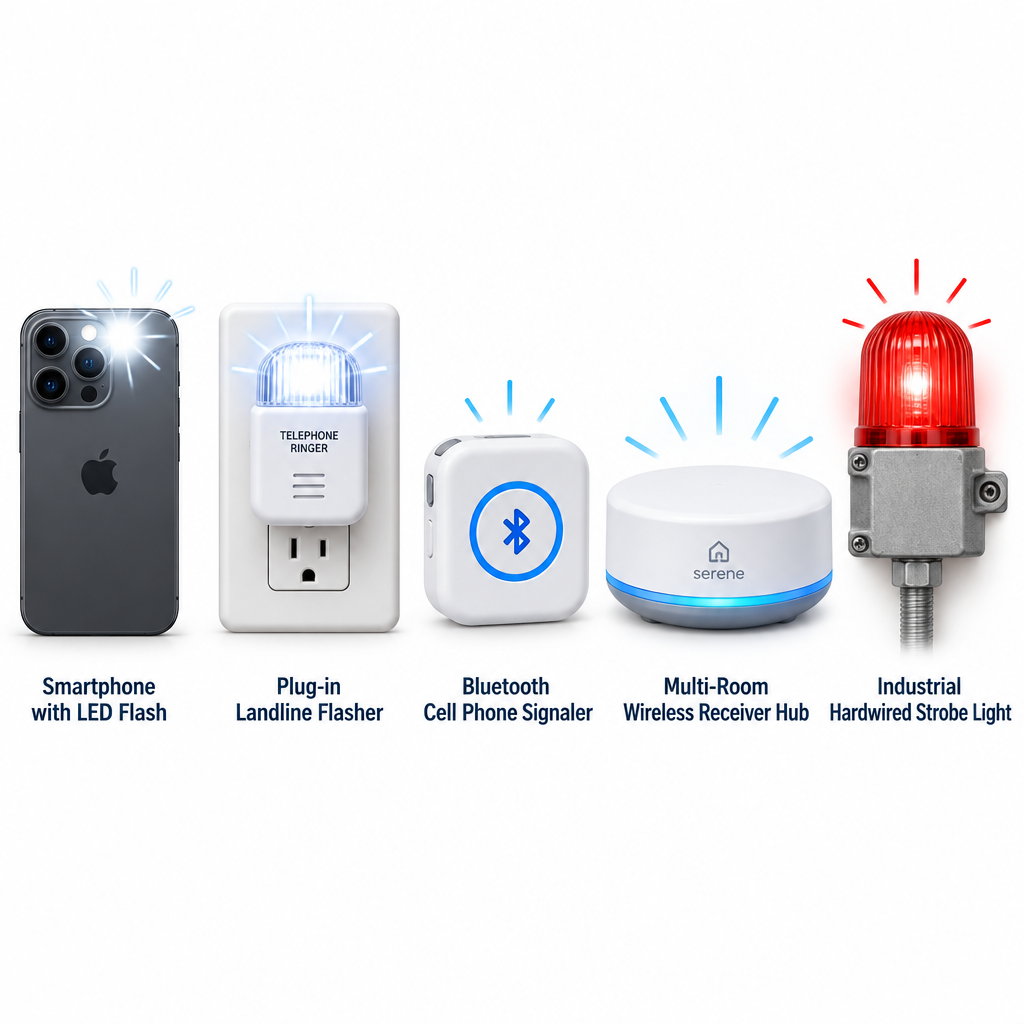
A light for your telephone flashes a lamp or strobe every time a call comes in, so you can see the ring when you can’t hear it. You have five practical options: your smartphone’s built-in flash, a plug-in landline flasher, a cell phone signaler, a whole-home alert system, or a hardwired strobe for loud workplaces. Here is how each one works and how to pick.
TypeVisual ring alerts
Works withLandline, mobile, VoIP
CostFree to moderate
Best forDeaf, hard of hearing
How a phone ringer light works
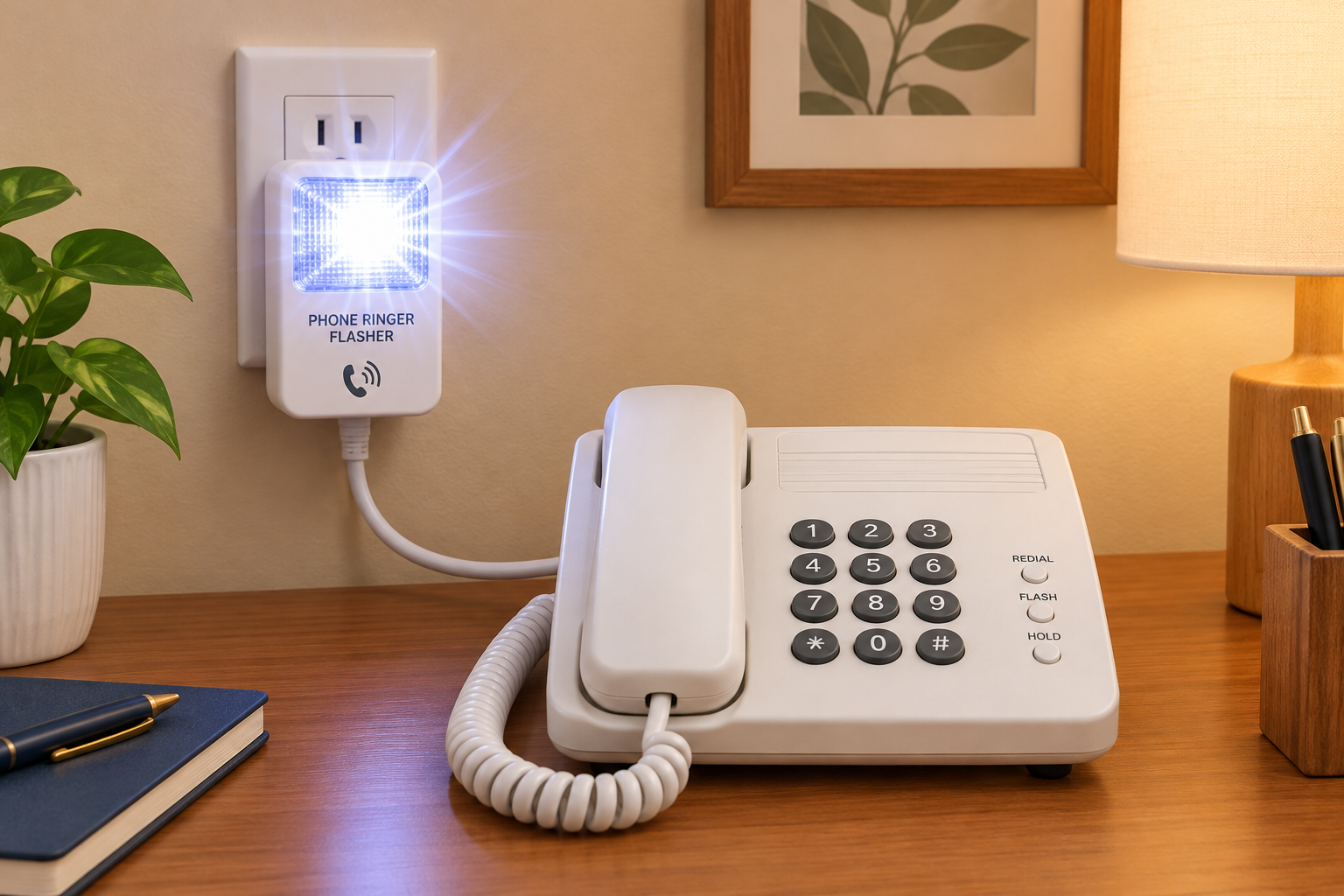
A landline phone flasher sits between your wall jack and your phone. When a call arrives, the line carries a ring signal. The flasher detects it and either fires a built-in strobe or switches on a lamp plugged into it. Most units also have a loud, adjustable-tone ringer.
Mobile phones don’t send a ring signal down a wire. So mobile options take one of two approaches. They use the phone’s own LED flash or screen, or they use a separate device that pairs over Bluetooth or listens for the ringtone.
The five main options compared
Option
Works with
How it alerts
Best for
Smartphone flash alerts
iPhone, Android
Camera LED or screen flashes
Anyone, at no cost
Plug-in landline flasher
Analog landlines
Strobe or plugged-in lamp
Home phones
Cell phone signaler
Mobile phones
Strobe, lamp or bed shaker
Seeing calls across a room
Whole-home alert system
Phone, doorbell, alarms
Receivers in several rooms
Multi-room homes
Hardwired phone strobe
Business lines
Bright industrial strobe
Factories, warehouses
Hardwired strobes such as the Viking BLK-4-EWP are built for noisy commercial spaces, not living rooms. If an employee who is hard of hearing needs one at work, it can count as a reasonable accommodation under the Americans with Disabilities Act.
Turn on flash alerts on your smartphone
Start here before you buy anything. The feature is free and takes under a minute to set up.
Setup steps
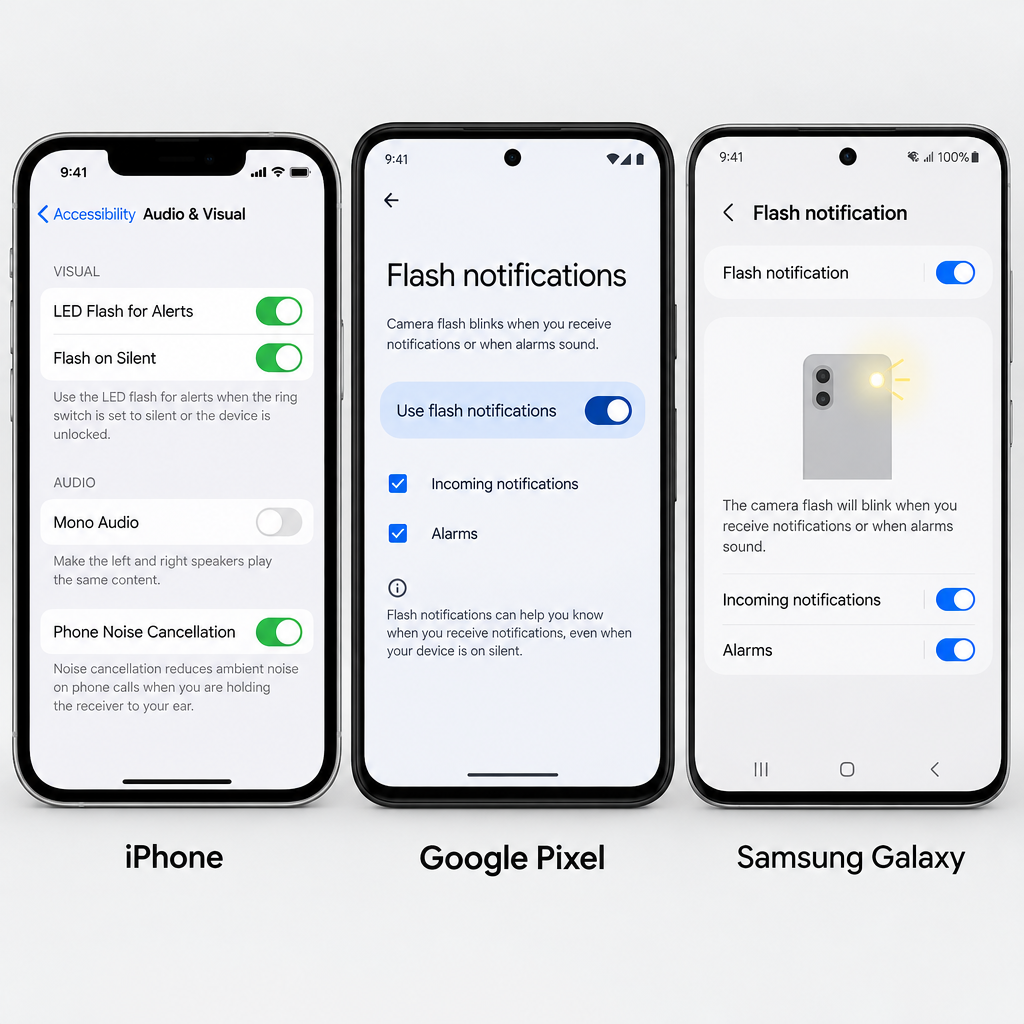
iPhone: open Settings, then Accessibility, then Audio & Visual.
Tap LED Flash for Alerts and switch it on.
Turn on Flash in Silent Mode if you keep the ringer off.
Google Pixel: open Settings, then Accessibility, then Flash notifications.
Turn on Camera flash notification, Screen flash notification, or both.
Samsung Galaxy: open Settings, then Accessibility, then Advanced settings, then Flash notification.
The catch is placement. The camera LED is on the back, so the phone needs to lie face down for you to notice it. In a pocket or bag, the flash is useless. That limitation is why many people add a dedicated signaler.
Hearing tip
Pair flash alerts with a strong vibration pattern. Then you’re covered when the phone is in your pocket and when it’s across the room.
Picking a landline or VoIP flasher
Check three things before you buy:
Line type. Classic plug-in flashers expect an analog ring signal. Many VoIP and cable phone services deliver one through a home adapter, but fully digital office systems often don’t. Confirm compatibility with the seller.
Lamp output. A built-in strobe is brightest. A lamp outlet lets you use a bedroom lamp you already own, which is easier on the eyes at night.
Room coverage. One flasher covers one room. If you move between the kitchen, living room and bedroom, consider a whole-home system with wireless receivers.
Get equipment free or at low cost
Most US states run a telecommunications equipment distribution program. These programs give amplified phones, ring signalers and similar devices to eligible residents, often at no charge. Eligibility rules vary by state. Many programs require residency and a form signed by a professional who can confirm your hearing loss.
If flashing lights still leave you missing parts of calls, a captioned phone or a telecommunications relay service can turn the conversation itself into text.
See a professional
If you notice a sudden drop in hearing, even in one ear, treat it as a medical emergency and see a doctor within 24 to 48 hours. Gradual changes are worth a hearing test with an audiologist.
FAQ
Where can I buy light for my phone?
Ring flashers are sold by assistive device retailers, hearing-loss specialty shops and major online marketplaces. Before you pay retail, check your state’s equipment distribution program. You may qualify for one free.
How do I turn my phone into a blacklight?
You can’t make a true UV light from a phone. A common trick covers the flashlight with clear tape colored in blue and purple marker. That makes some fluorescent items glow faintly, but it isn’t real ultraviolet and won’t reveal what a genuine UV torch does.
What is the light from phones called?
The bright white light on the back of a smartphone is the LED flash, which also works as the flashlight or torch. Some older Android phones also had a small notification LED on the front.
How do I turn the light on on my telephone?
On an iPhone, open Control Center and tap the flashlight icon. On Android, swipe down to Quick Settings and tap Flashlight or Torch. To make the light flash for calls instead, use the accessibility settings in the steps above.
A telecommunications relay service (TRS) lets people who are Deaf, hard of hearing, DeafBlind or who have a speech disability make phone calls through a trained communications assistant. The assistant converts text, captions, speech or sign language into a form the other caller can use. In the United States, relay is free to use, available 24 hours a day, and you can reach traditional relay by dialing 7-1-1.
Last checked: October 29, 2026
TypeFederal phone accessibility service
Cost to userFree relay service
AccessDial 711 or app
Hours24/7, every day
Overseen byFCC
What a relay service actually does
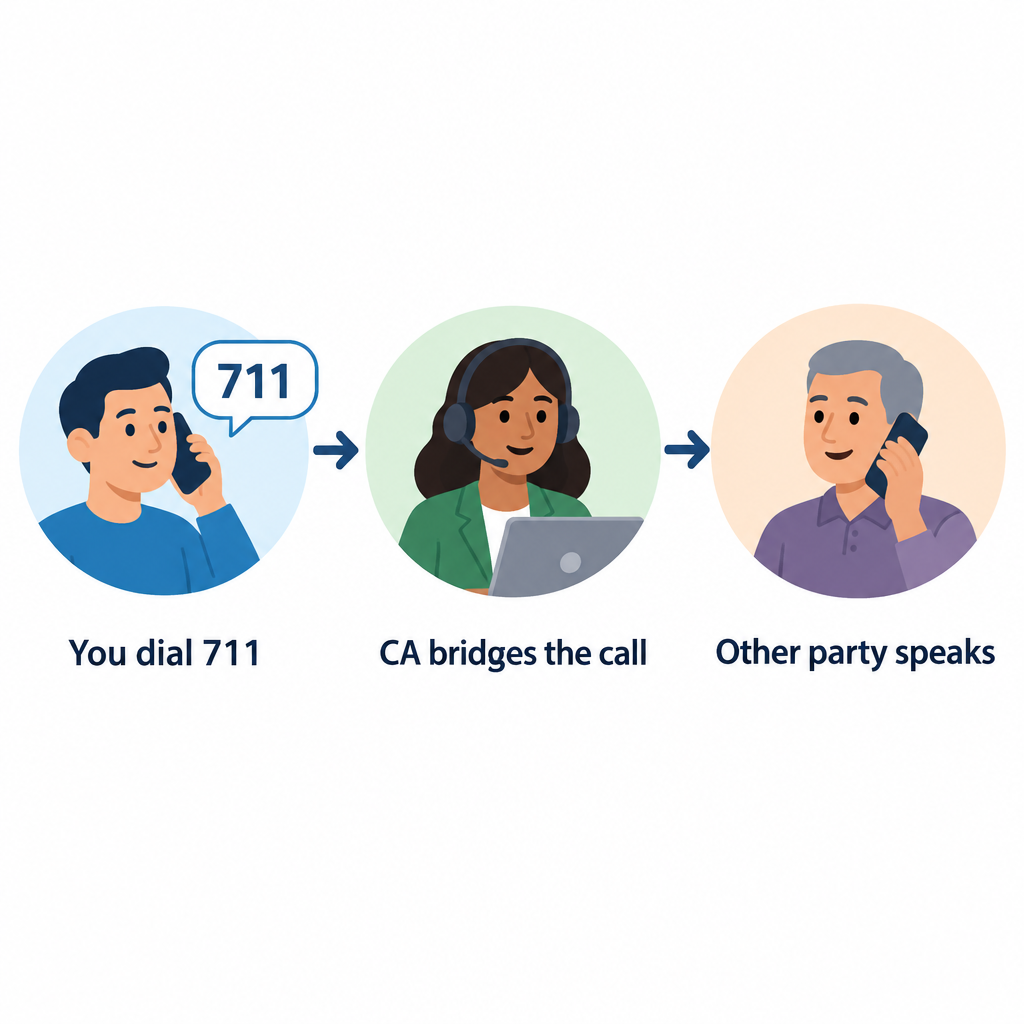
A relay service places a person in the middle of the call. That person is a communications assistant (CA), sometimes called an operator, and their job is to pass your words along as accurately as possible.
Here is a basic example. You type, “Hi, I’d like to book a table for two at 7.” The CA reads it aloud to the restaurant. When the host answers, the CA types the reply back to you. The call moves in turns, and many users type “GA” (go ahead) to signal that it’s the other person’s turn.
Title IV of the Americans with Disabilities Act created the nationwide telephone relay services system in 1990. The FCC sets the rules. Interstate and internet-based relay is paid for by a federal fund, and each state runs its own local relay program for calls within the state.
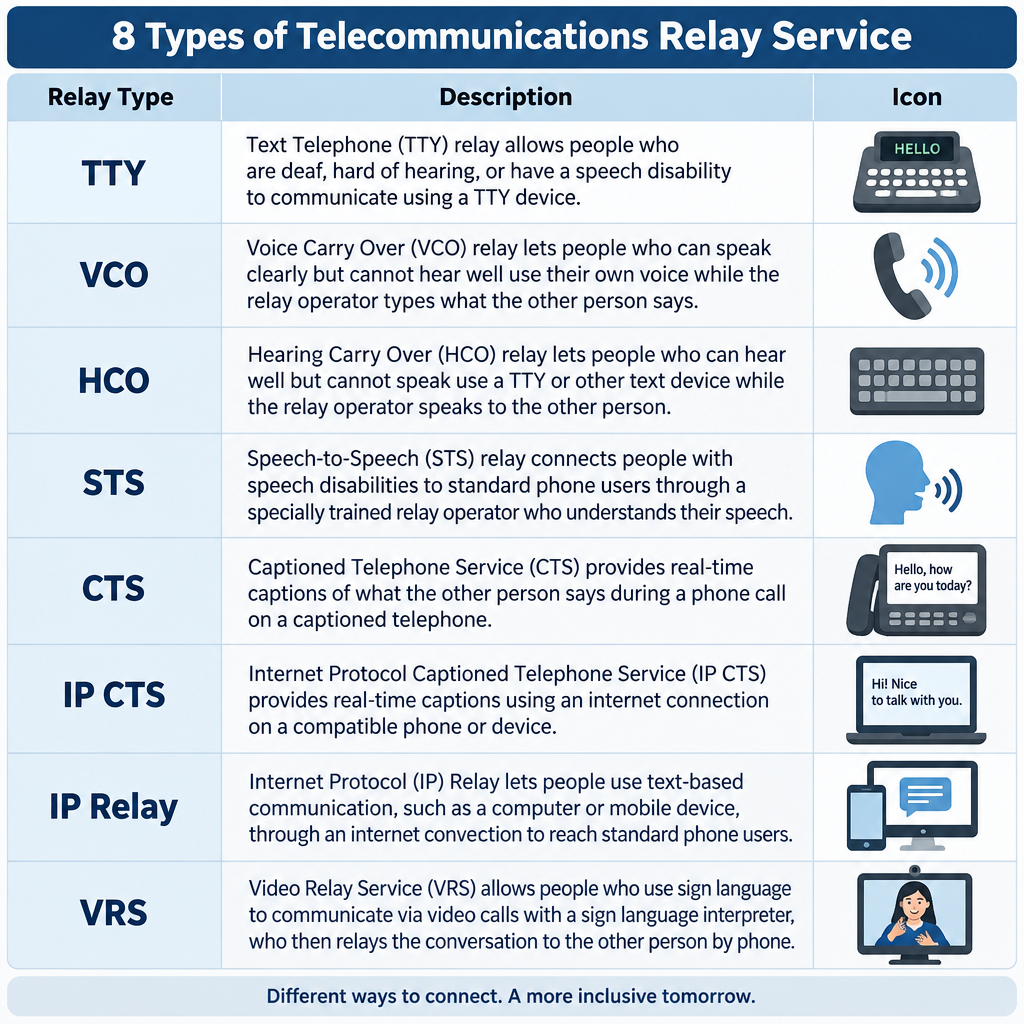
The 8 main types of relay service
Phone relay service is a family of services. The right one depends on how you hear, speak and prefer to communicate.
Relay type
How you communicate
Typical equipment
TTY (text-to-voice)
You type, CA voices and types replies
TTY or computer
Voice Carry Over (VCO)
You speak, read the other side’s replies as text
VCO phone or TTY
Hearing Carry Over (HCO)
You type, listen to the other person directly
TTY plus listening
Speech-to-Speech (STS)
CA repeats your speech clearly for the listener
Any phone
Captioned Telephone (CTS)
You talk and listen, read captions of replies
Captioned phone, such as CapTel
Internet Protocol Captioned Telephone (IP CTS)
Same as CTS, over the internet
App or captioned phone
IP Relay
Text relay through a web browser or app
Computer or smartphone
Video Relay Service (VRS)
You sign with an interpreter on video
Videophone, app, or computer
Federal rules also require interstate relay in Spanish, and many states offer it locally.
Captioned telephone and CapTel
Captioned telephone is the most common choice for people with acquired hearing loss who still speak clearly. You talk normally and hear what you can, while captions of the other person’s words appear on a screen. CapTel is a well-known brand of captioned phone, and IP CTS apps put the same feature on smartphones and tablets. To get IP CTS, you have to certify that you have a hearing loss that makes captions necessary. Free equipment programs usually also ask for a signature from a hearing professional.
Video Relay Service and ASL
VRS connects you by video to a qualified American Sign Language interpreter. You sign, and the interpreter speaks to the hearing party, then signs their reply back to you. For many Deaf people whose first language is ASL, this is far faster and more natural than typing in English. VRS users get a standard ten-digit phone number, so hearing people can call them like anyone else.
How to make a relay call with 7-1-1
Any hearing person can call a relay user. You do not need special equipment.
Calling through 711
Dial 711 from any landline or mobile phone in the US.
Tell the CA you want to place a relay call.
Give the phone number of the person you’re calling.
Speak directly to that person, using “you” rather than “tell her.”
Say “go ahead” when you finish each turn.
Stay patient during pauses while the CA types or relays.
To reach someone who uses VRS, just dial their ten-digit number. The call routes to an interpreter automatically.
Hearing tip
Don’t hang up when a relay call starts with a short introduction about relay. Legitimate businesses lose real customers this way, especially at reservation desks and doctor’s offices.
Rules that protect relay users
FCC rules give relay callers real protections:
Confidentiality. CAs cannot share the content of calls or keep records after the call ends.
Verbatim relay. CAs must pass along everything said, without editing or adding opinions.
Speed standards. Traditional TRS must answer 85% of calls within 10 seconds, and CAs must type at least 60 words per minute.
No extra cost. You should never pay more for a relay call than for the same voice call.
Any call, any purpose. Relay handles calls to banks, doctors and employers, as well as conference calls and long distance numbers.
Emergencies and 911
You can call 911 through VRS, IP Relay and IP CTS, and these services are required to route you to the right emergency center. A direct TTY call to 911, or text-to-911 where your area supports it, is often faster than going through 711.
See a professional
If your hearing drops suddenly in one or both ears, treat it as a medical emergency and get seen the same day. Ongoing changes in hearing are worth an audiologist visit before you choose captioned phone equipment.
Finding your state’s relay program
Each state has its own relay provider, customer care line and often a free equipment distribution program for TTYs, amplified phones and captioned phones. Your state’s commission for the deaf and hard of hearing, or its public utility commission, will list the current provider and how to request equipment.
FAQ
What is a relay service in simple terms?
It’s a phone service where a trained assistant helps two people talk when one of them can’t hear or speak on a standard call. The assistant turns speech into text, captions or sign language and back again.
Is telecommunications relay service free?
Yes. The relay itself costs you nothing, and you pay no more for the call than a hearing person would. VRS and IP CTS apps are free to download, though you need your own internet or data plan.
Can a hearing person use relay to call a Deaf person?
Yes. Dial 711 for text-based relay, or call a VRS user’s ten-digit number directly.
Does the operator listen to my private calls?
The CA does hear or read the call in order to relay it. However, the CA is legally bound to keep it confidential and cannot keep a record of what was said after the call ends.
Can I use relay for work conference calls?
Yes. VRS and captioning services can join conferencing calls. Ask your provider how to add an interpreter or captions before a long meeting so the session isn’t interrupted.