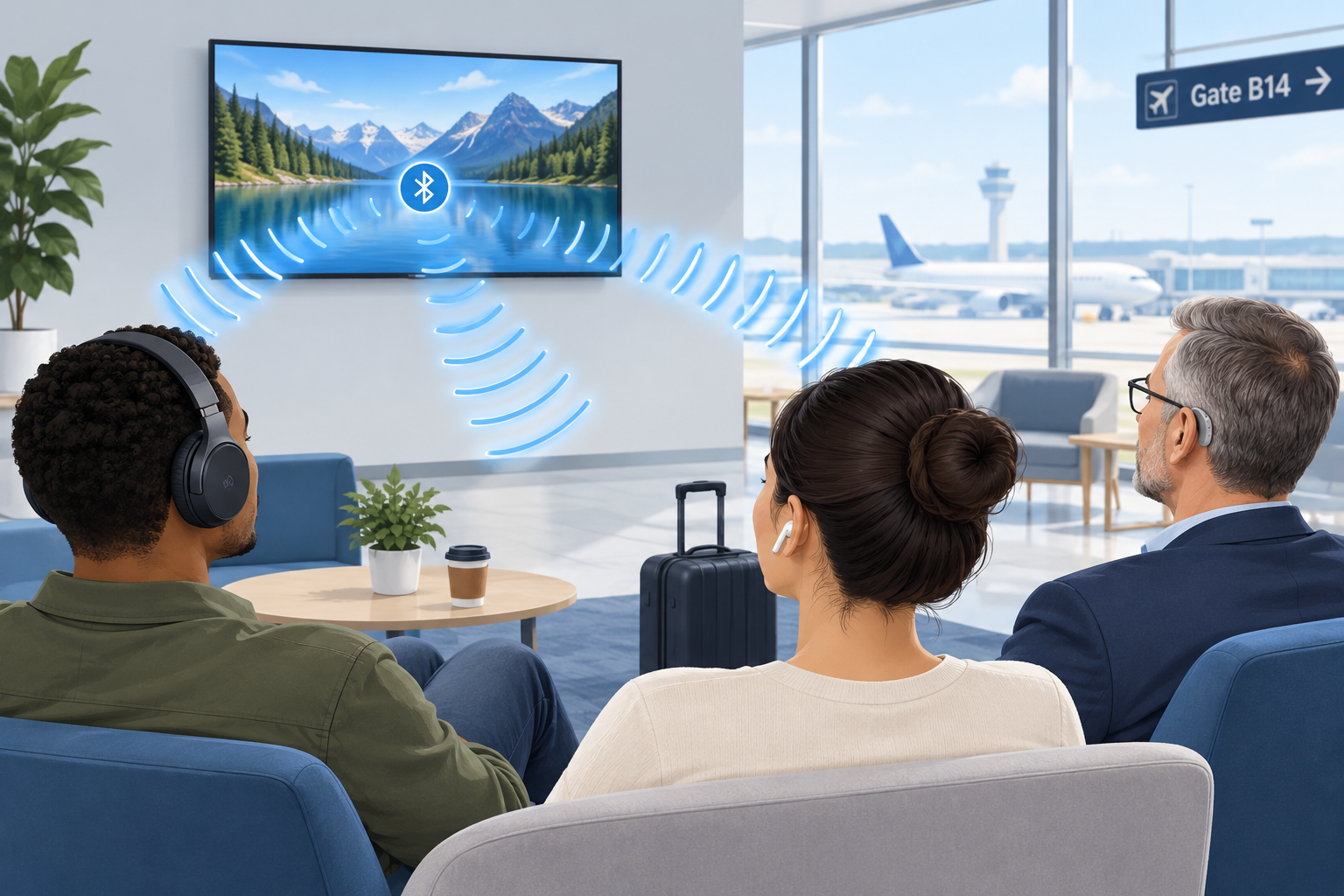
Auracast is a Bluetooth feature that lets one audio source, such as a TV, a PA system or a phone, broadcast sound to an unlimited number of nearby earbuds, headphones and hearing aids at the same time. For people with hearing loss, it means you can stream a gate announcement, a lecture or a gym TV directly into your own hearing aids, with your own settings, without borrowing a receiver or wearing a neckloop.
Last updated: October 29, 2026
What is Auracast?
Auracast is the consumer name the Bluetooth Special Interest Group (SIG) gave to broadcast audio in June 2022. The SIG is the industry body that writes the Bluetooth standards, so Auracast is an open standard rather than one company’s product. Any manufacturer can build it into a device.
It runs on Bluetooth LE Audio, the newer generation of Bluetooth audio the SIG announced in 2020. Classic Bluetooth audio, the kind most of us have used for years, connects one source to one listening device in a private pairing. Auracast removes that limit. A transmitter sends out a stream, and anyone with a compatible receiver in range can tune in, much like picking a station on a radio.
The SIG frames Auracast around three everyday uses:
- Share your audio: two or more people listen to the same phone or tablet on their own earbuds or hearing aids.
- Unmute your world: silent TVs in bars, gyms, airports and waiting rooms broadcast their sound to anyone who wants it.
- Hear your best: venues such as theaters, lecture halls, places of worship and conference centers stream speech directly to visitors’ hearing devices.
That third category is the one with the biggest implications for people who are hard of hearing. It could eventually replace a lot of the clunky assistive listening hardware venues hand out today.
How Auracast broadcast works
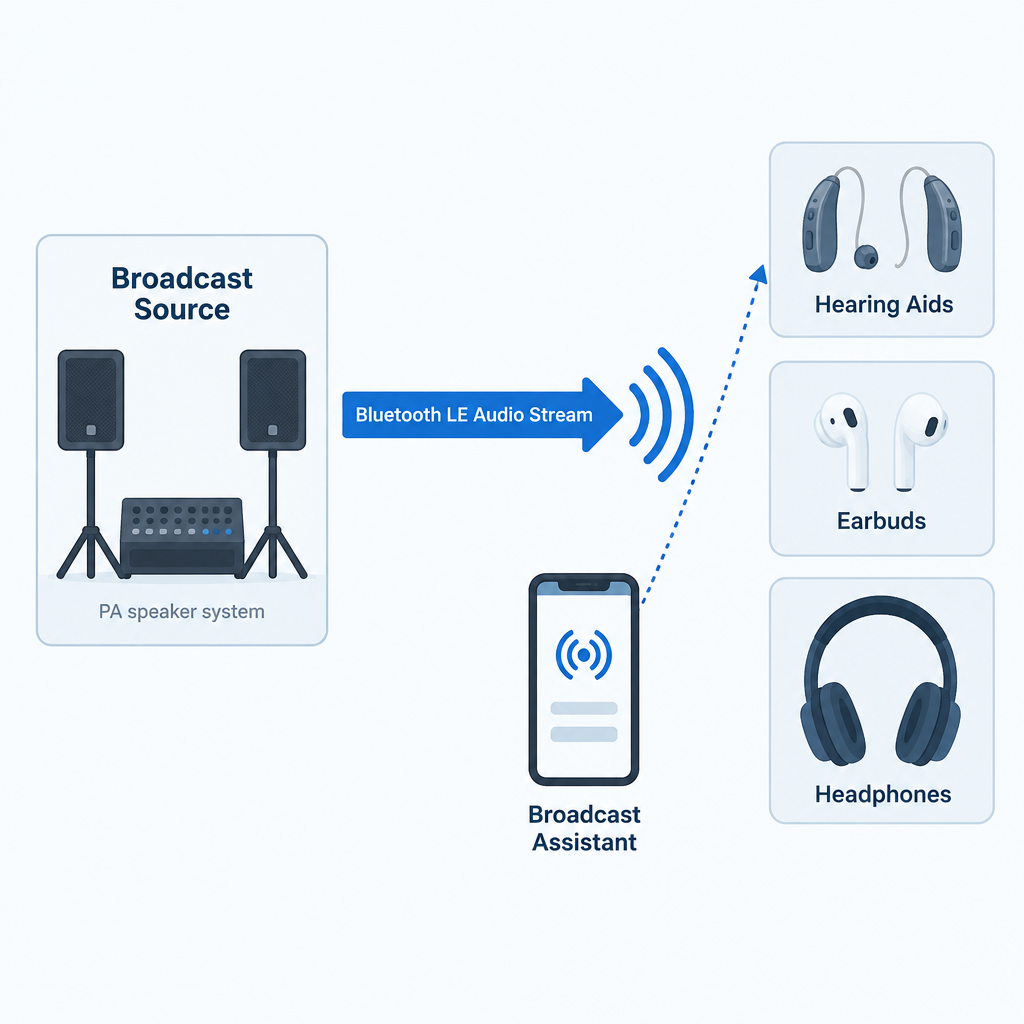
An Auracast setup has three roles. Sometimes one device plays two of them.
- The broadcast source transmits the audio. This might be a smart TV, a dedicated transmitter connected to a venue’s sound system, a laptop or a phone.
- The receiver (sink) plays the audio. That’s your earbuds, headphones, speaker or LE Audio hearing aids.
- The broadcast assistant helps you find and join a stream. Hearing aids have no screen, so your phone, smartwatch or the hearing aid maker’s app scans for nearby broadcasts, shows you a list, and tells your hearing aids which one to lock onto.
Each broadcast advertises a name, such as “Gate B12” or “Main Hall English”. A broadcast can be open, so anyone can join, or encrypted with a broadcast code, which works like a Wi-Fi password. A hotel conference room or a private tour group would use the encrypted option. Venues can also post a QR code that you scan to join the right stream with the code already filled in.
The technical pieces underneath
If you want to understand why Auracast works when older Bluetooth couldn’t do this, these are the building blocks inside the LE Audio specifications.
| Component | What it does | Why it matters to you |
|---|---|---|
| LC3 codec | Compresses audio efficiently at low data rates | Clear speech with less battery drain |
| Isochronous channels | Deliver time-synchronized audio streams | Left and right ears stay in sync; lip sync holds up |
| Broadcast Isochronous Stream (BIS) | Carries one-to-many audio | No pairing limit on listeners |
| Broadcast Audio Scan Service (BASS) | Lets an assistant device tell a receiver what to join | Your phone picks the stream for your hearing aids |
| Public Broadcast Profile (PBP) | Sets baseline quality rules for public streams | Any compliant device can play a public broadcast |
| Hearing Access Profile (HAP) | Standardizes LE Audio for hearing aids | Hearing aids work across brands of phones |
The LC3 codec deserves a special mention. In the SIG’s listening tests, LC3 delivered better quality than the old SBC codec at roughly half the data rate. Lower data rates mean lower power use, which is a big deal for small hearing aid batteries that have to last a full day. LC3 supports sampling rates from 8 kHz up to 48 kHz, so a broadcast can be tuned for speech or for full-range music.
Auracast Bluetooth vs. classic Bluetooth
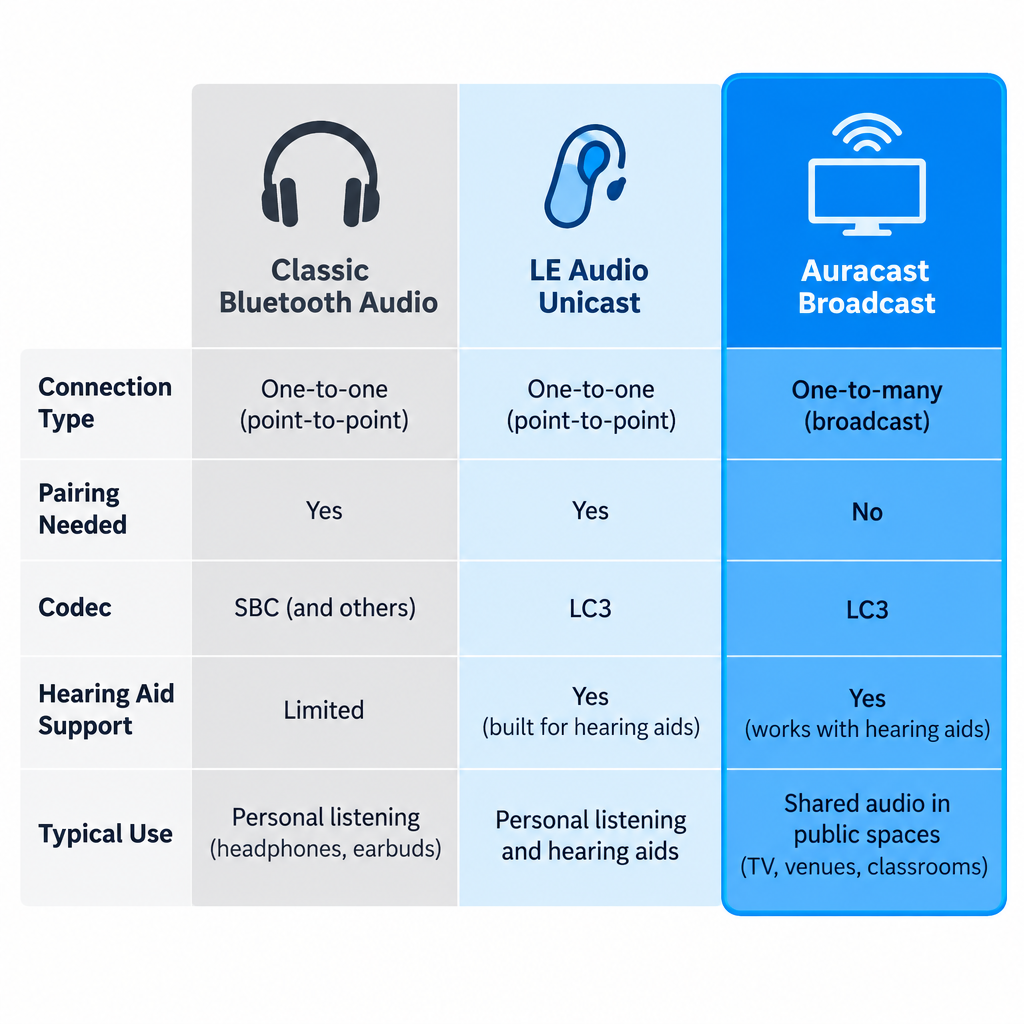
People often search for “Bluetooth Auracast” because they’re not sure whether it’s a different wireless system. It’s the same Bluetooth radio family with new rules on top. Here is how it compares with the Bluetooth you already know.
| Feature | Classic Bluetooth audio | LE Audio (unicast) | Auracast broadcast |
|---|---|---|---|
| Connection type | One source to one device | One source to one device (or a pair) | One source to unlimited devices |
| Pairing needed | Yes | Yes | No; you join a stream |
| Default codec | SBC | LC3 | LC3 |
| Hearing aid support | Proprietary (MFi, ASHA, or a streamer) | Standard via Hearing Access Profile | Standard via Hearing Access Profile |
| Typical use | Music and calls from your phone | Music and calls, lower power | TVs, venues, shared listening |
The hearing aid row is the important one. Until LE Audio, hearing aids streamed using Apple’s Made for iPhone protocol, Google’s ASHA protocol for Android, or a separate clip-on streamer. Those systems were tied to particular phones and didn’t let you join public audio at all. LE Audio gives hearing aids a common language, and Auracast adds the broadcast layer on top.
Why Auracast matters for people with hearing loss
Hearing aids are tuned to your specific hearing profile. Any time sound reaches you through the air, it picks up room echo, background noise and distance. Streaming audio directly into the aids skips all of that. Auracast extends direct streaming beyond your own phone to the wider world.
Here is what that changes in practice:
- No borrowed equipment. Today, at many theaters you ask at a desk for a receiver and a neckloop or headset, hand over ID as a deposit, and hope the battery is charged. With Auracast, the receiver is already in your ears.
- Your prescription stays in place. The broadcast plays through your hearing aids’ own processing, so the sound is shaped for your hearing loss, not a generic headset curve.
- Better signal-to-noise. The voice from a lecturer’s microphone arrives without the coughing, air conditioning and echo between you and the stage. For many listeners this is the single biggest improvement.
- Discretion. Nobody can tell you’re using an assistive listening system, because you aren’t holding or wearing anything extra.
- Unlimited capacity. A venue doesn’t have to guess how many receivers to stock. Ten people or ten thousand can join the same stream.
- Multiple language or audio channels. A venue can run separate streams, for example one for the main speaker and one for a translated version or audio description.
For public TVs, Auracast fills a gap that closed captioning only partly covers. Captions on a muted gym TV help, but they lag, drop words and are hard to follow during fast dialogue or sports commentary. Being able to hear the actual audio in your hearing aids, alongside captions if you like, is a real step up.
Auracast vs. hearing loops and other assistive listening systems
Auracast enters a field that already has several assistive listening technologies. Each has strengths, and Auracast is not an automatic replacement for all of them yet.
| System | How it reaches you | Needs extra gear? | Strengths | Weaknesses |
|---|---|---|---|---|
| Hearing loop (induction loop) | Magnetic field picked up by the telecoil in your hearing aid | No, if your aid has a telecoil | Works with millions of existing aids; no app or pairing | Needs a wire installed around the room; quality depends on installation |
| FM / RF systems | Radio signal to a body-worn receiver | Yes, a receiver plus headset or neckloop | Long range; mature technology | Borrowed hardware; hygiene and battery issues |
| Infrared (IR) | Light signal to a receiver | Yes, a receiver | Signal stays inside the room; good for privacy | Needs line of sight; sunlight can interfere |
| Wi-Fi streaming apps | Venue Wi-Fi to an app on your phone | Your phone, plus earbuds or a hearing aid connection | Uses the phone you already carry | Small delays; depends on venue Wi-Fi |
| Auracast | Bluetooth LE Audio broadcast to your hearing aids or earbuds | No, if your devices support LE Audio | Direct to your aids; unlimited listeners; open standard | Requires newer hearing aids and an assistant device; venue rollout still early |
Our honest view: if you’re buying hearing aids now, ask for both LE Audio and a telecoil. Hearing loops remain installed in many churches, theaters, ticket windows and public buildings, and a telecoil costs you nothing to use. Auracast is the future direction, but loops will stay useful for years, and some of the smallest hearing aid styles drop the telecoil to save space.
There’s also a regulatory point. In the United States, the 2010 ADA Standards for Accessible Design require assembly areas to provide assistive listening systems, and at least 25 percent of the receivers must be hearing-aid compatible. Those rules were written before Auracast existed, and the Department of Justice has not issued guidance specifically addressing Auracast as a compliant system. Venues installing it today usually run it alongside an existing system rather than in place of one.
What you need to use Auracast
To join a broadcast with your hearing aids, three things have to line up.
1. Hearing aids with LE Audio and Auracast support. This is hardware plus firmware. A hearing aid needs an LE Audio-capable chip, and the manufacturer has to enable broadcast listening in its software. Several makers launched models marketed as “Auracast ready” from 2023 onward, including ReSound Nexia, Oticon Intent and models in Signia’s IX platform. “Ready” usually means the hardware is capable; the full broadcast feature may arrive later through a firmware update, and it may depend on which phone you use.
2. A broadcast assistant. Usually this is your phone. Google added Auracast support for LE Audio hearing aids in Android 16, starting with recent Pixel phones, and Samsung was an early adopter across Galaxy phones, earbuds and TVs. Apple’s iPhone support has trailed Android here, so if you use an iPhone, check your hearing aid maker’s compatibility list and the current iOS release notes before counting on Auracast. Some hearing aid apps can also act as the assistant.
3. A broadcast to join. That means an Auracast-enabled TV, transmitter or venue system nearby.
Devices with Auracast support
Consumer audio brands have moved faster than venues. These are examples where the manufacturer has announced Auracast features.
| Device type | Examples | What Auracast does there |
|---|---|---|
| Hearing aids | ReSound Nexia, Oticon Intent, Signia IX models | Receive broadcasts (feature availability depends on firmware and phone) |
| Phones | Samsung Galaxy models, Google Pixel on Android 16 | Act as assistant; some can also broadcast audio sharing |
| Earbuds | Samsung Galaxy Buds2 Pro and later Galaxy Buds | Receive broadcasts from Samsung TVs and phones |
| TVs | Samsung TVs from the 2023 lineup onward | Broadcast TV sound to compatible earbuds |
| Speakers | JBL Go 4, Flip 7, Charge 6 | Link multiple speakers to one source |
Ask your audiologist or hearing aid provider to confirm two things for any model you’re considering: whether broadcast listening is enabled today, and which phones work as an assistant. Marketing pages don’t always make that distinction clear.
How to connect your hearing aids to an Auracast broadcast
Exact menus vary by phone and hearing aid brand, but the process follows the same pattern everywhere.
Joining an Auracast broadcast
- Update your hearing aids to the latest firmware through the manufacturer’s app.
- Update your phone to the newest operating system it supports.
- Make sure your hearing aids are connected to your phone over Bluetooth.
- On a Pixel running Android 16, open Settings, then Connected devices, and look for the audio sharing or broadcast option.
- On a Samsung Galaxy, open Bluetooth settings and look for the Auracast option, or use your hearing aid app.
- Wait for the list of nearby broadcasts, then tap the name the venue displays.
- Enter the broadcast code or scan the venue’s QR code if the stream is protected.
- Adjust the stream volume and the mix with surrounding sound in your hearing aid app.
Hearing tip
Most hearing aid apps let you blend the broadcast with your aids’ microphones. In a lecture, turn the microphones down to cut room noise; in a sports bar with friends, keep them up enough to hear the people at your table.
When you leave the venue’s range, your hearing aids drop the stream and return to normal. Your regular program and settings come back automatically.
Where Auracast is available now
Auracast is real and shipping, but it’s still early. The consumer side, meaning phones, earbuds, speakers and TVs, is ahead of public infrastructure. Venue adoption depends on transmitters from assistive listening companies, budgets for new installs, and enough visitors arriving with compatible hearing aids to justify the cost.
The places the SIG and equipment makers are targeting first include airports and train stations for announcements, gyms and bars with muted TVs, cinemas and theaters, universities and lecture halls, places of worship, museums with self-guided tours, and conference centers needing multiple language channels. If you visit any of these regularly, it’s worth asking the venue whether Auracast is on their plans. Requests from visitors are one of the ways venues decide what to fund.
At home, the most useful setup today is a TV with Auracast or a small Auracast transmitter plugged into your TV’s audio output, so you and your household can listen at different volumes. Check that any transmitter you buy explicitly lists Auracast or LE Audio broadcast support, not only “Bluetooth 5.x”. A Bluetooth version number alone doesn’t tell you a device supports Auracast.
A quick checklist before you buy hearing aids
If future Auracast access matters to you, raise these points with your audiologist:
- Does this model support Bluetooth LE Audio, and is Auracast broadcast listening active now or promised in an update?
- Which phones work as a broadcast assistant with these aids, including mine?
- Does it have a telecoil for hearing loops?
- Is it rechargeable, and how much does streaming cut daily battery life?
- Can I adjust the mix between streamed sound and room sound in the app?
See a professional
Get hearing aids fitted by an audiologist or licensed hearing professional if your loss is more than mild. Sudden hearing loss in one or both ears is a medical emergency, so see a doctor the same day.
FAQ
Is Auracast the same as Bluetooth?
Auracast is a feature of Bluetooth, specifically Bluetooth LE Audio. It uses the same radio technology but adds one-to-many broadcasting, so a single source can stream to unlimited listeners instead of one paired device.
Do my current hearing aids support Auracast?
Only if they have LE Audio hardware and the manufacturer has enabled broadcast listening. Most hearing aids sold before 2023 cannot be upgraded with a software update because the chip itself doesn’t support LE Audio. Your hearing aid app or your provider can confirm this.
Do I need an app to use Auracast?
You need something to act as a broadcast assistant, because hearing aids have no screen to pick a stream. That’s usually your phone’s Bluetooth settings or your hearing aid maker’s app. Some earbuds and headphones have buttons that join a stream directly.
Does Auracast work with iPhone?
Android has moved first, with support in Android 16 and on Samsung Galaxy devices. iPhone support has lagged, so check your hearing aid maker’s compatibility list and Apple’s current release notes before you rely on it.
Can strangers listen to my Auracast stream?
Only if you leave it open. Broadcasts can be protected with a broadcast code, so if you share audio from your phone or TV, set a code and only people who have it can join.
Will Auracast replace hearing loops?
Not soon. Hearing loops work with the telecoils in millions of existing hearing aids and need no app. Auracast offers direct streaming and unlimited listeners, but it depends on newer hearing aids and venue upgrades. Expect the two to run side by side for years.
Does Auracast help with tinnitus?
Auracast is a way to deliver sound, not a treatment. It can make speech and audio easier to follow, but it doesn’t treat tinnitus or hearing loss. Talk to an audiologist about tinnitus management options.