Rafael Dunham

  • Can Deaf People Drive? Licenses, Safety and Adaptations

    Can Deaf People Drive? Licenses, Safety and Adaptations

    Yes, deaf people can drive. Every US state licenses deaf and hard of hearing drivers on the same terms as everyone else, and no state requires a hearing test for a regular car license. This guide covers the actual rules, where hearing standards still apply, and how deaf drivers handle sirens, police stops and breakdowns.

    Last updated: October 30, 2026

    Allowed to drive (US)Yes, all states
    Hearing test for car licenseNone required
    Commercial licenseHearing standard, exemptions exist
    Key sense for drivingVision

    Are deaf people allowed to drive?

    Deaf people are allowed to drive in the United States. A person who is profoundly deaf from birth goes through the same licensing process as a hearing teenager: a written knowledge test, a vision screening and a road test. Hearing never enters the scoring.

    The reasoning is simple. Driving is a visual task. You read signs, track lane markings, watch brake lights, check mirrors and judge gaps in traffic with your eyes. Sound adds some information, but it is never the main channel. That is why every state requires a vision test and none requires a hearing test for a standard license.

    This has not always been settled. In the early 20th century, some states tried to bar or restrict deaf drivers. The National Association of the Deaf (NAD) campaigned against those rules for decades, using deaf drivers’ safety records as evidence. Today the question “do deaf people drive?” has a boring answer: millions do, every day, and the law treats them as ordinary drivers.

    What the licensing process looks like

    Getting a license as a deaf or hard of hearing person follows the standard path for your state. The differences are about communication, not qualification.

    • Written test: This is already a reading test, so it is accessible as is. Some DMVs also offer the knowledge test in other formats.
    • Vision test: This is the same for everyone. If your vision meets the state standard, you pass.
    • Road test: The examiner gives spoken directions in most cases. Here you can ask for an accommodation.

    DMVs are state agencies, so they fall under Title II of the Americans with Disabilities Act. That means they must provide effective communication. In practice, you can request an ASL interpreter for the road test or classroom portions, or ask the examiner to use written cards or agreed hand signals for turns and stops. Our article on the disability rights act explains who the ADA covers and how Title II works.

    Ask for the accommodation when you book the test, not on the day. Some offices need lead time to schedule an interpreter.

    Hearing tip

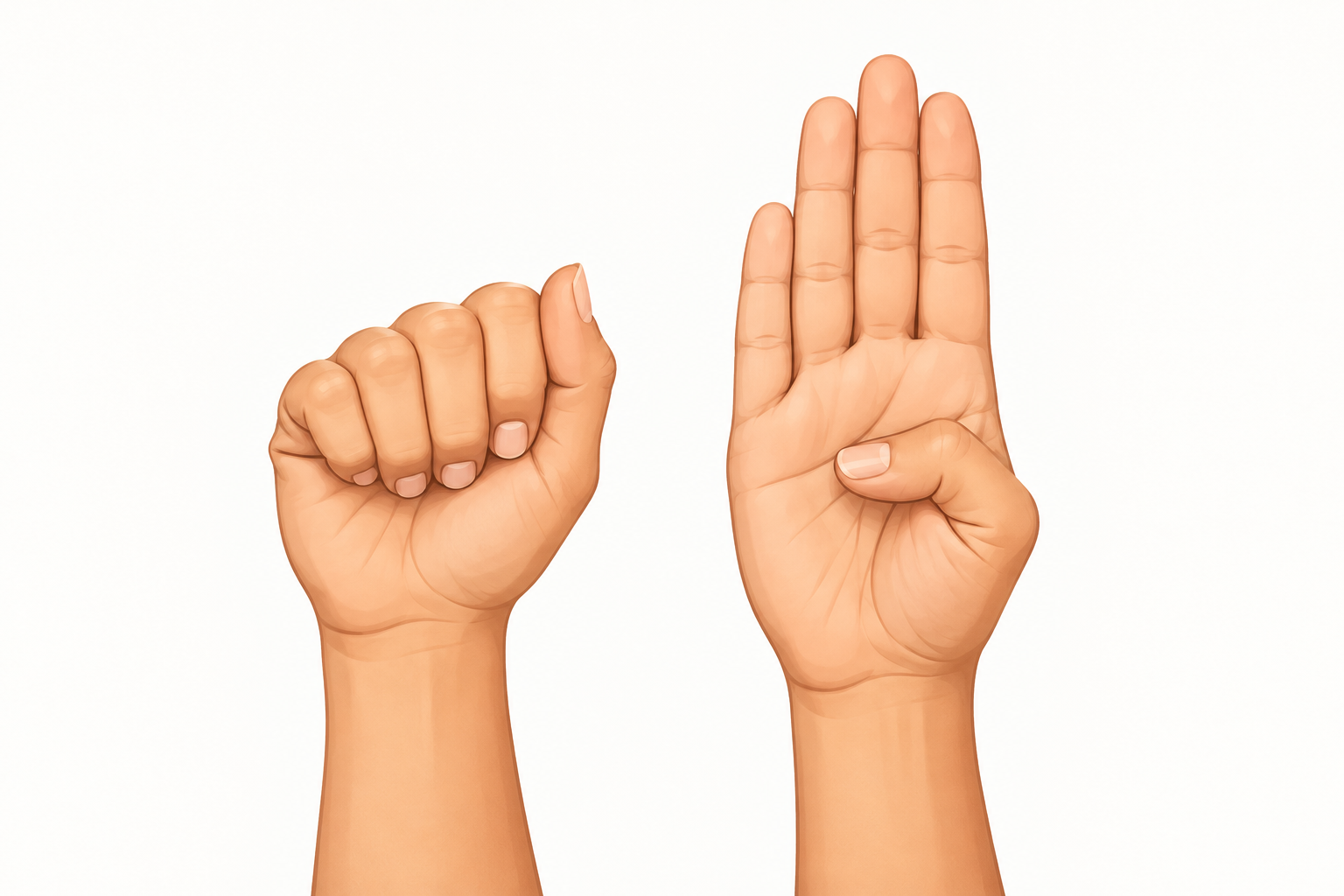
    Before your road test, agree on simple signals with the examiner: a pointed finger for turns, a flat palm for stop, a tap on the dashboard to pull over. Agreeing in advance means fewer surprises during the drive.

    Commercial licenses: where hearing standards still apply

    The one big exception in the US is commercial driving. The Federal Motor Carrier Safety Administration (FMCSA) sets medical standards for interstate commercial drivers, and hearing is one of them.

    Under the federal rule, a commercial driver must either perceive a forced whispered voice at 5 feet or more in the better ear, or have an average hearing loss no greater than 40 dB at 500, 1,000 and 2,000 Hz in the better ear. Hearing aids can be worn during the test. Many hard of hearing drivers pass this way.

    Drivers who cannot meet the standard are not automatically shut out. In 2013, after advocacy led by the NAD, FMCSA granted its first hearing exemptions to deaf drivers, and the program has continued since. An exemption allows a deaf driver to operate a commercial vehicle in interstate commerce if they meet every other qualification. Exemptions must be renewed, so check FMCSA’s current requirements before you apply.

    A few points matter here:

    • The federal hearing rule covers interstate commercial driving. Rules for intrastate commercial driving are set by each state and can differ.
    • School bus and passenger transport jobs often carry extra state or employer requirements.
    • A standard car license is never affected by the commercial hearing rule.

    Deaf truck drivers work across the country today. The obstacles that remain are mostly employer attitudes and paperwork, not ability.

    Driving outside the US
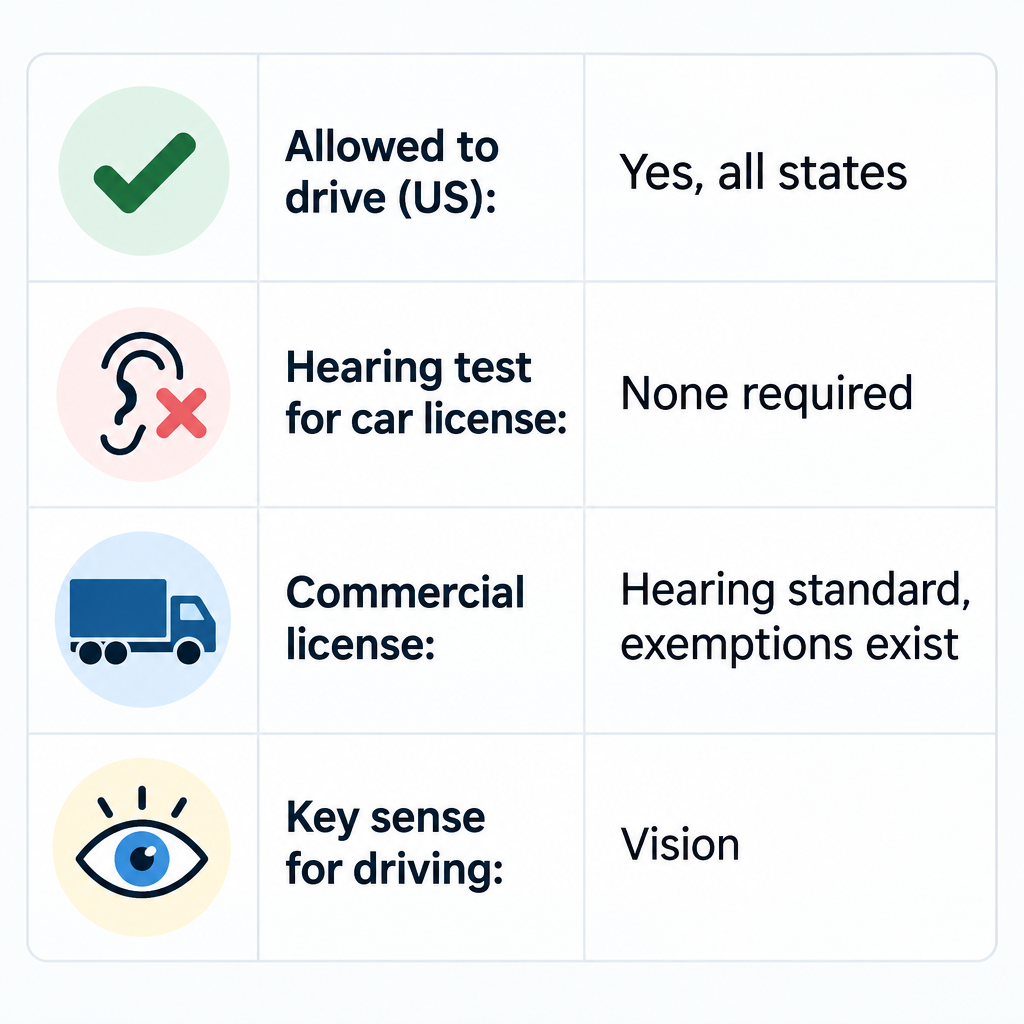
    Deaf Driving License Summary Chart

    Most high-income countries also license deaf drivers for ordinary cars. In the UK, for example, the DVLA says you do not need to tell it about deafness if you hold a car or motorcycle license. Drivers of buses, coaches and lorries must declare it, much like the US commercial rule.

    If you plan to drive abroad or move countries, check the licensing authority’s medical rules before you go. Rules for heavy vehicles vary more than rules for cars.

    Do deaf drivers have more crashes?

    The fear behind “are deaf people allowed to drive?” is usually about safety. The evidence does not support it. There is no solid research showing that deaf drivers crash more often than hearing drivers, and insurers and licensing agencies do not treat deafness as a risk category for regular licenses.

    There are reasonable explanations for this:

    • Visual attention: Lab research on deaf adults, notably work by cognitive scientist Daphne Bavelier and colleagues, has found that deaf people who use sign language often show stronger attention to their peripheral vision. That is useful for spotting a car drifting into your lane or a cyclist at the edge of your view.
    • Compensation: Swedish driving-simulator research on drivers with hearing loss found they tended to drive more cautiously and scan more. The same research suggested they were more affected when given demanding secondary tasks. That is a reminder that distraction is the real hazard.
    • Fewer audio distractions: A deaf driver is not half-listening to a podcast or an argument on speakerphone.

    Distraction is the common thread. A deaf driver reading a text is as dangerous as a hearing driver reading one. Hearing status does not change that.

    Why driving depends on sight far more than sound
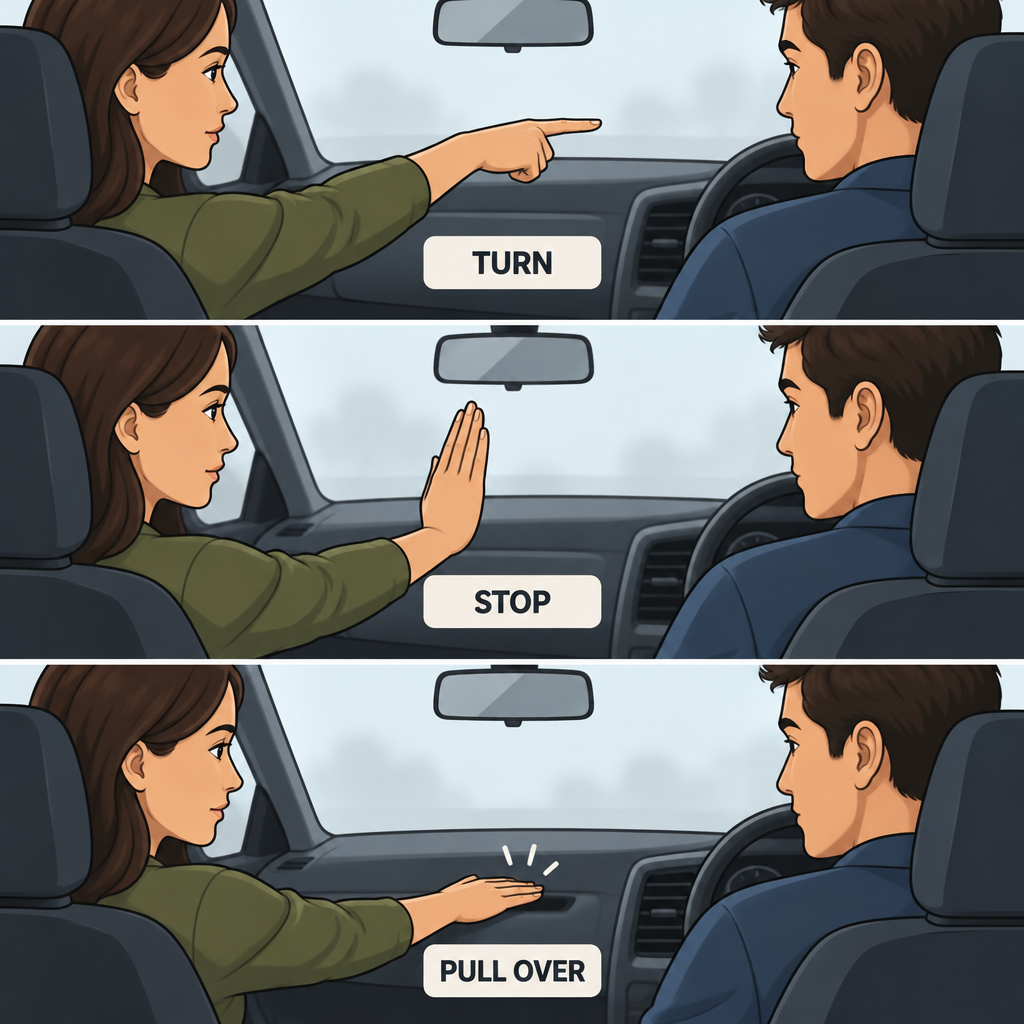
    Road Test Hand Signals

    Think about what sound actually tells a hearing driver. Horns, sirens, a train crossing bell, an engine noise that signals a problem, or a passenger’s warning shout. That is a short list, and every item on it has a visual backup.

    Sound cue Visual or physical backup
    Emergency siren Flashing lights, traffic pulling over, mirror checks
    Car horn Driver behavior around you, mirror scanning
    Railroad crossing bell Flashing signals, gates, crossbuck signs
    Turn signal clicking Dashboard indicator arrow
    Engine or brake trouble Warning lights, gauges, vibration, smell
    Tire going flat Tire pressure warning light, pull to one side

    Hearing drivers also miss sounds all the time. Modern cabins are well insulated, and many people drive with music up and windows closed. A siren often reaches a hearing driver late. Sometimes it is only noticed after the lights appear in the mirror. That is the same moment a deaf driver notices it.

    How to drive safely as a deaf driver

    Most deaf drivers build these habits early, often without thinking about them. If you have lost hearing as an adult, these are the adjustments worth making on purpose.

    Scan your mirrors more often

    Check your rearview and side mirrors every few seconds, especially on highways and in city traffic. Some drivers add a wide-angle or panoramic rearview mirror that clips over the factory one. It gives you a broader view of the lanes behind you and makes approaching flashing lights obvious sooner.

    Watch other drivers for emergency vehicles

    When cars ahead start slowing and moving right for no visible reason, assume an emergency vehicle is coming. Check all mirrors, slow down and pull over safely. Watching the traffic around you works as well as sound, and it often works better.

    Use your car’s safety features

    Driver-assistance features help every driver, and several are especially useful if you cannot hear:

    • Blind-spot monitoring: A light in or near the side mirror flags a car you might not see.
    • Lane departure and lane-keeping alerts: Many systems can vibrate the steering wheel instead of beeping.
    • Haptic seat alerts: Some General Motors vehicles offer a Safety Alert Seat that vibrates the left or right side of the seat cushion to signal where a hazard is.
    • Rear cross-traffic alerts: These are useful when backing out of parking spaces, where you would otherwise listen for approaching cars.
    • Tire pressure monitoring: This catches a slow leak you cannot hear.

    When you shop for a car, ask whether alerts can be set to vibration or visual only. Many cars let you switch alert style in the settings menu. The test drive is the time to check.

    Make dashboard checks routine

    Get in the habit of glancing at the instrument cluster: turn signal arrows, warning lights, temperature and fuel. A turn signal left blinking is a classic giveaway for any driver. The arrow on the dash is your cue to cancel it.

    Set up phone sound alerts as a backup

    Both iPhone and Android can listen for certain sounds and flash or vibrate an alert. These features are a backup, not a replacement for watching the road. They can miss sounds in a noisy cabin, and you should never look at the phone while moving.

    Turn on siren alerts on your phone

    1. iPhone: open Settings, then Accessibility, then Sound Recognition.
    2. Turn on Sound Recognition, tap Sounds, then turn on Siren.
    3. Android: open Settings, then Accessibility, then Sound Notifications (names vary by brand).
    4. Turn it on and allow it to listen for alarms and sirens.
    5. Mount the phone in a dashboard holder so a flash is visible without picking it up.

    Sign with passengers carefully

    For ASL users, conversation in the car is visual, which pulls the driver’s eyes off the road. Many deaf drivers handle this by letting passengers sign while the driver keeps their eyes forward and answers briefly at red lights. Longer conversations wait until you park. Front-seat passengers can also act as a second set of eyes and tap your arm when they spot an emergency vehicle.

    Wear your hearing aids if you use them

    If you are hard of hearing and use hearing aids, wear them while driving. They can help with sirens and horns, and many Bluetooth models stream navigation prompts straight to your ears. Some hearing aids offer a car or noise program that cuts down road rumble. Ask your audiologist to set one up if road noise drowns everything out.

    Headphones vs hearing loss: why the law treats them differently

    A common question on forums is why it is illegal to drive with headphones when deaf people can drive. California’s Vehicle Code, for example, bans wearing a headset or earplugs in both ears while driving, with an exception for hearing aids. Several other states have similar rules.

    The difference comes down to distraction and adaptation, not the volume of sound reaching your ears.

    • Headphones add a distraction. Music, podcasts and calls compete for attention, and the driver chose that distraction.
    • Headphones disrupt a driver who relies on sound. A hearing driver has built habits around hearing horns and sirens. Suddenly blocking them removes a cue the driver expects, and the driver has not built visual habits to replace it.
    • Deaf drivers have adapted. They have built their scanning habits around vision from the start. Nothing is suddenly missing.

    Hearing aids are exempt for the same reason. They restore sound rather than block it.

    Know your rights at a traffic stop

    Police stops are the part of driving that worries deaf drivers most, and for good reason. Officers give spoken commands, and a driver who does not respond can be misread as uncooperative. A few steps lower that risk.

    Before a stop happens:

    • Ask your state DMV about deaf or hard of hearing notations. Some states offer a voluntary flag on your license or vehicle record that an officer sees when running your plate. Others hand out visor communication cards.
    • Keep a visor card or printed card that says you are deaf and how you communicate. Many state commissions for the deaf and hard of hearing distribute these.
    • Keep a pen and notepad within easy view, not in the glove box.

    During a stop:

    1. Pull over safely, turn off the engine, and turn on the dome light if it is dark.
    2. Keep both hands on the steering wheel where they are visible.
    3. Do not reach for your phone, wallet or glove box until the officer understands you are deaf.
    4. When the officer approaches, point to your ear and shake your head, or hold up your visor card.
    5. Ask to communicate in writing, or by typing on a phone once the officer agrees.

    Under the ADA, police departments must communicate effectively with deaf people. For a simple traffic stop, writing notes is often enough. For an arrest or questioning about a serious matter, you can request a qualified ASL interpreter. If an officer refused reasonable communication, write down the date, location and badge number afterward and contact a disability rights organization.

    Breakdowns and emergencies on the road

    Plan how you will get help before you need it. Phone calls are the default for roadside assistance and emergencies, so line up text-based options.

    • Text-to-911: This works in many areas of the US, but not all of them. If it is not available, you will get a bounce-back message telling you to use another method. Check your area’s coverage in advance.
    • Real-time text (RTT): Many phones support RTT calls to 911, which send each character as you type.
    • Relay services: You can reach roadside assistance through a telecommunications relay service, including video relay in ASL.
    • Roadside apps: Most insurers and auto clubs let you request a tow through their app, with no voice call needed.

    Keep a written card in the glove box with your insurance details, your auto club number and a note explaining you are deaf. If a tow driver or bystander arrives, you can hand it over.

    When hearing changes affect your driving

    Stable deafness is not a driving problem. Some hearing-related conditions do affect safety, though, mostly through balance and dizziness rather than hearing itself.

    Conditions such as Ménière’s disease and other inner ear disorders can cause sudden vertigo. A vertigo attack at the wheel is dangerous. If you have episodes of spinning dizziness, talk to your doctor about whether and when it is safe to drive.

    See a professional

    Sudden hearing loss in one or both ears is a medical emergency. See a doctor or go to urgent care within a day or two, and do not drive if you also have vertigo or severe dizziness.

    If your hearing has been fading slowly, a hearing test with an audiologist is worth booking. Treating hearing loss will not change your license status. It can make driving less tiring and help you notice sirens and horns sooner.

    Key takeaways

    • Deaf people can drive legally in every US state, and no hearing test is required for a standard car license.
    • DMVs must offer communication accommodations such as ASL interpreters for road tests under the ADA.
    • Commercial drivers face a federal hearing standard, but FMCSA has granted exemptions to deaf drivers since 2013.
    • Research does not show deaf drivers are less safe. Distraction is the real risk for everyone.
    • Mirror scanning, haptic car alerts and phone sound alerts cover most of what hearing provides.
    • At a traffic stop, keep your hands visible, show a visor card and ask to communicate in writing.

    FAQ

    Can 100% deaf people drive?

    Yes. A person with no measurable hearing can get a regular driver’s license in every US state. Licensing depends on vision, knowledge of traffic laws and road skills, not hearing.

    Can you drive if you are totally deaf?

    You can. Total deafness does not disqualify you from a car license in the US or the UK. The only hearing standards apply to commercial driving, and even there US federal exemptions exist for deaf drivers.

    Can you drive if you are deaf in the US?

    Yes, in all 50 states. You take the same written, vision and road tests as any other applicant, and you can request an ASL interpreter or written instructions for the road test.

    Why is it illegal to drive with headphones but deaf people can drive?

    Headphone bans target distraction and the sudden loss of cues that hearing drivers depend on. Deaf drivers have built their driving habits around vision and are not choosing to add an audio distraction. Hearing aids are specifically exempt in states like California.

    Can hearing impaired people drive with hearing aids?

    Yes, and wearing them is a good idea if you use them every day. Hearing aids are allowed under state headphone laws. Bluetooth models can also stream navigation directions.

    Do I have to tell the DMV I am deaf?

    Not for a regular US car license. Some states let you add a voluntary notation so police know before approaching your car. Commercial drivers must disclose hearing loss during the DOT medical exam.
  • Cochlear Implant Surgery Step by Step and What Recovery Is Like

    Cochlear Implant Surgery Step by Step and What Recovery Is Like

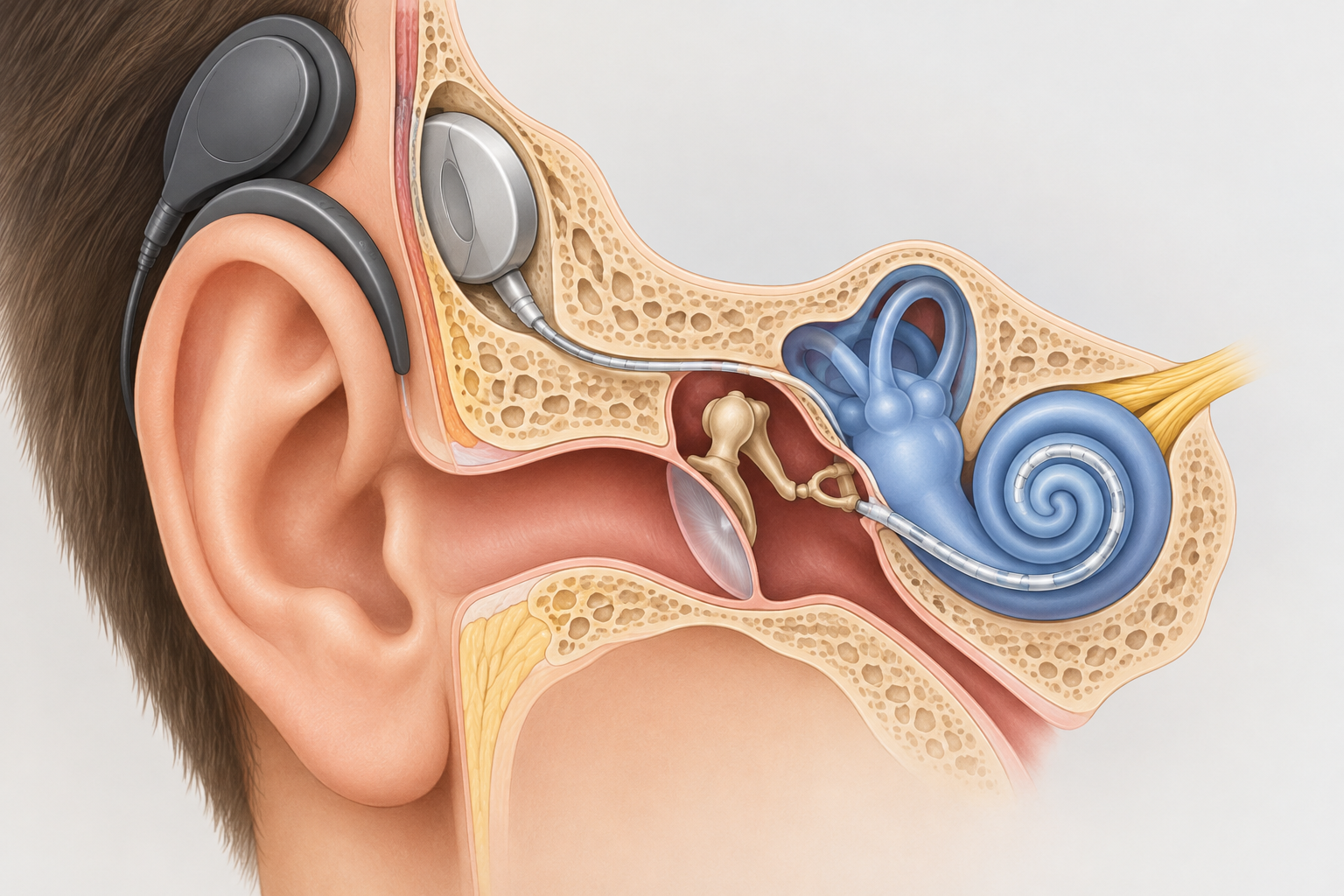
    Cochlear implant surgery is usually a 1.5 to 3 hour operation done under general anesthesia through a small cut behind your ear. Most adults go home the same day or the next morning and are back to light routines within about a week. The implant is not switched on until a follow-up visit, often 2 to 4 weeks later.

    Last updated: October 30, 2026. This is general information, not medical advice. Your surgeon’s instructions always come first.

    TypeSurgery, general anesthesia
    Operating timeAbout 1.5 to 3 hours
    Hospital staySame day or overnight
    Back to light routinesAbout 1 week
    Implant switched onOften 2 to 4 weeks

    Before surgery: what happens first

    You don’t book this operation the way you book a hearing test. A cochlear implant team first checks whether you are a candidate. Expect hearing tests with well-fitted hearing aids, speech recognition testing, and a CT or MRI scan of your inner ear.

    Your surgeon also reviews your general health for anesthesia. In the US, the CDC recommends that people getting cochlear implants be up to date on pneumococcal vaccines, because implant recipients have a higher risk of bacterial meningitis. Ask for your vaccines early, since some need to be given at least two weeks before surgery.

    You will also choose a device. Three manufacturers make FDA-approved implants in the US: Cochlear (Nucleus), Advanced Bionics and MED-EL. Your surgeon may recommend one based on your anatomy, the MRI compatibility you need, and which processor features matter to you.

    The cochlear surgery procedure, step by step

    Every surgeon’s technique differs slightly. This is the general sequence most hospitals describe.

    What happens in the operating room

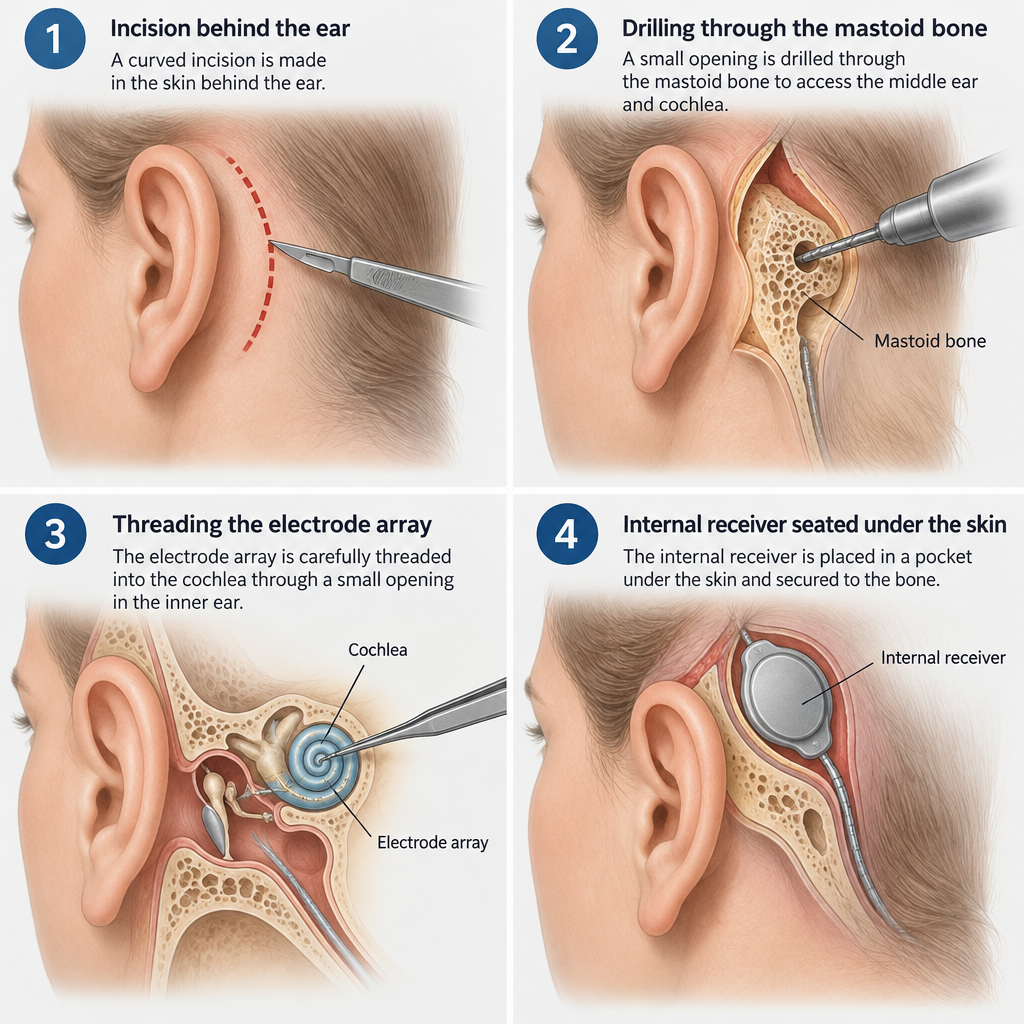
    1. You are given general anesthesia, so you are asleep throughout.
    2. A small area of hair behind the ear may be shaved, and a curved incision is made.
    3. The surgeon drills through the mastoid bone behind the ear to reach the middle ear.
    4. A shallow bed or snug pocket is made under the skin for the internal receiver.
    5. The electrode array is threaded into the cochlea, usually through the round window.
    6. The team tests the implant’s electrodes and your auditory nerve response while you sleep.
    7. The incision is closed and covered with a pressure dressing.

    Throughout the operation, the team monitors your facial nerve, which runs close to the surgical route. Some hospitals take an X-ray afterward to confirm the electrode’s position.

    Insights a surgeon will usually share

    Surgeons often stress two points. The first is that the operation is on bone and the inner ear, not the brain. The second is that many teams now use “soft” insertion techniques and thinner electrodes to try to preserve whatever natural low-pitch hearing you still have. Preservation isn’t guaranteed, so ask your surgeon for their own results.

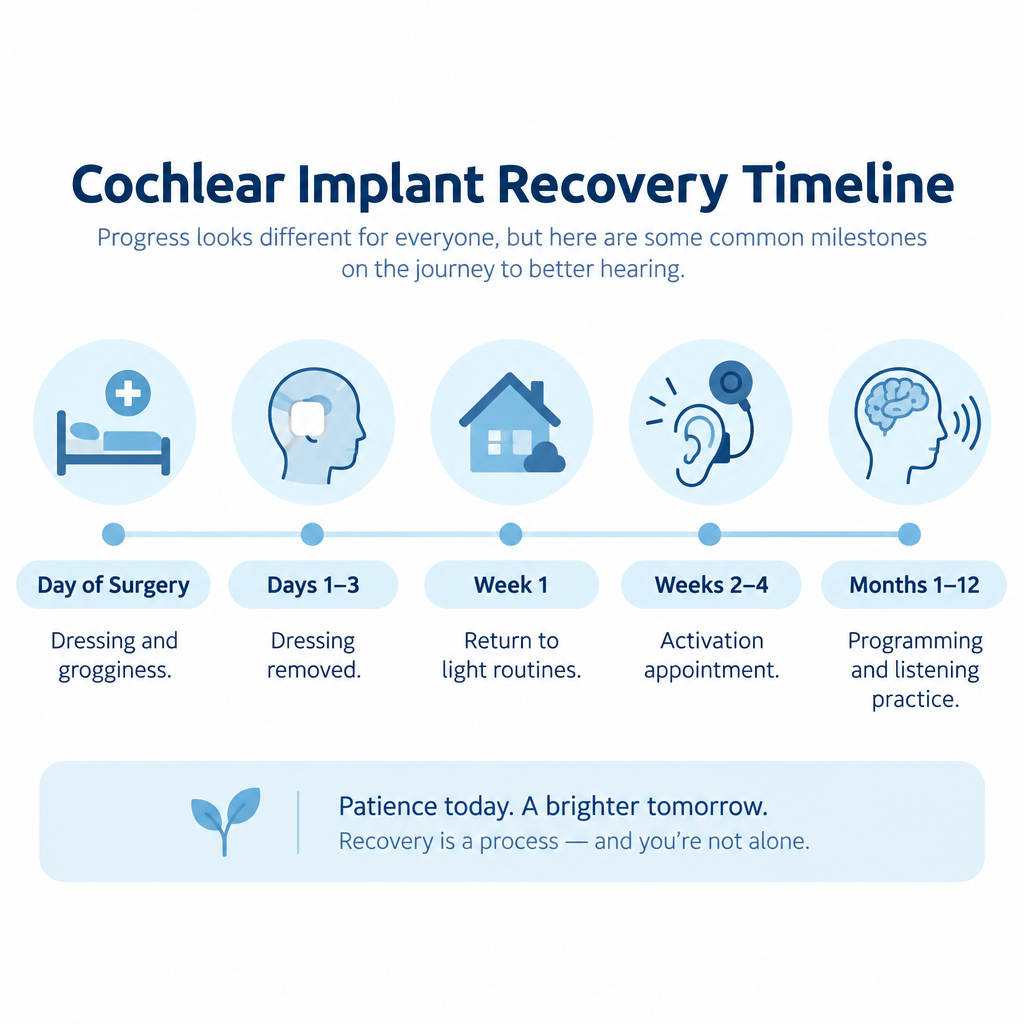
    Recovery timeline

    Step-by-Step Surgical Procedure Diagram
    When What is typical
    Day of surgery Grogginess, ear pressure, a head dressing, mild to moderate pain
    Days 1 to 3 Dressing removed, some dizziness, tenderness behind the ear
    Week 1 Most adults return to desk work and light activity
    Weeks 1 to 2 Stitches removed or dissolving, swelling fading
    Weeks 2 to 4 Activation appointment at many centers
    Months 1 to 12 Repeated programming visits and listening practice

    In the first weeks, you may notice a few side effects:

    • Dizziness or imbalance often settles within days, though some people feel it for longer.
    • Taste changes, such as a metallic taste on one side of the tongue, happen because a small taste nerve runs through the middle ear.
    • Numbness around the ear may last for weeks.
    • Tinnitus can change, either for better or worse.

    Keep the incision dry until your team clears it. You will also be told to avoid heavy lifting, contact sports and blowing your nose hard for a few weeks.

    Hearing tip

    Before activation, you’ll hear little or nothing on the implanted side. Turn on closed captioning for TV and video calls, and set up telecommunications relay service for phone calls so you don’t miss anything important.

    See a professional

    Call your surgeon promptly for fever, spreading redness, fluid from the wound, facial weakness, a stiff neck or a severe headache. If you notice sudden hearing loss in your other ear, treat it as a medical emergency.

    Hearing with your new device

    Activation is when an audiologist attaches the external sound processor and programs it. First sounds are often described as beeps, robotic voices or high-pitched chatter. That is normal. Your brain needs time to adapt to electrical hearing.

    Most people improve noticeably over the first 3 to 6 months, and many keep improving for a year or more. Daily listening practice speeds this up. Some newer processors support Bluetooth streaming, and a few are ready for Auracast broadcast audio, which helps in venues that offer it.

    Questions for your surgeon

    Recovery Timeline Chart
    • How many implant operations do you perform each year?
    • Will this be outpatient, or should I plan to stay overnight?
    • What are your rates of infection, facial nerve injury and device failure?
    • How likely is it that I’ll keep some natural hearing?
    • Is my device safe for MRI scans, and with what precautions?
    • When will activation happen, and how many programming visits come after?

    Supporting your child

    Children can receive implants from as young as 9 months, depending on the device and their hearing loss. The operation itself is similar to the adult version. Younger children usually bounce back from surgery quickly, but they need close supervision so they don’t knock or scratch the incision.

    Prepare your child with simple, honest words about a “sleepy medicine” and a bandage. Bring a favorite toy. Many families keep using sign language alongside spoken language during the early months, and you should plan for regular speech and listening therapy afterward.

    FAQ

    How serious is cochlear implant surgery?

    It is a well-established operation with a low rate of serious complications. It still carries real risks: infection, dizziness, taste changes, facial nerve injury, meningitis and device failure. Most of these are uncommon, and facial nerve injury is rare.

    How painful is cochlear implant surgery?

    Most people describe aching, pressure and tenderness behind the ear rather than severe pain. It is usually managed with over-the-counter pain relief or a short course of prescription medication. Discomfort typically eases within a few days.

    Is cochlear implant surgery major surgery?

    It involves general anesthesia and drilling through bone, so it is a significant operation. Even so, it is often done as a same-day or overnight procedure, and recovery is shorter than many people expect.

    How long does it take to fully recover from cochlear implant surgery?

    The incision usually heals within 2 to 4 weeks, and most adults resume normal activities within one to two weeks. Learning to hear with the implant is a separate process that unfolds over months, often a year or longer.

  • Black American Sign Language and Its History in the Deaf Community

    Black American Sign Language and Its History in the Deaf Community

    Black American Sign Language (BASL, often called Black ASL or Black sign language) is a distinct variety of American Sign Language that developed among Black Deaf people in the segregated schools of the American South. It shares ASL’s grammar and most of its vocabulary, but it has its own signs, a larger signing space, and a style shaped by Black culture and generations of racial separation.

    Last updated: October 29, 2026

    TypeVariety of ASL
    OriginSegregated Southern Deaf schools
    Key studyThe Black ASL Project
    Key bookThe Hidden Treasure of Black ASL
    Main usersBlack Deaf signers

    What Black American Sign Language actually is

    When I first started reading about BASL, the question I kept running into was whether it counts as its own language. The researchers who have studied it most closely describe it as a dialect, or variety, of ASL. A Black Deaf signer and a white Deaf signer can usually understand each other, much as speakers of African American English and other English varieties can.

    That label should not make it sound minor. BASL has consistent, documented differences in vocabulary, sign formation and use of space. Linguists treat those differences as systematic, which means they follow rules. They are not mistakes or “sloppy” signing, and they are not slang.

    If you want the wider background on where ASL itself came from, our guide to what ASL means and how American Sign Language began covers the founding of the first permanent Deaf school in Hartford in 1817. BASL branches off that same family tree, but its story runs through the Jim Crow South.

    How segregation created a distinct variety

    Separate schools, separate signing

    For most of the 19th and 20th centuries, Deaf children in the South were educated in racially segregated schools. The first school for Black Deaf children opened in Raleigh, North Carolina, in 1869. Other Southern states followed with “colored” schools or separate departments, often on different campuses from the white schools.

    Those Black schools were consistently underfunded. They had older buildings, fewer books and less trained staff. Black Deaf students lived and learned together, often for years at a time, with little contact with white Deaf peers. Any community that isolated develops its own way of talking, and that is exactly what happened with signing.

    Oralism hit white schools harder

    There is a twist here that surprises many readers. In the late 1800s, much of American Deaf education swung toward oralism, a method that tried to force Deaf children to lipread and speak while banning sign language in class. White schools adopted oralism widely.

    Many Black schools were treated as a lower priority, so the push toward oral methods reached them later or less forcefully. Signing often stayed in use in Black classrooms and dormitories. Researchers believe this is one reason older Black signers preserved some older forms of ASL that white schools had pushed aside.

    Desegregation came late

    Deaf schools desegregated slowly. Some did so in the 1950s and 1960s, and the last state school, in Louisiana, did not integrate until 1978. That means Black Deaf people who are alive today attended schools that were fully segregated by law.

    In Washington, D.C., a 1952 court case brought on behalf of Black Deaf children forced the Kendall School to admit them. Before that ruling, Black Deaf children from the District had been sent out of town to be educated.

    Carolyn McCaskill and the Black ASL Project

    Segregated Deaf Schools Map

    The person most associated with BASL research is Carolyn McCaskill, a Black Deaf scholar and longtime Gallaudet University professor. She grew up attending the segregated Alabama School for the Negro Deaf and Blind. When integration moved her to a formerly white school in the late 1960s, she has described being unable to understand the white teacher’s signing at first, even though both of them were using “ASL.”

    That experience fed directly into the Black ASL Project. McCaskill worked with linguists Ceil Lucas, Robert Bayley and Joseph Hill, with funding from the National Science Foundation. The team filmed 96 Black Deaf signers in six Southern states: North Carolina, Alabama, Arkansas, Louisiana, Texas and Virginia.

    The study compared older signers, who had attended segregated schools, with younger signers educated after integration. The results were published in 2011 by Gallaudet University Press as The Hidden Treasure of Black ASL: Its History and Structure. It remains the foundational book on the subject, and I would put it first on any reading list.

    6 features that make Black ASL distinct

    The research identified a set of patterns that show up more often in Black signing than in mainstream ASL. Not every Black Deaf person signs this way, and the features are strongest among older signers from the South.

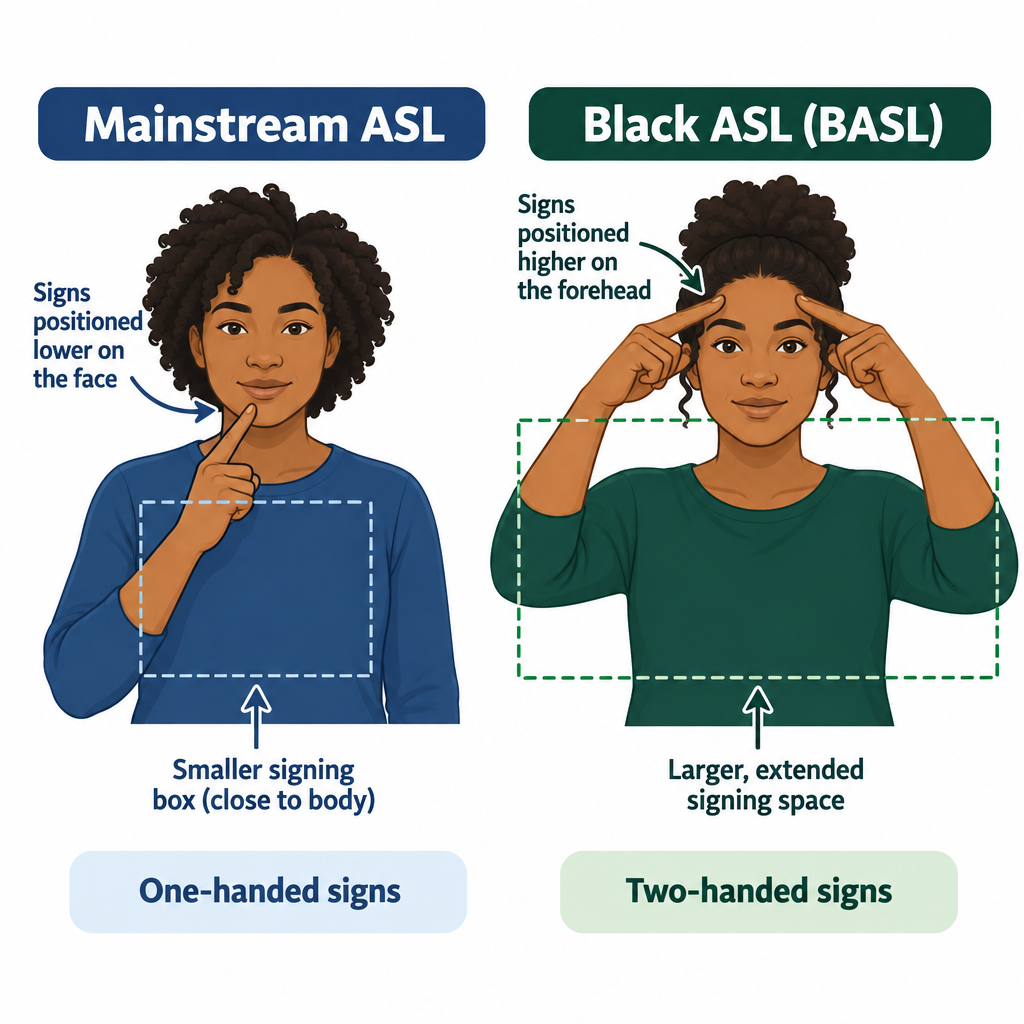
    1. More two-handed signs

    Many ASL signs can be made with one hand or two. Over time, mainstream ASL drifted toward one-handed versions. Older Black signers in the study used the two-handed forms noticeably more often, keeping a variant that white schools had moved away from.

    2. A larger signing space

    Signing space is the area in front of the body where signs are produced. Mainstream ASL generally keeps signs in a box from roughly the top of the head to the waist. Black signers in the study often used a bigger space, with signs extending further out and away from the body. Community members often describe this as signing “bigger.”

    3. Signs kept higher on the face

    Some ASL signs are traditionally made at the forehead. A well-documented example is KNOW, formed with a bent hand tapping the forehead. Many signers today make it lower, near the cheek. The Black ASL Project found that older Black signers lowered these signs less often, preserving the older forehead location.

    4. Distinct vocabulary

    BASL has lexical variants, meaning different signs for the same concept. Some came from the specific schools Black Deaf children attended, so variants can be regional as well as racial. A signer from a Black school in Texas might use a different sign than one from North Carolina.

    5. Influence from African American English

    Younger Black signers in the study incorporated phrases and expressions from African American English into their signing. These are expressions a hearing Black friend or relative might say, carried into ASL with their tone and meaning intact. This is where BASL shows how Black Deaf people participate in wider Black culture, including hearing Black culture.

    6. Facial expression, rhythm and body movement

    Facial expression is part of ASL grammar for everyone. Many Black Deaf signers, along with community educators, describe BASL as using more expression, rhythm and body movement. This one rests more on community description than on the 2011 measurements, so I treat it as a strong, widely shared observation rather than a lab finding.

    Feature Mainstream ASL tendency Black ASL tendency
    Hands One-handed variants common Two-handed variants more often
    Signing space Compact, close to body Larger, extends further out
    Forehead signs (e.g., KNOW) Often lowered toward cheek More often kept at forehead
    Vocabulary Standard national signs Some distinct, often regional, signs
    English influence Mainstream English mouthing and idioms African American English expressions
    Style Varies by signer Often described as more expressive

    Hearing tip

    If you are learning ASL and meet a Black Deaf signer who uses a sign you were not taught, ask what it means and where they learned it. Do not “correct” them toward your textbook version.

    Black Deaf identity and community

    BASL Distinct Features Diagram

    BASL sits inside a larger community story. Andrew Foster became Gallaudet’s first Black graduate in 1954 and went on to found dozens of schools for Deaf children across Africa. National Black Deaf Advocates (NBDA), founded in 1982, works on the specific issues Black Deaf people face, from education to employment.

    Black Deaf people often describe a double layer of exclusion. In hearing Black spaces, communication barriers shut them out. In mostly white Deaf spaces, racism and cultural differences can do the same. BASL is one of the clearest expressions of a community that built its own space when neither world fully made room for it.

    Public visibility has grown a lot in recent years. In 2020, Deaf content creator Nakia Smith posted videos signing with her grandfather that showed BASL to millions of people online. The same year, the Language & Life Project at North Carolina State University released Signing Black in America, a documentary featuring Joseph Hill and other Black Deaf signers.

    Black Deaf performers have also put Black signing on huge stages. Warren “Wawa” Snipe performed in ASL during the 2022 Super Bowl halftime show. In 2023, Justina Miles became the first Deaf woman to perform at a Super Bowl halftime show, signing for Rihanna, and her performance drew wide praise for its energy and style.

    Why this matters in higher education settings

    Gallaudet University, the world’s leading university for Deaf and hard of hearing students, opened a Center for Black Deaf Studies, with Carolyn McCaskill as founding director. That shift matters. For decades, Deaf studies programs taught ASL as if it had one “correct” form, and Black students could find their home signing treated as wrong.

    For colleges and employers, the practical issue is interpreting. Under the Americans with Disabilities Act, institutions must provide effective communication, which usually means qualified interpreters. “Effective” is the key word. An interpreter who does not recognize BASL variants or African American English may miss meaning, tone or humor.

    Black Deaf students and professionals often request Black interpreters for exactly this reason. Many also prefer Deaf interpreters working alongside hearing ones for complex situations. Our explainer on what the Americans with Disabilities Act is and who it protects covers the legal side of requesting accommodations.

    See a professional

    If a school, court or medical provider refuses a qualified interpreter, an advocacy organization or disability rights attorney can explain your options. For hearing changes, see an audiologist; sudden hearing loss is a medical emergency.

    Is Black ASL disappearing?

    My honest answer: it is changing, and parts of it are at risk. The features researchers measured most clearly belong to older signers who attended segregated schools. As that generation ages, some of those older forms will fade, much like older dialect words fade in spoken languages.

    Integration also pulled Black Deaf students into schools dominated by mainstream signing. Many Black Deaf people describe code-switching, using mainstream ASL in white or formal settings and BASL among family and Black Deaf friends.

    At the same time, younger signers are creating new features, especially through African American English and social media. Black ASL is not a museum piece. It is a living variety with a long history behind it, and documentation projects like McCaskill’s give the older forms a record that will outlast any one generation.

    How to learn about BASL respectfully

    Hearing learners and white Deaf learners sometimes ask me whether they should “learn BASL.” I think the better goal is to understand it, recognize it and learn from the people who use it.

    Learning about Black ASL respectfully

    1. Learn mainstream ASL basics first, starting with the sign language alphabet.
    2. Read The Hidden Treasure of Black ASL.
    3. Watch Signing Black in America.
    4. Follow Black Deaf educators and creators directly.
    5. Take workshops taught by Black Deaf instructors.
    6. Ask before using a BASL sign or expression.

    Avoid treating BASL as a trend or a costume. Copying expressions without understanding their cultural meaning is the fastest way to turn appreciation into appropriation. Pay Black Deaf teachers for their knowledge, and credit them when you share what you learned.

    FAQ

    Is Black American Sign Language a separate language from ASL?

    No. Linguists classify it as a dialect or variety of ASL. It shares ASL’s core grammar, and signers of both can usually understand each other, though some signs and styles differ enough to cause confusion.

    Where did Black ASL come from?

    It developed in segregated schools for Black Deaf children, mostly in the Southern United States, starting with the first such school in Raleigh, North Carolina, in 1869. Isolation from white schools let Black Deaf communities develop their own signing patterns over generations.

    Is BASL just slang?

    No. Its features are systematic and rule-governed, which is what linguists look for in a dialect. Some younger signers do use expressions from African American English, but that is a feature of the variety, not evidence that it is informal or incorrect.

    Who is Carolyn McCaskill?

    She is a Black Deaf scholar at Gallaudet University who attended a segregated Deaf school in Alabama. She co-led the Black ASL Project and co-wrote The Hidden Treasure of Black ASL, and she became founding director of Gallaudet’s Center for Black Deaf Studies.

    Can hearing people learn Black ASL?

    Hearing people can learn to recognize and understand it, ideally from Black Deaf teachers after building a solid base in ASL. The respectful approach is to learn about it from the community rather than adopt its expressions casually.

  • Closed Captioning vs Subtitles and Why the Difference Matters

    Closed Captioning vs Subtitles and Why the Difference Matters

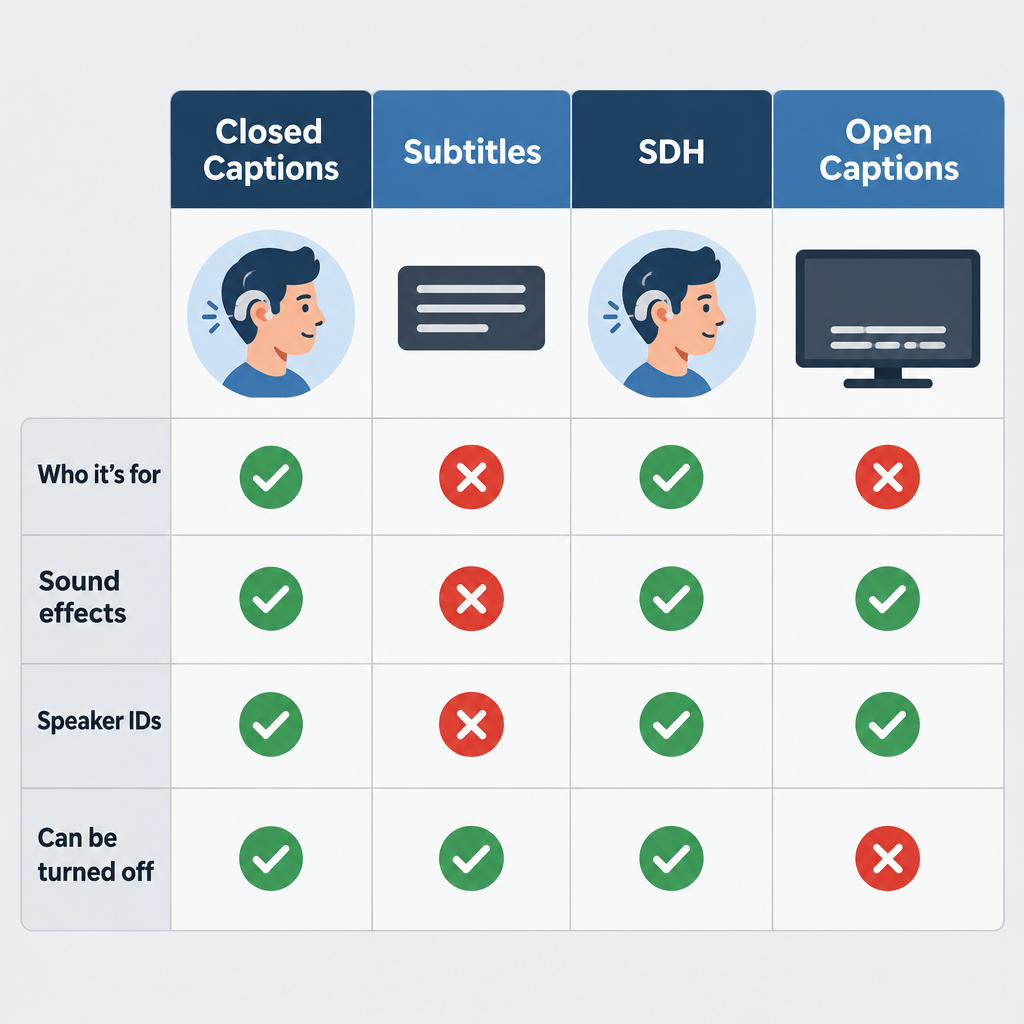
    Closed captioning and subtitles look the same on screen, but they are built for different viewers. Captions assume you can’t hear the audio. Subtitles assume you can hear it and don’t understand the language. This guide compares closed captions, subtitles, SDH and open captions, then helps you choose the right one on your TV, your phone or your own videos.

    Last updated: October 29, 2026

    Closed captionsFor viewers who can't hear
    SubtitlesFor viewers who can't understand
    SDHCaptions in subtitle form
    Open captionsBurned in, always on
    Best for accessibilityCaptions or SDH

    What’s the Difference Between Closed Captioning and Subtitles?

    The difference comes down to one question: what does the text assume about the viewer?

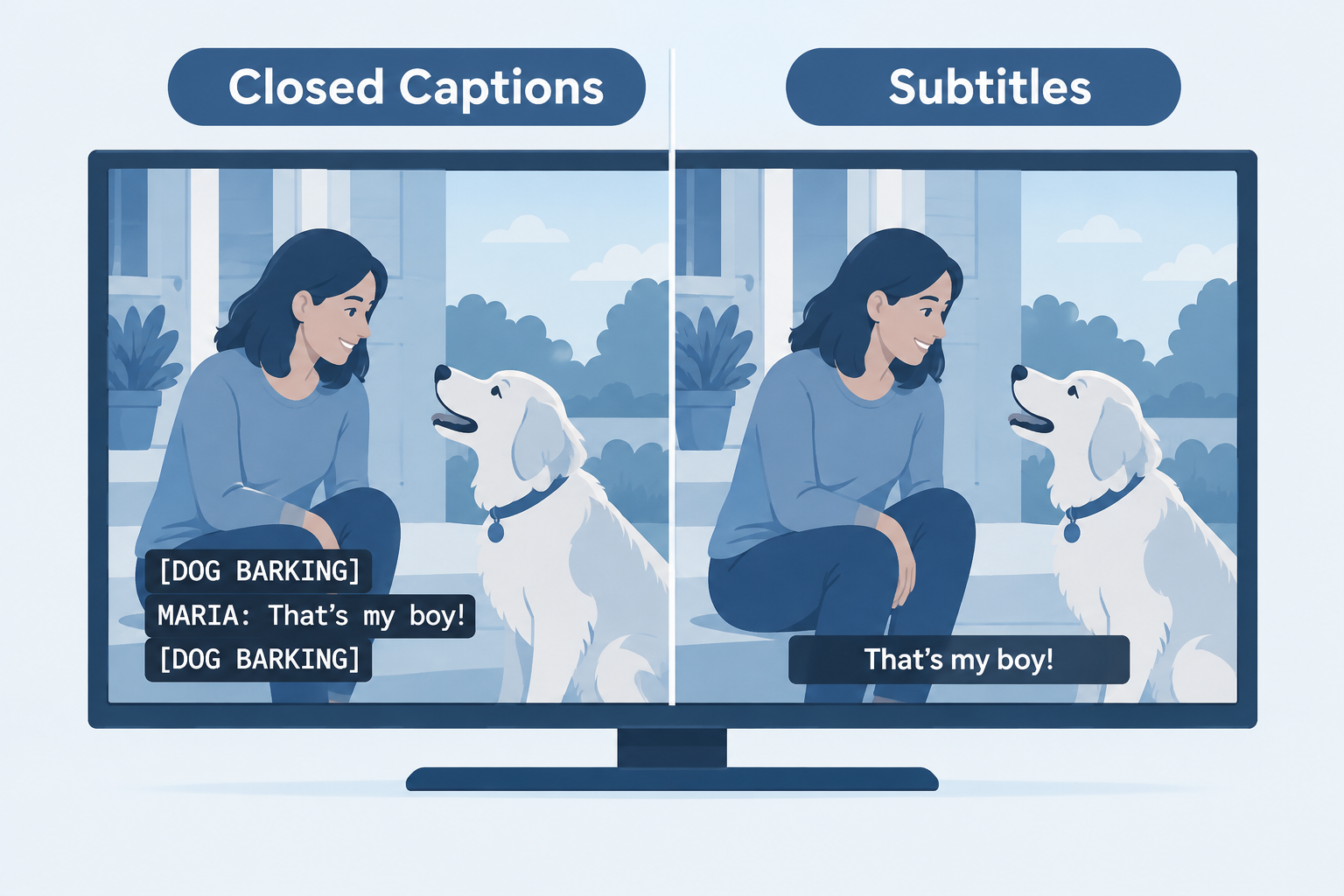
    Closed captions assume the viewer cannot hear the soundtrack. They transcribe the dialogue and also describe everything else the audio carries: who is speaking when they are off screen, music, a door slamming, a phone buzzing, a sarcastic tone. A good caption track gives a Deaf or hard of hearing viewer the same information a hearing viewer gets through their ears.

    Subtitles assume the viewer can hear just fine but doesn’t understand the spoken language. A hearing viewer watching a Korean drama already hears the gunshot and the swelling score, so subtitles only translate what people say. Sound effects and speaker labels are left out because they would be redundant.

    That single assumption shapes everything else: the content of the text, the file format, the legal rules and even the button you press.

    So does closed captioning mean subtitles? In everyday speech, many people use the two words interchangeably, and in the UK and Ireland “subtitles” is the normal word for both. Technically, though, they are different products. If you rely on the text to follow a show because of hearing loss, the difference is the gap between understanding a scene and missing half of it.

    Closed Captions vs Subtitles vs SDH vs Open Captions

    There are four text tracks you will meet in practice. Here is how they line up side by side.

    Feature Closed captions Subtitles SDH Open captions
    Who it’s for Deaf and hard of hearing viewers Hearing viewers who don’t speak the language Deaf and hard of hearing viewers Everyone watching that copy
    Includes sound effects Yes No Yes Usually yes
    Includes speaker IDs Yes Rarely Yes Usually yes
    Translated Usually same language Yes Same language or translated Either
    Can be turned off Yes Yes Yes No, burned into the picture
    Typical home US broadcast and cable TV Foreign films, streaming Blu-ray, DVD, streaming Social video, some cinema showings
    Customisable look Yes on digital TV (CEA-708) Depends on player Depends on player No

    What are closed captions?

    “Closed” means the text is hidden until the viewer turns it on. In the US, broadcast captions travel as data alongside the video signal. Analog television used a standard called CEA-608, which tucked caption data into line 21 of the picture. Digital TV uses CEA-708, which carries the captions in the digital stream and lets viewers change font, size, colour and background.

    Captions have a long history in American TV. PBS aired The French Chef with open captions in 1972, and the first closed-captioned programs reached viewers through set-top decoders in 1980. The Television Decoder Circuitry Act of 1990 then required TV sets 13 inches or larger sold in the US to include a caption decoder, which is why your TV has a captions setting today.

    A typical caption line reads something like:

    [DOG BARKING IN DISTANCE]
    MARIA: Did you hear that?
    ♪ tense music ♪

    What are subtitles?

    Subtitles are a translation tool. They sit at the bottom of the screen, carry only spoken dialogue (plus important on-screen text like signs or letters), and are written in the viewer’s language rather than the speaker’s. Because they serve hearing viewers, they don’t label speakers or describe sounds.

    Streaming services, DVDs and international releases often carry dozens of subtitle languages for the same title. A film’s English subtitle track for its Spanish-language scenes, sometimes called “forced narratives,” is a subtitle in this sense too.

    What is SDH (Subtitles for the Deaf and Hard of Hearing)?

    SDH is a hybrid. It contains everything a caption track contains (sound effects, speaker identification, music cues) but is delivered in a subtitle format instead of the broadcast caption format.

    SDH exists for a practical reason. HDMI connections don’t pass the old line-21 caption data, so a Blu-ray player hooked up over HDMI can’t send traditional closed captions to your TV. Disc authors solved this by putting caption-style text into the subtitle stream instead. Streaming services adopted the same approach, which is why you’ll see menu options like “English (SDH)” or “English [CC]” on Netflix, Disney+ and Max.

    SDH also looks different. It usually uses the same font and positioning as regular subtitles, while 608-style captions often appear as white text on a black background in a fixed position.

    What are open captions?

    Open captions are part of the video image itself. Nobody can turn them off, because they’re baked into the pixels. You see them all the time on TikTok, Instagram Reels and YouTube Shorts, where creators burn in large text because most people scroll with the sound off.

    Some cinemas run open caption screenings of new releases. US movie theaters showing digital movies have also had to provide closed movie captioning devices, such as seat-mounted caption displays or caption glasses, under a Department of Justice rule issued under the ADA in December 2016, with a compliance deadline of June 2, 2018.

    Pros and Cons of Each Option

    Four Caption Types Comparison Chart

    No single format wins everywhere. Each has a job it does well and a place where it falls short.

    Closed captions

    • Pros: Full sound information, legally required on most US TV, customisable on digital sets, can be switched off by viewers who don’t want them.
    • Cons: Live captions (news, sports) often lag several seconds behind and contain errors; older 608 captions are limited to 32 characters per line; not passed over HDMI from disc players.

    Subtitles

    • Pros: Clean and unobtrusive, available in many languages, easy to read for hearing viewers, cheaper to produce than full captions.
    • Cons: Useless as an accessibility tool on their own, because they leave out sound effects, music and off-screen speakers.

    SDH

    • Pros: Accessibility content of captions with the flexibility of subtitle formats; works on discs and streaming; often supports multiple languages.
    • Cons: Labelling is inconsistent between services, so you sometimes have to try two tracks to find the full one; styling options depend on the player.

    Open captions

    • Pros: Always visible, impossible to forget to turn on, works on every platform, great for social video and public displays.
    • Cons: Viewers can’t hide them, resize them or change their colour; text can cover important parts of the image; you can’t offer multiple languages from one file.

    Which File Formats Carry Each Type?

    If you publish video, the format you export often decides which kind of text you can deliver. These are the formats you’ll actually encounter.

    Format Extension Typical use Supports styling and positioning
    SubRip .srt YouTube, Vimeo, social uploads, general subtitles Minimal
    WebVTT .vtt HTML5 web video, many streaming players Yes, basic
    Scenarist Closed Caption .scc US broadcast (CEA-608 data), iTunes-era delivery Yes, 608 rules
    TTML / DFXP .ttml, .dfxp, .xml Broadcast and streaming platforms Yes, extensive
    IMSC1 .ttml / .xml Netflix and other premium streaming specs Yes, extensive
    EBU STL .stl European broadcast subtitling Yes
    YouTube SubViewer .sbv YouTube Studio exports Minimal

    A plain SRT file can carry caption-style content, sound tags and all. The format doesn’t stop you from writing good captions. It just can’t hold placement or styling information, so speaker positioning is lost.

    Which One Does Your Delivery Spec Need?

    For anyone producing content, the honest answer is that the platform or the law decides.

    Where your video goes What’s usually required
    US broadcast or cable TV Closed captions meeting FCC quality standards (accuracy, synchronicity, completeness, placement)
    Online video that previously aired on US TV with captions Captions online too, under the 21st Century Communications and Video Accessibility Act (2010)
    Netflix Timed text files to their spec (IMSC1.1/TTML); English subtitle lines capped at 42 characters, two lines max
    US government and many public institutions Captions under Section 508 and the ADA
    YouTube, Vimeo, your website SRT or VTT; captions strongly recommended for accessibility
    Social media (Reels, TikTok, Shorts) Open captions burned in, plus platform auto-captions where available
    International release Translated subtitles per language, plus SDH for the original language

    The FCC’s caption quality rules took effect in 2014. They’re why US broadcasters can be held to standards on accuracy and timing rather than just “some text appeared.”

    Hearing tip

    On streaming services, if you see both “English” and “English (SDH)” or “English [CC]”, pick the SDH or CC track. The plain “English” track is often a subtitle that skips sound effects.

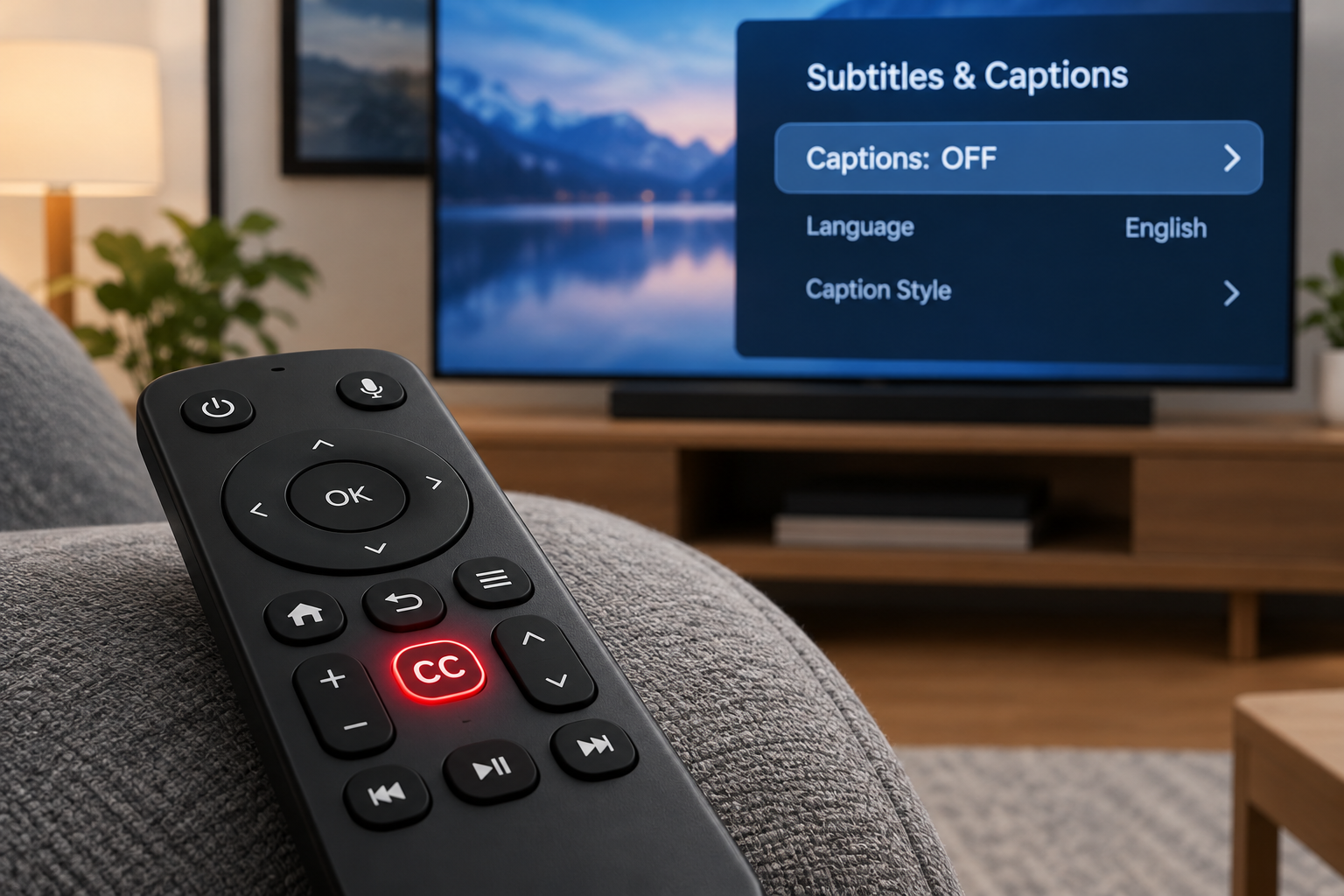
    Where Is the Closed Captioning Button on Your Device?

    The setting is rarely labelled consistently. Some devices say “CC,” some say “Subtitles,” and some bury it in accessibility menus. Menu wording shifts with software updates, so treat these paths as the current starting point.

    Device or app How to turn captions on
    Most TV remotes CC or SUBTITLE button, if present
    Samsung TV Settings > General (or General & Privacy) > Accessibility > Caption Settings
    LG TV Settings > Accessibility > Subtitles
    Roku Press the * (star) button during playback > Closed Captioning
    Amazon Fire TV Press the Menu button (three lines) during playback > Subtitles
    Apple TV Swipe down during playback, or Settings > Accessibility > Subtitles and Captioning
    iPhone and iPad Settings > Accessibility > Subtitles & Captioning > Closed Captions + SDH
    Netflix Speech-bubble icon > Audio & Subtitles
    YouTube CC button in the player, or press C on a keyboard
    Windows 11 Live Captions shortcut: Windows + Ctrl + L

    DirecTV subtitles vs closed captioning

    DirecTV is a common source of confusion. On satellite receivers, the setting you want for TV shows is Closed Captioning, usually reached by pressing INFO during a program and selecting the CC option, or through the menu under Settings and then Accessibility (exact wording varies by receiver model). That turns on the captions the broadcaster sends, with sound effects and speaker labels.

    “Subtitles” on DirecTV usually refers to something else: translated text on foreign-language content, or a separate text track in on-demand titles and the DirecTV Stream app. If you switch on a subtitle option and notice sound cues are missing, go back and look for the closed captioning toggle instead. Separately, SAP (Secondary Audio Program) switches the audio language, which is easy to tap by accident when you’re hunting for captions.

    If you’re trying to get text off the screen rather than on it, our guide on how to turn off closed captioning covers each major device step by step.

    Turn on captions and make them readable (iPhone)

    1. Open Settings, then tap Accessibility.
    2. Tap Subtitles & Captioning.
    3. Switch on Closed Captions + SDH so apps prefer the full caption track.
    4. Tap Style, then choose Large Text or Outline Text.
    5. Tap Custom to set font size and background opacity.

    How to Create Captions and Subtitles

    For creators, the process is similar either way. Write the dialogue, time it to the video, and export the right format. The difference lies in what you include.

    Your main options

    1. Automatic speech recognition (ASR). YouTube Studio generates automatic captions for free on many uploads, and editors such as CapCut and Premiere Pro offer auto-transcription. Accuracy has improved a lot, but names, jargon, accents and crosstalk still trip it up. ASR output also rarely includes sound descriptions, so it’s closer to subtitles than captions until you edit it.
    2. Human captioning services. Professional vendors charge per minute of video, and human work costs several times more than AI. Rates change often, so we haven’t listed specific prices here; get quotes for your exact turnaround time and file format.
    3. Hybrid. Run ASR first, then edit it yourself or pay a human editor to correct it and add sound tags. For most small creators, this is the best value.
    4. Live captioning (CART). For live events, a trained stenographer or real-time captioner produces text on the fly. It’s the gold standard for meetings and lectures where accuracy matters.

    Writing captions that actually work

    • Identify speakers when it isn’t obvious who’s talking, especially off screen.
    • Describe sounds that matter to the story: [glass shatters], [phone vibrates]. Skip ambient noise that carries no meaning.
    • Name the music’s mood or lyrics when they affect the scene: ♪ upbeat jazz ♪.
    • Keep lines short. Broadcast 608 captions top out at 32 characters per line; Netflix allows 42 for English. Shorter lines are easier to read in time.
    • Keep reading speed comfortable. Netflix’s English guidelines cap adult content at about 20 characters per second.
    • Sync tightly. Captions that appear late force viewers to match words to faces after the moment has passed.

    Free built-in tools for viewers

    You don’t always need a creator to do the work. These free features generate captions on your own device.

    Tool Platform Cost Notes
    Live Caption Android (Pixel and many Android 10+ phones) Free Captions any audio playing on the phone, works offline
    Live Captions iPhone 11 and later, recent Macs Free Captions media, calls and FaceTime on device
    Live Captions Windows 11 Free System-wide, works in any app
    Automatic captions YouTube Free Quality varies by audio
    Live captions Microsoft Teams, Zoom, Google Meet Free tiers available Meeting captions, language support varies

    For phone calls specifically, captioned telephone services and the telecommunications relay service offer a different route, with a human or software transcribing the other person’s speech in real time.

    Why the Distinction Matters

    It’s easy to treat this as wordplay. It isn’t.

    For Deaf and hard of hearing viewers, subtitles leave real gaps. A horror movie with subtitles but no captions shows you a character turning around, startled, with no indication that a floorboard creaked. A thriller hides that a phone is ringing in another room. Comedy loses the sarcastic tone that makes a line funny. The World Health Organization estimates more than 1.5 billion people live with some degree of hearing loss, and in the US roughly 15% of adults report some trouble hearing, according to the National Institute on Deafness and Other Communication Disorders. That’s a lot of people being handed half the story when a service labels a bare subtitle track as “CC.”

    For hearing viewers, captions help more than you’d expect. People use them in noisy kitchens, on trains, with sleeping babies nearby, for heavy accents or mumbled dialogue, and while learning a language. Ofcom research in the UK found back in 2006 that around 7.5 million people used TV subtitles, and about 6 million of them had no hearing loss. Captions have become a mainstream feature that happens to be essential for some users.

    For creators and businesses, the label carries legal weight. Delivering translated subtitles when the spec calls for captions can get a file rejected by a broadcaster or platform. In the US, getting it wrong on public-facing video can also raise accessibility complaints under the ADA.

    For anyone noticing they need captions more often, it’s a signal worth acting on. Turning on captions for every show is fine, and plenty of people with typical hearing do it. But if dialogue that used to be clear now sounds muddy, a hearing test is cheap peace of mind. If it leads to hearing aids, ask whether the fitting includes real ear measurement, which checks that the devices deliver the right sound in your actual ear rather than an average one.

    See a professional

    If hearing in one or both ears drops suddenly, over hours or a few days, treat it as an emergency and see a doctor the same day. Gradual trouble following speech is a reason to book a hearing test with an audiologist.

    Which Should You Choose?

    Here’s our verdict, by situation.

    • You’re Deaf or hard of hearing: Choose closed captions on live and broadcast TV, and SDH or the “[CC]” track on streaming and discs. Avoid plain subtitle tracks, which strip out sound information.
    • You’re watching in a language you don’t speak: Choose subtitles. If you also have hearing loss, look for a translated SDH track, which some services offer for major languages.
    • You have typical hearing but struggle with dialogue, accents or a noisy room: Captions or SDH work best because speaker labels help in busy scenes. Plain subtitles are fine if sound tags annoy you.
    • You’re publishing on social media: Use open captions so the text survives autoplay with sound off, and add a closed caption file where the platform allows it.
    • You’re publishing on YouTube or a website: Upload a proper SRT or VTT caption file with sound tags. Don’t rely on unedited auto-captions.
    • You’re delivering to a broadcaster or streamer: Follow the spec exactly. It will name the format and whether it needs captions, SDH, subtitles or all three.

    If we had to pick one default for most viewers, it would be closed captions or SDH. They contain everything subtitles contain, plus the information subtitles leave out.

    FAQ

    Is CC better than subtitles?

    For accessibility, yes. Closed captions include dialogue, speaker identification, sound effects and music cues, so a viewer who can’t hear gets the full experience. Subtitles are better only when you can hear the audio and need a translation, because they’re less cluttered.

    What button is closed captioning?

    On many TV remotes it’s a button marked CC or SUBTITLE. On Roku it’s the * (star) button during playback, on Fire TV the Menu button, and on Apple TV you swipe down during playback. In apps like Netflix and YouTube, look for a speech-bubble or CC icon in the player controls.

    Why are subtitles called CC?

    Mostly habit and branding. US viewers learned to look for the CC symbol, so streaming services often slap “CC” on any text track. In the UK, “subtitles” is the everyday word for both. The label alone doesn’t tell you what’s in the track; sound effects and speaker names are the giveaway.

    Should closed captions be on or off?

    That depends entirely on you. Leave them on if you have hearing loss, watch in noisy places, or simply follow stories better with text. Turn them off if they distract you and you hear dialogue clearly. Neither choice is wrong, and many households switch them per show.

    Does closed captioning mean subtitles?

    Not technically. Both put text on screen, but captions are written for people who can’t hear the audio, while subtitles are written for people who can’t understand the language. In casual conversation, people use the words interchangeably.

    What’s the difference between subtitles and closed captioning on DirecTV?

    On DirecTV receivers, Closed Captioning shows the broadcaster’s full caption track, including sound descriptions. “Subtitles” usually refers to translated text on foreign-language or on-demand content. If you want accessibility captions, use the Closed Captioning setting rather than a subtitle option.

  • What Is Auracast and How Broadcast Audio Helps Hearing Loss

    What Is Auracast and How Broadcast Audio Helps Hearing Loss

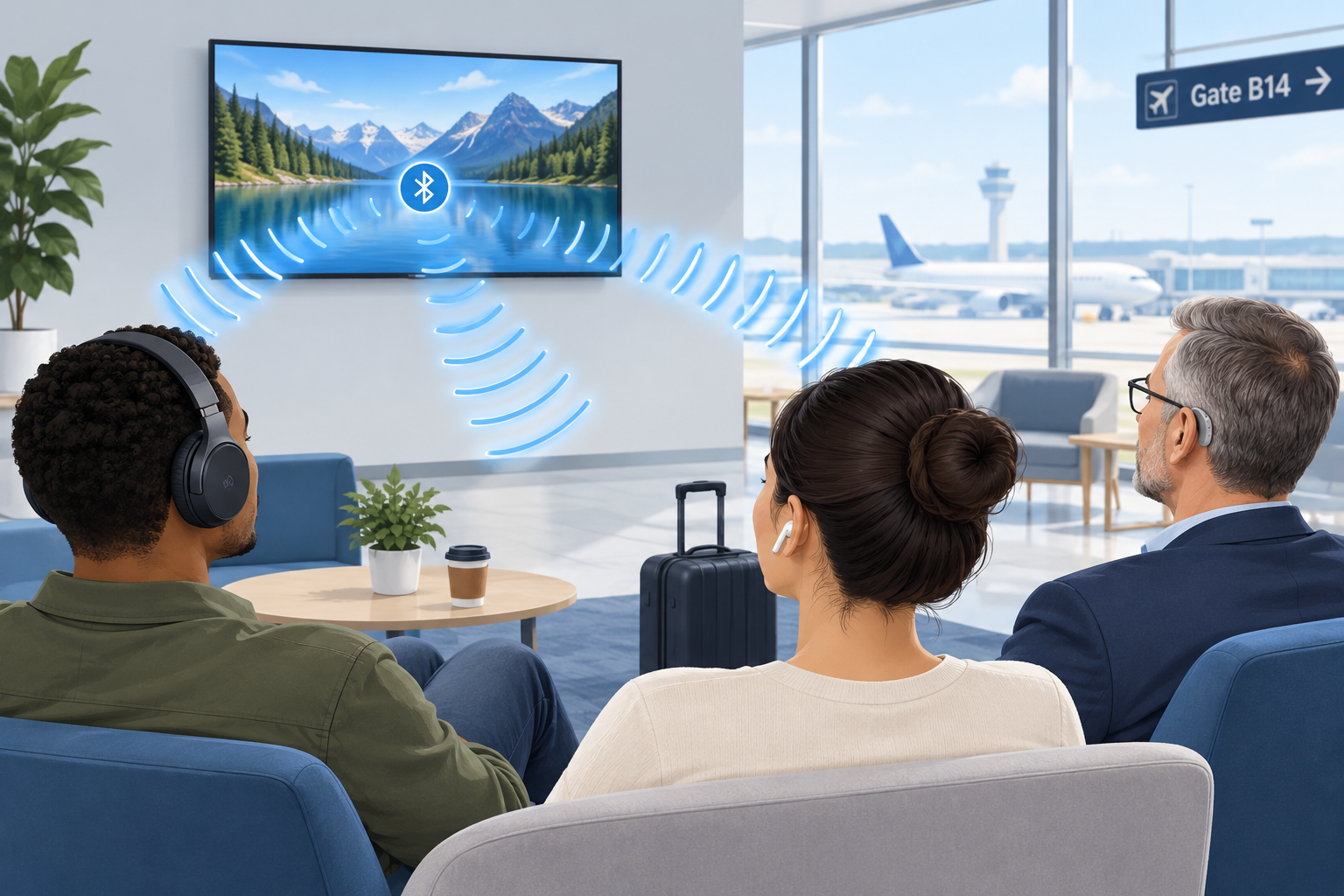
    Auracast is a Bluetooth feature that lets one audio source, such as a TV, a PA system or a phone, broadcast sound to an unlimited number of nearby earbuds, headphones and hearing aids at the same time. For people with hearing loss, it means you can stream a gate announcement, a lecture or a gym TV directly into your own hearing aids, with your own settings, without borrowing a receiver or wearing a neckloop.

    Last updated: October 29, 2026

    TypeBluetooth broadcast audio
    Built onBluetooth LE Audio
    Listeners per streamUnlimited
    Introduced2022 by Bluetooth SIG
    Best forVenues, TVs, sharing

    What is Auracast?

    Auracast is the consumer name the Bluetooth Special Interest Group (SIG) gave to broadcast audio in June 2022. The SIG is the industry body that writes the Bluetooth standards, so Auracast is an open standard rather than one company’s product. Any manufacturer can build it into a device.

    It runs on Bluetooth LE Audio, the newer generation of Bluetooth audio the SIG announced in 2020. Classic Bluetooth audio, the kind most of us have used for years, connects one source to one listening device in a private pairing. Auracast removes that limit. A transmitter sends out a stream, and anyone with a compatible receiver in range can tune in, much like picking a station on a radio.

    The SIG frames Auracast around three everyday uses:

    • Share your audio: two or more people listen to the same phone or tablet on their own earbuds or hearing aids.
    • Unmute your world: silent TVs in bars, gyms, airports and waiting rooms broadcast their sound to anyone who wants it.
    • Hear your best: venues such as theaters, lecture halls, places of worship and conference centers stream speech directly to visitors’ hearing devices.

    That third category is the one with the biggest implications for people who are hard of hearing. It could eventually replace a lot of the clunky assistive listening hardware venues hand out today.

    How Auracast broadcast works

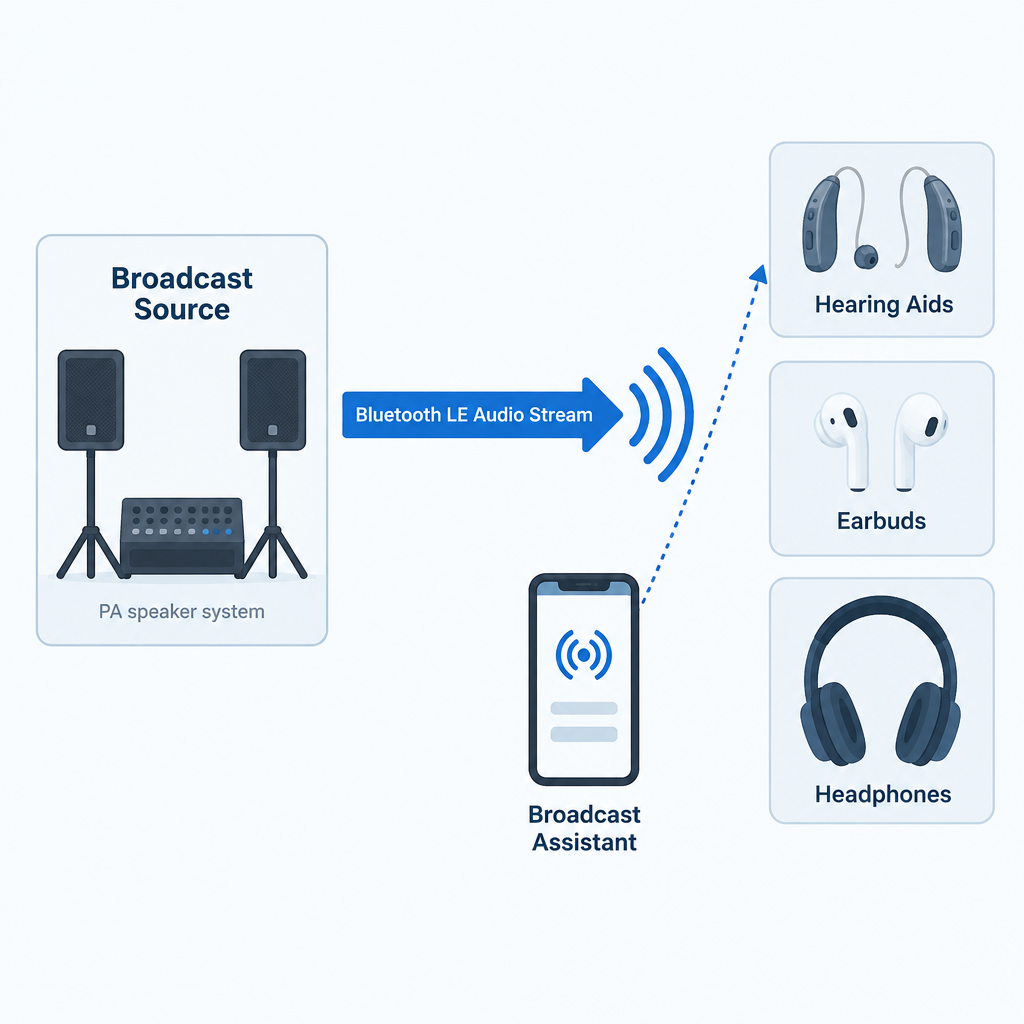
    An Auracast setup has three roles. Sometimes one device plays two of them.

    1. The broadcast source transmits the audio. This might be a smart TV, a dedicated transmitter connected to a venue’s sound system, a laptop or a phone.
    2. The receiver (sink) plays the audio. That’s your earbuds, headphones, speaker or LE Audio hearing aids.
    3. The broadcast assistant helps you find and join a stream. Hearing aids have no screen, so your phone, smartwatch or the hearing aid maker’s app scans for nearby broadcasts, shows you a list, and tells your hearing aids which one to lock onto.

    Each broadcast advertises a name, such as “Gate B12” or “Main Hall English”. A broadcast can be open, so anyone can join, or encrypted with a broadcast code, which works like a Wi-Fi password. A hotel conference room or a private tour group would use the encrypted option. Venues can also post a QR code that you scan to join the right stream with the code already filled in.

    The technical pieces underneath

    If you want to understand why Auracast works when older Bluetooth couldn’t do this, these are the building blocks inside the LE Audio specifications.

    Component What it does Why it matters to you
    LC3 codec Compresses audio efficiently at low data rates Clear speech with less battery drain
    Isochronous channels Deliver time-synchronized audio streams Left and right ears stay in sync; lip sync holds up
    Broadcast Isochronous Stream (BIS) Carries one-to-many audio No pairing limit on listeners
    Broadcast Audio Scan Service (BASS) Lets an assistant device tell a receiver what to join Your phone picks the stream for your hearing aids
    Public Broadcast Profile (PBP) Sets baseline quality rules for public streams Any compliant device can play a public broadcast
    Hearing Access Profile (HAP) Standardizes LE Audio for hearing aids Hearing aids work across brands of phones

    The LC3 codec deserves a special mention. In the SIG’s listening tests, LC3 delivered better quality than the old SBC codec at roughly half the data rate. Lower data rates mean lower power use, which is a big deal for small hearing aid batteries that have to last a full day. LC3 supports sampling rates from 8 kHz up to 48 kHz, so a broadcast can be tuned for speech or for full-range music.

    Auracast Bluetooth vs. classic Bluetooth

    Auracast vs Classic Bluetooth Comparison Chart

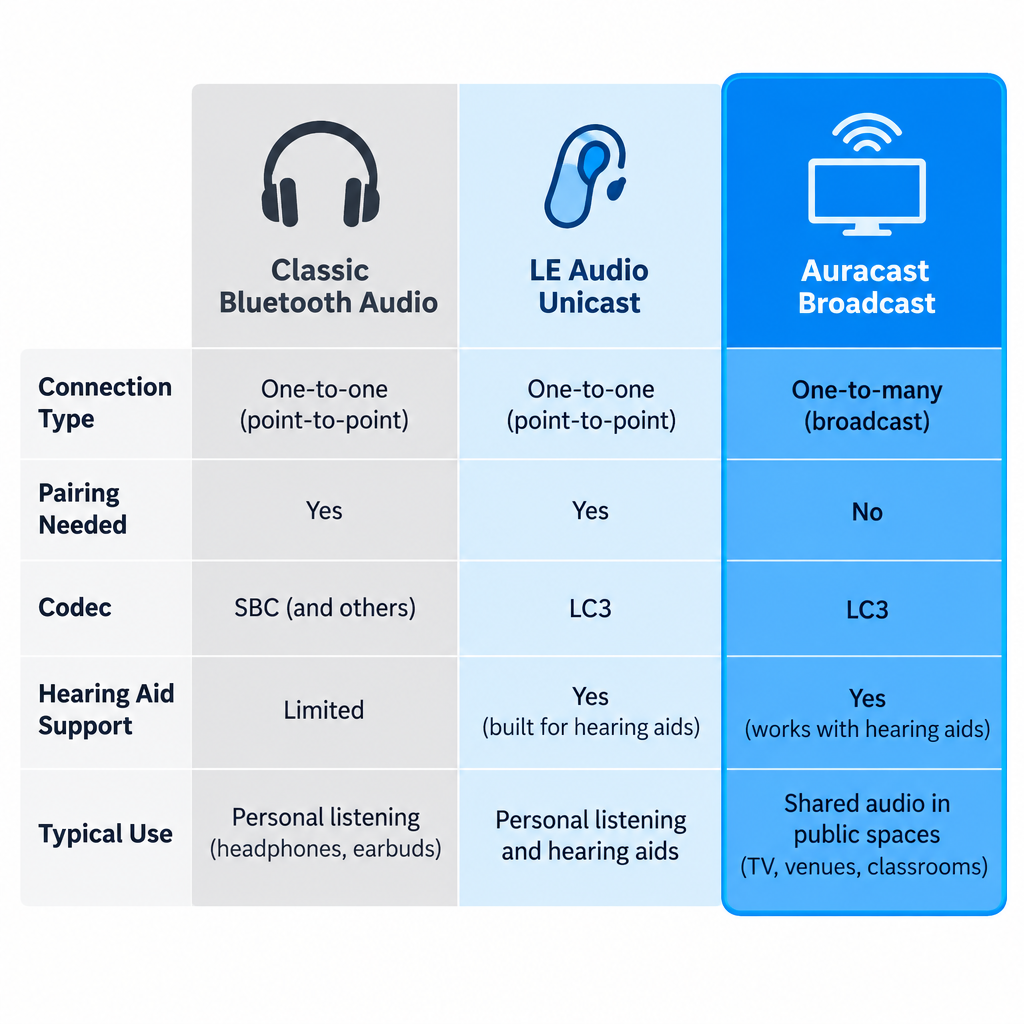
    People often search for “Bluetooth Auracast” because they’re not sure whether it’s a different wireless system. It’s the same Bluetooth radio family with new rules on top. Here is how it compares with the Bluetooth you already know.

    Feature Classic Bluetooth audio LE Audio (unicast) Auracast broadcast
    Connection type One source to one device One source to one device (or a pair) One source to unlimited devices
    Pairing needed Yes Yes No; you join a stream
    Default codec SBC LC3 LC3
    Hearing aid support Proprietary (MFi, ASHA, or a streamer) Standard via Hearing Access Profile Standard via Hearing Access Profile
    Typical use Music and calls from your phone Music and calls, lower power TVs, venues, shared listening

    The hearing aid row is the important one. Until LE Audio, hearing aids streamed using Apple’s Made for iPhone protocol, Google’s ASHA protocol for Android, or a separate clip-on streamer. Those systems were tied to particular phones and didn’t let you join public audio at all. LE Audio gives hearing aids a common language, and Auracast adds the broadcast layer on top.

    Why Auracast matters for people with hearing loss

    Hearing aids are tuned to your specific hearing profile. Any time sound reaches you through the air, it picks up room echo, background noise and distance. Streaming audio directly into the aids skips all of that. Auracast extends direct streaming beyond your own phone to the wider world.

    Here is what that changes in practice:

    • No borrowed equipment. Today, at many theaters you ask at a desk for a receiver and a neckloop or headset, hand over ID as a deposit, and hope the battery is charged. With Auracast, the receiver is already in your ears.
    • Your prescription stays in place. The broadcast plays through your hearing aids’ own processing, so the sound is shaped for your hearing loss, not a generic headset curve.
    • Better signal-to-noise. The voice from a lecturer’s microphone arrives without the coughing, air conditioning and echo between you and the stage. For many listeners this is the single biggest improvement.
    • Discretion. Nobody can tell you’re using an assistive listening system, because you aren’t holding or wearing anything extra.
    • Unlimited capacity. A venue doesn’t have to guess how many receivers to stock. Ten people or ten thousand can join the same stream.
    • Multiple language or audio channels. A venue can run separate streams, for example one for the main speaker and one for a translated version or audio description.

    For public TVs, Auracast fills a gap that closed captioning only partly covers. Captions on a muted gym TV help, but they lag, drop words and are hard to follow during fast dialogue or sports commentary. Being able to hear the actual audio in your hearing aids, alongside captions if you like, is a real step up.

    Auracast vs. hearing loops and other assistive listening systems

    Auracast Venue Streaming Diagram

    Auracast enters a field that already has several assistive listening technologies. Each has strengths, and Auracast is not an automatic replacement for all of them yet.

    System How it reaches you Needs extra gear? Strengths Weaknesses
    Hearing loop (induction loop) Magnetic field picked up by the telecoil in your hearing aid No, if your aid has a telecoil Works with millions of existing aids; no app or pairing Needs a wire installed around the room; quality depends on installation
    FM / RF systems Radio signal to a body-worn receiver Yes, a receiver plus headset or neckloop Long range; mature technology Borrowed hardware; hygiene and battery issues
    Infrared (IR) Light signal to a receiver Yes, a receiver Signal stays inside the room; good for privacy Needs line of sight; sunlight can interfere
    Wi-Fi streaming apps Venue Wi-Fi to an app on your phone Your phone, plus earbuds or a hearing aid connection Uses the phone you already carry Small delays; depends on venue Wi-Fi
    Auracast Bluetooth LE Audio broadcast to your hearing aids or earbuds No, if your devices support LE Audio Direct to your aids; unlimited listeners; open standard Requires newer hearing aids and an assistant device; venue rollout still early

    Our honest view: if you’re buying hearing aids now, ask for both LE Audio and a telecoil. Hearing loops remain installed in many churches, theaters, ticket windows and public buildings, and a telecoil costs you nothing to use. Auracast is the future direction, but loops will stay useful for years, and some of the smallest hearing aid styles drop the telecoil to save space.

    There’s also a regulatory point. In the United States, the 2010 ADA Standards for Accessible Design require assembly areas to provide assistive listening systems, and at least 25 percent of the receivers must be hearing-aid compatible. Those rules were written before Auracast existed, and the Department of Justice has not issued guidance specifically addressing Auracast as a compliant system. Venues installing it today usually run it alongside an existing system rather than in place of one.

    What you need to use Auracast

    To join a broadcast with your hearing aids, three things have to line up.

    1. Hearing aids with LE Audio and Auracast support. This is hardware plus firmware. A hearing aid needs an LE Audio-capable chip, and the manufacturer has to enable broadcast listening in its software. Several makers launched models marketed as “Auracast ready” from 2023 onward, including ReSound Nexia, Oticon Intent and models in Signia’s IX platform. “Ready” usually means the hardware is capable; the full broadcast feature may arrive later through a firmware update, and it may depend on which phone you use.

    2. A broadcast assistant. Usually this is your phone. Google added Auracast support for LE Audio hearing aids in Android 16, starting with recent Pixel phones, and Samsung was an early adopter across Galaxy phones, earbuds and TVs. Apple’s iPhone support has trailed Android here, so if you use an iPhone, check your hearing aid maker’s compatibility list and the current iOS release notes before counting on Auracast. Some hearing aid apps can also act as the assistant.

    3. A broadcast to join. That means an Auracast-enabled TV, transmitter or venue system nearby.

    Devices with Auracast support

    Consumer audio brands have moved faster than venues. These are examples where the manufacturer has announced Auracast features.

    Device type Examples What Auracast does there
    Hearing aids ReSound Nexia, Oticon Intent, Signia IX models Receive broadcasts (feature availability depends on firmware and phone)
    Phones Samsung Galaxy models, Google Pixel on Android 16 Act as assistant; some can also broadcast audio sharing
    Earbuds Samsung Galaxy Buds2 Pro and later Galaxy Buds Receive broadcasts from Samsung TVs and phones
    TVs Samsung TVs from the 2023 lineup onward Broadcast TV sound to compatible earbuds
    Speakers JBL Go 4, Flip 7, Charge 6 Link multiple speakers to one source

    Ask your audiologist or hearing aid provider to confirm two things for any model you’re considering: whether broadcast listening is enabled today, and which phones work as an assistant. Marketing pages don’t always make that distinction clear.

    How to connect your hearing aids to an Auracast broadcast

    Exact menus vary by phone and hearing aid brand, but the process follows the same pattern everywhere.

    Joining an Auracast broadcast

    1. Update your hearing aids to the latest firmware through the manufacturer’s app.
    2. Update your phone to the newest operating system it supports.
    3. Make sure your hearing aids are connected to your phone over Bluetooth.
    4. On a Pixel running Android 16, open Settings, then Connected devices, and look for the audio sharing or broadcast option.
    5. On a Samsung Galaxy, open Bluetooth settings and look for the Auracast option, or use your hearing aid app.
    6. Wait for the list of nearby broadcasts, then tap the name the venue displays.
    7. Enter the broadcast code or scan the venue’s QR code if the stream is protected.
    8. Adjust the stream volume and the mix with surrounding sound in your hearing aid app.

    Hearing tip

    Most hearing aid apps let you blend the broadcast with your aids’ microphones. In a lecture, turn the microphones down to cut room noise; in a sports bar with friends, keep them up enough to hear the people at your table.

    When you leave the venue’s range, your hearing aids drop the stream and return to normal. Your regular program and settings come back automatically.

    Where Auracast is available now

    Auracast is real and shipping, but it’s still early. The consumer side, meaning phones, earbuds, speakers and TVs, is ahead of public infrastructure. Venue adoption depends on transmitters from assistive listening companies, budgets for new installs, and enough visitors arriving with compatible hearing aids to justify the cost.

    The places the SIG and equipment makers are targeting first include airports and train stations for announcements, gyms and bars with muted TVs, cinemas and theaters, universities and lecture halls, places of worship, museums with self-guided tours, and conference centers needing multiple language channels. If you visit any of these regularly, it’s worth asking the venue whether Auracast is on their plans. Requests from visitors are one of the ways venues decide what to fund.

    At home, the most useful setup today is a TV with Auracast or a small Auracast transmitter plugged into your TV’s audio output, so you and your household can listen at different volumes. Check that any transmitter you buy explicitly lists Auracast or LE Audio broadcast support, not only “Bluetooth 5.x”. A Bluetooth version number alone doesn’t tell you a device supports Auracast.

    A quick checklist before you buy hearing aids

    If future Auracast access matters to you, raise these points with your audiologist:

    • Does this model support Bluetooth LE Audio, and is Auracast broadcast listening active now or promised in an update?
    • Which phones work as a broadcast assistant with these aids, including mine?
    • Does it have a telecoil for hearing loops?
    • Is it rechargeable, and how much does streaming cut daily battery life?
    • Can I adjust the mix between streamed sound and room sound in the app?

    See a professional

    Get hearing aids fitted by an audiologist or licensed hearing professional if your loss is more than mild. Sudden hearing loss in one or both ears is a medical emergency, so see a doctor the same day.

    FAQ

    Is Auracast the same as Bluetooth?

    Auracast is a feature of Bluetooth, specifically Bluetooth LE Audio. It uses the same radio technology but adds one-to-many broadcasting, so a single source can stream to unlimited listeners instead of one paired device.

    Do my current hearing aids support Auracast?

    Only if they have LE Audio hardware and the manufacturer has enabled broadcast listening. Most hearing aids sold before 2023 cannot be upgraded with a software update because the chip itself doesn’t support LE Audio. Your hearing aid app or your provider can confirm this.

    Do I need an app to use Auracast?

    You need something to act as a broadcast assistant, because hearing aids have no screen to pick a stream. That’s usually your phone’s Bluetooth settings or your hearing aid maker’s app. Some earbuds and headphones have buttons that join a stream directly.

    Does Auracast work with iPhone?

    Android has moved first, with support in Android 16 and on Samsung Galaxy devices. iPhone support has lagged, so check your hearing aid maker’s compatibility list and Apple’s current release notes before you rely on it.

    Can strangers listen to my Auracast stream?

    Only if you leave it open. Broadcasts can be protected with a broadcast code, so if you share audio from your phone or TV, set a code and only people who have it can join.

    Will Auracast replace hearing loops?

    Not soon. Hearing loops work with the telecoils in millions of existing hearing aids and need no app. Auracast offers direct streaming and unlimited listeners, but it depends on newer hearing aids and venue upgrades. Expect the two to run side by side for years.

    Does Auracast help with tinnitus?

    Auracast is a way to deliver sound, not a treatment. It can make speech and audio easier to follow, but it doesn’t treat tinnitus or hearing loss. Talk to an audiologist about tinnitus management options.

  • What ASL Means and How American Sign Language Began

    What ASL Means and How American Sign Language Began

    ASL stands for American Sign Language, the visual language used by many Deaf and hard of hearing people in the United States and much of English-speaking Canada. It is a complete language with its own grammar, separate from English, and it took shape after America’s first permanent school for deaf students opened in Hartford, Connecticut, in 1817. Below you’ll find what the term means, where the language came from, and how to sign a few core words yourself.

    Full nameAmerican Sign Language
    Took shapeEarly 1800s, Hartford
    Main ancestorFrench Sign Language
    GrammarSeparate from English

    What ASL Means

    A sign language is a natural language that uses the hands, face and body in space instead of sound. In ASL, the meaning of a sign depends on five things: handshape, location, movement, palm orientation, and non-manual markers such as facial expression and head position.

    ASL is not English spelled out on the hands. Systems like Signed Exact English follow English word order, but ASL has its own syntax. To ask “Are you going to the store?” you might sign YOU GO STORE? with your eyebrows raised. Raised eyebrows mark a yes/no question. For a question like “What’s your name?” you would sign YOUR NAME WHAT? with your eyebrows pulled down.

    Your face is grammar in ASL, not decoration. Leave the eyebrows out and the sentence can read as a statement.

    Other Meanings of “asl” Online

    If you found this page through a text message, the letters may mean something else entirely.

    Term Meaning Where you’ll see it
    ASL American Sign Language Schools, the Deaf community, dictionaries
    a/s/l “Age, sex, location?” 1990s chat rooms and early messaging apps
    asl “As hell,” as in “tired asl” Recent texting and social media slang

    Context tells you which one is meant. Capitalized and in a sentence about deaf people or language, it is almost always American Sign Language.

    How American Sign Language Began

    Before 1817, deaf Americans used home signs and local sign systems. One of the best known grew up on Martha’s Vineyard, where hereditary deafness was common enough, especially around Chilmark, that hearing and deaf neighbors alike signed. Historians believe Martha’s Vineyard Sign Language fed into early ASL.

    The turning point came from Hartford. Mason Fitch Cogswell, a local doctor whose daughter Alice was deaf, helped send minister Thomas Hopkins Gallaudet to Europe in 1815 to study deaf education. The Braidwood family schools in Britain kept their methods close. In London, Gallaudet met Abbé Roch-Ambroise Sicard of the Paris school for the deaf and two Deaf teachers, Jean Massieu and Laurent Clerc.

    Gallaudet studied in Paris, and Clerc agreed to come to America in 1816. Together they opened what is now the American School for the Deaf on April 15, 1817. Students arrived with their own home and regional signs, and those blended with Clerc’s French Sign Language (LSF). Comparisons of vocabulary have found that a little over half of core ASL signs share roots with LSF, which is why ASL is grouped in the French sign language family.

    Key Dates in ASL History

    Year Event
    1815 Gallaudet travels to Europe to study deaf education
    1817 American School for the Deaf opens in Hartford
    1864 Abraham Lincoln signs the charter for the college that becomes Gallaudet University
    1880 Milan congress votes for oral-only teaching; the National Association of the Deaf is founded
    1913 George Veditz films “The Preservation of the Sign Language”
    1960 William Stokoe publishes Sign Language Structure
    1965 Stokoe, Casterline and Croneberg publish A Dictionary of American Sign Language on Linguistic Principles
    1988 Deaf President Now protest; I. King Jordan becomes Gallaudet’s first Deaf president
    1990 The Americans with Disabilities Act is signed

    How ASL Survived the Oral Era

    ASL Origins Timeline

    In 1880, a mostly hearing gathering of educators in Milan voted that deaf children should be taught through speech and lipreading alone. Many American schools followed. Signing was banned in classrooms, and Deaf teachers lost their jobs.

    ASL survived anyway. Children passed it on in dormitories, and adults kept it alive in Deaf clubs, churches and Deaf families. In 1913, NAD president George Veditz recorded a signed film defending the language, including the line often quoted today: “As long as we have deaf people on earth, we will have signs.”

    When Linguists Recognized ASL

    William Stokoe, a hearing English professor at Gallaudet, showed in 1960 that signs break down into smaller parts the same way spoken words break into sounds. That work, and the dictionary that followed in 1965, convinced linguists that ASL was a real language. The 1988 Deaf President Now protest then put Deaf leadership in the national spotlight. Today many states accept ASL for high school world language credit.

    How many people use ASL? Nobody knows precisely. The U.S. Census doesn’t ask, and researchers have traced the frequently repeated 250,000 to 500,000 figure back to data from the 1970s.

    ASL Is Not Universal

    ASL Basic Handshapes Chart

    Sign language isn’t one global language. The United Nations counts more than 300 sign languages worldwide, and ASL is only one. A British signer and an American signer can’t easily understand each other, even though both countries speak English.

    Sign language Main region Family
    ASL United States, English-speaking Canada French
    LSF France French
    LSQ Quebec French-influenced
    BSL United Kingdom BANZSL
    Auslan Australia BANZSL

    Even the manual alphabet differs. ASL fingerspelling is one-handed, while BSL uses two hands. Our sign language alphabet guide walks through every ASL letter from A to Z.

    How to Sign a Few Basic Words in ASL

    These descriptions use a right-handed signer. Left-handed signers mirror them.

    Word Handshape Location Movement
    ASL Letters A, S, L Near your shoulder Fingerspell in quick sequence; many signers trace a small circle
    SIGN Both index fingers extended In front of your chest Hands circle alternately back toward you
    LANGUAGE Both hands in L shape, palms down Thumbs nearly touching in front of you Pull apart while twisting slightly
    DEAF Index finger Cheek near the ear, then near the mouth Two light touches (either order is common)
    HEARING Index finger held sideways In front of your mouth Small forward circles
    MEAN Bent V on right hand, left palm up Right fingertips on left palm Touch, twist the wrist, touch again
    WHAT Both open hands, palms up In front of your body Small side-to-side shake, eyebrows down

    To sign “sign language” in ASL, sign SIGN followed by LANGUAGE.

    Practice steps

    1. Learn the manual alphabet first so you can fingerspell names.
    2. Watch videos made by Deaf signers.
    3. Replay each sign at half speed and copy it.
    4. Practice in a mirror, checking your face.
    5. Join a class or Deaf community event.

    Hearing tip

    You don’t need to unmute an ASL lesson. Turn the sound off and watch the hands and face, the way a Deaf signer would.

    Where You’ll See ASL Today

    ASL is everywhere once you look: interpreters at press briefings, Deaf performers on stage, and video relay calls. Video relay is one form of telecommunications relay service, connecting ASL users with hearing callers through an interpreter. Under the Americans with Disabilities Act, the main U.S. disability rights act, many businesses and public bodies must provide effective communication, which can mean an interpreter. Closed captioning helps many viewers, but it isn’t a full substitute, because English is a second language for many Deaf people whose first language is ASL.

    See a professional

    If you or your child notice hearing changes, book an audiologist. Sudden hearing loss in one or both ears is a medical emergency, so see a doctor right away.

    FAQ

    Is ASL the same as sign language?

    No. ASL is one specific sign language. “Sign language” is the umbrella term for all of them, including BSL, LSF and Auslan.

    Is ASL based on English?

    No. ASL developed largely from French Sign Language mixed with American home and regional signs. Its grammar differs from English.

    How do you sign “I love you” in ASL?

    Raise your hand with the palm facing out, then extend your thumb, index finger and pinky while folding your middle and ring fingers down. This handshape combines the letters I, L and Y.

    How long does it take to learn ASL?

    Basic conversation can come within months of regular classes and practice. Fluency takes years, just as it does with any spoken language.

    What does “asl” mean in a text?

    It usually means “as hell” in current slang. In older chat rooms, “a/s/l” asked for age, sex and location.

  • Was Beethoven Deaf? How He Kept Composing Through Hearing Loss

    Was Beethoven Deaf? How He Kept Composing Through Hearing Loss

    Yes, Beethoven was deaf. His hearing began to fail in his late twenties, around 1798, and by about 1818 he could no longer follow conversation at all. He wrote some of his greatest music, including the Ninth Symphony, after he had lost almost all of his hearing.

    First symptomsAround age 27
    Fully deaf byAbout 1818
    Main symptomsTinnitus, muffled sound
    CauseStill unknown

    When Beethoven Started Going Deaf

    Ludwig van Beethoven was born in Bonn in December 1770 and moved to Vienna in 1792 to make his name as a pianist. A few years later, while still in his twenties, he noticed that something was wrong with his ears.

    He kept it secret for several years. A deaf composer sounds like a contradiction, and a deaf piano virtuoso would have lost his income. He finally confessed in letters to two close friends in 1801: the physician Franz Wegeler and the violinist Karl Amenda.

    The letter to Wegeler gives a clear picture of the symptoms. Beethoven described a constant humming and buzzing in his ears, which we would now call tinnitus. He could not hear the high notes of instruments or voices from a distance in the theater. Speech reached him as sound, but he couldn’t make out the words. He also found loud noise painful. If someone shouted, he said, he could not bear it.

    Audiologists recognize that pattern today. When you lose sensitivity to soft sounds, loud sounds can still feel uncomfortably loud. The ear has a narrower comfortable range.

    The Heiligenstadt Testament

    In October 1802, on the advice of his doctor, Beethoven spent months in Heiligenstadt, then a quiet village outside Vienna. There he wrote a long letter to his brothers Carl and Johann. It was never sent. It was found among his papers after his death and is now called the Heiligenstadt Testament.

    It is a painful document. Beethoven describes pulling away from company because he could not bear people noticing that he could not hear. He describes standing beside a companion who heard a distant flute or a shepherd singing when he heard nothing. He admits he came close to ending his life. Only his art held him back, he wrote. He could not leave the world until he had brought out everything he felt was in him.

    He went back to Vienna and into the most productive stretch of his life. The “heroic” middle period followed, including the Third Symphony (Eroica), the Fifth, the Violin Concerto and the opera Fidelio.

    How His Hearing Got Worse Over Time

    Timeline of Beethoven's Hearing Loss

    Beethoven’s deafness came on gradually over about 20 years.

    Year Age (approx.) What happened
    c. 1798 27 First signs of hearing loss and tinnitus
    1801 30 Admits the problem in letters to Wegeler and Amenda
    1802 31 Writes the Heiligenstadt Testament
    c. 1813–1814 42–43 Uses ear trumpets made by Johann Nepomuk Mälzel
    1814 43 Struggles in one of his last public piano performances
    1818 47 Begins relying on written conversation books
    1824 53 Ninth Symphony premieres in Vienna
    1827 56 Dies in Vienna in March

    Performing went first. The composer Louis Spohr heard him rehearse the “Archduke” Trio in 1814. He wrote that the playing was harsh and uneven, too loud in some places and inaudible in others. After that, Beethoven largely stopped appearing as a pianist. Conducting lasted a little longer, but it also became impossible.

    How Beethoven Kept Composing

    You don’t need working ears to write music down. Beethoven had trained since childhood, and he could hear a score in his head the way a skilled reader hears a sentence without saying it aloud. Musicians call this inner hearing. He had decades of sound stored in memory, and he could imagine how a chord or orchestral color would sound before anyone played it.

    He also used every tool available to him:

    • Ear trumpets. Mälzel, the inventor best known for the metronome, built him several brass ear trumpets. A few survive at the Beethoven-Haus museum in Bonn. They helped for a while, then stopped being enough.
    • Louder pianos. In 1818 the London maker Broadwood sent him a piano, and the Viennese builder Conrad Graf later lent him an instrument with four strings per note for extra volume. A sound-reflecting cover is said to have been fitted over it.
    • Vibration. A story often told about Beethoven says he held a rod between his teeth and pressed it against the piano to feel the sound through his jawbone. That is bone conduction, the same principle used in some modern headphones and hearing devices. The story is plausible but secondhand, so treat the details with caution.
    • Conversation books. From around 1818, visitors wrote their side of the conversation in notebooks, and Beethoven usually answered aloud. Over a hundred of these books survive. They are a remarkable record of daily life, although his secretary Anton Schindler later destroyed some and added fake entries to others.

    The conversation books were an early version of something many deaf and hard of hearing people use today. Live closed captioning and text relay services such as telecommunications relay service do the same job of turning speech into something you can read.

    Did Deafness Change His Music?

    Beethoven's Coping Tools

    It did, and researchers have tried to measure it. A 2011 study in the BMJ analyzed the notes in Beethoven’s string quartets across his career. As his hearing worsened in his middle years, he used fewer high notes, which were the frequencies he had the most trouble hearing. In the late quartets, written when he was almost completely deaf, the high notes came back. The authors suggested that once he could no longer hear anything, he relied entirely on his inner ear and stopped writing around his damaged hearing.

    The late works are often described as the most inward and experimental music he wrote. They include the Hammerklavier Sonata, the Missa Solemnis, the Ninth Symphony and the late string quartets, including the Grosse Fuge. You can argue about cause and effect, but isolation from the sounding world clearly didn’t make his music simpler.

    The Ninth Symphony Premiere

    The Ninth Symphony premiered at Vienna’s Kärntnertortheater on May 7, 1824. Beethoven stood on stage beside the official conductor, Michael Umlauf, and indicated the tempos. The musicians had reportedly been told to follow Umlauf.

    The most famous story from that night comes at the end. Beethoven was still facing the orchestra, out of step with the music or simply unaware it had finished. The contralto soloist Caroline Unger turned him around so he could see the audience applauding. Many accounts say people waved hats and handkerchiefs so he could see the ovation he couldn’t hear.

    The “Ode to Joy” finale, a setting of Friedrich Schiller’s poem, became one of the most recognized pieces of music in the world. Beethoven never heard it performed.

    What Caused Beethoven’s Deafness?

    Nobody knows for sure. Theories have included otosclerosis (abnormal bone growth in the middle ear), Paget’s disease of bone, typhus, autoimmune disease, syphilis and lead poisoning. The autopsy in 1827 recorded shrunken auditory nerves and a badly damaged liver. That fits nerve-related hearing loss but doesn’t identify a cause.

    DNA testing has added real evidence. A 2023 study in Current Biology sequenced authenticated locks of his hair. It found a genetic risk for liver disease and signs of hepatitis B infection, but no clear genetic cause for his deafness. The same team showed that one famous lock, long used to support the lead theory, actually came from a woman.

    A 2024 follow-up in Clinical Chemistry tested other authenticated locks and found lead at dozens of times the normal level. The researchers said lead exposure could have contributed to his hearing loss and other illnesses. Possible sources included wine sweetened with lead compounds and lead-glazed tableware. They did not claim lead alone explains everything. The honest answer remains that his deafness probably had more than one cause.

    Other Deaf Musicians After Beethoven

    Beethoven is the most famous deaf composer, but he isn’t the only musician to keep working with hearing loss.

    • Bedřich Smetana lost his hearing at 50. In his String Quartet No. 1, “From My Life,” a long, high-pitched violin note depicts the tinnitus that came before his deafness.
    • Gabriel Fauré struggled with hearing loss and distorted pitch in his final decades and kept composing.
    • Evelyn Glennie, the Scottish percussionist, has been profoundly deaf since childhood and plays barefoot to feel vibrations through the floor.
    • Mandy Harvey, an American singer who lost her hearing at 18, also performs barefoot to sense pitch and rhythm. She reached the finals of America’s Got Talent in 2017.

    Hearing tip

    If you play or listen to loud music regularly, musicians’ earplugs such as Loop earplugs reduce volume without muffling sound the way foam plugs do.

    What Beethoven’s Symptoms Would Mean Today

    Beethoven’s early complaints were ringing in the ears, trouble hearing high pitches, and speech that sounded loud but unclear. Many people describe the same thing to an audiologist today. The difference is that you now have options he never had: a proper hearing test, prescription and over-the-counter hearing aids, cochlear implants for severe loss, and captioning on almost every screen.

    See a professional

    If your hearing drops suddenly in one or both ears, treat it as an emergency and get medical care the same day. Ongoing tinnitus or gradually muffled hearing deserves a visit to an audiologist or doctor.

    FAQ

    At what age did Beethoven go deaf?

    His symptoms began around age 27, in about 1798. His hearing declined over roughly 20 years, and he was essentially deaf by his late forties.

    Was Beethoven completely deaf when he wrote the Ninth Symphony?

    He was profoundly deaf by then. He composed the Ninth mainly between 1822 and 1824, relying on inner hearing and decades of musical training.

    Could Beethoven hear anything at the end of his life?

    Accounts suggest he could still sense some very loud sounds and vibrations, but he could not follow speech or music. That is why visitors wrote in his conversation books.

    Did Beethoven use sign language?

    No. Beethoven relied on written notes, lip reading and his own speech, which he kept throughout his life.

    Is Beethoven the only famous deaf composer?

    No. Bedřich Smetana and Gabriel Fauré also composed with serious hearing loss, and performers such as Evelyn Glennie and Mandy Harvey work as deaf musicians today.

  • How to Turn Off Closed Captioning on Any Device

    How to Turn Off Closed Captioning on Any Device

    To turn off closed captioning, open the subtitles or CC menu during playback and select Off. If captions keep coming back, a second switch in your device’s Accessibility settings is turning them on by default. Below you’ll find the exact paths for TVs, streaming players, cable boxes, phones, computers and the big apps.

    Last checked: October 29, 2026. Menu names shift with software updates. If yours looks different, check Accessibility first.

    The Quick Fix That Works Almost Everywhere

    Turn captions off in under a minute

    1. Start playing any video.
    2. Press the CC, subtitles or speech-bubble button.
    3. Select Off under Subtitles or Captions.
    4. If captions return later, open the device’s Settings, then Accessibility.
    5. Turn off the Captions or Closed Captioning setting there too.

    Most people only need step 3. Steps 4 and 5 fix the stubborn cases.

    Why Captions Keep Coming Back

    Captions can be switched on in several layers at once. Turning off one layer leaves the others active. These are the usual culprits:

    • The TV and the cable box both have captions on. Each one can draw its own captions on screen.
    • A device-level preference overrides the app. On iPhone and Apple TV, the Closed Captions + SDH setting tells apps to show captions every time.
    • “On mute” mode. Some TVs, including Roku models, show captions automatically whenever you mute.
    • Profiles. Netflix and other services save caption choices per profile. A family member’s choice won’t carry over to yours.
    • Updates. A firmware or app update can occasionally reset your settings.

    Smart TVs

    Device Settings Paths Chart

    Your TV’s own caption setting sits in Accessibility. Use the path for your brand.

    TV brand or platform Settings path
    Samsung Settings > General (or General & Privacy) > Accessibility > Caption Settings > Caption off
    LG Settings > All Settings > Accessibility > Subtitles off (older sets: General > Accessibility)
    Vizio Menu > Accessibility > Closed Captions > Off
    Roku TV (TCL, Hisense and others) Settings > Accessibility > Captions mode > Off
    Google TV (Sony, TCL, Hisense) Settings > System > Accessibility > Captions > turn off
    Fire TV Edition (Insignia, Toshiba) Settings > Accessibility > Closed Captioning > Off

    On many Samsung remotes, pressing and holding the Mute button opens Accessibility Shortcuts. That’s a quick way to reach the caption toggle.

    Streaming Players

    Roku. Press the star (*) button during a show to change captions for that video. For the default, go to Settings > Accessibility > Captions mode. You’ll see four options: Off, On always, On replay and On mute. Pick Off. If you choose On mute, captions will appear only while sound is muted.

    Apple TV. Go to Settings > Accessibility > Subtitles and Captioning (on older models, Settings > General > Accessibility > Subtitles and Captioning) and turn off Closed Captions and SDH. During playback, swipe down on the Siri Remote to change subtitles for one video.

    Amazon Fire TV. Go to Settings > Accessibility > Closed Captioning and switch it off. During playback, the Menu button opens subtitle options.

    Google TV Streamer and Chromecast with Google TV. Go to Settings > System > Accessibility > Captions and turn them off.

    Cable and Satellite Boxes

    Boxes from Xfinity, Spectrum, DirecTV and others have their own caption setting. It’s usually under Menu > Settings > Accessibility, or behind a CC or Info button on the remote. Xfinity’s voice remote also responds to “turn off closed captioning.”

    You may still see captions after you turn them off on the box. If so, they’re coming from the TV. Turn them off in the TV’s Accessibility menu as well.

    Streaming Apps

    Netflix, Prime Video, Disney+, Hulu, HBO Max, Peacock and Paramount+ all work the same way. Pause or tap the screen, then select the speech-bubble or Audio & Subtitles icon. Under Subtitles, choose Off.

    The app usually remembers your choice for that profile on that service. If captions return on Apple devices, the device-level setting is the cause (see below).

    YouTube

    • Single video: click the CC button on the player, or press C on your keyboard.
    • Mobile app: tap the video, then the gear icon > Captions > Turn off captions.
    • Account default (desktop): click your profile picture > Settings > Playback and performance. Uncheck “Always show captions.”

    On YouTube TV, open the player options and select the CC icon to switch captions off.

    Phones and Tablets

    iPhone and iPad. Go to Settings > Accessibility > Subtitles & Captioning and turn off Closed Captions + SDH. If text is transcribing all audio on screen, that’s Live Captions. Turn it off under Settings > Accessibility > Live Captions.

    Android. Go to Settings > Accessibility > Caption preferences and turn off Show captions. On Samsung phones, look under Settings > Accessibility > Hearing enhancements > Subtitle settings.

    Android’s Live Caption is a separate feature. To turn it off, press a volume button and tap the Live Caption icon in the volume panel. You can also switch it off in Accessibility settings.

    Computers and Media Players

    Windows 11. Live captions turn on and off with Windows + Ctrl + L. The full settings are under Settings > Accessibility > Captions. Captions inside a video are controlled by the player or website, not Windows.

    Mac. Go to System Settings > Accessibility > Captions and turn off “Prefer closed captions and SDH.” Live Captions has its own toggle under System Settings > Accessibility > Live Captions.

    Chrome. If every video and call shows captions, Chrome’s Live Caption is probably on. Go to Chrome’s menu > Settings > Accessibility and turn off Live Caption.

    Media players:
    – VLC: Subtitle > Sub Track > Disable
    – QuickTime Player: View > Subtitles > Off
    – Windows Media Player: select the CC button and choose Off

    Change Captions Instead of Removing Them

    Many people turn off captions because they’re too large or in the wrong language. You can fix both instead.

    • Language: in the app’s subtitle menu, choose the language you want. You can also select an audio track without subtitles.
    • Size and style: most TVs and phones let you change caption font, size, color and background. Look in the same Accessibility menu covered above.

    For more on how closed captioning works on TV and online, see our explainer.

    Hearing tip

    If a family member relies on captions, give them their own streaming profile. Then their settings and yours won’t keep overriding each other.

    Captions You Can’t Turn Off

    Some text is part of the video itself, so no setting will remove it.

    • Open captions are burned into the picture. Some social clips and older broadcasts use them.
    • Forced narrative subtitles translate brief foreign-language lines or on-screen signs. They appear even with subtitles off, because the creator considers them part of the story.

    See a professional

    If you’ve started needing captions because speech sounds muffled, book a hearing test with an audiologist. Sudden hearing loss in one or both ears is a medical emergency, so get same-day care.

    FAQ

    How do I turn off closed captioning with my TV remote?

    Press the CC or subtitles button during playback and select Off. If your remote has no CC button, press Menu or Settings and open Accessibility.

    Why do captions come back after I shut them off?

    Usually a second layer is still on. That’s often the cable box, a device-level preference, or an “On mute” mode. Turn captions off in each layer you use.

    How do I remove closed captioning on YouTube for good?

    On desktop, go to Settings > Playback and performance and uncheck “Always show captions.” Also check your phone’s or TV’s caption setting, because YouTube follows it.

    Are closed captions the same as subtitles?

    Not quite. Closed captions include sound cues like [door slams] for viewers who are Deaf or hard of hearing. Subtitles usually show dialogue only. Most menus manage both from the same place.

    How can I turn off closed captioning on Netflix everywhere?

    Netflix saves your choice per profile, so switch subtitles off once in your profile. If captions persist on an Apple device, turn off Closed Captions + SDH in that device’s Accessibility settings.

  • Phone Ringer Lights and Flashers for People With Hearing Loss

    Phone Ringer Lights and Flashers for People With Hearing Loss

    A light for your telephone flashes a lamp or strobe every time a call comes in, so you can see the ring when you can’t hear it. You have five practical options: your smartphone’s built-in flash, a plug-in landline flasher, a cell phone signaler, a whole-home alert system, or a hardwired strobe for loud workplaces. Here is how each one works and how to pick.

    TypeVisual ring alerts
    Works withLandline, mobile, VoIP
    CostFree to moderate
    Best forDeaf, hard of hearing

    How a phone ringer light works

    A landline phone flasher sits between your wall jack and your phone. When a call arrives, the line carries a ring signal. The flasher detects it and either fires a built-in strobe or switches on a lamp plugged into it. Most units also have a loud, adjustable-tone ringer.

    Mobile phones don’t send a ring signal down a wire. So mobile options take one of two approaches. They use the phone’s own LED flash or screen, or they use a separate device that pairs over Bluetooth or listens for the ringtone.

    The five main options compared

    Option Works with How it alerts Best for
    Smartphone flash alerts iPhone, Android Camera LED or screen flashes Anyone, at no cost
    Plug-in landline flasher Analog landlines Strobe or plugged-in lamp Home phones
    Cell phone signaler Mobile phones Strobe, lamp or bed shaker Seeing calls across a room
    Whole-home alert system Phone, doorbell, alarms Receivers in several rooms Multi-room homes
    Hardwired phone strobe Business lines Bright industrial strobe Factories, warehouses

    Hardwired strobes such as the Viking BLK-4-EWP are built for noisy commercial spaces, not living rooms. If an employee who is hard of hearing needs one at work, it can count as a reasonable accommodation under the Americans with Disabilities Act.

    Turn on flash alerts on your smartphone

    Five Phone Light Alert Options Compared

    Start here before you buy anything. The feature is free and takes under a minute to set up.

    Setup steps

    1. iPhone: open Settings, then Accessibility, then Audio & Visual.
    2. Tap LED Flash for Alerts and switch it on.
    3. Turn on Flash in Silent Mode if you keep the ringer off.
    4. Google Pixel: open Settings, then Accessibility, then Flash notifications.
    5. Turn on Camera flash notification, Screen flash notification, or both.
    6. Samsung Galaxy: open Settings, then Accessibility, then Advanced settings, then Flash notification.

    The catch is placement. The camera LED is on the back, so the phone needs to lie face down for you to notice it. In a pocket or bag, the flash is useless. That limitation is why many people add a dedicated signaler.

    Hearing tip

    Pair flash alerts with a strong vibration pattern. Then you’re covered when the phone is in your pocket and when it’s across the room.

    Picking a landline or VoIP flasher

    Check three things before you buy:

    • Line type. Classic plug-in flashers expect an analog ring signal. Many VoIP and cable phone services deliver one through a home adapter, but fully digital office systems often don’t. Confirm compatibility with the seller.
    • Lamp output. A built-in strobe is brightest. A lamp outlet lets you use a bedroom lamp you already own, which is easier on the eyes at night.
    • Room coverage. One flasher covers one room. If you move between the kitchen, living room and bedroom, consider a whole-home system with wireless receivers.

    Get equipment free or at low cost

    Smartphone Flash Accessibility Settings

    Most US states run a telecommunications equipment distribution program. These programs give amplified phones, ring signalers and similar devices to eligible residents, often at no charge. Eligibility rules vary by state. Many programs require residency and a form signed by a professional who can confirm your hearing loss.

    If flashing lights still leave you missing parts of calls, a captioned phone or a telecommunications relay service can turn the conversation itself into text.

    See a professional

    If you notice a sudden drop in hearing, even in one ear, treat it as a medical emergency and see a doctor within 24 to 48 hours. Gradual changes are worth a hearing test with an audiologist.

    FAQ

    Where can I buy light for my phone?

    Ring flashers are sold by assistive device retailers, hearing-loss specialty shops and major online marketplaces. Before you pay retail, check your state’s equipment distribution program. You may qualify for one free.

    How do I turn my phone into a blacklight?

    You can’t make a true UV light from a phone. A common trick covers the flashlight with clear tape colored in blue and purple marker. That makes some fluorescent items glow faintly, but it isn’t real ultraviolet and won’t reveal what a genuine UV torch does.

    What is the light from phones called?

    The bright white light on the back of a smartphone is the LED flash, which also works as the flashlight or torch. Some older Android phones also had a small notification LED on the front.

    How do I turn the light on on my telephone?

    On an iPhone, open Control Center and tap the flashlight icon. On Android, swipe down to Quick Settings and tap Flashlight or Torch. To make the light flash for calls instead, use the accessibility settings in the steps above.

  • Sign Language Alphabet With Every Letter From A to Z

    Sign Language Alphabet With Every Letter From A to Z

    The American Sign Language (ASL) alphabet uses 26 one-handed handshapes, one for each letter from A to Z. Twenty-four letters are held still, and two (J and Z) are traced in the air. Below you’ll find a written description of every letter, the pairs beginners mix up most, and how other countries spell with their hands.

    Letters26 handshapes
    Hands usedOne
    Moving lettersJ and Z
    RootsFrench manual alphabet

    What the sign language alphabet is (and isn’t)

    The ASL alphabet is a manual alphabet. It represents the letters of written English on the hand. Signers call using it fingerspelling. It is a small part of ASL, not the whole language.

    Most ASL conversation runs on signs, which stand for whole words and concepts. Each sign has its own handshape, location, movement and facial expression. You fingerspell when no established sign exists or when the exact spelling matters:

    • Personal names and place names
    • Brand names, titles and technical terms
    • Words borrowed from English that a signer wants to show precisely
    • Clarifying a sign the other person doesn’t know

    Some fingerspelled words have been used so often that they’ve worn down into signs of their own. Linguists call these lexicalized fingerspellings. #OK, #NO, #JOB and #BACK are common examples, with the letters blended into a single quick movement.

    Research by linguist Carol Padden found that ASL signers fingerspell more often than users of many other sign languages. That means good fingerspelling skills pay off quickly once you start talking with Deaf people.

    Sign language is not universal

    A common surprise for new learners: there is no single world sign language. The World Federation of the Deaf estimates more than 300 sign languages are in use. Each grew up inside its own Deaf community, with its own grammar and vocabulary.

    Alphabets differ too. British, Australian and New Zealand signers share a two-handed alphabet. The United States and much of English-speaking Canada use the one-handed ASL alphabet. So “sign language alphabet” really means “a sign language’s alphabet.” This article focuses on the American one.

    How to hold your hand for fingerspelling

    ASL Alphabet A-Z Chart

    Before you learn the letters, set up your position. Good form makes you easier to read and saves your wrist during long practice sessions.

    Fingerspelling setup

    1. Use your dominant hand only (right if you’re right-handed).
    2. Hold your hand beside your chin or shoulder, slightly forward.
    3. Keep your elbow relaxed and close to your body.
    4. Face your palm toward the person watching, for most letters.
    5. Hold the hand steady; change only the handshape between letters.

    Avoid bouncing your hand on every letter. A small, deliberate bounce or slide is reserved for double letters, as in BOOK or HELLO.

    The ASL alphabet, letter by letter

    Each description assumes your palm faces outward unless noted.

    A to G

    • A: Make a fist. Rest your thumb against the side of your index finger, pointing up.
    • B: Hold four fingers straight up and pressed together. Fold your thumb across your palm.
    • C: Curve your fingers and thumb into a C shape. Turn your hand slightly so the viewer sees the curve from the side.
    • D: Point your index finger up. Touch the tips of your middle, ring and pinky fingers to your thumb, forming a rounded base.
    • E: Bend all four fingers down so the fingertips rest on or just above your thumb, which is tucked across your palm.
    • F: Touch your index fingertip to your thumb tip to make a circle. Hold the other three fingers up and slightly spread.
    • G: Extend your index finger and thumb parallel to each other, pointing sideways. Curl the other fingers in. Your palm faces you.

    H to N

    • H: Extend your index and middle fingers together, pointing sideways, palm facing you.
    • I: Make a fist with your thumb across the front and raise your pinky.
    • J: Start with the I handshape and draw a J in the air with your pinky, scooping down and curving toward you.
    • K: Raise your index finger, angle your middle finger forward, and place your thumb between them, touching the middle finger.
    • L: Raise your index finger and stick your thumb out to the side, making an L.
    • M: Tuck your thumb under your index, middle and ring fingers, which fold down over it.
    • N: Tuck your thumb under just your index and middle fingers.

    O to U

    • O: Curve all your fingers so the tips meet your thumb, forming an O.
    • P: Make a K, then tip your hand so your middle finger points down.
    • Q: Make a G, then tip your hand so the index finger and thumb point down.
    • R: Raise your index and middle fingers and cross the middle finger over the index.
    • S: Make a fist with your thumb wrapped across the front of your fingers.
    • T: Make a fist with your thumb poking up between your index and middle fingers.
    • U: Raise your index and middle fingers, held together.

    V to Z

    • V: Raise your index and middle fingers, spread apart.
    • W: Raise your index, middle and ring fingers, spread, with your thumb holding down your pinky.
    • X: Raise your index finger and hook it, like a bent finger beckoning. Keep the other fingers closed.
    • Y: Extend your thumb and pinky. Fold the three middle fingers down.
    • Z: Point your index finger and trace a Z in the air, from the viewer’s left to right.

    ASL alphabet quick-reference table

    Common Mix-Up Letter Pairs
    Letter Handshape summary Moves? Often confused with
    A Fist, thumb at side No S, T
    B Flat hand, thumb across palm No 4 (number)
    C Curved C shape No O
    D Index up, others touch thumb No 1 (number)
    E Fingertips bent onto thumb No O, S
    F Index-thumb circle, three fingers up No 9 (number)
    G Index and thumb point sideways No H, Q
    H Two fingers point sideways No G, U
    I Pinky up No J
    J Pinky traces a J Yes I
    K Index up, middle forward, thumb between No P, V
    L Index up, thumb out No None common
    M Thumb under three fingers No N
    N Thumb under two fingers No M
    O Fingertips meet thumb No C, E
    P K pointing down No K
    Q G pointing down No G
    R Index and middle crossed No U
    S Fist, thumb across front No A, E
    T Thumb between index and middle No A, N
    U Two fingers up together No V, R
    V Two fingers up, spread No U, 2 (number)
    W Three fingers up, spread No 6 (number)
    X Hooked index finger No None common
    Y Thumb and pinky out No None common
    Z Index traces a Z Yes 1 (number)

    The letter groups beginners mix up

    Most fingerspelling errors happen inside a few families of closed or near-identical handshapes. Drill these groups side by side until the differences feel automatic.

    Group What separates them
    A, S, T, M, N, E Where the thumb sits: beside the fist (A), across the front (S), between index and middle (T), under three fingers (M), under two (N), under bent fingertips (E)
    U, V, R Fingers together (U), spread (V), or crossed (R)
    G, H One finger with thumb (G) versus two fingers (H)
    K, P Same handshape; P points down
    G, Q Same handshape; Q points down
    I, J J adds a traced movement
    V, W, 2, 6 Letters and numbers share shapes; context tells you which

    Hearing tip

    Practice in front of a mirror, but remember the mirror flips your hand. Better still, record a short video on your phone and watch it back as a viewer would.

    Fingerspell like a pro

    Knowing all 26 letters is the easy part. Reading and producing them at conversational speed takes longer. These habits make the biggest difference.

    Read the word shape, not each letter. Fluent signers recognize the rhythm and outline of a whole word, much like you read printed words without sounding out every letter. Start with common names and short words.

    Don’t say the letters out loud or in your head. Mouthing “B… O… O… K” slows you down. If you mouth anything, mouth the whole word.

    Keep a steady rhythm. Even pacing beats raw speed. A smooth, moderate tempo is easier to read than a fast burst with hesitations.

    Pause slightly between words. A brief hold at the end of each word acts like a space.

    Mark double letters. Slide your hand a little to the side for letters like L or E, or give a small bounce for closed letters.

    Spell what matters, sign the rest. If a sign exists, use it. Fingerspelling every word reads like someone typing every word in capitals.

    Sign language alphabets from around the world

    Many manual alphabets trace back to Spain. In 1620, Juan Pablo Bonet published a book on teaching deaf people to speak that included a one-handed manual alphabet. Later, in the mid-1700s, the Abbé de l’Épée founded a school for deaf children in Paris, building on signs already used by deaf Parisians.

    The French link reached America in 1817. Thomas Hopkins Gallaudet brought Deaf French teacher Laurent Clerc to Hartford, Connecticut, where they founded what is now the American School for the Deaf. French Sign Language blended with local signing to form ASL. That is why the ASL and French alphabets still share many handshapes.

    Sign language Alphabet type Writing system Notes
    American Sign Language (ASL) One-handed Latin Used in the US and much of Canada
    French Sign Language (LSF) One-handed Latin Ancestor of ASL’s alphabet; several letters differ
    Irish Sign Language One-handed Latin Related to the French alphabet
    British Sign Language (BSL) Two-handed Latin Vowels touch the fingertips of the other hand
    Auslan and New Zealand Sign Language Two-handed Latin Share the BSL alphabet, part of the BANZSL family
    Indian Sign Language Two-handed Latin Influenced by the British system
    Russian Sign Language One-handed Cyrillic Spells Russian letters
    Japanese Sign Language One-handed Kana Spells syllables, not single letters

    The two-handed BANZSL alphabet works very differently from ASL. Your non-dominant hand acts as a base. You touch its thumb for A, index for E, middle finger for I, ring finger for O and pinky for U. Consonants combine both hands in set shapes.

    Plains Sign Talk

    Not every signing tradition has an alphabet. Plains Indian Sign Language, also called Plains Sign Talk or Hand Talk, was used across the Great Plains by nations including the Crow, Cheyenne, Kiowa, Arapaho, Lakota and Blackfoot. It served as a shared language between peoples who spoke different tongues and as a primary language for Deaf members of those communities.

    Plains Sign Talk communicates through signs for concepts rather than spelled letters. It is now endangered, though tribal communities and researchers continue to document and teach it.

    Learning American Sign Language beyond the ABCs

    The alphabet is a good first step, but it won’t carry a conversation. Plan your next stages:

    1. Numbers. ASL numbers 1 to 10 use their own handshapes, some identical to letters. After that, many learners pick up math terms such as the sign for more than.
    2. Core vocabulary. Greetings, family, questions (WHO, WHAT, WHERE) and everyday verbs.
    3. Grammar and facial expression. Raised or lowered eyebrows change a statement into a question. Your face carries grammar in ASL.
    4. Real conversation. Deaf events, ASL meetups and classes taught by Deaf instructors teach things no app can.

    Learning ASL also opens your eyes to the wider accessibility picture. You’ll notice how closed captioning, interpreters and phone options such as telecommunications relay service fit together, and how the Americans with Disabilities Act shapes access in US workplaces, schools and public places.

    Free and low-cost ways to learn the ASL alphabet

    Resource What you get Cost model
    Lifeprint (ASL University, Dr. Bill Vicars) Lessons, fingerspelling practice, video dictionary Free
    SignSchool Vocabulary, fingerspelling games Free
    Lingvano app Structured ASL lessons with video Free lessons, paid subscription
    Gallaudet University ASL Connect Courses from the leading Deaf university Some free content, paid courses
    Local Deaf community classes Live practice with fluent signers Varies, often low cost

    Pricing models change, so check current terms before you subscribe to any paid plan.

    See a professional

    If you’re learning sign language because your own hearing has changed, get a hearing test from an audiologist. Sudden hearing loss in one or both ears is a medical emergency, so see a doctor the same day.

    FAQ

    What are the 5 basics of sign language?

    Linguists describe five parameters that make up every sign: handshape, location, movement, palm orientation, and non-manual markers such as facial expression and head movement. Change any one of them and you can change the meaning. The alphabet mainly trains handshape and orientation.

    How do I sign “I’m sorry”?

    Make the A handshape (a fist with your thumb at the side). Place it over the center of your chest and move it in small circles. Pair it with a sincere, apologetic facial expression. You can point to yourself first for “I,” but SORRY with the right expression already reads as “I’m sorry.”

    Has the ASL alphabet changed?

    The core handshapes have been stable for generations, and the alphabet you learn today matches what Deaf adults use. Small variations exist. E has a few accepted forms, and some older or regional signers form letters like T slightly differently. Lexicalized fingerspellings, such as #JOB, keep evolving as everyday usage smooths them out.

    How can I teach myself sign language?

    Start with the alphabet and numbers using free video lessons, then build vocabulary a little each day. Record yourself so you can see your signing from the viewer’s side. Self-study only gets you so far, though. To become conversational, take a class with a Deaf instructor and spend time in Deaf community spaces where ASL is used naturally.

    Can I use the ASL alphabet in the UK or Australia?

    You can, but most Deaf people there use the two-handed BANZSL alphabet. Learn the local system if you plan to sign with British, Australian or New Zealand Deaf communities.