Rafael Dunham

  • What the Americans with Disabilities Act Is and Who It Protects

    What the Americans with Disabilities Act Is and Who It Protects

    The Americans with Disabilities Act (ADA) is a federal civil rights law, signed on July 26, 1990, that bans discrimination against people with disabilities in jobs, government services, public places, transportation and telecommunications. It protects anyone with a physical or mental impairment that substantially limits a major life activity, anyone with a record of one, and anyone treated as if they have one. This guide covers what each of its five titles requires, who enforces them, and how to file a complaint.

    Last checked: October 29, 2026

    TypeFederal civil rights law
    SignedJuly 26, 1990
    Major amendmentADA Amendments Act, 2008
    Enforced byDOJ, EEOC, FCC, DOT

    ADA meaning: what the statute actually says

    ADA stands for the Americans with Disabilities Act. People also search for it as the “American Disabilities Act” or “American with Disabilities Act,” but the official name uses the plural. The statute is Public Law 101-336. Most of it is codified at 42 U.S.C. § 12101 and the sections that follow. The telecommunications parts sit in Title 47 of the U.S. Code.

    Congress modeled the ADA on the Civil Rights Act of 1964. It also built on Section 504 of the Rehabilitation Act of 1973. Section 504 only reached programs that receive federal money. The ADA carried similar protections into private employers, state and local government, and most businesses open to the public.

    The federal government is not covered by the ADA. Federal agencies and federal contractors fall under the Rehabilitation Act instead.

    Who the ADA protects

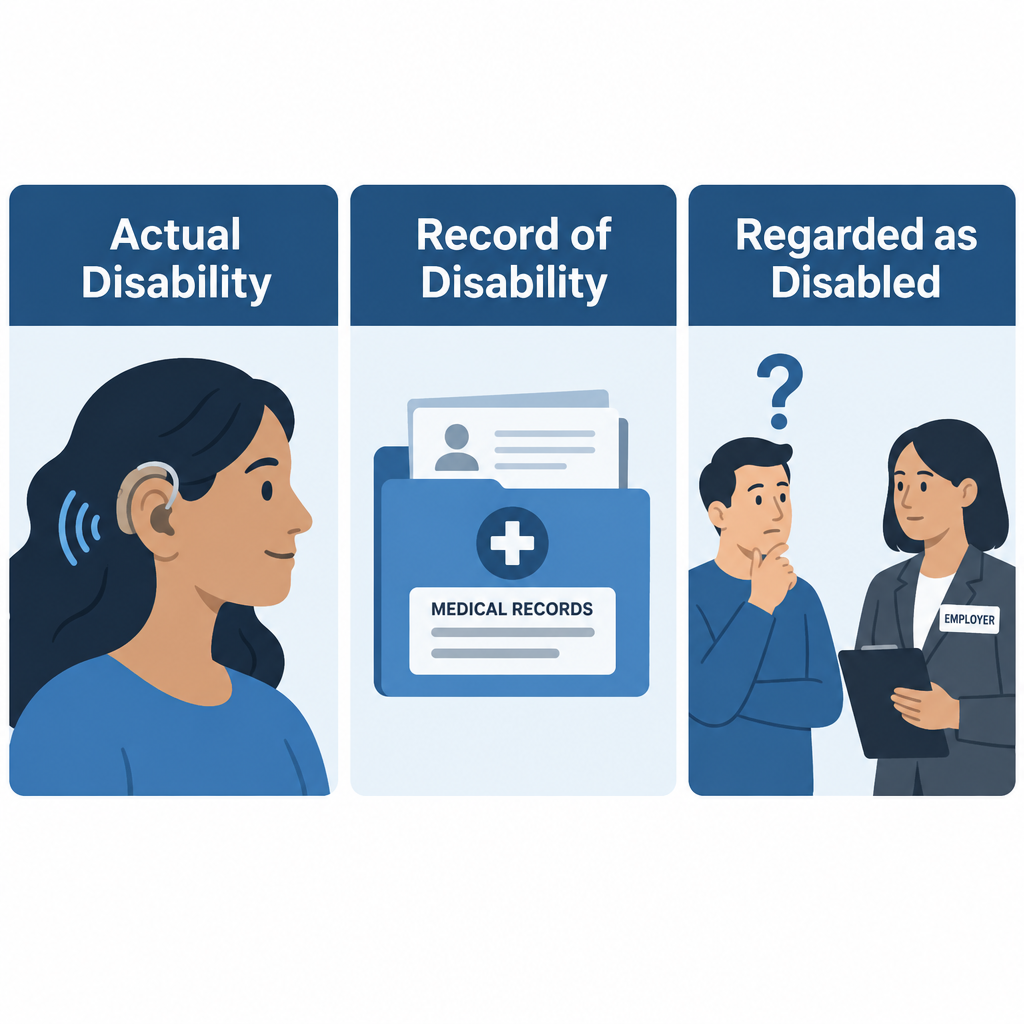
    The law uses a three-part definition of disability. A person qualifies under any one of these:

    • Actual disability: a physical or mental impairment that substantially limits one or more major life activities, such as hearing, seeing, walking, communicating or working.
    • Record of disability: a history of such an impairment, like a past cancer diagnosis.
    • Regarded as disabled: being treated as impaired, even when the person is not.

    After the Supreme Court read the definition narrowly in cases from the late 1990s and early 2000s, Congress passed the ADA Amendments Act of 2008, which took effect January 1, 2009. It told courts to interpret “disability” broadly. It also said to judge an impairment without mitigating measures. That point matters a lot for my readers. A person whose hearing loss is helped by hearing aids or a cochlear implant can still have a disability under the law. Ordinary eyeglasses and contact lenses are the one stated exception.

    The ADA also protects people who are associated with someone who has a disability, such as a parent caring for a Deaf child. The CDC estimates that about 1 in 4 U.S. adults lives with some type of disability.

    The five titles of the Americans with Disabilities Act
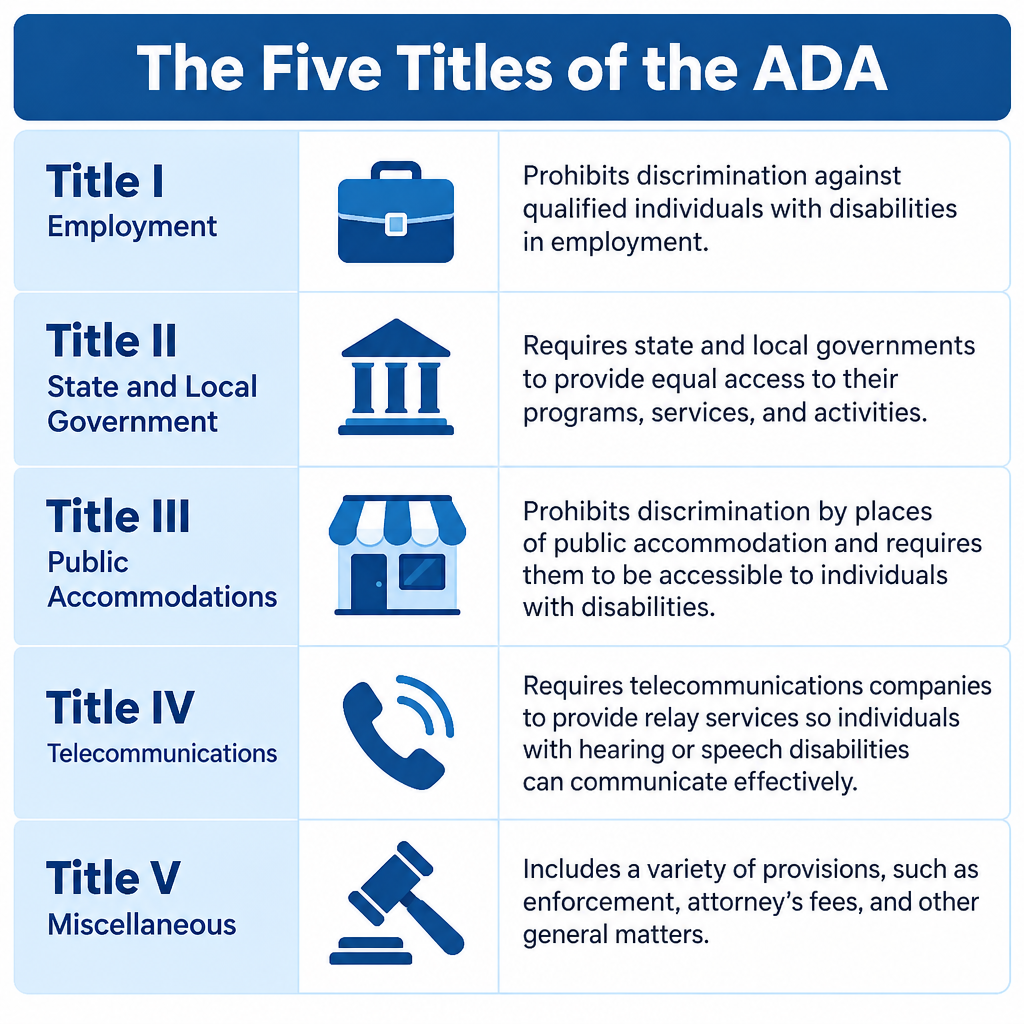
    ADA Five Titles Overview Chart
    Title Covers Main enforcer Example requirement
    I: Employment Private employers with 15+ employees, state and local governments, unions, employment agencies EEOC Reasonable accommodations such as an ASL interpreter for a training session
    II: State and local government All state and local agencies, regardless of size, plus public transit Department of Justice; DOT for transit Captioned city council meetings and accessible courthouses
    III: Public accommodations Private businesses open to the public and commercial facilities Department of Justice Effective communication at hospitals, hotels, theaters and stores
    IV: Telecommunications Telephone carriers and federally funded TV public service announcements FCC Nationwide relay services
    V: Miscellaneous Applies across the whole law Varies Ban on retaliation and coercion

    Title I (Employment)

    Employers can’t discriminate in hiring, pay, promotion, training or firing against a qualified person with a disability. They have to provide reasonable accommodations unless doing so would cause “undue hardship,” meaning significant difficulty or expense. Before a job offer, an employer can’t ask whether you have a disability or require a medical exam. In my experience, the accommodation requests I see most from hard of hearing workers are captioned phones, CART for meetings and seating with clear sightlines.

    Title II (State and local government)

    Title II covers every service, program and activity of state and local governments. That includes schools, courts, police, voting, parks and public transportation. Agencies must communicate as effectively with people who have disabilities as with others. For Deaf and hard of hearing people, that can mean interpreters, captioning or assistive listening systems.

    Title III (Public accommodations)

    Restaurants, hotels, doctors’ offices, retail stores, gyms, private schools, movie theaters and similar businesses must remove barriers where it is “readily achievable.” They must also provide auxiliary aids so people can communicate effectively. Religious organizations and private clubs are exempt. A private lawsuit under Title III can win changes and attorney’s fees, but not money damages. The Justice Department can seek civil penalties. The statute set them at up to $50,000 for a first violation and $100,000 for later ones, and those caps are adjusted for inflation.

    Title IV (Telecommunications)

    Title IV required phone companies to offer telecommunications relay service nationwide, so people who are Deaf, hard of hearing or speech-disabled can make calls through a relay operator or text interface. Dialing 711 reaches relay anywhere in the U.S. Title IV also requires closed captioning on federally funded television public service announcements.

    Title V (Miscellaneous provisions)

    Title V holds the rules that tie everything together. It prohibits retaliation against anyone who files a complaint, and it allows courts to award attorney’s fees. It confirms that the ADA doesn’t weaken stronger state laws. It also excludes current illegal drug use from protection.

    Key dates in ADA history

    Year Milestone
    1990 President George H.W. Bush signs the ADA on July 26
    1991 Justice Department publishes the first ADA Standards for Accessible Design
    2008 ADA Amendments Act restores a broad definition of disability
    2010 Revised ADA Standards for Accessible Design adopted
    2012 2010 Standards become mandatory on March 15
    2024 DOJ final rule sets WCAG 2.1 Level AA for state and local government websites and apps

    Service animals under the ADA

    ADA Three-Part Disability Definition

    Under the ADA, a service animal is a dog individually trained to do work or perform tasks for a person with a disability. A hearing dog that alerts its handler to a doorbell or smoke alarm qualifies. Separate rules allow trained miniature horses in some cases. Emotional support animals don’t count as service animals under the ADA.

    When the need isn’t obvious, staff may ask only two questions. They can ask whether the dog is required because of a disability, and what task it has been trained to perform. They can’t demand paperwork or ask the dog to demonstrate.

    Guide to the ADA Standards: what they mean for hearing access

    The 2010 ADA Standards for Accessible Design set technical rules for buildings and facilities. One section I point readers to often is the assistive listening requirement. Assembly areas where audible communication is integral, such as courtrooms, theaters and lecture halls, must provide assistive listening systems. A set share of the receivers must work with hearing aids, typically through neckloops.

    Seating capacity Minimum receivers Hearing-aid compatible receivers
    50 or fewer 2 2
    51 to 200 2, plus 1 per 25 seats over 50 2
    201 to 500 2, plus 1 per 25 seats over 50 1 per 4 receivers
    501 to 1,000 20, plus 1 per 33 seats over 500 1 per 4 receivers
    1,001 to 2,000 35, plus 1 per 50 seats over 1,000 1 per 4 receivers
    2,001 and over 55, plus 1 per 100 seats over 2,000 1 per 4 receivers

    Hearing tip

    If your hearing aids have a telecoil, ask venue staff for a neckloop or look for the hearing loop symbol. A loop can send sound straight to your aids without a separate headset.

    Future ADA issues: web accessibility

    Digital access is the biggest open area. In April 2024, the Justice Department published a Title II rule requiring state and local government websites and mobile apps to meet WCAG 2.1 Level AA. As published, the rule set compliance dates of April 24, 2026 for governments serving 50,000 or more people, and April 26, 2027 for smaller governments and special districts. I couldn’t confirm whether those dates have been revised, so check ADA.gov for the current status. No equivalent final regulation exists for private businesses under Title III. Courts there still decide website cases one lawsuit at a time.

    How to report a disability rights violation

    Where you file depends on the title involved.

    Filing an ADA complaint

    1. For employment discrimination, file a charge with the EEOC through its online Public Portal, by phone or in person.
    2. For state or local government, businesses or public places, file through the Justice Department’s online civil rights portal, or by mail.
    3. For relay or captioning problems, file a complaint with the FCC.
    4. Keep copies of emails, names, dates and any written denials of your request.
    5. For questions before you file, call the ADA Information Line at 800-514-0301 (voice) or 833-610-1264 (TTY).

    Deadlines matter

    EEOC charges generally must be filed within 180 days, or 300 days in states with their own disability law. If you have lost a job or been denied services, talk to a disability rights attorney or your state protection and advocacy agency quickly.

    FAQ

    Is the ADA a medical law or a civil rights law?

    It is a civil rights law. It doesn’t pay for hearing aids, treatment or medical care. It requires equal access and bans discrimination.

    Does the ADA apply to small businesses?

    Title III applies to public accommodations of any size. Title I’s employment rules only apply to employers with 15 or more employees. Many state laws cover smaller employers.

    Does the ADA require businesses to provide sign language interpreters?

    They must provide effective communication. For a medical appointment or legal meeting, that often means a qualified interpreter. For a quick retail exchange, written notes may be enough. The business pays, not the customer.

    What’s the difference between the ADA and Section 504?

    Section 504 of the Rehabilitation Act covers federal agencies and programs that receive federal funds. The ADA extends similar protections to private employers, state and local governments and most businesses.

    Is hearing loss a disability under the ADA?

    It often is. Since the 2008 amendments, hearing loss is assessed without counting the benefit of hearing aids or cochlear implants. Many hard of hearing and Deaf people qualify.
  • What Closed Captioning Is and How It Works on TV and Online

    What Closed Captioning Is and How It Works on TV and Online

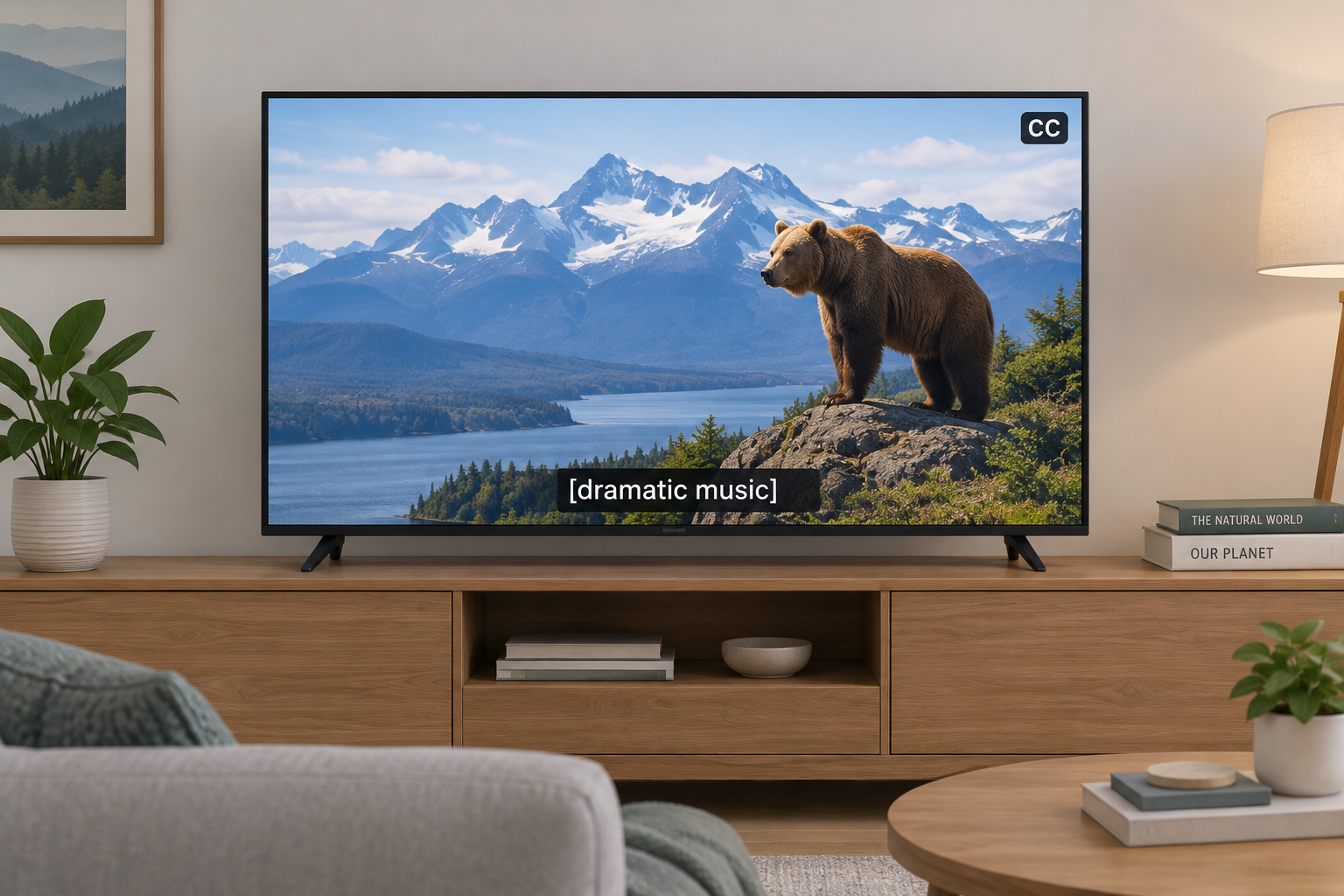
    Closed captioning is on-screen text that shows a program’s spoken dialogue and important sounds. “Closed” means viewers can switch it on or off, unlike open captions, which are burned into the video. Below we explain how captions are made, how they reach your TV, phone, or browser, what US law requires, and what to do when they fail.

    Last updated: October 29, 2026.

    Closed Captioning Definition and Meaning

    Closed captions are a text version of a video’s audio. They cover what people say, who is saying it when that isn’t obvious, and the non-speech sounds that carry meaning: a phone ringing offscreen, [ominous music], [crowd cheering], [door slams]. That last part separates captions from simple subtitles.

    The word “closed” is about control, not content. The captioned text travels alongside the video as hidden data, and your TV or player decodes it only when you press CC or turn captions on in settings. Open captions are permanent and part of the picture itself.

    Captions began as an accessibility tool for people who are Deaf or hard of hearing, and that is still their most important job. The audience is much larger now. Captions help people watching in a loud bar or next to a sleeping baby, viewers learning English, anyone with auditory processing difficulties, and everyone who has rewound a scene to catch a mumbled line.

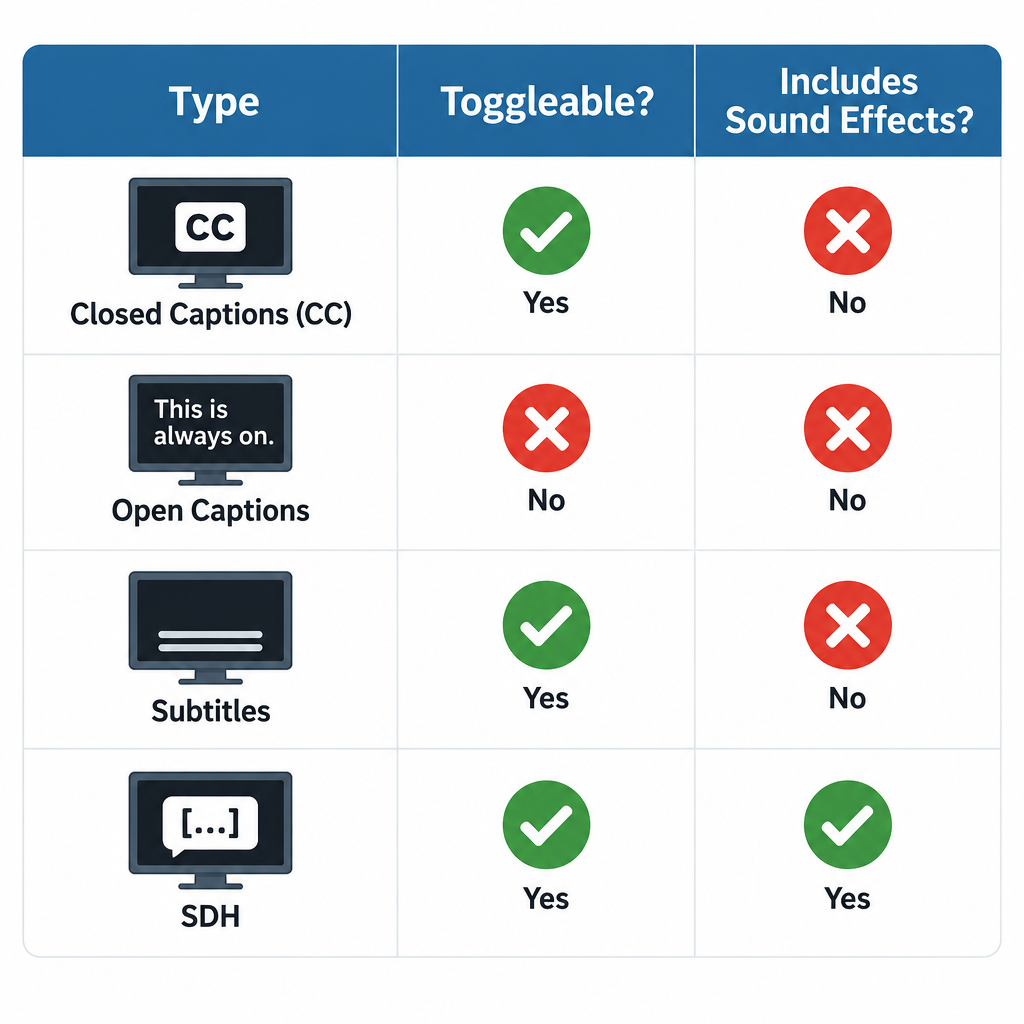
    Captions, Subtitles, and SDH Compared

    These terms get mixed up on streaming menus, so here is how they actually differ.

    Type Can you turn it off? Includes sound effects and speaker IDs? Main purpose
    Closed captions (CC) Yes Yes Access for Deaf and hard of hearing viewers
    Open captions No, burned into video Usually yes Access where viewers can’t control settings
    Subtitles Yes No, dialogue only Translation for hearing viewers
    SDH (Subtitles for the Deaf and Hard of Hearing) Yes Yes Caption-style text in subtitle format, common on streaming and discs
    Forced subtitles No, shown automatically No Translating brief foreign-language lines or signs

    If a streaming service offers both “English” and “English (CC)” or “English [SDH],” we recommend the CC or SDH track for anyone with hearing loss. The plain “English” track often leaves out sound cues.

    How Closed Captioning Works

    Captions vs Subtitles Comparison

    How captions are created

    There are two broad ways to produce captions, and they look different on screen.

    Offline (prerecorded) captioning is done after a program is finished. A captioner transcribes the audio, times each caption to the frame, positions text so it doesn’t cover faces or on-screen graphics, and adds sound descriptions. Movies, scripted series, and most streaming content are captioned this way. Done well, offline captions are near-perfect and appear in pop-on blocks that match each line of dialogue.

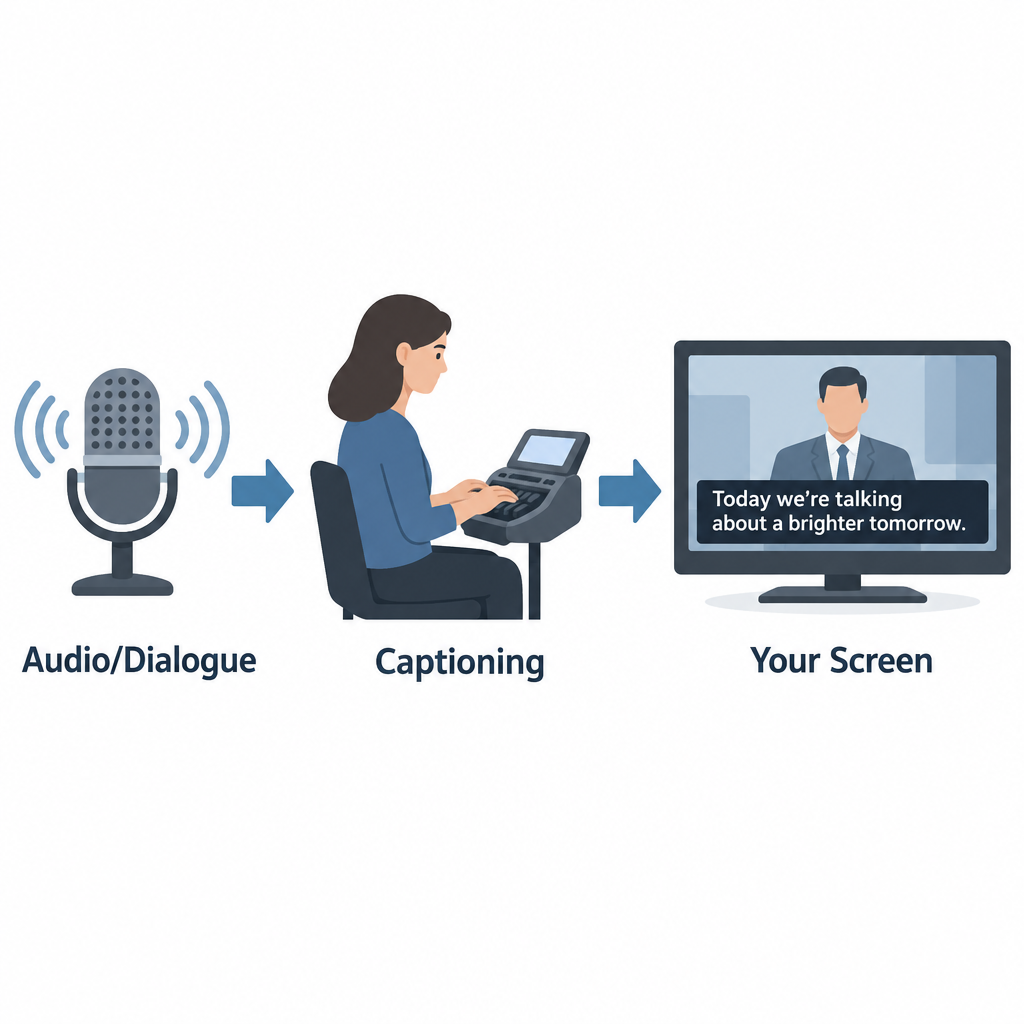
    Real-time (live) captioning happens as the program airs. Trained stenocaptioners use a stenotype machine to write phonetic chords that software turns into text, often at well over 200 words per minute. Voice writers repeat the audio into speech recognition software trained on their own voice. More and more, broadcasters and platforms use automatic speech recognition (ASR) with no human in the loop. Live captions usually roll up line by line and lag a few seconds behind the speaker, which is why news and sports captions can feel delayed or contain errors.

    How captions reach your television

    Analog US television carried captions on line 21 of the vertical blanking interval, a part of the signal you never saw. That standard, now called CEA-608, allowed only basic white text on a black box.

    Digital broadcasting uses CEA-708, which travels inside the digital stream and lets viewers change font, size, color, background, and opacity. Most modern TVs, cable boxes, and streaming devices still support both, since lots of content carries legacy 608 data alongside 708.

    How captions work online

    Online video usually keeps captions in a separate text file synced to timecodes. Common formats include SRT (simple and widely supported), WebVTT (the web standard for HTML5 video), and TTML or DFXP (used by many broadcasters and streaming services). The player reads the file and draws captions over the video, which is why online caption styling depends on your app and device settings.

    A Short History of Closed Captioning in the US

    Year Milestone
    1972 PBS airs The French Chef with open captions, an early captioned national broadcast
    1980 Closed captioning debuts on ABC, NBC, and PBS; viewers need a set-top decoder
    1982 Real-time captioning makes live captioned TV possible
    1990 Television Decoder Circuitry Act passes
    1993 TVs 13 inches or larger sold in the US must include caption decoders
    1996 Telecommunications Act leads to FCC rules requiring most TV programming to be captioned
    2010 21st Century Communications and Video Accessibility Act (CVAA) signed
    2014 FCC adopts caption quality standards for TV
    2024 FCC adopts rules requiring caption display settings to be readily accessible on devices

    FCC Closed Captioning Rules

    How Captions Reach Your Screen

    In the US, the Federal Communications Commission requires most television programming to carry closed captions. This applies to broadcast stations, cable and satellite providers, and other video programming distributors. Rules cover English programming and Spanish-language programming.

    Caption quality standards

    Since 2014, FCC rules hold TV captions to four quality standards:

    • Accuracy: Captions match the spoken words, in their original language, and convey background noises and speaker identities.
    • Synchronicity: Captions appear at the same time as the matching audio, at a speed viewers can read.
    • Completeness: Captions run from the start of the program to the end.
    • Placement: Captions don’t block important visual content such as faces, on-screen text, or graphics.

    The FCC holds prerecorded programming to a higher bar than live programming, since live captioners can’t preview what’s coming.

    Captions on online video

    The CVAA extended captioning to the internet, but with a key limit. Video shown online must have captions if it aired on US television with captions. This covers full episodes on network apps and streaming services, and it now also covers clips of those shows posted online. Web-only content that never aired on TV, like most original YouTube videos, isn’t covered by these FCC rules, though other laws such as the ADA can still apply to certain organizations.

    Exempt Programming

    Not every program needs captions. The FCC exempts several categories. The main ones:

    Exemption What it covers
    Overnight hours Programming shown between 2 a.m. and 6 a.m. local time
    Short advertisements Ads under five minutes long
    Short promos and PSAs Promos, interstitials, and PSAs under 10 minutes (federally funded PSAs must be captioned)
    Small channels Channels with under $3 million in annual gross revenue
    New networks A network’s first four years of operation
    Primarily textual programs Programs where the content is already on screen as text
    Local non-news content Locally produced programming with no repeat value
    Local instructional content Instructional programming produced locally by public TV stations for students

    Distributors can also petition the FCC for an exemption if captioning would be economically burdensome. These petitions are reviewed case by case and aren’t granted automatically.

    How to Turn On Closed Captions

    Settings paths change with software updates, but these were the standard locations as of our last check.

    Device or app Where to find captions
    iPhone and iPad Settings > Accessibility > Subtitles & Captioning > Closed Captions + SDH
    Android phones Settings > Accessibility > Caption preferences (wording varies by maker)
    Apple TV Settings > Accessibility > Subtitles and Captioning
    Roku Settings > Accessibility > Captions mode
    YouTube CC button on the player, or press C on a keyboard
    Netflix Audio & Subtitles icon during playback
    Windows 11 (live captions for any audio) Press Windows + Ctrl + L

    Turn on captions on most TVs

    1. Press the CC or Subtitle button on your remote, if it has one.
    2. If not, open Settings and look for Accessibility.
    3. Select Closed Captions or Captions and set it to On.
    4. Choose CC1 for standard English captions on broadcast TV.
    5. Open Caption Style or Digital Caption Options to change size and color.

    Hearing tip

    If captions are on but you see nothing on a cable box, the TV and box may both be trying to decode them. Turn captions on in one place only, usually the cable box or streaming device, and off on the TV.

    Phones and computers now offer live captions generated on the device itself. Android’s Live Caption, iPhone’s Live Captions, Windows Live Captions, and Chrome’s Live Caption can caption almost any audio, including video calls and podcasts with no captions of their own. They’re automatic, so expect mistakes with names, accents, and crosstalk.

    Common Closed Captioning Messages and Problems

    Many people search for a “closed captioning message” after seeing something odd on screen. The most common ones:

    • “Captions not available” or a greyed-out CC button: the program has no caption track, or the app isn’t receiving it.
    • CC1, CC2, and similar options: different caption channels. CC1 is almost always the main English captions; CC2 or CC3 often carry Spanish.
    • “Captioning made possible by…”: a sponsor credit, not an error.
    • [NO AUDIO] or [INAUDIBLE]: the captioner couldn’t hear or understand the audio.
    • Garbled letters or repeated words: usually a live captioning error or a signal problem.

    Other problems we hear about often: captions running far behind dialogue, captions cutting off before a show ends, text covering the score in a sports game, and captions disappearing after a channel change or software update.

    What to Do If You Experience Closed Captioning Problems

    Start with the basics. Restart the TV and set-top box, confirm captions are on in only one device, and check whether the problem affects one channel or all of them. If one channel or program keeps failing, it’s a distributor problem, not your equipment.

    Filing a complaint or seeking assistance

    For TV captioning problems in the US, you can complain either to your video programming distributor (your cable, satellite, or streaming TV provider) or directly to the FCC. Distributors are required to publish contact information for captioning complaints, often on their website and billing statements.

    File within 60 days of the problem. Include the channel, program name, date and time, your provider, and a description of what went wrong. A distributor that receives your complaint generally must respond within 30 days. Complaints to the FCC go through its Consumer Complaint Center, which accepts complaints online and by phone, and the agency also takes complaints in ASL by video call.

    For captioned phone calls, which follow separate rules, the right route is telecommunications relay service, including captioned telephone services.

    Who Benefits From Closed Captioning

    For people who are Deaf or hard of hearing, captions are often the difference between full access to a program and guessing. Many people with hearing aids or cochlear implants use captions too, because TV audio mixes music, effects, and quick dialogue in ways that are hard to follow even with good amplification.

    See a professional

    If you notice you suddenly need captions to follow speech you used to hear easily, book a hearing test with an audiologist. Sudden hearing loss in one or both ears is a medical emergency, so see a doctor the same day.

    How Closed Captioning Will Evolve

    Automatic speech recognition is reshaping captioning quickly. It’s cheap and instant, so far more content now has captions than ever before. Quality is the catch. ASR still struggles with names, technical terms, overlapping speakers, and accented speech, and it rarely adds meaningful sound descriptions without human editing.

    We expect the best results to keep coming from hybrid workflows, where ASR drafts and trained captioners correct. On the device side, the FCC’s 2024 order on readily accessible caption settings should make it easier to find and customize captions without digging through menus. Broadcast standards are moving too, with ATSC 3.0 (NextGen TV) supporting more flexible caption formats.

    FAQ

    What does closed captioning mean?

    It means on-screen text showing a program’s dialogue and important sounds that viewers can turn on or off. “Closed” refers to that on-off control.

    What is the difference between closed and open captioning?

    Closed captions are hidden until you activate them. Open captions are burned into the video and appear for everyone, with no way to hide them.

    Are subtitles the same as closed captions?

    No. Subtitles usually show dialogue only and assume the viewer can hear. Closed captions also describe sound effects, music, and who is speaking.

    Why are live TV captions delayed and full of errors?

    Live captions are created in real time by stenocaptioners, voice writers, or speech recognition software. They can only caption what they’ve already heard, which adds a lag of a few seconds and leaves no time to fix mistakes.

    Does every online video have to be captioned?

    No. FCC rules require captions on online video only if it aired on US television with captions. Other laws can require captions for specific organizations, such as government agencies and some businesses.

    Is closed captioning free to use?

    Yes. Viewers pay nothing extra to turn on captions on TV, streaming services, or built-in phone and computer features.

  • What Is Telecommunications Relay Service and How It Works

    What Is Telecommunications Relay Service and How It Works

    A telecommunications relay service (TRS) lets people who are Deaf, hard of hearing, DeafBlind or who have a speech disability make phone calls through a trained communications assistant. The assistant converts text, captions, speech or sign language into a form the other caller can use. In the United States, relay is free to use, available 24 hours a day, and you can reach traditional relay by dialing 7-1-1.

    Last checked: October 29, 2026

    TypeFederal phone accessibility service
    Cost to userFree relay service
    AccessDial 711 or app
    Hours24/7, every day
    Overseen byFCC

    What a relay service actually does

    A relay service places a person in the middle of the call. That person is a communications assistant (CA), sometimes called an operator, and their job is to pass your words along as accurately as possible.

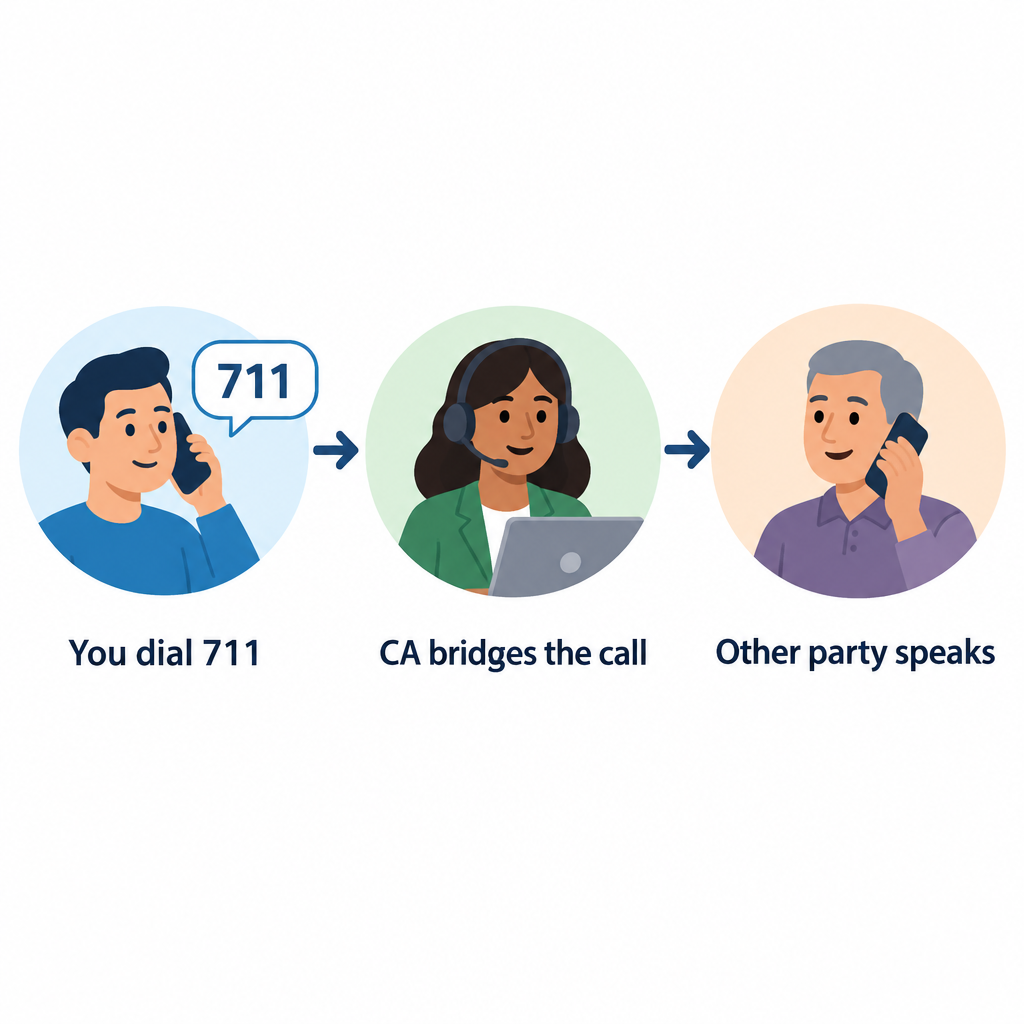
    Here is a basic example. You type, “Hi, I’d like to book a table for two at 7.” The CA reads it aloud to the restaurant. When the host answers, the CA types the reply back to you. The call moves in turns, and many users type “GA” (go ahead) to signal that it’s the other person’s turn.

    Title IV of the Americans with Disabilities Act created the nationwide telephone relay services system in 1990. The FCC sets the rules. Interstate and internet-based relay is paid for by a federal fund, and each state runs its own local relay program for calls within the state.

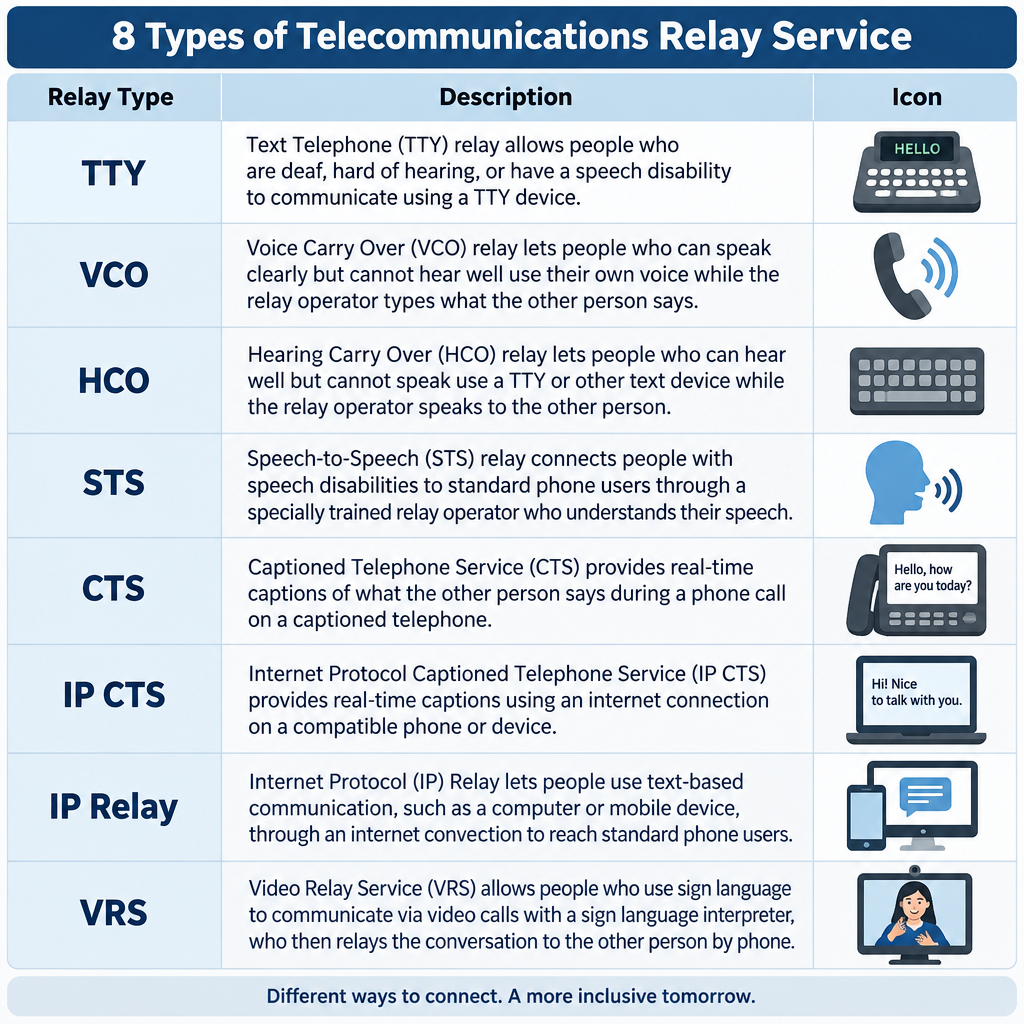
    The 8 main types of relay service

    Phone relay service is a family of services. The right one depends on how you hear, speak and prefer to communicate.

    Relay type How you communicate Typical equipment
    TTY (text-to-voice) You type, CA voices and types replies TTY or computer
    Voice Carry Over (VCO) You speak, read the other side’s replies as text VCO phone or TTY
    Hearing Carry Over (HCO) You type, listen to the other person directly TTY plus listening
    Speech-to-Speech (STS) CA repeats your speech clearly for the listener Any phone
    Captioned Telephone (CTS) You talk and listen, read captions of replies Captioned phone, such as CapTel
    Internet Protocol Captioned Telephone (IP CTS) Same as CTS, over the internet App or captioned phone
    IP Relay Text relay through a web browser or app Computer or smartphone
    Video Relay Service (VRS) You sign with an interpreter on video Videophone, app, or computer

    Federal rules also require interstate relay in Spanish, and many states offer it locally.

    Captioned telephone and CapTel

    Captioned telephone is the most common choice for people with acquired hearing loss who still speak clearly. You talk normally and hear what you can, while captions of the other person’s words appear on a screen. CapTel is a well-known brand of captioned phone, and IP CTS apps put the same feature on smartphones and tablets. To get IP CTS, you have to certify that you have a hearing loss that makes captions necessary. Free equipment programs usually also ask for a signature from a hearing professional.

    Video Relay Service and ASL

    VRS connects you by video to a qualified American Sign Language interpreter. You sign, and the interpreter speaks to the hearing party, then signs their reply back to you. For many Deaf people whose first language is ASL, this is far faster and more natural than typing in English. VRS users get a standard ten-digit phone number, so hearing people can call them like anyone else.

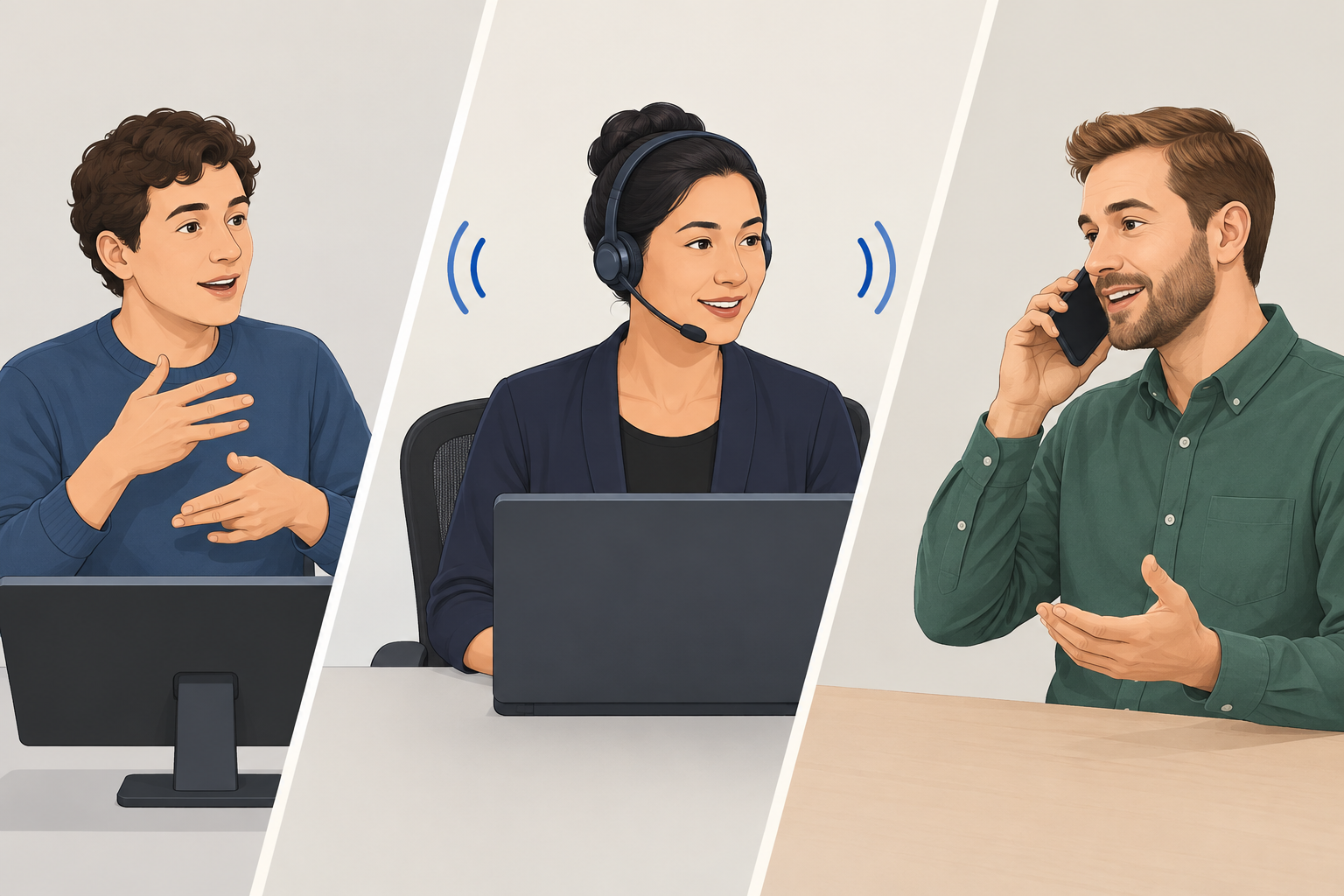
    How to make a relay call with 7-1-1

    8 Types of Relay Service Chart

    Any hearing person can call a relay user. You do not need special equipment.

    Calling through 711

    1. Dial 711 from any landline or mobile phone in the US.
    2. Tell the CA you want to place a relay call.
    3. Give the phone number of the person you’re calling.
    4. Speak directly to that person, using “you” rather than “tell her.”
    5. Say “go ahead” when you finish each turn.
    6. Stay patient during pauses while the CA types or relays.

    To reach someone who uses VRS, just dial their ten-digit number. The call routes to an interpreter automatically.

    Hearing tip

    Don’t hang up when a relay call starts with a short introduction about relay. Legitimate businesses lose real customers this way, especially at reservation desks and doctor’s offices.

    Rules that protect relay users

    FCC rules give relay callers real protections:

    • Confidentiality. CAs cannot share the content of calls or keep records after the call ends.
    • Verbatim relay. CAs must pass along everything said, without editing or adding opinions.
    • Speed standards. Traditional TRS must answer 85% of calls within 10 seconds, and CAs must type at least 60 words per minute.
    • No extra cost. You should never pay more for a relay call than for the same voice call.
    • Any call, any purpose. Relay handles calls to banks, doctors and employers, as well as conference calls and long distance numbers.

    Emergencies and 911

    Dial 711 Relay Call Flow

    You can call 911 through VRS, IP Relay and IP CTS, and these services are required to route you to the right emergency center. A direct TTY call to 911, or text-to-911 where your area supports it, is often faster than going through 711.

    See a professional

    If your hearing drops suddenly in one or both ears, treat it as a medical emergency and get seen the same day. Ongoing changes in hearing are worth an audiologist visit before you choose captioned phone equipment.

    Finding your state’s relay program

    Each state has its own relay provider, customer care line and often a free equipment distribution program for TTYs, amplified phones and captioned phones. Your state’s commission for the deaf and hard of hearing, or its public utility commission, will list the current provider and how to request equipment.

    FAQ

    What is a relay service in simple terms?

    It’s a phone service where a trained assistant helps two people talk when one of them can’t hear or speak on a standard call. The assistant turns speech into text, captions or sign language and back again.

    Is telecommunications relay service free?

    Yes. The relay itself costs you nothing, and you pay no more for the call than a hearing person would. VRS and IP CTS apps are free to download, though you need your own internet or data plan.

    Can a hearing person use relay to call a Deaf person?

    Yes. Dial 711 for text-based relay, or call a VRS user’s ten-digit number directly.

    Does the operator listen to my private calls?

    The CA does hear or read the call in order to relay it. However, the CA is legally bound to keep it confidential and cannot keep a record of what was said after the call ends.

    Can I use relay for work conference calls?

    Yes. VRS and captioning services can join conferencing calls. Ask your provider how to add an interpreter or captions before a long meeting so the session isn’t interrupted.

  • How to Sign More Than, Divide, Square and Approximately in ASL

    How to Sign More Than, Divide, Square and Approximately in ASL

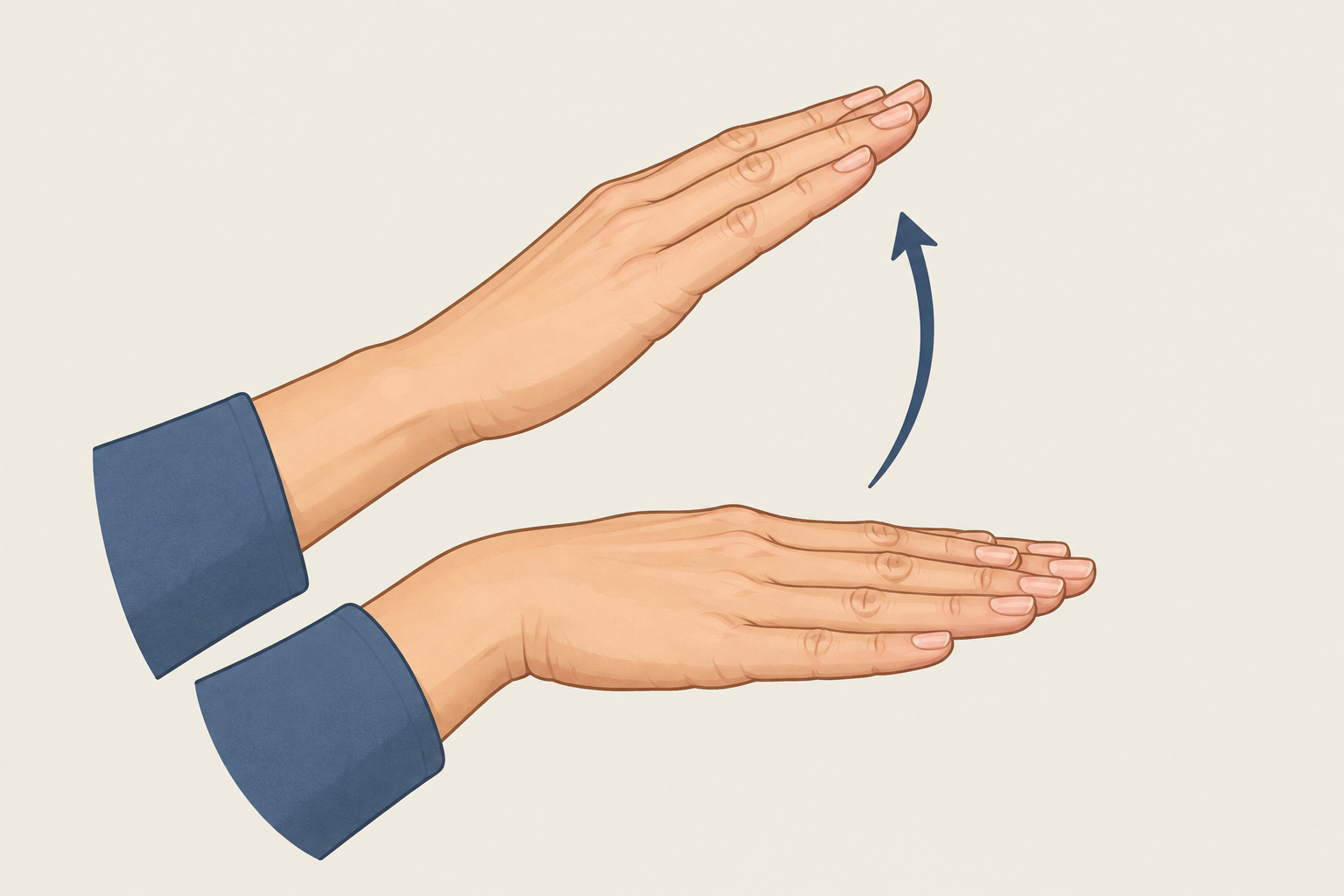
    To sign “more than” in ASL, hold your non-dominant hand flat with the palm down, rest your dominant flat hand on top of it, then lift the dominant hand up and slightly forward so it rises over the base. This guide covers that sign along with less than, divide, square, squared, square root and approximately, and explains how each one maps to the written math symbol.

    Last updated: October 29, 2026

    TopicASL math vocabulary
    Signs covered10 core signs
    LevelBeginner to intermediate
    Best forStudents, parents, tutors

    What the math symbols mean before you sign them

    You can only sign a concept clearly if you understand it, so here is the math first.

    The greater-than symbol (>) means the value on the left is bigger than the value on the right. The less-than symbol (<) means the left value is smaller. In both cases, the open side faces the bigger number and the pointed tip faces the smaller one. So 9 > 4 reads “nine is greater than four,” and 4 < 9 reads “four is less than nine.”

    Those two statements say the same thing. Flipping the numbers to opposite sides also flips the symbol. That matters in ASL, because signers often rearrange a statement for clarity, and you need to keep the meaning intact when you do.

    The other symbols in this guide work like this:

    • ÷ (divide): splits a number into equal parts. 12 ÷ 3 = 4.
    • ² (squared): multiplies a number by itself. 5² = 25.
    • √ (square root): undoes squaring. √25 = 5.
    • ≈ (approximately equal): the values are close but not exact. π ≈ 3.14.

    How to sign more than in ASL

    The sign most often used for “more than” in a comparison is the same sign that means EXCEED or OVER, in the sense of going past a level.

    • Handshape: Both hands flat, fingers together. Some signers bend the fingers slightly at the knuckles.
    • Location: In front of your chest, in neutral signing space.
    • Movement: Your dominant hand starts resting on the back of your non-dominant hand, palms down. Lift the dominant hand upward in a small arc, ending above and a little in front of the base hand.

    The base hand represents the comparison point. The rising hand shows something going past it. That picture makes the sign easy to remember.

    More than vs. MORE

    Learners mix these up constantly. The everyday sign MORE (as in “more food, please”) uses two flat-O hands, fingertips pinched to the thumbs, tapping together in front of you. That sign means “additional.” It does not compare two values. If you are signing 9 > 4, use the rising-hand sign, not MORE.

    Hearing tip

    Let your face carry the size of the gap. A small rise with a neutral face suggests “a bit more than.” A bigger rise with puffed cheeks suggests “way more than.” Non-manual markers like these are part of ASL grammar, so they belong in your signing.

    How to sign less than

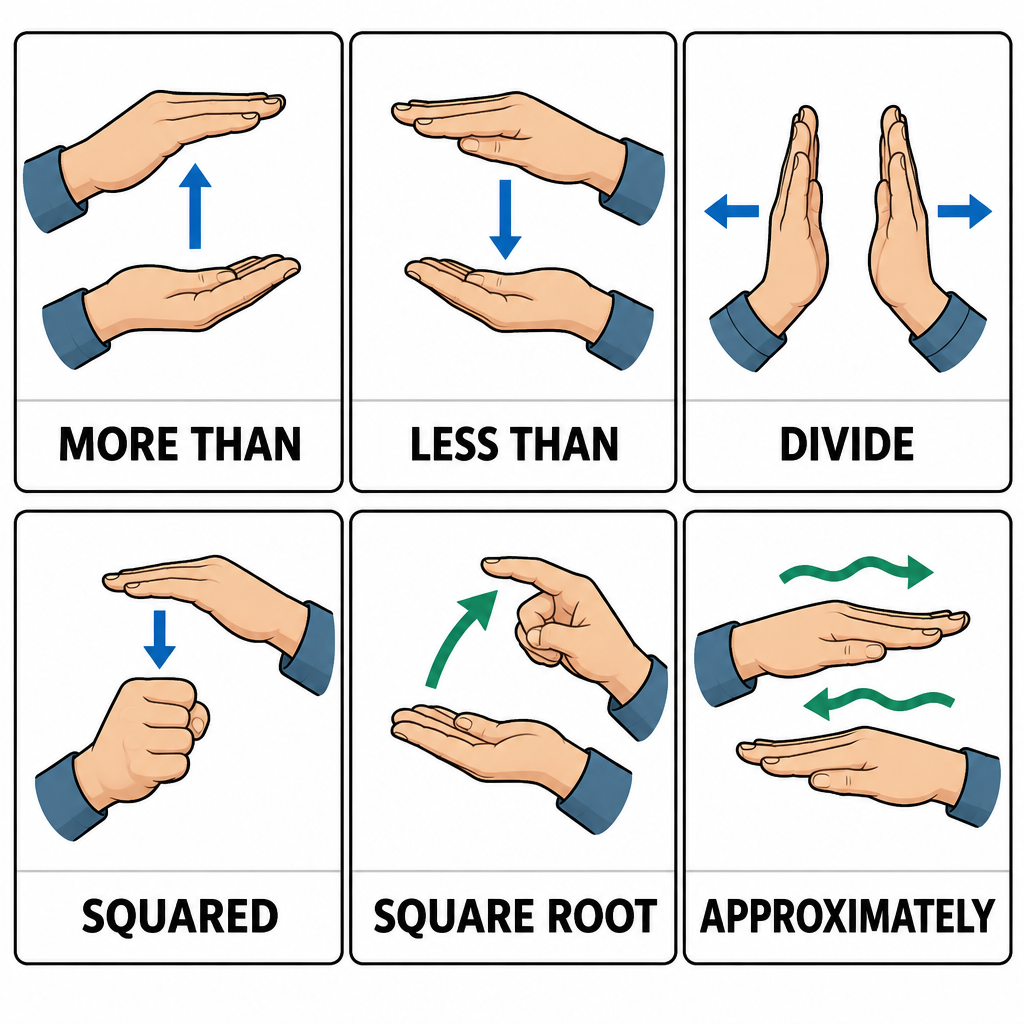
    ASL Math Signs Quick Reference Chart

    Less than mirrors more than. Start with the same two flat hands, palms down, dominant hand resting on the back of the base hand. Then move the dominant hand downward, dropping past the edge of the base hand so it ends below it.

    You will also see the plain sign LESS, where the dominant hand starts above the base hand and lowers toward it without passing it. Both show up in classrooms. If your teacher or interpreter uses one consistently, match them.

    Using space to sign a full comparison

    Here is where ASL differs from spoken English. You do not have to sign “nine is greater than four” word by word. Many signers set up the values in space first, then compare them.

    For 9 > 4, you might sign NINE and place it on your left, sign FOUR and place it on your right, then sign MORE-THAN starting from the nine’s side. The location does the work that word order does in English.

    This also makes changing sides painless. If you placed the values once, you can point back to either one and sign LESS-THAN or MORE-THAN without restating the numbers.

    How to sign divide

    • Handshape: Both hands flat, palms facing down or angled slightly toward each other.
    • Location: In front of your chest.
    • Movement: Cross your hands so the pinkie edge of your dominant hand rests across the index-finger edge of your base hand, making an X shape. Then pull both hands apart, moving down and out to the sides.

    The motion looks like breaking something into pieces, which is why the same sign also covers SPLIT and SEPARATE in everyday conversation. For “12 divided by 3,” sign TWELVE, DIVIDE, THREE.

    In written-math contexts, some teachers instead trace the ÷ symbol in the air with an index finger: a short horizontal line, a dot above, a dot below. That is handy when a student needs to copy notation onto paper exactly.

    How to sign square, squared and square root

    “Square” covers three different ideas in math, and each one has its own sign.

    Square (the shape)

    Both index fingers touch at the top center in front of you. Pull them apart horizontally, drop them straight down, then bring them back together at the bottom. You have traced the outline of a square. RECTANGLE uses the same motion with a wider horizontal pull.

    Squared (the exponent)

    To sign x² or 5², sign the base first, then sign the number TWO raised higher and slightly to the side, often with a small upward flick. The raised position echoes the small superscript in written math. CUBED follows the same pattern with THREE.

    Square root

    Most signers draw the radical symbol (√) with the index finger: a short tick down, a longer stroke up, then a line across the top. Then sign the number that sits under it. “Square root of 25” becomes the traced √ followed by TWENTY-FIVE.

    How to sign approximately

    • Handshape: Open hand, either a flat hand or a 5 hand with fingers spread.
    • Location: Near your dominant shoulder, palm facing out.
    • Movement: Make a few small circles.

    This sign covers APPROXIMATELY, ABOUT, ROUGHLY and AROUND in the sense of estimating. Sign it right before the number: APPROXIMATELY FIFTY. A slight squint or tilted head adds to the “give or take” feel.

    For the ≈ symbol in a formula, signers either use this sign or trace two wavy lines in the air.

    Quick reference: core math signs

    Concept Handshape Location Movement
    More than Two flat hands Chest height Dominant hand rises off the base hand
    Less than Two flat hands Chest height Dominant hand drops below the base hand
    Divide Two flat hands, crossed Chest height Hands pull apart, down and out
    Square (shape) Two index fingers In front of chest Trace a square outline
    Squared (x²) Number 2 handshape Raised, to the side Small upward flick after the base
    Square root Index finger In front of chest Trace the √ symbol
    Approximately Flat or 5 hand, palm out Near shoulder Small circles
    Equal Two bent hands, palms down Chest height Tap fingertips together

    Related signs you will need with these

    Inequalities rarely appear alone. These signs fill out most middle-school and algebra work.

    Symbol Meaning How it is commonly signed
    = Equal Two bent hands, palms down, fingertips tap together
    ≠ Not equal NOT, then EQUAL, or trace = with a slash
    ≥ Greater than or equal to MORE-THAN, OR, EQUAL, or trace the symbol
    ≤ Less than or equal to LESS-THAN, OR, EQUAL, or trace the symbol
    + Plus Two index fingers cross to form a plus sign
    − Minus Dominant index finger placed against the base palm
    × Times Two V hands, dominant V brushes across the base V

    Check your classroom's conventions

    Math signs vary by region, school and interpreter. Students taking exams with an interpreter should agree on sign choices for symbols in advance so nothing gets lost in translation.

    A worked example: signing an algebra inequality

    Take the problem x + 3 > 7.

    1. Sign or fingerspell X, sign PLUS, sign THREE.
    2. Sign MORE-THAN.
    3. Sign SEVEN.

    Now solve it. Subtract 3 from both sides and you get x > 4. Sign X, MORE-THAN, FOUR.

    The tricky part comes when you multiply or divide by a negative number. Inequalities flip when that happens. If −2x > 6, dividing both sides by −2 gives x < −3. In ASL, emphasize that switch. Many tutors sign the original MORE-THAN, sign a clear FLIP or CHANGE, then sign LESS-THAN. Seeing the hands literally reverse direction helps the rule stick.

    A real-life example: cutting rope

    Say you have a 10-foot rope and need pieces longer than 3 feet. How many can you cut?

    Signed naturally, that might go: ROPE TEN FOOT. NEED PIECE MORE-THAN THREE FOOT. HOW-MANY?

    The answer is 3 pieces at most, because 10 ÷ 3 ≈ 3.3, and each piece has to exceed 3 feet. Three pieces of about 3.3 feet each works. Four pieces would leave each one at 2.5 feet, which fails the test. That one problem uses MORE-THAN, DIVIDE and APPROXIMATELY together, which makes it great practice.

    How to remember greater than and less than

    Two tricks work well, and one ties directly to ASL handshapes.

    • The hungry mouth. The open side of the symbol always “eats” the bigger number. Kids often draw it as an alligator.
    • The left-hand L. Hold up your left hand with thumb and index finger extended in an L, then tilt it slightly. It looks like <, and L stands for Less than. Your right hand makes a backward L that resembles >.

    Typing the symbols when you write math notes

    Deaf and hard of hearing students often rely on text: chat with an interpreter, captioned lectures, shared notes. Being able to type these symbols quickly saves time.

    Symbol Unicode Windows Alt code (numpad) Mac shortcut
    > U+003E Alt+62 Shift+period
    < U+003C Alt+60 Shift+comma
    ≥ U+2265 Alt+242 Option+period
    ≤ U+2264 Alt+243 Option+comma
    ≈ U+2248 Alt+247 Option+X
    ÷ U+00F7 Alt+246 Option+slash
    √ U+221A Alt+251 Option+V
    ² U+00B2 Alt+253 Character Viewer

    In Microsoft Word, you can also type the Unicode number (for example, 2265) and press Alt+X to convert it to the symbol.

    Practice tips that actually work

    • Drill pairs, not singles. Practice MORE-THAN and LESS-THAN back to back so the direction becomes automatic.
    • Use real numbers. Sign comparisons from your day: prices, temperatures, game scores.
    • Record yourself. Check that your dominant hand clearly rises or drops, and that your face matches the size of the difference.
    • Learn from STEM sources. Projects like ASL Clear and ASLCORE focus on academic and technical vocabulary signed by Deaf content experts.
    • Sign homework aloud. Talking through each step in ASL forces you to understand the math and the grammar at once.

    Hearing tip

    Pick one version of each sign and stay consistent for a few weeks. Switching between variants too early slows down both your math and your signing.

    FAQ

    Is the sign for more than the same as the sign for MORE?

    No. MORE (flat-O hands tapping) means “additional.” The comparison sign uses flat hands, with the dominant hand rising off the base hand. Use the rising sign whenever you compare two values.

    How do you sign greater than or equal to?

    Most signers sign MORE-THAN, then OR, then EQUAL. In a written-math context, tracing the ≥ symbol in the air is also common and avoids ambiguity.

    Does ASL have one standard set of math signs?

    Not fully. Core signs like EQUAL, PLUS and DIVIDE are widely shared, but symbols like ≈, exponents and square roots vary between schools and regions. Ask your teacher or interpreter which version they use.

    How do you sign “about” for a time, like “about 3 o’clock”?

    Use the same APPROXIMATELY sign (open hand, palm out, small circles near the shoulder), then sign the time.

    Is DIVIDE the same sign as SPLIT?

    Yes, the same crossed-hands movement covers DIVIDE, SPLIT and SEPARATE. Context tells the viewer which meaning you intend.