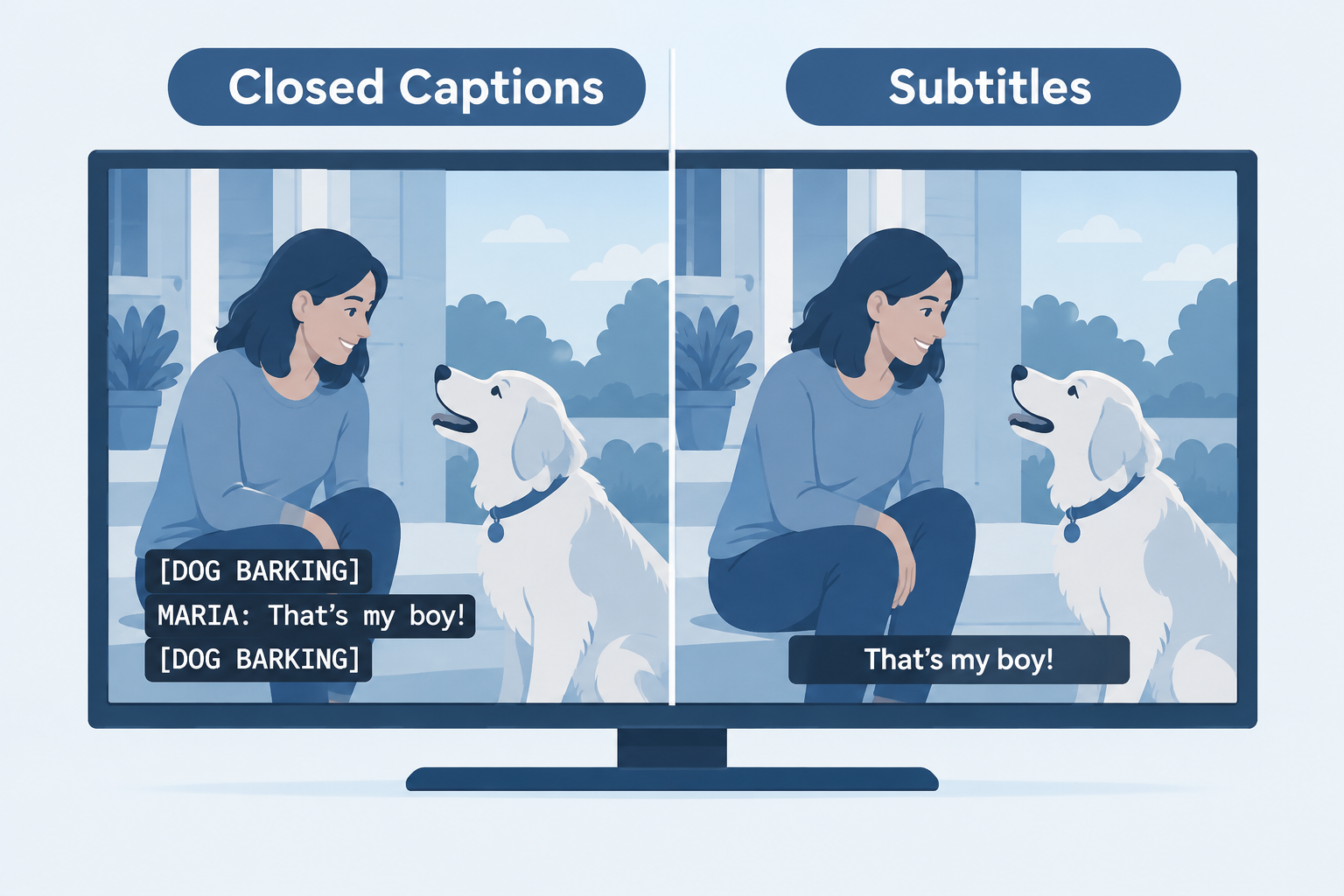
Closed captioning and subtitles look the same on screen, but they are built for different viewers. Captions assume you can’t hear the audio. Subtitles assume you can hear it and don’t understand the language. This guide compares closed captions, subtitles, SDH and open captions, then helps you choose the right one on your TV, your phone or your own videos.
Last updated: October 29, 2026
What’s the Difference Between Closed Captioning and Subtitles?
The difference comes down to one question: what does the text assume about the viewer?
Closed captions assume the viewer cannot hear the soundtrack. They transcribe the dialogue and also describe everything else the audio carries: who is speaking when they are off screen, music, a door slamming, a phone buzzing, a sarcastic tone. A good caption track gives a Deaf or hard of hearing viewer the same information a hearing viewer gets through their ears.
Subtitles assume the viewer can hear just fine but doesn’t understand the spoken language. A hearing viewer watching a Korean drama already hears the gunshot and the swelling score, so subtitles only translate what people say. Sound effects and speaker labels are left out because they would be redundant.
That single assumption shapes everything else: the content of the text, the file format, the legal rules and even the button you press.
So does closed captioning mean subtitles? In everyday speech, many people use the two words interchangeably, and in the UK and Ireland “subtitles” is the normal word for both. Technically, though, they are different products. If you rely on the text to follow a show because of hearing loss, the difference is the gap between understanding a scene and missing half of it.
Closed Captions vs Subtitles vs SDH vs Open Captions
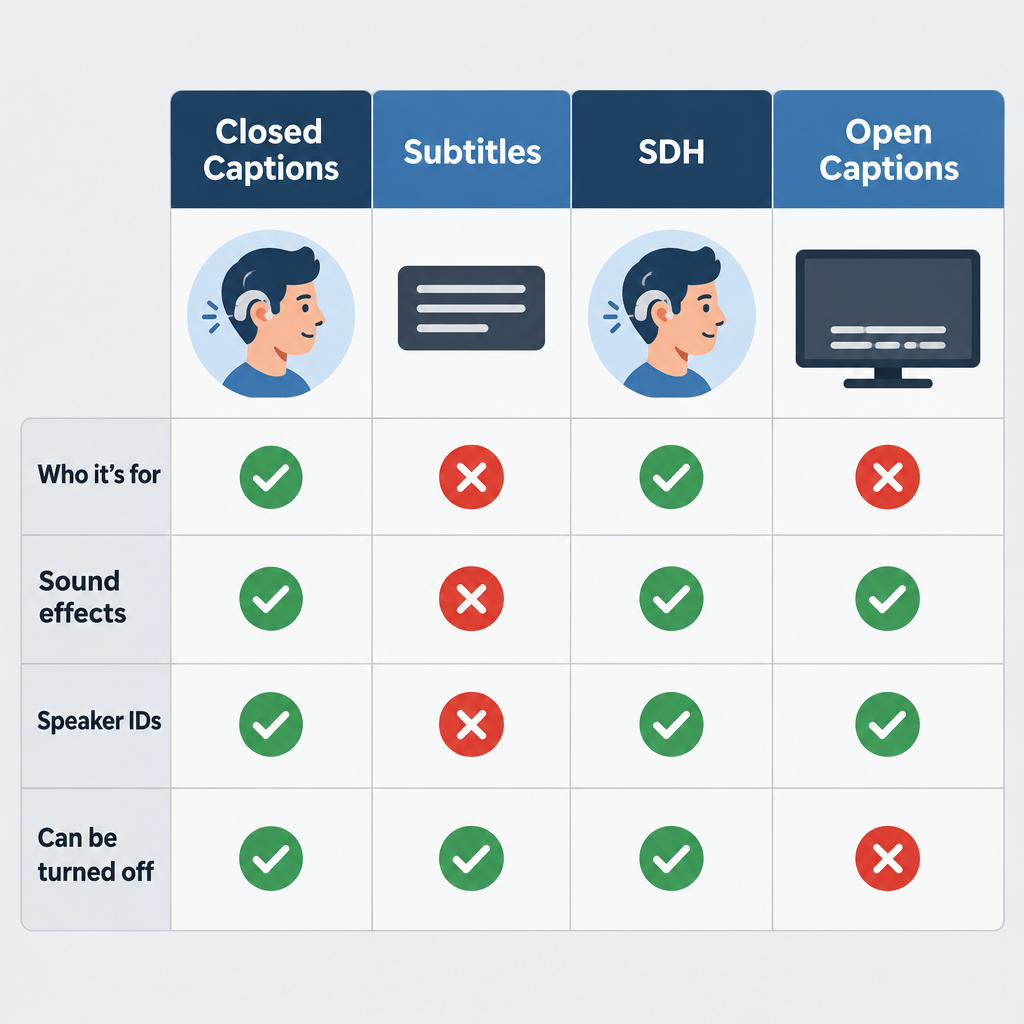
There are four text tracks you will meet in practice. Here is how they line up side by side.
| Feature | Closed captions | Subtitles | SDH | Open captions |
|---|---|---|---|---|
| Who it’s for | Deaf and hard of hearing viewers | Hearing viewers who don’t speak the language | Deaf and hard of hearing viewers | Everyone watching that copy |
| Includes sound effects | Yes | No | Yes | Usually yes |
| Includes speaker IDs | Yes | Rarely | Yes | Usually yes |
| Translated | Usually same language | Yes | Same language or translated | Either |
| Can be turned off | Yes | Yes | Yes | No, burned into the picture |
| Typical home | US broadcast and cable TV | Foreign films, streaming | Blu-ray, DVD, streaming | Social video, some cinema showings |
| Customisable look | Yes on digital TV (CEA-708) | Depends on player | Depends on player | No |
What are closed captions?
“Closed” means the text is hidden until the viewer turns it on. In the US, broadcast captions travel as data alongside the video signal. Analog television used a standard called CEA-608, which tucked caption data into line 21 of the picture. Digital TV uses CEA-708, which carries the captions in the digital stream and lets viewers change font, size, colour and background.
Captions have a long history in American TV. PBS aired The French Chef with open captions in 1972, and the first closed-captioned programs reached viewers through set-top decoders in 1980. The Television Decoder Circuitry Act of 1990 then required TV sets 13 inches or larger sold in the US to include a caption decoder, which is why your TV has a captions setting today.
A typical caption line reads something like:
[DOG BARKING IN DISTANCE]
MARIA: Did you hear that?
♪ tense music ♪
What are subtitles?
Subtitles are a translation tool. They sit at the bottom of the screen, carry only spoken dialogue (plus important on-screen text like signs or letters), and are written in the viewer’s language rather than the speaker’s. Because they serve hearing viewers, they don’t label speakers or describe sounds.
Streaming services, DVDs and international releases often carry dozens of subtitle languages for the same title. A film’s English subtitle track for its Spanish-language scenes, sometimes called “forced narratives,” is a subtitle in this sense too.
What is SDH (Subtitles for the Deaf and Hard of Hearing)?
SDH is a hybrid. It contains everything a caption track contains (sound effects, speaker identification, music cues) but is delivered in a subtitle format instead of the broadcast caption format.
SDH exists for a practical reason. HDMI connections don’t pass the old line-21 caption data, so a Blu-ray player hooked up over HDMI can’t send traditional closed captions to your TV. Disc authors solved this by putting caption-style text into the subtitle stream instead. Streaming services adopted the same approach, which is why you’ll see menu options like “English (SDH)” or “English [CC]” on Netflix, Disney+ and Max.
SDH also looks different. It usually uses the same font and positioning as regular subtitles, while 608-style captions often appear as white text on a black background in a fixed position.
What are open captions?
Open captions are part of the video image itself. Nobody can turn them off, because they’re baked into the pixels. You see them all the time on TikTok, Instagram Reels and YouTube Shorts, where creators burn in large text because most people scroll with the sound off.
Some cinemas run open caption screenings of new releases. US movie theaters showing digital movies have also had to provide closed movie captioning devices, such as seat-mounted caption displays or caption glasses, under a Department of Justice rule issued under the ADA in December 2016, with a compliance deadline of June 2, 2018.
Pros and Cons of Each Option
No single format wins everywhere. Each has a job it does well and a place where it falls short.
Closed captions
- Pros: Full sound information, legally required on most US TV, customisable on digital sets, can be switched off by viewers who don’t want them.
- Cons: Live captions (news, sports) often lag several seconds behind and contain errors; older 608 captions are limited to 32 characters per line; not passed over HDMI from disc players.
Subtitles
- Pros: Clean and unobtrusive, available in many languages, easy to read for hearing viewers, cheaper to produce than full captions.
- Cons: Useless as an accessibility tool on their own, because they leave out sound effects, music and off-screen speakers.
SDH
- Pros: Accessibility content of captions with the flexibility of subtitle formats; works on discs and streaming; often supports multiple languages.
- Cons: Labelling is inconsistent between services, so you sometimes have to try two tracks to find the full one; styling options depend on the player.
Open captions
- Pros: Always visible, impossible to forget to turn on, works on every platform, great for social video and public displays.
- Cons: Viewers can’t hide them, resize them or change their colour; text can cover important parts of the image; you can’t offer multiple languages from one file.
Which File Formats Carry Each Type?
If you publish video, the format you export often decides which kind of text you can deliver. These are the formats you’ll actually encounter.
| Format | Extension | Typical use | Supports styling and positioning |
|---|---|---|---|
| SubRip | .srt | YouTube, Vimeo, social uploads, general subtitles | Minimal |
| WebVTT | .vtt | HTML5 web video, many streaming players | Yes, basic |
| Scenarist Closed Caption | .scc | US broadcast (CEA-608 data), iTunes-era delivery | Yes, 608 rules |
| TTML / DFXP | .ttml, .dfxp, .xml | Broadcast and streaming platforms | Yes, extensive |
| IMSC1 | .ttml / .xml | Netflix and other premium streaming specs | Yes, extensive |
| EBU STL | .stl | European broadcast subtitling | Yes |
| YouTube SubViewer | .sbv | YouTube Studio exports | Minimal |
A plain SRT file can carry caption-style content, sound tags and all. The format doesn’t stop you from writing good captions. It just can’t hold placement or styling information, so speaker positioning is lost.
Which One Does Your Delivery Spec Need?
For anyone producing content, the honest answer is that the platform or the law decides.
| Where your video goes | What’s usually required |
|---|---|
| US broadcast or cable TV | Closed captions meeting FCC quality standards (accuracy, synchronicity, completeness, placement) |
| Online video that previously aired on US TV with captions | Captions online too, under the 21st Century Communications and Video Accessibility Act (2010) |
| Netflix | Timed text files to their spec (IMSC1.1/TTML); English subtitle lines capped at 42 characters, two lines max |
| US government and many public institutions | Captions under Section 508 and the ADA |
| YouTube, Vimeo, your website | SRT or VTT; captions strongly recommended for accessibility |
| Social media (Reels, TikTok, Shorts) | Open captions burned in, plus platform auto-captions where available |
| International release | Translated subtitles per language, plus SDH for the original language |
The FCC’s caption quality rules took effect in 2014. They’re why US broadcasters can be held to standards on accuracy and timing rather than just “some text appeared.”
Hearing tip
On streaming services, if you see both “English” and “English (SDH)” or “English [CC]”, pick the SDH or CC track. The plain “English” track is often a subtitle that skips sound effects.
Where Is the Closed Captioning Button on Your Device?
The setting is rarely labelled consistently. Some devices say “CC,” some say “Subtitles,” and some bury it in accessibility menus. Menu wording shifts with software updates, so treat these paths as the current starting point.
| Device or app | How to turn captions on |
|---|---|
| Most TV remotes | CC or SUBTITLE button, if present |
| Samsung TV | Settings > General (or General & Privacy) > Accessibility > Caption Settings |
| LG TV | Settings > Accessibility > Subtitles |
| Roku | Press the * (star) button during playback > Closed Captioning |
| Amazon Fire TV | Press the Menu button (three lines) during playback > Subtitles |
| Apple TV | Swipe down during playback, or Settings > Accessibility > Subtitles and Captioning |
| iPhone and iPad | Settings > Accessibility > Subtitles & Captioning > Closed Captions + SDH |
| Netflix | Speech-bubble icon > Audio & Subtitles |
| YouTube | CC button in the player, or press C on a keyboard |
| Windows 11 | Live Captions shortcut: Windows + Ctrl + L |
DirecTV subtitles vs closed captioning
DirecTV is a common source of confusion. On satellite receivers, the setting you want for TV shows is Closed Captioning, usually reached by pressing INFO during a program and selecting the CC option, or through the menu under Settings and then Accessibility (exact wording varies by receiver model). That turns on the captions the broadcaster sends, with sound effects and speaker labels.
“Subtitles” on DirecTV usually refers to something else: translated text on foreign-language content, or a separate text track in on-demand titles and the DirecTV Stream app. If you switch on a subtitle option and notice sound cues are missing, go back and look for the closed captioning toggle instead. Separately, SAP (Secondary Audio Program) switches the audio language, which is easy to tap by accident when you’re hunting for captions.
If you’re trying to get text off the screen rather than on it, our guide on how to turn off closed captioning covers each major device step by step.
Turn on captions and make them readable (iPhone)
- Open Settings, then tap Accessibility.
- Tap Subtitles & Captioning.
- Switch on Closed Captions + SDH so apps prefer the full caption track.
- Tap Style, then choose Large Text or Outline Text.
- Tap Custom to set font size and background opacity.
How to Create Captions and Subtitles
For creators, the process is similar either way. Write the dialogue, time it to the video, and export the right format. The difference lies in what you include.
Your main options
- Automatic speech recognition (ASR). YouTube Studio generates automatic captions for free on many uploads, and editors such as CapCut and Premiere Pro offer auto-transcription. Accuracy has improved a lot, but names, jargon, accents and crosstalk still trip it up. ASR output also rarely includes sound descriptions, so it’s closer to subtitles than captions until you edit it.
- Human captioning services. Professional vendors charge per minute of video, and human work costs several times more than AI. Rates change often, so we haven’t listed specific prices here; get quotes for your exact turnaround time and file format.
- Hybrid. Run ASR first, then edit it yourself or pay a human editor to correct it and add sound tags. For most small creators, this is the best value.
- Live captioning (CART). For live events, a trained stenographer or real-time captioner produces text on the fly. It’s the gold standard for meetings and lectures where accuracy matters.
Writing captions that actually work
- Identify speakers when it isn’t obvious who’s talking, especially off screen.
- Describe sounds that matter to the story: [glass shatters], [phone vibrates]. Skip ambient noise that carries no meaning.
- Name the music’s mood or lyrics when they affect the scene: ♪ upbeat jazz ♪.
- Keep lines short. Broadcast 608 captions top out at 32 characters per line; Netflix allows 42 for English. Shorter lines are easier to read in time.
- Keep reading speed comfortable. Netflix’s English guidelines cap adult content at about 20 characters per second.
- Sync tightly. Captions that appear late force viewers to match words to faces after the moment has passed.
Free built-in tools for viewers
You don’t always need a creator to do the work. These free features generate captions on your own device.
| Tool | Platform | Cost | Notes |
|---|---|---|---|
| Live Caption | Android (Pixel and many Android 10+ phones) | Free | Captions any audio playing on the phone, works offline |
| Live Captions | iPhone 11 and later, recent Macs | Free | Captions media, calls and FaceTime on device |
| Live Captions | Windows 11 | Free | System-wide, works in any app |
| Automatic captions | YouTube | Free | Quality varies by audio |
| Live captions | Microsoft Teams, Zoom, Google Meet | Free tiers available | Meeting captions, language support varies |
For phone calls specifically, captioned telephone services and the telecommunications relay service offer a different route, with a human or software transcribing the other person’s speech in real time.
Why the Distinction Matters
It’s easy to treat this as wordplay. It isn’t.
For Deaf and hard of hearing viewers, subtitles leave real gaps. A horror movie with subtitles but no captions shows you a character turning around, startled, with no indication that a floorboard creaked. A thriller hides that a phone is ringing in another room. Comedy loses the sarcastic tone that makes a line funny. The World Health Organization estimates more than 1.5 billion people live with some degree of hearing loss, and in the US roughly 15% of adults report some trouble hearing, according to the National Institute on Deafness and Other Communication Disorders. That’s a lot of people being handed half the story when a service labels a bare subtitle track as “CC.”
For hearing viewers, captions help more than you’d expect. People use them in noisy kitchens, on trains, with sleeping babies nearby, for heavy accents or mumbled dialogue, and while learning a language. Ofcom research in the UK found back in 2006 that around 7.5 million people used TV subtitles, and about 6 million of them had no hearing loss. Captions have become a mainstream feature that happens to be essential for some users.
For creators and businesses, the label carries legal weight. Delivering translated subtitles when the spec calls for captions can get a file rejected by a broadcaster or platform. In the US, getting it wrong on public-facing video can also raise accessibility complaints under the ADA.
For anyone noticing they need captions more often, it’s a signal worth acting on. Turning on captions for every show is fine, and plenty of people with typical hearing do it. But if dialogue that used to be clear now sounds muddy, a hearing test is cheap peace of mind. If it leads to hearing aids, ask whether the fitting includes real ear measurement, which checks that the devices deliver the right sound in your actual ear rather than an average one.
See a professional
If hearing in one or both ears drops suddenly, over hours or a few days, treat it as an emergency and see a doctor the same day. Gradual trouble following speech is a reason to book a hearing test with an audiologist.
Which Should You Choose?
Here’s our verdict, by situation.
- You’re Deaf or hard of hearing: Choose closed captions on live and broadcast TV, and SDH or the “[CC]” track on streaming and discs. Avoid plain subtitle tracks, which strip out sound information.
- You’re watching in a language you don’t speak: Choose subtitles. If you also have hearing loss, look for a translated SDH track, which some services offer for major languages.
- You have typical hearing but struggle with dialogue, accents or a noisy room: Captions or SDH work best because speaker labels help in busy scenes. Plain subtitles are fine if sound tags annoy you.
- You’re publishing on social media: Use open captions so the text survives autoplay with sound off, and add a closed caption file where the platform allows it.
- You’re publishing on YouTube or a website: Upload a proper SRT or VTT caption file with sound tags. Don’t rely on unedited auto-captions.
- You’re delivering to a broadcaster or streamer: Follow the spec exactly. It will name the format and whether it needs captions, SDH, subtitles or all three.
If we had to pick one default for most viewers, it would be closed captions or SDH. They contain everything subtitles contain, plus the information subtitles leave out.
FAQ
Is CC better than subtitles?
For accessibility, yes. Closed captions include dialogue, speaker identification, sound effects and music cues, so a viewer who can’t hear gets the full experience. Subtitles are better only when you can hear the audio and need a translation, because they’re less cluttered.
What button is closed captioning?
On many TV remotes it’s a button marked CC or SUBTITLE. On Roku it’s the * (star) button during playback, on Fire TV the Menu button, and on Apple TV you swipe down during playback. In apps like Netflix and YouTube, look for a speech-bubble or CC icon in the player controls.
Why are subtitles called CC?
Mostly habit and branding. US viewers learned to look for the CC symbol, so streaming services often slap “CC” on any text track. In the UK, “subtitles” is the everyday word for both. The label alone doesn’t tell you what’s in the track; sound effects and speaker names are the giveaway.
Should closed captions be on or off?
That depends entirely on you. Leave them on if you have hearing loss, watch in noisy places, or simply follow stories better with text. Turn them off if they distract you and you hear dialogue clearly. Neither choice is wrong, and many households switch them per show.
Does closed captioning mean subtitles?
Not technically. Both put text on screen, but captions are written for people who can’t hear the audio, while subtitles are written for people who can’t understand the language. In casual conversation, people use the words interchangeably.
What’s the difference between subtitles and closed captioning on DirecTV?
On DirecTV receivers, Closed Captioning shows the broadcaster’s full caption track, including sound descriptions. “Subtitles” usually refers to translated text on foreign-language or on-demand content. If you want accessibility captions, use the Closed Captioning setting rather than a subtitle option.