Blog

  • Real Ear Measurement Explained and Why It Matters for Fitting

    Real Ear Measurement Explained and Why It Matters for Fitting

    Real ear measurement is a short test that checks how much sound your hearing aids actually deliver at your eardrum, using a thin probe tube and a microphone. It is the only way to confirm that your hearing aids match a prescription built from your hearing test, and it often reveals that the manufacturer’s default settings fall short, especially in the high pitches that carry speech clarity.

    TypeHearing aid verification test
    TimeAbout 15 to 30 minutes
    DiscomfortNone to minimal
    Done byAudiologist or hearing aid specialist
    Best forEvery new fitting

    What Real Ear Measurement Means

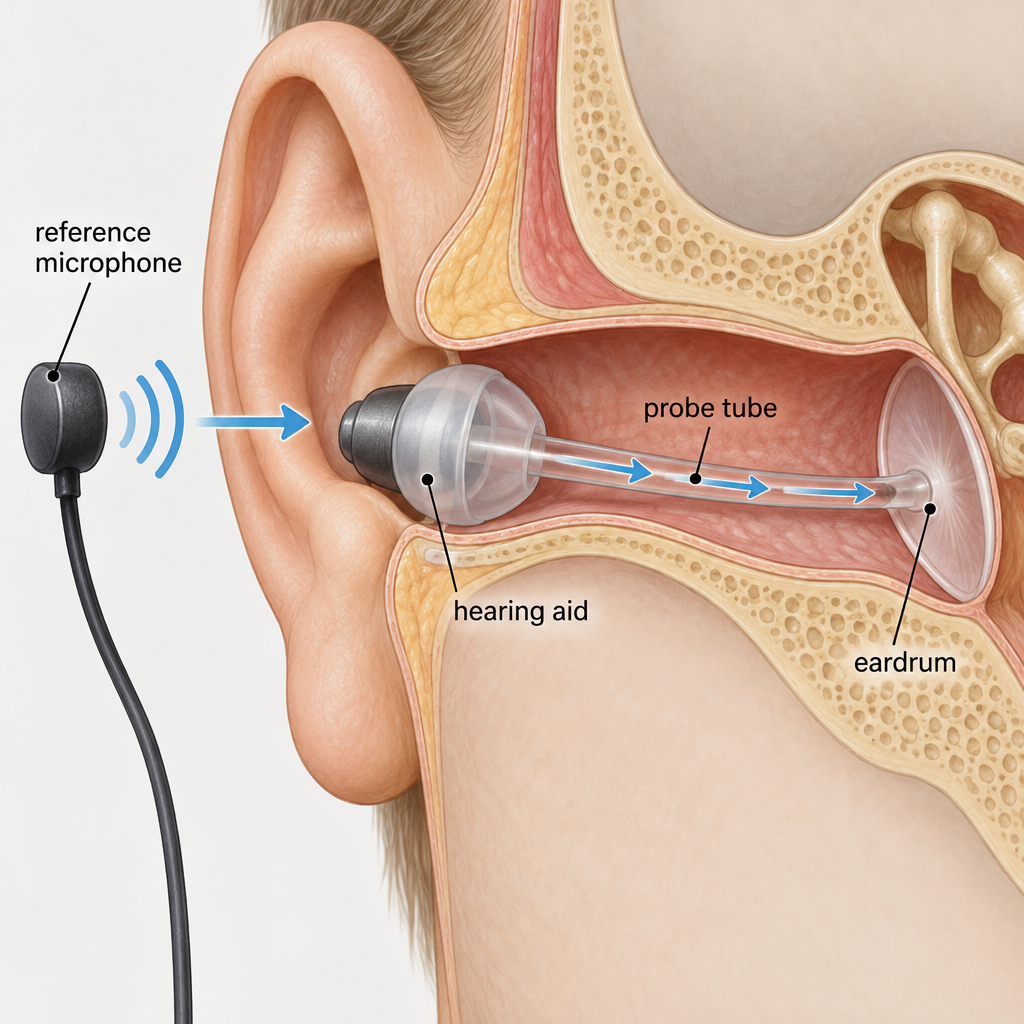
    Real ear measurement (REM), also called probe-microphone measurement, records sound inside your own ear canal while your hearing aid is in place and working. A soft silicone tube, about as thin as a strand of cooked spaghetti, sits a few millimetres from your eardrum. It carries sound to a microphone that sits on a small headset or ear hook just outside your ear.

    A speaker in front of you plays speech or a speech-like signal at set loudness levels. The equipment compares what reaches your eardrum with what your hearing loss calls for. Your audiologist then adjusts the hearing aid until the two line up.

    The reason this matters is simple. Every ear canal has a different size and shape, and that changes how loud and how bright sound becomes by the time it reaches the eardrum. A hearing aid set to “50 dB of gain” in the fitting software can deliver noticeably more or less than that in your specific ear. REM measures the result instead of trusting an estimate.

    What REM is not

    It is not a hearing test. Your hearing test (the audiogram) measures what you can hear. REM measures what the hearing aid produces. You do not need to respond to any sounds or press any buttons. You just sit still and stay quiet.

    It also does not diagnose anything. It verifies a device. If your hearing has changed suddenly or you have ear pain or drainage, that is a medical issue for a doctor, not a fitting issue.

    See a professional

    Sudden hearing loss in one or both ears is a medical emergency. See a doctor or go to urgent care within 24 to 48 hours, because treatment works best when started early.

    The Terms You Will See on the Screen

    REM software throws a lot of acronyms at you. You do not need to memorise them, but knowing a few helps you understand what your audiologist is showing you. Most modern clinics display results as an “SPL-o-gram” or “speechmap,” which plots your hearing thresholds, your prescription targets and the aided sound on one graph.

    Term Full name What it shows
    REUR / REUG Real-ear unaided response / gain How your open ear naturally boosts sound, with no hearing aid in
    REOR Real-ear occluded response Sound at the eardrum with the hearing aid in but switched off or muted
    REAR Real-ear aided response Sound at the eardrum with the hearing aid on, at a given input level
    REIG Real-ear insertion gain The difference between aided and unaided responses (REAR minus REUR)
    RESR / MPO Real-ear saturation response / maximum power output The loudest sound the hearing aid can produce in your ear
    RECD Real-ear-to-coupler difference How your ear differs from a standard test cavity, used heavily with children
    SII Speech Intelligibility Index An estimate (0 to 100) of how much speech information is audible

    The two most common ways to work are insertion gain (REIG) and aided response (REAR). Older protocols used insertion gain. Most current systems favour aided response shown as sound pressure level at the eardrum, because it sits neatly on the same graph as your hearing thresholds. Both are valid. What matters is that the fitting is checked against a target in your ear.

    Why REM Is the Gold Standard for Fitting
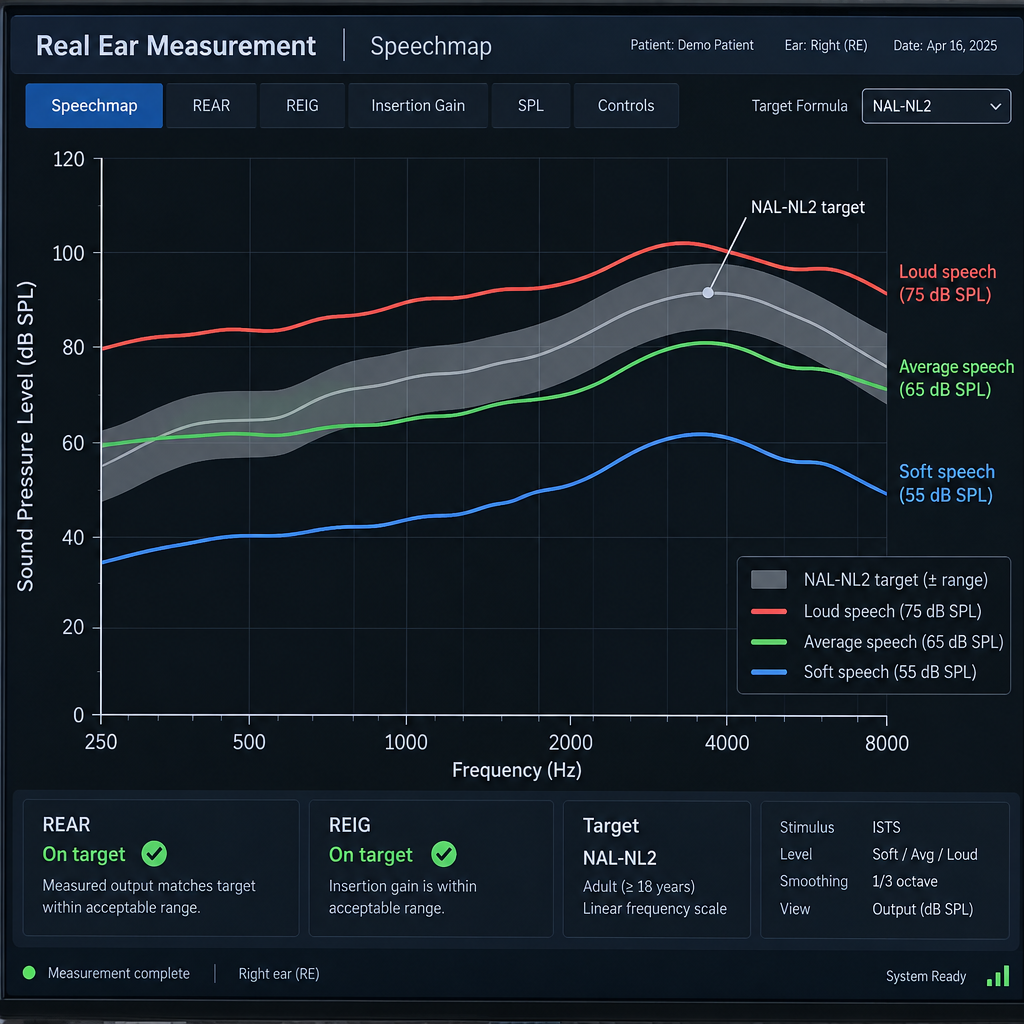
    REM SPL-o-gram / Speechmap Display

    Professional bodies in audiology have recommended probe-microphone verification for decades. The American Academy of Audiology and the American Speech-Language-Hearing Association both list it in their best-practice guidance for adult hearing aid fitting, and pediatric guidelines treat verification as essential. The British Society of Audiology publishes its own REM guidance for the same reason.

    Prescriptions and targets

    Your audiologist does not pick hearing aid settings by feel. Validated prescriptive formulas turn your audiogram into a target for how much sound you need at each pitch and loudness level. The two big ones are:

    • NAL-NL2, from the National Acoustic Laboratories in Australia, widely used for adults. It aims to maximise speech intelligibility while keeping overall loudness comfortable.
    • DSL v5, the Desired Sensation Level method developed at Western University in Canada, standard in pediatric fitting and also used for adults.

    Each formula produces separate targets for soft, average and loud speech. Soft speech gets more boost than loud speech, because modern hearing aids use compression to squeeze the wide range of everyday sound into your narrower range of usable hearing.

    The “first fit” problem

    When a hearing aid is connected to the manufacturer’s software, it offers a “first fit” or “initial fit” setting. Many fittings stop there. The trouble is that first-fit settings are a prediction. They assume an average ear canal, an average fit of the dome or earmold, and in many cases a manufacturer’s own proprietary formula rather than NAL-NL2 or DSL.

    Research has repeatedly found that first-fit settings miss prescriptive targets, usually by giving too little high-frequency sound. That is a real problem, because the consonants that make speech clear (s, f, th, sh, t, k) live mostly above 2,000 Hz. Miss the highs and people sound like they are mumbling, which is exactly the complaint that sent many people to the audiologist in the first place.

    What the research shows

    Study Journal Key finding
    Aazh and Moore, 2007 Journal of the American Academy of Audiology Only about 36% of hearing aids set with manufacturer first-fit came within 10 dB of NAL-NL1 targets across frequencies; after REM-based adjustment, most did
    Abrams and colleagues, 2012 Journal of the American Academy of Audiology Adults fitted with REM verification reported better outcomes on a standard benefit questionnaire than with first-fit settings
    Sanders and colleagues, 2015 The Hearing Journal Manufacturer first-fit settings tended to under-amplify high frequencies relative to NAL-NL2 targets
    Valente and colleagues, 2018 Journal of the American Academy of Audiology Adults wore REM-verified NAL-NL2 and first-fit settings in a blinded trial; most preferred the verified fitting and reported better outcomes

    Taken together, these studies point the same way: a verified fitting is more likely to be audible, more likely to be accurate, and more likely to leave you satisfied. That is why REM is called the gold standard, and why skipping it puts the burden on you to notice something is wrong.

    Why So Many Clinics Skip It

    Despite the guidance, routine REM use has never been universal. Surveys going back more than a decade, including a widely cited 2010 survey published in The Hearing Journal, found that only somewhere between a third and two-fifths of hearing aid fitters used probe-microphone measures routinely. Awareness has grown since then, but plenty of people still get hearing aids without it.

    The common reasons:

    • Time. REM adds roughly 15 to 30 minutes to a fitting appointment. In a busy schedule that feels expensive.
    • Equipment cost. Dedicated systems from makers such as Audioscan, Interacoustics, Natus Otometrics and MedRx represent a significant investment for a small practice.
    • Training and confidence. Placing a probe tube well and interpreting the graph takes practice. Clinicians who did not learn it thoroughly may avoid it.
    • Trust in the software. Some fitters assume modern “in-situ” or “feedback calibration” routines in the manufacturer software do the same job. They do not. Those routines estimate the acoustic properties of your ear and tubing; they do not measure the result against a validated target.
    • Patients don’t ask. Most people have never heard of REM, so there is no pressure to provide it.

    None of these reasons benefits you. Time and equipment are business costs. If a clinic chooses not to verify, you are effectively the test instrument, reporting back over weeks of follow-ups whether things sound “okay.”

    Hearing tip

    When you book a hearing aid fitting, ask on the phone: “Do you use real ear measurement to verify every fitting?” A clinic that does will say yes without hesitation.

    What You Need Before the Test
    Probe Tube Anatomy Diagram

    REM needs very little from you, but a few things make it faster and more accurate. Here is what should be in place.

    Prerequisites:

    1. A recent, accurate audiogram. Ideally from within the last year, including air and bone conduction thresholds. The prescription targets are only as good as the hearing test.
    2. Clear ear canals. Earwax can block the probe tube or change the reading. Your audiologist will look in your ears first. If you know you build up wax, have it cleared a week or so before the fitting rather than on the day.
    3. Your hearing aids, programmed and fitted physically. The domes or earmolds need to be the size and style you will actually wear, because the vent and seal change the low-frequency response a lot.
    4. A quiet room and a calibrated system. The clinic’s job, but worth knowing: REM equipment needs regular calibration and a reasonably quiet space.
    5. Twenty to thirty minutes of sitting still. You will need to face a speaker, stay quiet and avoid moving your jaw much while measurements run.

    If you wear glasses, keep them on unless asked otherwise. If you have a medical condition affecting your ear canal (recent surgery, an active infection, a perforated eardrum), tell your audiologist before anything goes into your ear.

    How a Real Ear Measurement Works, Step by Step

    Protocols vary slightly between clinics and equipment, but a typical adult fitting follows this order.

    Real ear measurement steps

    1. Look in both ears with an otoscope to check for wax and canal health.
    2. Enter or import your audiogram so the system calculates prescription targets.
    3. Calibrate the probe tube against the reference microphone.
    4. Insert the probe tube to the correct depth, near the eardrum.
    5. Optionally measure your open ear (unaided response).
    6. Insert the hearing aid beside the tube and measure aided responses at soft, average and loud levels.
    7. Adjust the hearing aid until it matches targets, then check maximum output.

    Step 1: Otoscopy

    Your audiologist looks into each ear with a lit otoscope. They are checking that the canal is clear and healthy, and getting a sense of its shape and bends so they can place the probe tube safely. If there is significant wax, it needs to come out first, because a tube pressed against wax will give a muffled, inaccurate reading.

    Step 2: Load the audiogram and choose a prescription

    Your hearing thresholds go into the REM system, usually imported directly from the clinic’s database (often through Noah, the industry-standard software platform). The audiologist picks a prescription, most commonly NAL-NL2 for adults or DSL v5 for children, and sets details such as whether you are a new or experienced user, which affects how much gain you start with.

    Step 3: Calibrate the probe tube

    The tube itself slightly changes the sound passing through it. To correct for that, the audiologist holds the tube tip next to the reference microphone and runs a quick calibration. It takes a few seconds. Skipping it is one of the easier ways to get a misleading result.

    Step 4: Place the probe tube

    This is the step that takes skill. The tube needs to sit within about 5 mm of the eardrum, close enough to capture high-frequency sound accurately but not touching the eardrum.

    Many audiologists use a rule of thumb: measure along the tube from the tip and mark it so that it extends roughly 28 mm (for many women) to 30 mm (for many men) past the intertragal notch, the little dip at the bottom of the opening of your ear. Others use otoscopy to watch the tube tip move into position, or play a tone and watch for a characteristic dip in the response to judge depth.

    You may feel a light tickle or hear a faint scratching sound. It should not hurt. If it does, say so immediately and the tube will be repositioned.

    Step 5: Measure the open ear (optional)

    Some protocols start by measuring your open, unaided ear. Your outer ear and canal naturally boost sound around 2,500 to 3,000 Hz by roughly 15 to 20 dB. This open-ear resonance matters because putting a hearing aid in partly blocks it, and the hearing aid has to make up for what it takes away. Insertion-gain protocols need this measurement. Aided-response protocols can skip it.

    Step 6: Measure aided response at three levels

    The hearing aid goes in, carefully placed beside the probe tube so the tube does not move. The speaker plays a calibrated speech signal, often the International Speech Test Signal (ISTS), a standardised recording built from several languages so that it sounds like speech without being understandable. Some clinics also use real recorded speech or live voice.

    The signal plays at three levels, each producing a curve on the screen:

    Input level Represents What the audiologist checks
    About 50 to 55 dB SPL Soft speech, a quiet voice across the room Is soft speech audible above your thresholds?
    About 65 dB SPL Average conversational speech Does the curve match the target closely, especially 1,000 to 4,000 Hz?
    About 75 to 80 dB SPL Loud speech, a raised voice Is loud speech comfortable and on target, not overamplified?
    85 to 90 dB SPL pure-tone sweep Very loud sounds Maximum output stays below your discomfort level

    Step 7: Adjust and recheck

    Now the audiologist adjusts gain, compression and output in the fitting software, rerunning measurements until the aided curves sit on or near the targets. This is where REM earns its keep. Without it, adjustments are guesses. With it, every change is visible immediately.

    The final check is maximum power output. A loud sweep tone confirms that the hearing aid never pushes sound above a level that would be uncomfortable or potentially harmful to you. Once both ears are done, many audiologists save the curves to your file so future adjustments can be compared against them.

    Reading the Results: What a Good Match Looks Like

    The expected result is a set of aided curves that track the prescription targets closely across the speech frequencies, with soft speech audible and loud sounds kept comfortable.

    Common tolerances

    A widely used clinical tolerance, reflected in British Society of Audiology guidance, is:

    • Within ±5 dB of target from 250 to 2,000 Hz
    • Within ±8 dB of target at 3,000 and 4,000 Hz

    Above 4,000 Hz, matching gets harder, both because hearing aids run out of power there and because the measurement itself gets less precise. Many fittings will fall below target at 6,000 Hz and beyond, and that can be acceptable if your hearing in that range is very poor.

    When “close enough” is the right answer

    Targets are a starting point, not a commandment. Experienced audiologists sometimes deliberately set gain a few decibels under target for a brand-new user who finds full amplification overwhelming, with a plan to step up over several weeks. Some manufacturers build this “acclimatisation” into the software automatically.

    The difference is that with REM, the deviation is a choice you can see and track. Without it, nobody knows how far off the fitting is or in which direction.

    What the Speech Intelligibility Index tells you

    Many systems also show an aided SII, a score estimating how much of the speech signal is audible. If your unaided SII at average conversation is 35 and your aided SII is 70, the hearing aids are making a large share of speech audible that was missing before. A high SII is not the same as understanding speech perfectly, because your brain’s ability to process sound also matters, but it is a useful check that the basics are in place.

    Common Mistakes and Troubleshooting

    REM is reliable when done properly, but certain errors crop up often. Knowing them helps you judge whether your test was done carefully.

    Problem What causes it How it shows up Fix
    Probe tube too shallow Tube not inserted far enough False dip in the high frequencies, often around 4,000 to 6,000 Hz Reinsert deeper, toward the eardrum
    Tube pinched or blocked Wax, or the hearing aid pressing on the tube Very low or erratic readings Clean canal, re-route tube, recalibrate
    Tube moved when aid inserted Hearing aid pushes the tube in or out Aided curves look inconsistent with unaided Mark the tube depth and check it after insertion
    Skipped calibration Probe tube not calibrated Systematic error across frequencies Recalibrate before measuring
    Feedback (whistling) during test Gain set high with an open dome Spike or ripple in the curve, audible squeal Run feedback management, change dome, reduce gain slightly
    Patient talking or moving Natural restlessness Jumpy, noisy curves Re-run the measurement in silence
    Speaker in wrong position Patient turned away or too far Unexpected level differences between ears Reposition at the standard distance and angle
    Noise reduction or features active Adaptive features reacting to test signal Gain drops partway through Use a speech-like signal or temporarily disable for verification

    Open fittings and venting

    With open domes, low-frequency sound passes straight through the vent, and low-frequency amplification leaks back out. It is normal for open fittings to fall below target below about 750 Hz. That is a physical limit, not a mistake, and many people with good low-frequency hearing do not need much boost there anyway. If you have significant low-frequency loss and the curve is far below target, a closed dome or custom earmold is often the fix.

    Feedback limits high-frequency gain

    Feedback management systems in modern hearing aids sometimes reduce high-frequency gain to stop whistling. REM makes this visible: you will see the high-frequency curve stuck below target even after the audiologist raises gain in the software. Solutions include a tighter dome, a different receiver, a custom mold or changing the feedback manager’s settings.

    Going Beyond the Basic Fit: Verifying Features

    Matching targets for speech is the core of REM. Good clinics also use it to check that the features you are paying for actually work in your ear.

    Maximum power output

    Already covered in the steps, but worth repeating. Output that is too high risks discomfort and further damage. Output that is too low makes loud speech sound flat and squashed. REM is the only way to confirm the setting in your own canal.

    Frequency lowering

    Many hearing aids can move high-pitched sounds into a lower range you can still hear. Brands use different names: Phonak calls it SoundRecover2, Oticon uses Speech Rescue, Signia offers Frequency Compression and ReSound has Sound Shaper. Some REM systems include test signals designed for this, such as filtered speech bands centred on the “s” and “sh” sounds. The audiologist can confirm that those sounds land in an audible region, and that the setting is strong enough to help without making speech sound distorted.

    Directional microphones

    Directional processing focuses on sound from in front of you and turns down sound from behind. Some systems can test this by playing a signal from the front and then from the side or back, showing how much the hearing aid reduces the rear sound. It is a useful check that the microphones are clean and the program is set up correctly.

    Noise reduction

    Digital noise reduction is harder to verify with a single measurement, because it reacts to signal type over time. Some systems play speech with steady background noise and show how gain changes. At minimum, REM confirms that noise reduction is not secretly cutting speech gain below target.

    Bluetooth and streaming

    Streamed audio from phones and TVs goes straight into the hearing aid and bypasses the microphones, so it is not measured by standard REM. Streaming volume and tone are adjusted separately in the fitting software or in the manufacturer’s app. If streamed calls sound thin or quiet, mention it at your follow-up.

    REM for Children

    Verification matters even more for children, who cannot always say whether speech sounds clear and who need full access to speech to develop language. Pediatric fittings commonly use the DSL v5 prescription.

    Because children’s ear canals are smaller, the same hearing aid produces more sound at a child’s eardrum than at an adult’s. Their canals also change as they grow. That is why the real-ear-to-coupler difference (RECD) is so useful. The audiologist measures, once, how the child’s ear differs from a standard test cavity called a coupler. After that, much of the fine-tuning can happen in a test box using that correction, with the hearing aid connected to the coupler instead of the child’s ear. That makes it practical for babies and toddlers who will not sit still for 20 minutes.

    The RECD needs to be remeasured as the child grows and whenever earmolds are replaced, which happens often in the first years of life.

    OTC Hearing Aids and Real Ear Measurement

    Since the FDA’s over-the-counter hearing aid rule took effect on October 17, 2022, adults with perceived mild to moderate hearing loss can buy hearing aids without seeing a professional. OTC devices are designed to be fitted by the user, typically with an in-app hearing check or a set of presets.

    That convenience comes with a trade-off: OTC self-fitting does not include probe-microphone verification. The app estimates your needs and sets the device, but nobody measures what actually reaches your eardrum.

    Factor OTC hearing aids Prescription hearing aids
    Who can buy Adults 18+ with perceived mild to moderate loss Anyone, through a licensed professional
    How settings are chosen Self-fitting app or presets Professional fitting from your audiogram
    REM verification Not included Recommended best practice; ask for it
    FDA output limit 111 dB SPL, or 117 dB SPL with input-controlled compression and user volume control Set by professional for your hearing
    Suits Mild to moderate loss, no red-flag symptoms All degrees of loss, including severe and complex cases

    Some audiologists will verify OTC devices with REM for a fee, though how much you can adjust depends on whether the device lets a professional reach its settings. If you have bought OTC hearing aids and speech still sounds unclear after a few weeks of daily wear, a professional evaluation is the sensible next step. It may show that your loss is more significant than the OTC category is designed for.

    See a professional

    Skip OTC devices and see a doctor or audiologist if you have hearing loss in only one ear, ear pain, drainage, dizziness, or a sudden or rapidly worsening change.

    Questions to Ask Your Audiologist

    You have every right to understand how your hearing aids are being fitted. These questions help you gauge the quality of care without sounding confrontational.

    1. “Do you verify every fitting with real ear measurement?” The answer should be yes, routinely, not “only if there’s a problem.”
    2. “Which prescription are you fitting to?” You want a recognised formula such as NAL-NL2 or DSL v5, not only the manufacturer’s proprietary target.
    3. “Can you show me my results on the screen?” A good audiologist will happily walk you through where your thresholds, targets and aided curves sit.
    4. “How close are we to target, and where are we deliberately below it?” This tells you whether gaps are a plan or a limitation.
    5. “Did you check maximum output?” It confirms that loud sounds are kept at a safe, comfortable level.
    6. “Will you re-run REM if we make big changes later?” Major adjustments, a new dome or a new earmold all change the acoustics and justify remeasuring.
    7. “Is REM included in the fitting price?” In bundled pricing it usually is. In unbundled clinics it may be listed separately, so ask before you commit.

    If a clinic says the manufacturer software “already accounts for your ear,” that is a sign they are relying on the first fit. You can politely ask for verification or look for another provider.

    What to Expect After a Verified Fitting

    A well-verified fitting usually sounds brighter and sharper on day one than you expect. Paper rustles. Your own voice sounds different. The fridge hums. The clinking of cutlery seems absurdly loud. That is normal: your brain has been missing those sounds, sometimes for years, and needs a few weeks of consistent daily wear to settle.

    What you should notice over the first few weeks is easier conversation in quiet rooms, fewer requests for people to repeat themselves and less effort following speech on TV. Noisy restaurants will still be harder than quiet ones, because no hearing aid fully separates speech from competing voices.

    Plan for at least one follow-up visit about two to four weeks after the fitting. Bring notes on specific situations: “my grandson’s voice is still hard to catch,” “the car is too loud,” “my own voice sounds boomy.” Those details guide fine-tuning far better than “it’s mostly fine.”

    Hearing aids are one tool among several

    Even a perfectly verified fitting does not solve every listening situation. Phone calls can remain difficult, especially with background noise. Many people combine hearing aids with captions on TV and streaming services (closed captioning has improved a lot on most platforms), captioned phone apps, or a telecommunications relay service for calls where clarity matters. Using those tools alongside your hearing aids is smart practice, not a sign the fitting failed.

    When to come back for re-verification

    Ask for REM again if:

    • Your hearing test shows a meaningful change
    • You switch dome size or style, or get a new earmold
    • You get new hearing aids, even the same model
    • Something sounds noticeably different and adjustments in the app have not helped

    FAQ

    Is real ear measurement accurate?

    Yes, when it is done properly. With the probe tube tip within about 5 mm of the eardrum, measurements are typically accurate to within a couple of decibels up to about 6,000 Hz. Most errors come from poor tube placement, skipped calibration, wax or movement during testing, all of which a careful clinician controls. It is far more accurate than relying on manufacturer first-fit predictions.

    What does real ear measurement mean?

    It means measuring sound inside your own ear canal while you wear a hearing aid, using a thin probe tube connected to a microphone. The results show exactly how much sound reaches your eardrum at different pitches and loudness levels, so your audiologist can adjust the hearing aid to match a prescription built from your hearing test.

    How long does a real ear measurement take?

    Usually about 15 to 30 minutes for both ears, including probe placement, measurements at several loudness levels and adjustments. It can take longer for complex fittings, feature checks such as frequency lowering, or young children. It is normally done during your hearing aid fitting appointment, not as a separate visit.

    How many inches deep is your ear?

    An adult ear canal is roughly 2.5 cm long, just under an inch, from the opening to the eardrum, with an S-shaped curve and two bends. During REM, the probe tube typically extends about 28 to 30 mm (around 1.1 to 1.2 inches) past the notch at the bottom of the ear opening, which places the tip close to the eardrum without touching it. Children’s canals are shorter. Never insert anything into your own ear canal to check its depth.

    Does real ear measurement hurt?

    No. Most people feel a slight tickle or hear a soft scratching as the tube goes in. If you feel any pain, tell your audiologist straight away so they can reposition it.

    Can I ask for REM if my clinic doesn’t offer it?

    You can ask, but a clinic without the equipment cannot provide it. If verification matters to you, and the evidence says it should, look for an audiologist or hearing aid specialist who uses REM routinely and is willing to show you the results.

    Last updated: October 29, 2026. This article provides general information about hearing aid fitting and is not a substitute for advice from an audiologist or doctor.
  • Loop Earplugs Compared and Which Model Fits Your Needs

    Loop Earplugs Compared and Which Model Fits Your Needs

    Loop earplugs do work. They are reusable, filtered silicone earplugs that cut volume by roughly 16 to 27 dB depending on the model, so sound stays clear but gets quieter. This guide compares seven current Loop models, shows how much protection each one gives you in real situations, and matches them to concerts, work, sleep and sensory sensitivity.

    Last checked: October 29, 2026.

    The short answer: which Loop model to buy

    Most people only need one of four Loop earplugs. The others are variations with add-ons or adjustable settings.

    • Concerts, festivals, clubs and loud bars: Experience 2. If you stand near the speakers or spend whole days at festivals, choose Experience 2 Plus, which comes with an extra insert for more reduction.
    • Open offices, commuting, restaurants, family gatherings and noise sensitivity: Engage 2. It gives you the lightest reduction and keeps speech clearest.
    • Sleep, studying and blocking out a partner’s snoring: Quiet 2 for back sleepers and occasional use. Choose Dream if you sleep on your side.
    • One pair for everything: Switch 2. It has three modes on a dial, but you pay more for that flexibility.

    If you work in sustained industrial noise, use firearms, or run power tools all day, do not rely on any of these. Use protection rated for occupational noise, ideally fitted and fit-tested through your employer’s hearing conservation program.

    What Loop earplugs are, and what they are not

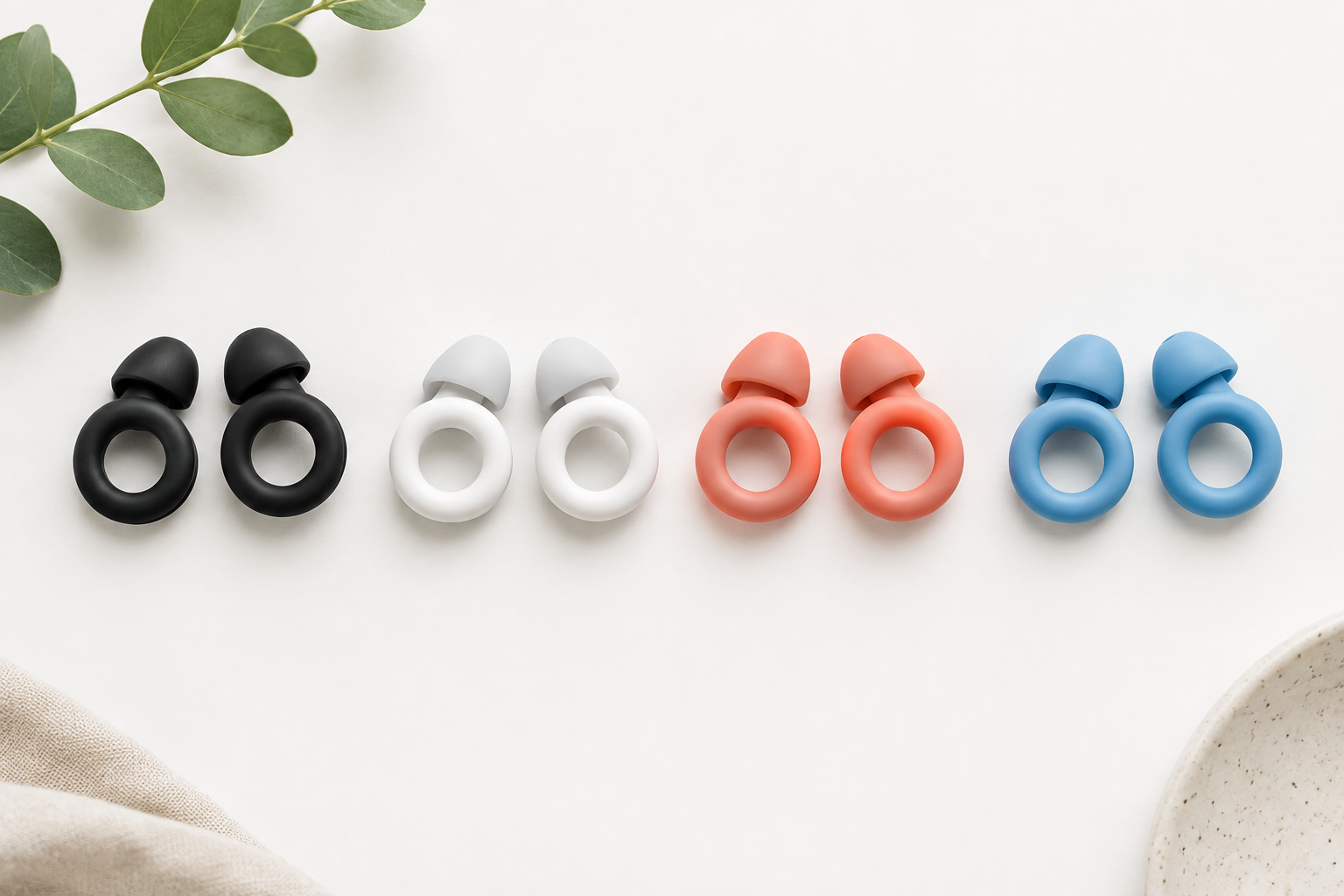
    Loop is a Belgian company founded in Antwerp in 2016. It sells reusable earplugs built around a distinctive ring, the “loop” that gives the brand its name. People search for them as loop earplugs, loop ear plugs and loops earplugs. All three refer to the same product family.

    Each earplug has a soft silicone tip that seals your ear canal. A rigid body behind the tip houses an acoustic channel and, on most models, a filter. The ring is a design feature. It also works as a grip, which makes it easier to remove the earplug.

    Loop markets the range as a lifestyle and wellness product. It has been the official earplug partner of the Tomorrowland festival, and it has released collaborations and special colourways, so the plugs show up as fashion accessories as well as hearing protection. That marketing is part of why they are popular. You are far more likely to wear an earplug you do not mind being seen in.

    Loop earplugs are not hearing aids. They do not amplify anything, they are not regulated by the FDA as hearing devices, and they do not treat hearing loss or tinnitus. If you already notice trouble following conversations, that is a separate problem. Since October 2022, adults with perceived mild to moderate hearing loss in the US can buy FDA-regulated over-the-counter hearing aids without a prescription. A hearing test with an audiologist is still the best starting point.

    How Loop earplugs reduce sound

    Loop Models Comparison Chart

    Cheap foam earplugs stuff your ear canal with dense material. They block high frequencies much more than low ones, so music turns muddy and voices sound distant. That is the main reason people take foam plugs out halfway through a gig.

    Filtered earplugs like Loop’s Experience and Engage models let sound pass through a channel and an acoustic filter. They aim for a flatter reduction across frequencies. The result is quieter sound rather than muffled sound. Loop’s designs are not perfectly flat, but they are much closer than foam, and that difference is what you notice on first use.

    The Quiet and Dream models work differently. They block as much as their size and softness allow, because at night clarity does not matter and comfort does.

    SNR, NRR and the number on the box

    Loop publishes its reduction figures as SNR (Single Number Rating), the European rating under the EN 352 standard. US products usually show NRR (Noise Reduction Rating), which is tested under different rules. The two are not interchangeable, and SNR figures usually run a few decibels higher than the NRR for the same plug. Do not compare a Loop SNR directly against a foam plug’s NRR.

    Both ratings come from lab tests with trained subjects and careful insertion. In everyday use you get less protection than the label says, mostly because of fit. A plug that is the wrong size, inserted too shallowly, or loosened by talking and chewing can lose a large share of its rated reduction. Assume your real protection will fall several decibels short of the box figure unless you size and insert the plugs carefully.

    Why a few decibels matter so much

    Decibels are logarithmic. Under the US National Institute for Occupational Safety and Health (NIOSH) guideline, 85 dBA is acceptable for 8 hours. Every 3 dB increase halves the safe time. A 17 dB reduction therefore moves you a long way down the risk curve. A 5 dB gap between two models matters more than the small numbers suggest.

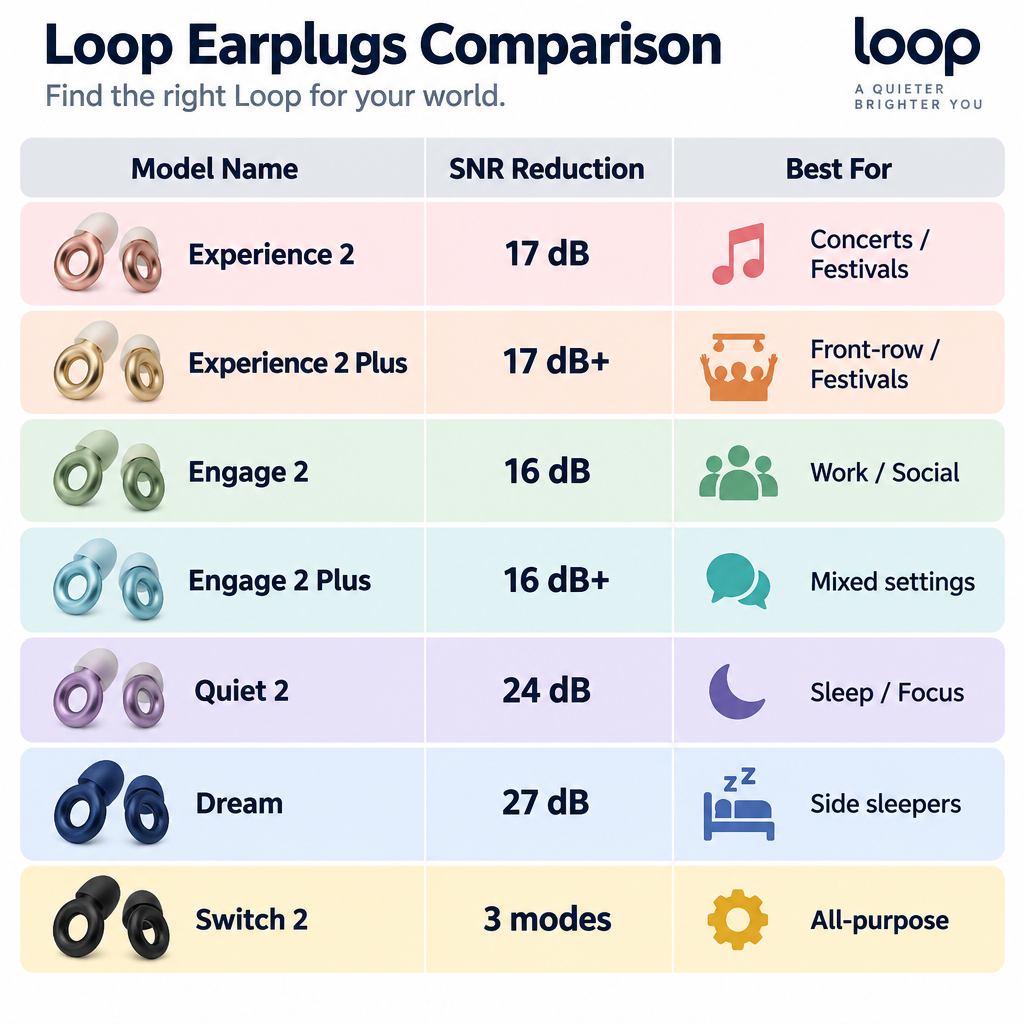
    The Loop lineup at a glance

    The table below covers the current generation as listed by Loop at our last check. Loop revises its figures between generations (the second-generation Experience is rated slightly differently from the original), so check the packaging of the exact version you buy.

    Model Loop’s stated reduction (SNR) Design Best for
    Experience 2 About 17 dB Filtered, ring body Concerts, festivals, nightlife
    Experience 2 Plus About 17 dB, more with Mute insert Filtered, includes Mute Front-row gigs, long festival days
    Engage 2 About 16 dB Filtered, speech-focused Work, social events, sensitivity
    Engage 2 Plus About 16 dB, more with Mute insert Filtered, includes Mute Mixed social and noisy settings
    Quiet 2 About 24 dB Soft, unfiltered silicone Sleep, focus, travel
    Dream About 27 dB Low-profile, sleep-specific Side sleepers, loud snorers
    Switch 2 Three modes via dial Adjustable filter One pair for many situations

    Price tiers

    Loop discounts heavily during sales periods, runs regional pricing, and adjusts list prices over time. We could not confirm the current list price for every model on October 29, 2026. The tiers below reflect the approximate US list prices these models have carried and should be treated as a guide, not a quote.

    Price tier (approx. US list) Models
    About $25 Quiet 2
    About $35 Experience 2, Engage 2
    About $45 to $50 Experience 2 Plus, Engage 2 Plus, Dream
    About $60 Switch 2

    Foam earplugs cost cents per pair. A custom-molded musician’s earplug from an audiologist usually costs well over $150. Loop sits between the two in price, and that is roughly where it sits in performance and convenience too.

    Model by model

    Loop Experience 2

    TypeFiltered reusable earplug
    ReductionAbout 17 dB SNR
    Price tierAbout $35
    Best forConcerts and festivals

    Experience 2 is the model most people picture when they think of Loop. It is tuned for live music. It turns down a loud room while keeping vocals, cymbals and bass detail more intact than foam would. Most wearers report that a gig sounds like the same gig with the volume knob turned down, and that is the point of the product.

    At about 17 dB SNR, it handles a typical club or mid-sized concert well. A loud arena show or a spot directly in front of a festival stack can push it to its limit, as the worked example later in this guide shows. You get four sizes of silicone tips (XS to L) on most packs, and getting the size right matters more than any other choice you make.

    Choose it if music is your main use and you rarely stand in the loudest spot in the venue.

    Loop Experience 2 Plus

    Experience 2 Plus is the same earplug bundled with Loop Mute. Mute is a small insert that closes off part of the acoustic channel for a few extra decibels of reduction. You can put it in when a set gets brutal, or for a DJ’s peak hour, and take it out for quieter stretches.

    This is the better buy if you go to festivals, play in a band, or tend to end up near the barrier. The price difference is small compared with the extra flexibility. Mute is tiny, though. Keep it in the case, not loose in your pocket.

    Loop Engage 2 (and Engage 2 Plus)

    TypeSpeech-focused filtered earplug
    ReductionAbout 16 dB SNR
    Price tierAbout $35
    Best forConversations and work

    Engage 2 gives the lightest reduction in the range, and Loop tunes it to keep speech intelligible. That makes it the right choice for loud restaurants, open-plan offices, crowded commutes, weddings and family gatherings. In those settings you want the background noise turned down without missing what the person beside you says.

    Engage is also the model people with sensory sensitivity most often settle on. That includes many autistic people and people with ADHD or misophonia. It takes the edge off overwhelming environments without the isolation of a stronger plug. Engage 2 Plus adds the Mute insert, which is useful if your day moves from a quiet meeting to a noisy event.

    Choose Engage over Experience if you mainly need to talk while wearing the plugs. For loud music, Experience protects you a little more.

    Loop Quiet 2

    TypeSoft sleep and focus earplug
    ReductionAbout 24 dB SNR
    Price tierAbout $25 to $30
    Best forSleep and study

    Quiet 2 is the cheapest Loop and the most different in design. It has no filter. It is a soft silicone plug built to block as much noise as possible while staying comfortable for hours. Loop rates it at about 24 dB SNR, much more than the filtered models.

    It works well for back sleepers, airplane cabins, studying in a noisy home and partners who snore at moderate volume. Side sleepers often find that the ring presses against the ear when the head is on a pillow, and that pressure gets uncomfortable over a full night. Foam earplugs with a high NRR can still block more noise than Quiet 2, so if raw blocking power matters more than comfort, foam still beats it on value.

    Loop Dream

    TypeSide-sleeper earplug
    ReductionAbout 27 dB SNR
    Price tierAbout $45 to $50
    Best forSide sleepers, snoring

    Dream is Loop’s sleep-specific model. It has a slimmer, lower-profile shape designed to sit flatter in the ear so a pillow does not push it in or pry it out. It is also the strongest Loop at about 27 dB SNR, which puts it in the range of good-quality foam plugs.

    It costs about double Quiet 2. That premium makes sense if you sleep on your side every night or share a bed with a heavy snorer. If you only need earplugs for occasional hotel stays, Quiet 2 is enough.

    Loop Switch 2

    Switch 2 has a small rotating dial that moves between three modes. Loop names them after its main product lines: an Engage-style mode for conversation, an Experience-style mode for music, and a Quiet-style mode for maximum blocking. Instead of carrying two or three pairs, you turn the dial.

    The trade-off is that each mode is a compromise. In Quiet mode, Switch 2 does not block as much as a dedicated Dream, and the dial makes the body bulkier than a standard Experience 2. Switch 2 suits travellers and people who move between very different environments in one day. If you mostly do one thing, a dedicated model works better and costs less.

    Features compared

    Feature Experience 2 Exp. 2 Plus Engage 2 Quiet 2 Dream Switch 2
    Acoustic filter Yes Yes Yes No No Yes
    Adjustable reduction No Via Mute No No No Three modes
    Speech stays clear Good Good Best Poor Poor Mode-dependent
    Comfortable side sleeping No No No Fair Yes No
    Includes Mute insert No Yes No (Plus: yes) No No No
    Reusable and washable Yes Yes Yes Yes Yes Yes

    None of the Loop models is rechargeable, electronic or Bluetooth-connected. They are purely passive. That is an advantage: no battery to die halfway through a festival, no app, and nothing to update.

    Help me choose: match the model to the noise

    Picking the right Loop depends more on how loud your situation is, and for how long, than on how the plug looks. This table uses the NIOSH guideline (85 dBA for 8 hours, with safe time halving every 3 dB) and typical sound levels. Real levels vary widely by venue and position.

    Situation Typical level Unprotected safe time (NIOSH)
    Busy restaurant 70 to 85 dBA Most of a workday or more
    Heavy city traffic About 85 dBA About 8 hours
    Subway platform, train arriving 90 to 100 dBA 2.5 hours down to 15 minutes
    Club dance floor About 100 dBA About 15 minutes
    Concert near the stage 100 to 110 dBA 15 minutes down to under 2 minutes

    Concerts and festivals

    Here is a worked example. Say a concert averages 103 dBA where you stand, which is common for rock and electronic shows. Unprotected, NIOSH puts your safe dose at about 7.5 minutes.

    Experience 2 is rated at about 17 dB. With careful fit you might get 12 to 15 dB in practice, which brings you to roughly 88 to 91 dBA. That gives you a safe time of about 2 to 4 hours. With a poor fit and only 10 dB of real reduction, you sit around 93 dBA and have barely over an hour.

    That is why a single headline act in Experience 2 is usually fine, while a 10-hour festival day near the main stage is where you should step up to Experience 2 Plus with Mute in. The other answer is to stand further back. Distance from the speakers is free protection, and it can easily give you several decibels.

    Hearing tip

    Put your earplugs in before the first band starts, not when it starts to hurt. Pain is a late signal, and ringing ears after a show mean you already took more than a safe dose.

    Work, commuting and open offices

    Engage 2 suits office life best. It takes the clatter out of an open-plan floor and the screech out of a train braking, and you can still hear a colleague say your name. For calls on a headset, take the earplugs out. Wearing both adds pressure and can muddy the call audio.

    If you work somewhere with legally regulated noise exposure, such as a factory, workshop, construction site or airport ramp, your employer’s hearing conservation program should specify protection. A lifestyle earplug is not a substitute for protection that has been fit-tested in that environment.

    Sleep

    Quiet 2 and Dream are the sleep options. Back sleepers usually do fine with Quiet 2. Side sleepers tend to prefer Dream’s lower profile. Keep your expectations realistic. No earplug fully blocks loud low-frequency snoring, because bass travels through your skull as well as your ear canal. Better earplugs turn snoring from a problem into background noise.

    If you wear earplugs every night, make sure you can still hear a smoke alarm. Test it once with your plugs in. If you cannot hear it clearly, look into a vibrating bed-shaker alarm or a strobe alarm. People who are Deaf or hard of hearing use these widely, and they are worth considering for anyone sleeping with strong protection.

    Sensory sensitivity, autism, ADHD and misophonia

    Many people buy Loop for sensory regulation rather than hearing protection, and Engage 2 is usually the best starting point. It takes the harshness out of supermarkets, classrooms, school pickups and busy offices while keeping you connected to conversation. Some people keep a Quiet 2 in their bag for moments when everything becomes too much.

    In the US, earplugs and quieter workspaces are common examples of workplace accommodations. The Americans with Disabilities Act is the main US disability rights act covering employment. It generally requires covered employers to provide reasonable accommodations for qualifying disabilities, which can include sensory needs. If your workplace is hostile to you wearing earplugs, that law is worth reading up on.

    Musicians, DJs and sound engineers

    Musicians playing every week usually need more than Loop. Experience 2 works well for a drummer’s occasional rehearsal or a DJ’s weekend set, especially the Plus version. People who play loud music professionally get better results from custom-molded musician’s earplugs fitted by an audiologist. Those use interchangeable flat-response filters and seal more consistently than off-the-shelf tips. They cost several times more, but they last for years and are far more consistent.

    Kids

    Loop’s tips can be small enough for older children, and Loop has offered child-focused options. For toddlers and young children at fireworks, sporting events or concerts, over-ear protective earmuffs are usually the safer choice. They are easier to fit, harder to lose and carry no risk of being pushed too far into a small ear canal. Infants should always wear earmuffs, never earplugs.

    Loop versus other hearing protection

    Option Sound quality Max blocking Cost Best for
    Foam earplugs Muffled Very high Very low Sleep, maximum noise
    Loop filtered models Clear, quieter Moderate Moderate Concerts, social, work
    Other filtered brands (e.g. Etymotic, Eargasm, Vibes) Clear, quieter Moderate Moderate Concerts, social
    Custom musician’s earplugs Most natural Moderate High Regular musicians
    Earmuffs Muffled High Low to moderate Kids, tools, shooting ranges
    ANC earbuds with loud sound reduction Varies Varies High Commuting, everyday noise

    Some earbuds now offer hearing protection features. Apple added a Hearing Protection feature to AirPods Pro 2 through a software update in 2024, which helps minimize exposure to loud environmental noise across listening modes. You can review it on an iPhone under Settings, then the AirPods name, then Hearing Health. The feature works, but the earbuds need charging, cost far more than a Loop, and are easier to lose or have stolen at a festival. For a long gig day, cheap passive earplugs are still the more practical choice.

    Fitting, sizing and care

    Fit decides how much protection you actually get. A perfectly rated Loop in the wrong tip size will protect you worse than a cheap foam plug inserted properly.

    How to fit Loop earplugs

    1. Start with the medium tip that comes pre-fitted.
    2. Reach over your head with the opposite hand and gently pull the top of your ear up and back to straighten the canal.
    3. Insert the tip with a slight twisting motion until it feels sealed, with the ring sitting naturally in your ear.
    4. Speak a sentence aloud. Your voice should sound noticeably fuller and more internal.
    5. Gently tug the ring. If the plug slides out easily or you can hear the room clearly, try the next size up.
    6. If it hurts, presses or itches after 10 minutes, try the next size down.

    Many people need different tip sizes for each ear, which is normal. Ear canals are rarely symmetrical.

    The “fuller voice” effect in step four is called the occlusion effect. It shows the plug is sealing properly. For some people it is the most annoying part of wearing earplugs, especially in conversation. It usually becomes less noticeable within a few uses. Engage 2 handles it a little better than the other models.

    Cleaning and replacing tips

    Wipe the plugs after each use. Every week or two, or after a sweaty festival, wash the silicone tips in lukewarm water with mild soap, rinse them, and let them dry fully before storing. Take the tips off the body first, and keep the body itself out of soaking water, because water can get into the filter.

    Replace the tips when they lose their bounce, become discoloured or stop sealing. Loop sells replacement tips, so you do not need to buy a whole new pair. Do not share earplugs. Ear canals carry bacteria and wax, and shared earplugs spread infections.

    Hearing tip

    Frequent earplug use can push earwax deeper into the canal. If your ears feel blocked after a few weeks of nightly wear, ask a doctor or audiologist to check. Do not dig around with cotton swabs.

    Honest drawbacks of Loop earplugs

    Loop earplugs come up constantly in online forums. When you look past the marketing, some complaints repeat across thousands of user reports.

    • The ring catches on things. Hair, hats, hoods and pillows snag on it. That is fine at a concert and annoying in bed, which is why Dream exists.
    • They can work loose. Talking, chewing and dancing move your jaw and gradually loosen the seal. Re-seat the plugs every hour or so at a long event.
    • They are easy to lose. The carry case is small. Clip it to a keyring or a bag zip.
    • Quiet 2 is not the strongest sleep option. If your only goal is maximum blocking at night, foam earplugs or Dream outperform it.
    • The price surprises people. You are paying for reusability, sound quality and design. If you only go to one concert a year, a pair of disposable filtered plugs or good foam plugs does the job.
    • Experience is not enough for everything. About 17 dB is right for most gigs and too little for a full day directly in front of the stage.

    Taken together, Loop’s main strength is that people actually wear them. A comfortable, discreet earplug you keep in for the whole show protects you better than a stronger plug you take out after twenty minutes because it makes the music sound like it’s underwater.

    Hearing health: when earplugs are not enough

    Earplugs prevent damage. They do not reverse it. If you already have symptoms, put down the shopping list and get your hearing checked.

    See a professional

    Sudden hearing loss in one or both ears is a medical emergency. See a doctor or go to urgent care the same day, because treatment works best within the first few days.

    You should also see an audiologist or doctor if:

    • Ringing, buzzing or muffled hearing after a loud event lasts longer than a day or two.
    • Tinnitus is new, gets worse, or is only in one ear.
    • Everyday sounds start to feel painfully loud (possible hyperacusis).
    • You often ask people to repeat themselves or turn the TV up more than the rest of your household.

    Tinnitus and overprotection

    Earplugs do not cure tinnitus, and no reputable earplug brand claims they do. For some people they make tinnitus more noticeable at night, because blocking the room sound leaves the ringing as the loudest thing you hear. A quiet fan or sound machine with Quiet 2, or with lighter protection, often works better than total silence.

    Audiologists also warn against wearing earplugs all the time in ordinary environments if you have sound sensitivity. The brain can respond to constant quiet by turning up its own sensitivity, which makes normal sounds feel even louder. Use your Loops for situations that are actually loud or overwhelming, and talk to an audiologist about sound therapy if sensitivity is affecting your daily life.

    If you already have hearing loss

    Earplugs and hearing aids do different jobs, and you cannot wear both at once. If you have hearing loss and still go to concerts, ask your audiologist about it. Many modern hearing aids have noise programs, and your audiologist can tell you whether to remove the aids and use plugs, or use a dedicated program.

    Earplugs can also make speech harder to follow if your hearing is already reduced. In noisy social settings, some hard of hearing people do better with assistive tools than with more blocking: a remote microphone paired to their hearing aids, live captions on a phone, or closed captioning on venue screens and at home. At home, if you wear Quiet 2 to shut out a noisy household while watching something, switching on captions keeps the dialogue accessible.

    Special editions and collaborations

    Loop releases limited editions regularly. Its long-running partnership as Tomorrowland’s official earplug brand has produced festival-branded versions, and collaborations such as the Paris Hilton edition have brought special colours and packaging. Loop also sells exclusive finishes through its own store.

    These editions are usually cosmetic variations of the core models, so the acoustic performance follows the base product. Before you buy, check which model a special edition is built on and confirm its stated reduction on the product page or box. A limited-edition Experience is still an Experience. Pick the model for your use first and the colour second.

    FAQ

    Do Loop Earplugs really work?

    Yes. Loop’s filtered models reduce volume by about 16 to 17 dB, and the sleep models by about 24 to 27 dB, according to the company’s published SNR figures. In real use you get somewhat less, mainly because of fit. With the right tip size and proper insertion, they meaningfully cut your noise dose at concerts, in loud venues and during sleep.

    What’s so special about Loop Earplugs?

    Three things set them apart. The filtered models reduce sound more evenly across frequencies than foam does, so music and speech stay clear. They are reusable with replaceable tips. And the design is comfortable and stylish enough that people actually wear them. Many people value that last point most, because an earplug you leave in your pocket protects no one.

    Can you still hear everything with Loop Earplugs?

    With Experience 2 and Engage 2 you still hear music, voices and announcements clearly, just more quietly. Engage 2 keeps speech the clearest. With Quiet 2 and Dream you hear far less, which is the point for sleep. Test that you can still hear your smoke alarm before relying on them at night.

    What is the difference between Loop Earplugs and regular earplugs?

    Regular foam earplugs block as much sound as possible and cut high frequencies hardest, so everything sounds muffled. Loop’s filtered models aim for a more balanced reduction that keeps sound natural. Loop plugs are also reusable and washable, while foam plugs are usually disposable. Foam can block more total noise for far less money, which still makes it a good choice for maximum blocking.

    Which Loop is best for concerts?

    Experience 2 suits most concerts. Choose Experience 2 Plus if you stand near the speakers, play in a band or attend multi-day festivals, because its Mute insert adds extra reduction for the loudest moments.

    Can you sleep in Loop Experience earplugs?

    You can, but they are not designed for it. The filter lets through more sound than a sleep plug, and the rigid ring presses against a pillow. Quiet 2 is the better choice for back sleepers and Dream for side sleepers.

    Do Loop earplugs help with tinnitus?

    They help prevent noise exposure that can cause or worsen tinnitus, but they do not treat it. If you have ongoing tinnitus, see an audiologist or doctor. Tinnitus in one ear, or tinnitus that comes with sudden hearing changes, needs prompt medical attention.

  • What the Americans with Disabilities Act Is and Who It Protects

    What the Americans with Disabilities Act Is and Who It Protects

    The Americans with Disabilities Act (ADA) is a federal civil rights law, signed on July 26, 1990, that bans discrimination against people with disabilities in jobs, government services, public places, transportation and telecommunications. It protects anyone with a physical or mental impairment that substantially limits a major life activity, anyone with a record of one, and anyone treated as if they have one. This guide covers what each of its five titles requires, who enforces them, and how to file a complaint.

    Last checked: October 29, 2026

    TypeFederal civil rights law
    SignedJuly 26, 1990
    Major amendmentADA Amendments Act, 2008
    Enforced byDOJ, EEOC, FCC, DOT

    ADA meaning: what the statute actually says

    ADA stands for the Americans with Disabilities Act. People also search for it as the “American Disabilities Act” or “American with Disabilities Act,” but the official name uses the plural. The statute is Public Law 101-336. Most of it is codified at 42 U.S.C. § 12101 and the sections that follow. The telecommunications parts sit in Title 47 of the U.S. Code.

    Congress modeled the ADA on the Civil Rights Act of 1964. It also built on Section 504 of the Rehabilitation Act of 1973. Section 504 only reached programs that receive federal money. The ADA carried similar protections into private employers, state and local government, and most businesses open to the public.

    The federal government is not covered by the ADA. Federal agencies and federal contractors fall under the Rehabilitation Act instead.

    Who the ADA protects

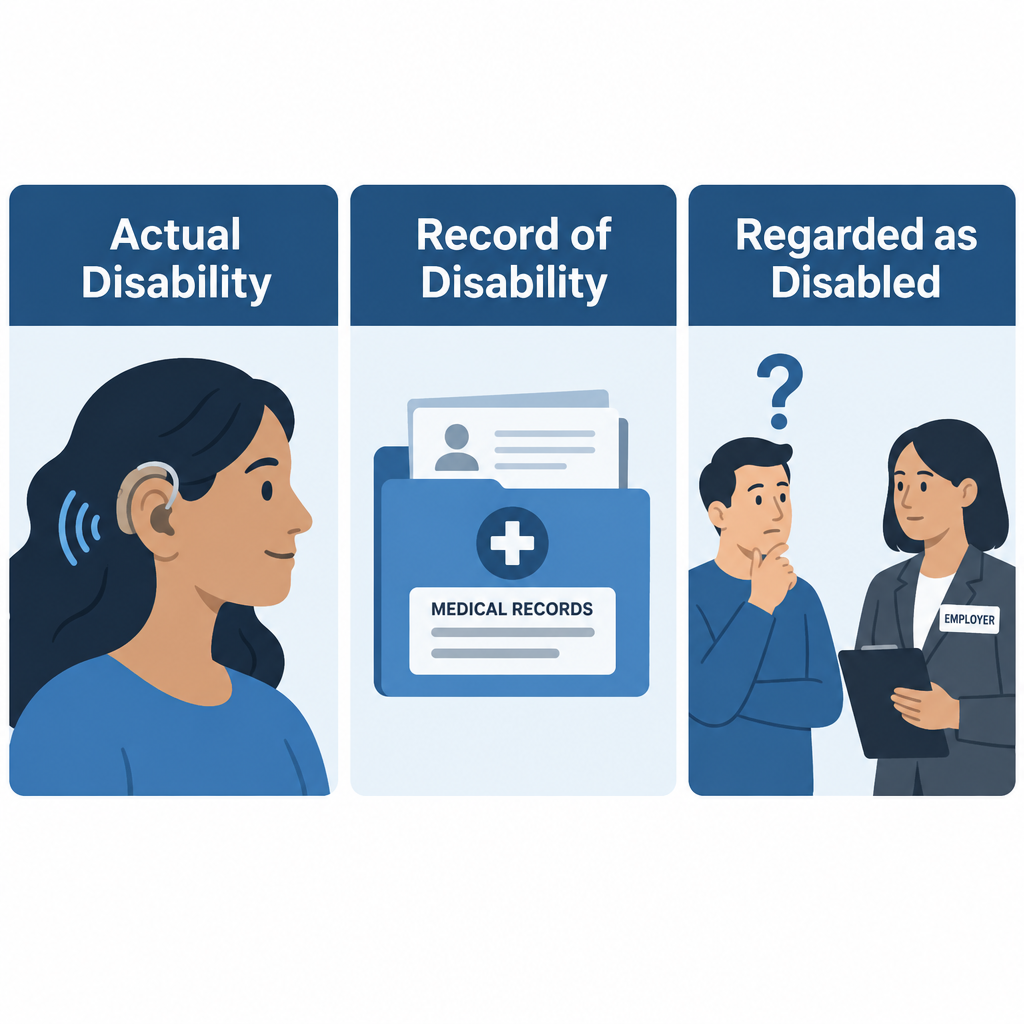
    The law uses a three-part definition of disability. A person qualifies under any one of these:

    • Actual disability: a physical or mental impairment that substantially limits one or more major life activities, such as hearing, seeing, walking, communicating or working.
    • Record of disability: a history of such an impairment, like a past cancer diagnosis.
    • Regarded as disabled: being treated as impaired, even when the person is not.

    After the Supreme Court read the definition narrowly in cases from the late 1990s and early 2000s, Congress passed the ADA Amendments Act of 2008, which took effect January 1, 2009. It told courts to interpret “disability” broadly. It also said to judge an impairment without mitigating measures. That point matters a lot for my readers. A person whose hearing loss is helped by hearing aids or a cochlear implant can still have a disability under the law. Ordinary eyeglasses and contact lenses are the one stated exception.

    The ADA also protects people who are associated with someone who has a disability, such as a parent caring for a Deaf child. The CDC estimates that about 1 in 4 U.S. adults lives with some type of disability.

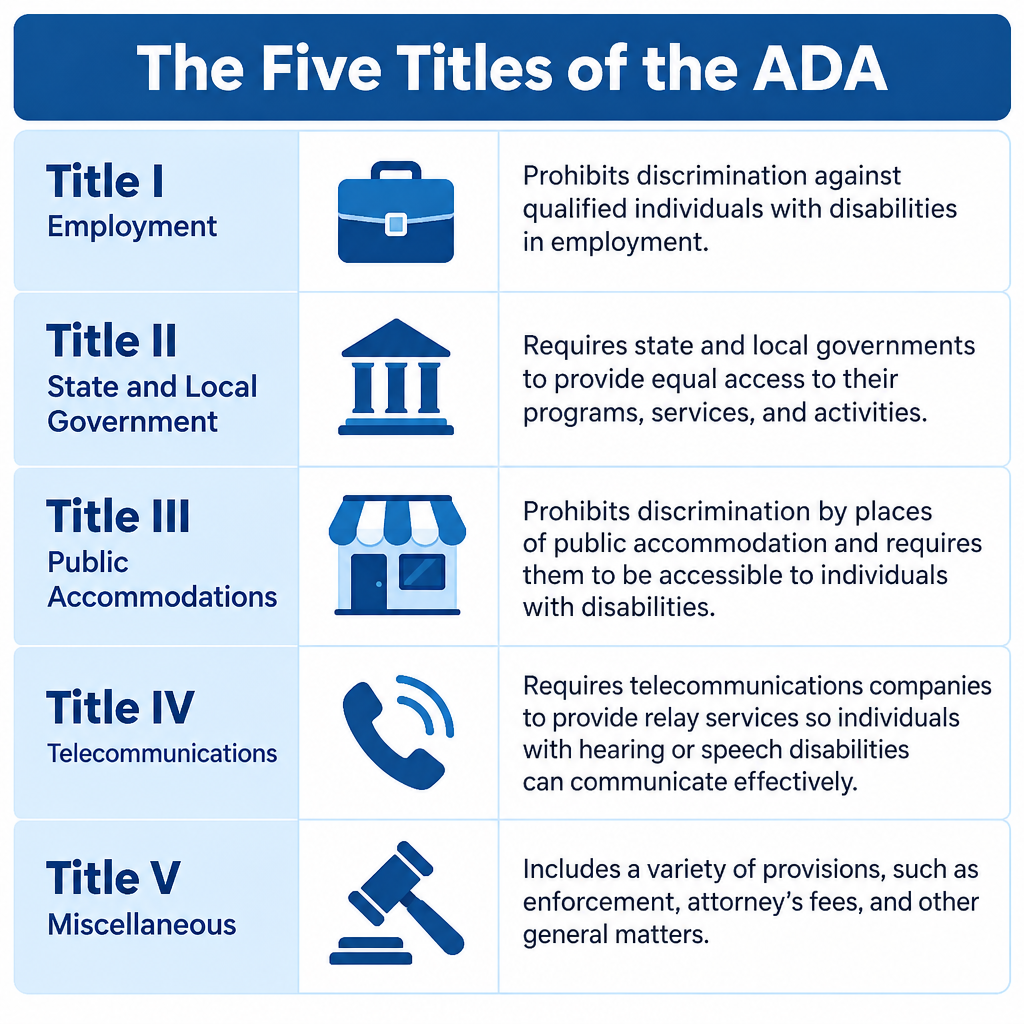
    The five titles of the Americans with Disabilities Act

    ADA Five Titles Overview Chart
    Title Covers Main enforcer Example requirement
    I: Employment Private employers with 15+ employees, state and local governments, unions, employment agencies EEOC Reasonable accommodations such as an ASL interpreter for a training session
    II: State and local government All state and local agencies, regardless of size, plus public transit Department of Justice; DOT for transit Captioned city council meetings and accessible courthouses
    III: Public accommodations Private businesses open to the public and commercial facilities Department of Justice Effective communication at hospitals, hotels, theaters and stores
    IV: Telecommunications Telephone carriers and federally funded TV public service announcements FCC Nationwide relay services
    V: Miscellaneous Applies across the whole law Varies Ban on retaliation and coercion

    Title I (Employment)

    Employers can’t discriminate in hiring, pay, promotion, training or firing against a qualified person with a disability. They have to provide reasonable accommodations unless doing so would cause “undue hardship,” meaning significant difficulty or expense. Before a job offer, an employer can’t ask whether you have a disability or require a medical exam. In my experience, the accommodation requests I see most from hard of hearing workers are captioned phones, CART for meetings and seating with clear sightlines.

    Title II (State and local government)

    Title II covers every service, program and activity of state and local governments. That includes schools, courts, police, voting, parks and public transportation. Agencies must communicate as effectively with people who have disabilities as with others. For Deaf and hard of hearing people, that can mean interpreters, captioning or assistive listening systems.

    Title III (Public accommodations)

    Restaurants, hotels, doctors’ offices, retail stores, gyms, private schools, movie theaters and similar businesses must remove barriers where it is “readily achievable.” They must also provide auxiliary aids so people can communicate effectively. Religious organizations and private clubs are exempt. A private lawsuit under Title III can win changes and attorney’s fees, but not money damages. The Justice Department can seek civil penalties. The statute set them at up to $50,000 for a first violation and $100,000 for later ones, and those caps are adjusted for inflation.

    Title IV (Telecommunications)

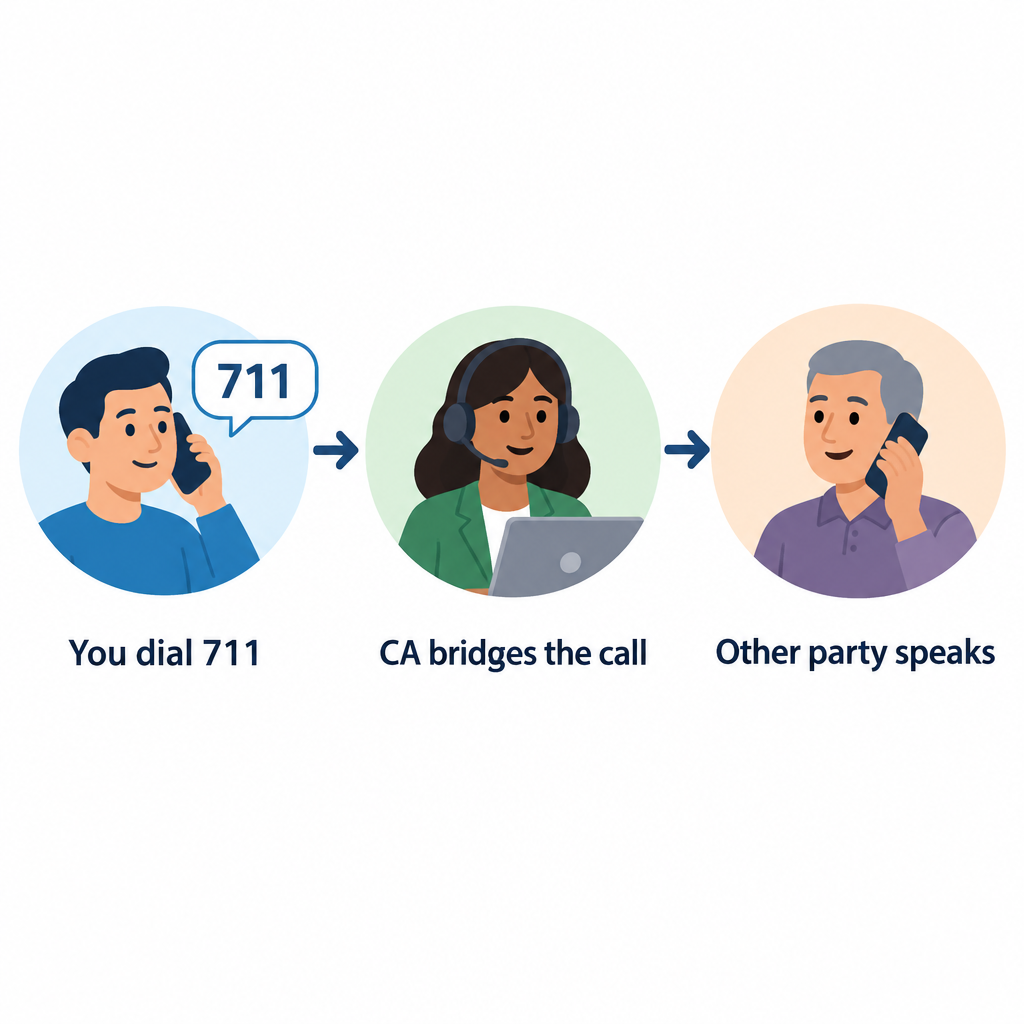
    Title IV required phone companies to offer telecommunications relay service nationwide, so people who are Deaf, hard of hearing or speech-disabled can make calls through a relay operator or text interface. Dialing 711 reaches relay anywhere in the U.S. Title IV also requires closed captioning on federally funded television public service announcements.

    Title V (Miscellaneous provisions)

    Title V holds the rules that tie everything together. It prohibits retaliation against anyone who files a complaint, and it allows courts to award attorney’s fees. It confirms that the ADA doesn’t weaken stronger state laws. It also excludes current illegal drug use from protection.

    Key dates in ADA history

    Year Milestone
    1990 President George H.W. Bush signs the ADA on July 26
    1991 Justice Department publishes the first ADA Standards for Accessible Design
    2008 ADA Amendments Act restores a broad definition of disability
    2010 Revised ADA Standards for Accessible Design adopted
    2012 2010 Standards become mandatory on March 15
    2024 DOJ final rule sets WCAG 2.1 Level AA for state and local government websites and apps

    Service animals under the ADA

    ADA Three-Part Disability Definition

    Under the ADA, a service animal is a dog individually trained to do work or perform tasks for a person with a disability. A hearing dog that alerts its handler to a doorbell or smoke alarm qualifies. Separate rules allow trained miniature horses in some cases. Emotional support animals don’t count as service animals under the ADA.

    When the need isn’t obvious, staff may ask only two questions. They can ask whether the dog is required because of a disability, and what task it has been trained to perform. They can’t demand paperwork or ask the dog to demonstrate.

    Guide to the ADA Standards: what they mean for hearing access

    The 2010 ADA Standards for Accessible Design set technical rules for buildings and facilities. One section I point readers to often is the assistive listening requirement. Assembly areas where audible communication is integral, such as courtrooms, theaters and lecture halls, must provide assistive listening systems. A set share of the receivers must work with hearing aids, typically through neckloops.

    Seating capacity Minimum receivers Hearing-aid compatible receivers
    50 or fewer 2 2
    51 to 200 2, plus 1 per 25 seats over 50 2
    201 to 500 2, plus 1 per 25 seats over 50 1 per 4 receivers
    501 to 1,000 20, plus 1 per 33 seats over 500 1 per 4 receivers
    1,001 to 2,000 35, plus 1 per 50 seats over 1,000 1 per 4 receivers
    2,001 and over 55, plus 1 per 100 seats over 2,000 1 per 4 receivers

    Hearing tip

    If your hearing aids have a telecoil, ask venue staff for a neckloop or look for the hearing loop symbol. A loop can send sound straight to your aids without a separate headset.

    Future ADA issues: web accessibility

    Digital access is the biggest open area. In April 2024, the Justice Department published a Title II rule requiring state and local government websites and mobile apps to meet WCAG 2.1 Level AA. As published, the rule set compliance dates of April 24, 2026 for governments serving 50,000 or more people, and April 26, 2027 for smaller governments and special districts. I couldn’t confirm whether those dates have been revised, so check ADA.gov for the current status. No equivalent final regulation exists for private businesses under Title III. Courts there still decide website cases one lawsuit at a time.

    How to report a disability rights violation

    Where you file depends on the title involved.

    Filing an ADA complaint

    1. For employment discrimination, file a charge with the EEOC through its online Public Portal, by phone or in person.
    2. For state or local government, businesses or public places, file through the Justice Department’s online civil rights portal, or by mail.
    3. For relay or captioning problems, file a complaint with the FCC.
    4. Keep copies of emails, names, dates and any written denials of your request.
    5. For questions before you file, call the ADA Information Line at 800-514-0301 (voice) or 833-610-1264 (TTY).

    Deadlines matter

    EEOC charges generally must be filed within 180 days, or 300 days in states with their own disability law. If you have lost a job or been denied services, talk to a disability rights attorney or your state protection and advocacy agency quickly.

    FAQ

    Is the ADA a medical law or a civil rights law?

    It is a civil rights law. It doesn’t pay for hearing aids, treatment or medical care. It requires equal access and bans discrimination.

    Does the ADA apply to small businesses?

    Title III applies to public accommodations of any size. Title I’s employment rules only apply to employers with 15 or more employees. Many state laws cover smaller employers.

    Does the ADA require businesses to provide sign language interpreters?

    They must provide effective communication. For a medical appointment or legal meeting, that often means a qualified interpreter. For a quick retail exchange, written notes may be enough. The business pays, not the customer.

    What’s the difference between the ADA and Section 504?

    Section 504 of the Rehabilitation Act covers federal agencies and programs that receive federal funds. The ADA extends similar protections to private employers, state and local governments and most businesses.

    Is hearing loss a disability under the ADA?

    It often is. Since the 2008 amendments, hearing loss is assessed without counting the benefit of hearing aids or cochlear implants. Many hard of hearing and Deaf people qualify.

  • What Closed Captioning Is and How It Works on TV and Online

    What Closed Captioning Is and How It Works on TV and Online

    Closed captioning is on-screen text that shows a program’s spoken dialogue and important sounds. “Closed” means viewers can switch it on or off, unlike open captions, which are burned into the video. Below we explain how captions are made, how they reach your TV, phone, or browser, what US law requires, and what to do when they fail.

    Last updated: October 29, 2026.

    Closed Captioning Definition and Meaning

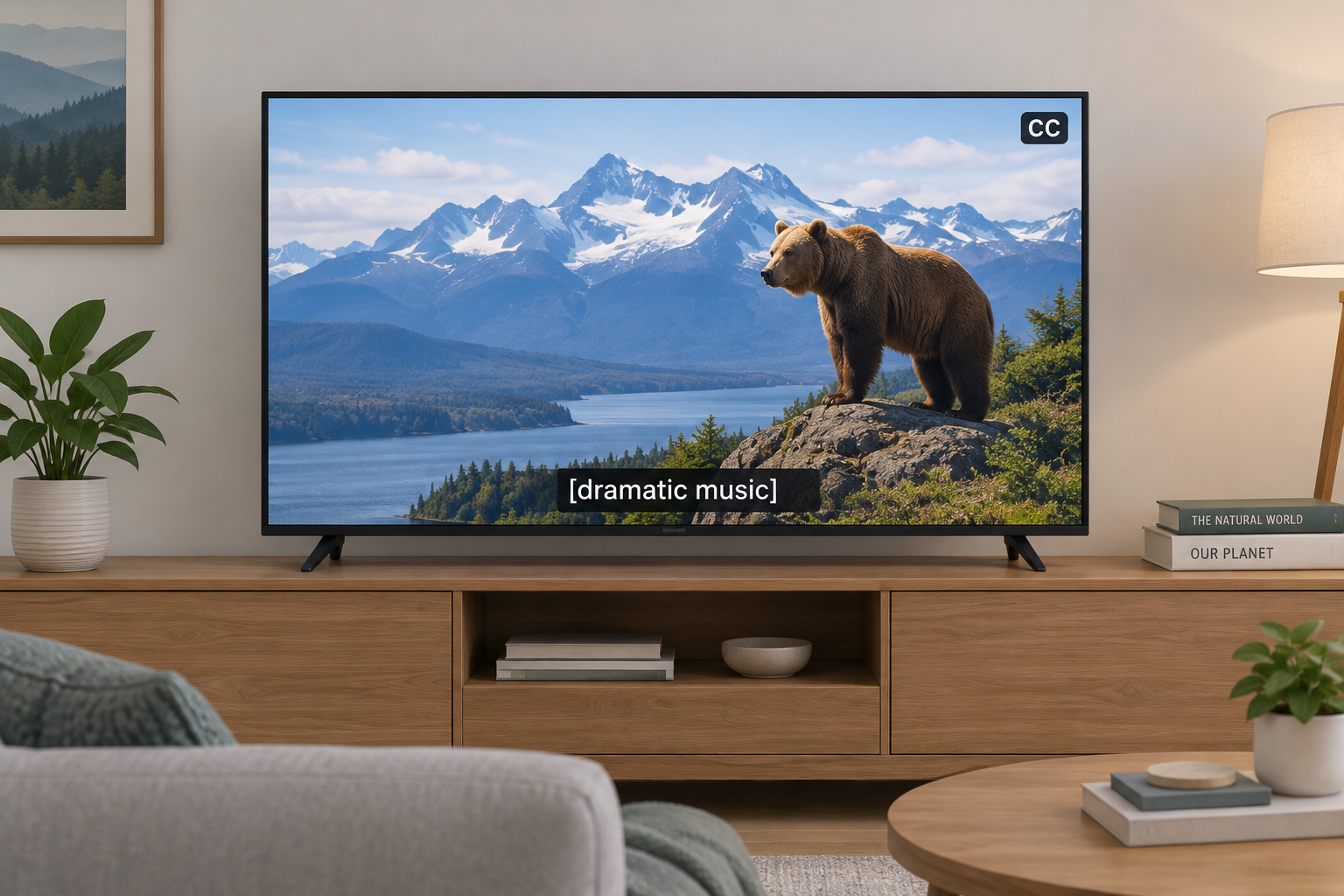
    Closed captions are a text version of a video’s audio. They cover what people say, who is saying it when that isn’t obvious, and the non-speech sounds that carry meaning: a phone ringing offscreen, [ominous music], [crowd cheering], [door slams]. That last part separates captions from simple subtitles.

    The word “closed” is about control, not content. The captioned text travels alongside the video as hidden data, and your TV or player decodes it only when you press CC or turn captions on in settings. Open captions are permanent and part of the picture itself.

    Captions began as an accessibility tool for people who are Deaf or hard of hearing, and that is still their most important job. The audience is much larger now. Captions help people watching in a loud bar or next to a sleeping baby, viewers learning English, anyone with auditory processing difficulties, and everyone who has rewound a scene to catch a mumbled line.

    Captions, Subtitles, and SDH Compared

    These terms get mixed up on streaming menus, so here is how they actually differ.

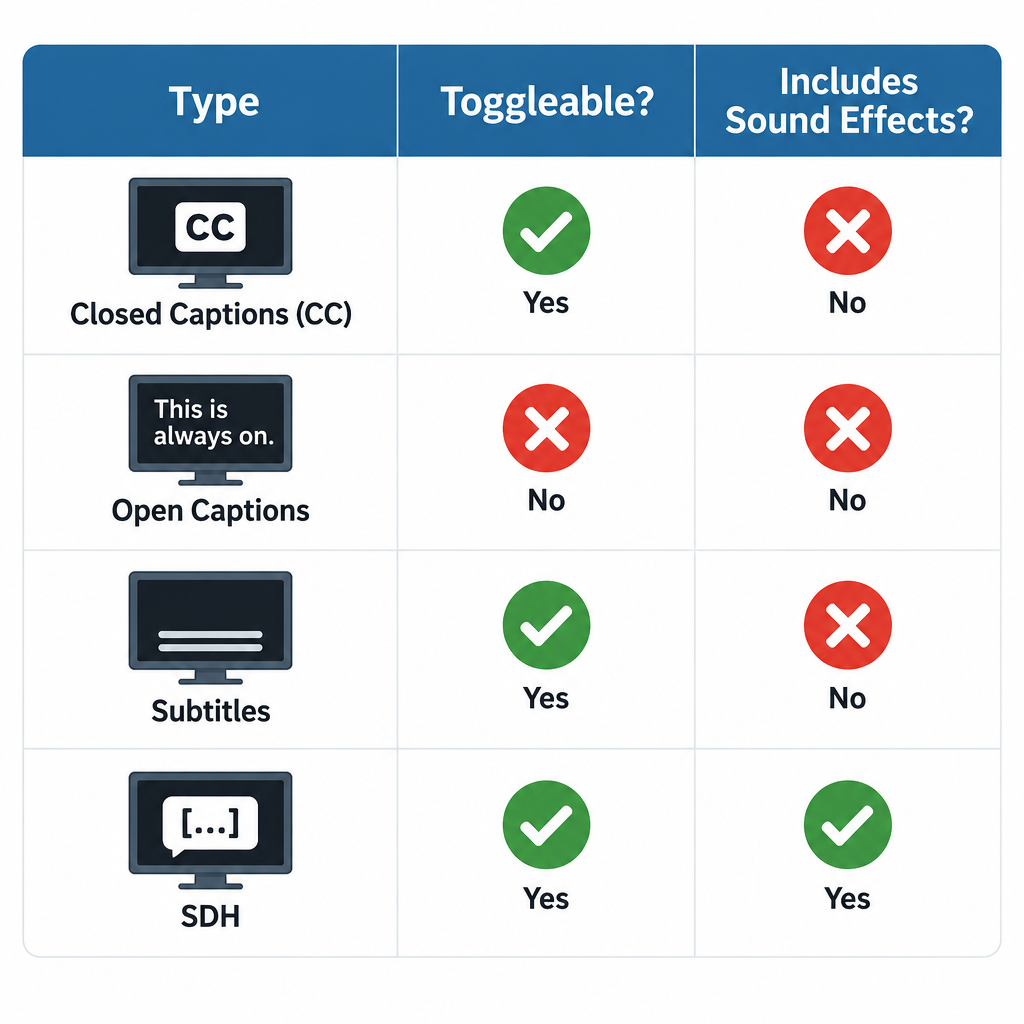
    Type Can you turn it off? Includes sound effects and speaker IDs? Main purpose
    Closed captions (CC) Yes Yes Access for Deaf and hard of hearing viewers
    Open captions No, burned into video Usually yes Access where viewers can’t control settings
    Subtitles Yes No, dialogue only Translation for hearing viewers
    SDH (Subtitles for the Deaf and Hard of Hearing) Yes Yes Caption-style text in subtitle format, common on streaming and discs
    Forced subtitles No, shown automatically No Translating brief foreign-language lines or signs

    If a streaming service offers both “English” and “English (CC)” or “English [SDH],” we recommend the CC or SDH track for anyone with hearing loss. The plain “English” track often leaves out sound cues.

    How Closed Captioning Works

    Captions vs Subtitles Comparison

    How captions are created

    There are two broad ways to produce captions, and they look different on screen.

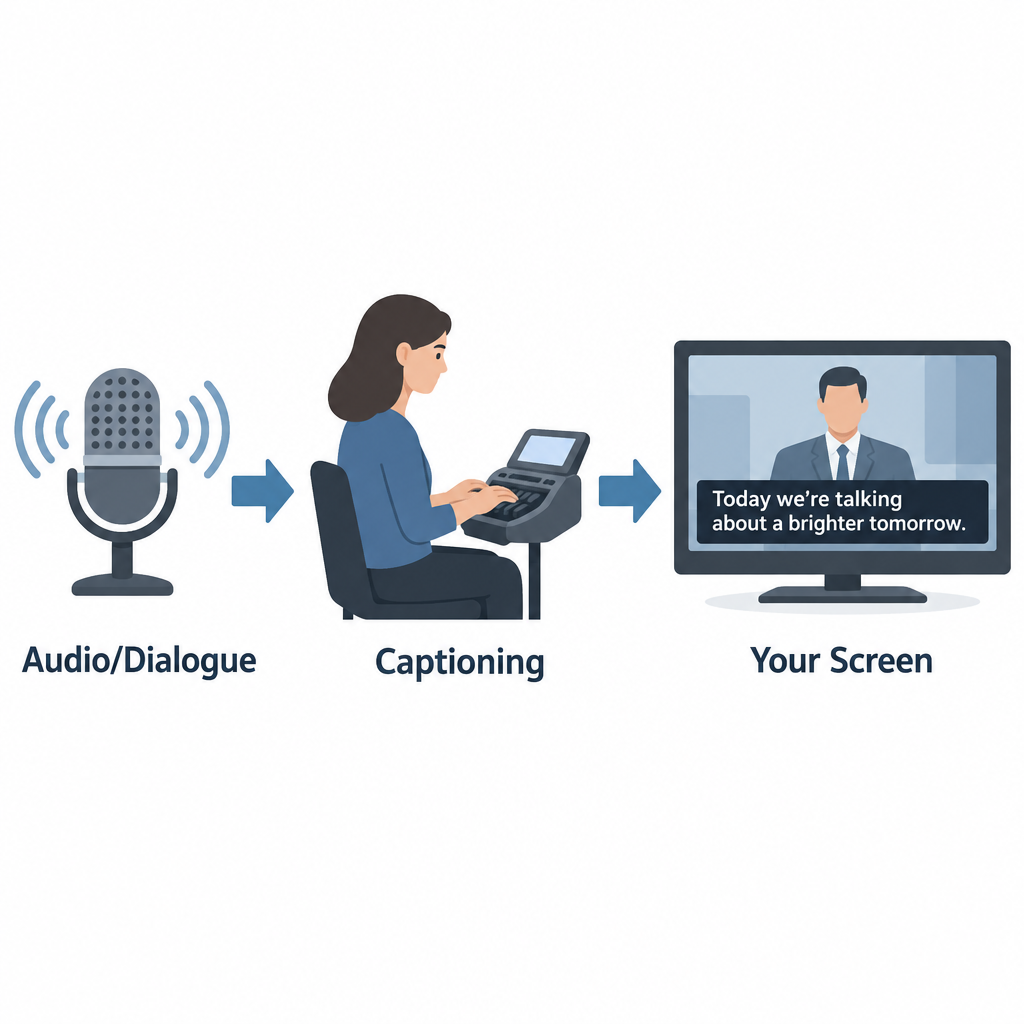
    Offline (prerecorded) captioning is done after a program is finished. A captioner transcribes the audio, times each caption to the frame, positions text so it doesn’t cover faces or on-screen graphics, and adds sound descriptions. Movies, scripted series, and most streaming content are captioned this way. Done well, offline captions are near-perfect and appear in pop-on blocks that match each line of dialogue.

    Real-time (live) captioning happens as the program airs. Trained stenocaptioners use a stenotype machine to write phonetic chords that software turns into text, often at well over 200 words per minute. Voice writers repeat the audio into speech recognition software trained on their own voice. More and more, broadcasters and platforms use automatic speech recognition (ASR) with no human in the loop. Live captions usually roll up line by line and lag a few seconds behind the speaker, which is why news and sports captions can feel delayed or contain errors.

    How captions reach your television

    Analog US television carried captions on line 21 of the vertical blanking interval, a part of the signal you never saw. That standard, now called CEA-608, allowed only basic white text on a black box.

    Digital broadcasting uses CEA-708, which travels inside the digital stream and lets viewers change font, size, color, background, and opacity. Most modern TVs, cable boxes, and streaming devices still support both, since lots of content carries legacy 608 data alongside 708.

    How captions work online

    Online video usually keeps captions in a separate text file synced to timecodes. Common formats include SRT (simple and widely supported), WebVTT (the web standard for HTML5 video), and TTML or DFXP (used by many broadcasters and streaming services). The player reads the file and draws captions over the video, which is why online caption styling depends on your app and device settings.

    A Short History of Closed Captioning in the US

    Year Milestone
    1972 PBS airs The French Chef with open captions, an early captioned national broadcast
    1980 Closed captioning debuts on ABC, NBC, and PBS; viewers need a set-top decoder
    1982 Real-time captioning makes live captioned TV possible
    1990 Television Decoder Circuitry Act passes
    1993 TVs 13 inches or larger sold in the US must include caption decoders
    1996 Telecommunications Act leads to FCC rules requiring most TV programming to be captioned
    2010 21st Century Communications and Video Accessibility Act (CVAA) signed
    2014 FCC adopts caption quality standards for TV
    2024 FCC adopts rules requiring caption display settings to be readily accessible on devices

    FCC Closed Captioning Rules

    How Captions Reach Your Screen

    In the US, the Federal Communications Commission requires most television programming to carry closed captions. This applies to broadcast stations, cable and satellite providers, and other video programming distributors. Rules cover English programming and Spanish-language programming.

    Caption quality standards

    Since 2014, FCC rules hold TV captions to four quality standards:

    • Accuracy: Captions match the spoken words, in their original language, and convey background noises and speaker identities.
    • Synchronicity: Captions appear at the same time as the matching audio, at a speed viewers can read.
    • Completeness: Captions run from the start of the program to the end.
    • Placement: Captions don’t block important visual content such as faces, on-screen text, or graphics.

    The FCC holds prerecorded programming to a higher bar than live programming, since live captioners can’t preview what’s coming.

    Captions on online video

    The CVAA extended captioning to the internet, but with a key limit. Video shown online must have captions if it aired on US television with captions. This covers full episodes on network apps and streaming services, and it now also covers clips of those shows posted online. Web-only content that never aired on TV, like most original YouTube videos, isn’t covered by these FCC rules, though other laws such as the ADA can still apply to certain organizations.

    Exempt Programming

    Not every program needs captions. The FCC exempts several categories. The main ones:

    Exemption What it covers
    Overnight hours Programming shown between 2 a.m. and 6 a.m. local time
    Short advertisements Ads under five minutes long
    Short promos and PSAs Promos, interstitials, and PSAs under 10 minutes (federally funded PSAs must be captioned)
    Small channels Channels with under $3 million in annual gross revenue
    New networks A network’s first four years of operation
    Primarily textual programs Programs where the content is already on screen as text
    Local non-news content Locally produced programming with no repeat value
    Local instructional content Instructional programming produced locally by public TV stations for students

    Distributors can also petition the FCC for an exemption if captioning would be economically burdensome. These petitions are reviewed case by case and aren’t granted automatically.

    How to Turn On Closed Captions

    Settings paths change with software updates, but these were the standard locations as of our last check.

    Device or app Where to find captions
    iPhone and iPad Settings > Accessibility > Subtitles & Captioning > Closed Captions + SDH
    Android phones Settings > Accessibility > Caption preferences (wording varies by maker)
    Apple TV Settings > Accessibility > Subtitles and Captioning
    Roku Settings > Accessibility > Captions mode
    YouTube CC button on the player, or press C on a keyboard
    Netflix Audio & Subtitles icon during playback
    Windows 11 (live captions for any audio) Press Windows + Ctrl + L

    Turn on captions on most TVs

    1. Press the CC or Subtitle button on your remote, if it has one.
    2. If not, open Settings and look for Accessibility.
    3. Select Closed Captions or Captions and set it to On.
    4. Choose CC1 for standard English captions on broadcast TV.
    5. Open Caption Style or Digital Caption Options to change size and color.

    Hearing tip

    If captions are on but you see nothing on a cable box, the TV and box may both be trying to decode them. Turn captions on in one place only, usually the cable box or streaming device, and off on the TV.

    Phones and computers now offer live captions generated on the device itself. Android’s Live Caption, iPhone’s Live Captions, Windows Live Captions, and Chrome’s Live Caption can caption almost any audio, including video calls and podcasts with no captions of their own. They’re automatic, so expect mistakes with names, accents, and crosstalk.

    Common Closed Captioning Messages and Problems

    Many people search for a “closed captioning message” after seeing something odd on screen. The most common ones:

    • “Captions not available” or a greyed-out CC button: the program has no caption track, or the app isn’t receiving it.
    • CC1, CC2, and similar options: different caption channels. CC1 is almost always the main English captions; CC2 or CC3 often carry Spanish.
    • “Captioning made possible by…”: a sponsor credit, not an error.
    • [NO AUDIO] or [INAUDIBLE]: the captioner couldn’t hear or understand the audio.
    • Garbled letters or repeated words: usually a live captioning error or a signal problem.

    Other problems we hear about often: captions running far behind dialogue, captions cutting off before a show ends, text covering the score in a sports game, and captions disappearing after a channel change or software update.

    What to Do If You Experience Closed Captioning Problems

    Start with the basics. Restart the TV and set-top box, confirm captions are on in only one device, and check whether the problem affects one channel or all of them. If one channel or program keeps failing, it’s a distributor problem, not your equipment.

    Filing a complaint or seeking assistance

    For TV captioning problems in the US, you can complain either to your video programming distributor (your cable, satellite, or streaming TV provider) or directly to the FCC. Distributors are required to publish contact information for captioning complaints, often on their website and billing statements.

    File within 60 days of the problem. Include the channel, program name, date and time, your provider, and a description of what went wrong. A distributor that receives your complaint generally must respond within 30 days. Complaints to the FCC go through its Consumer Complaint Center, which accepts complaints online and by phone, and the agency also takes complaints in ASL by video call.

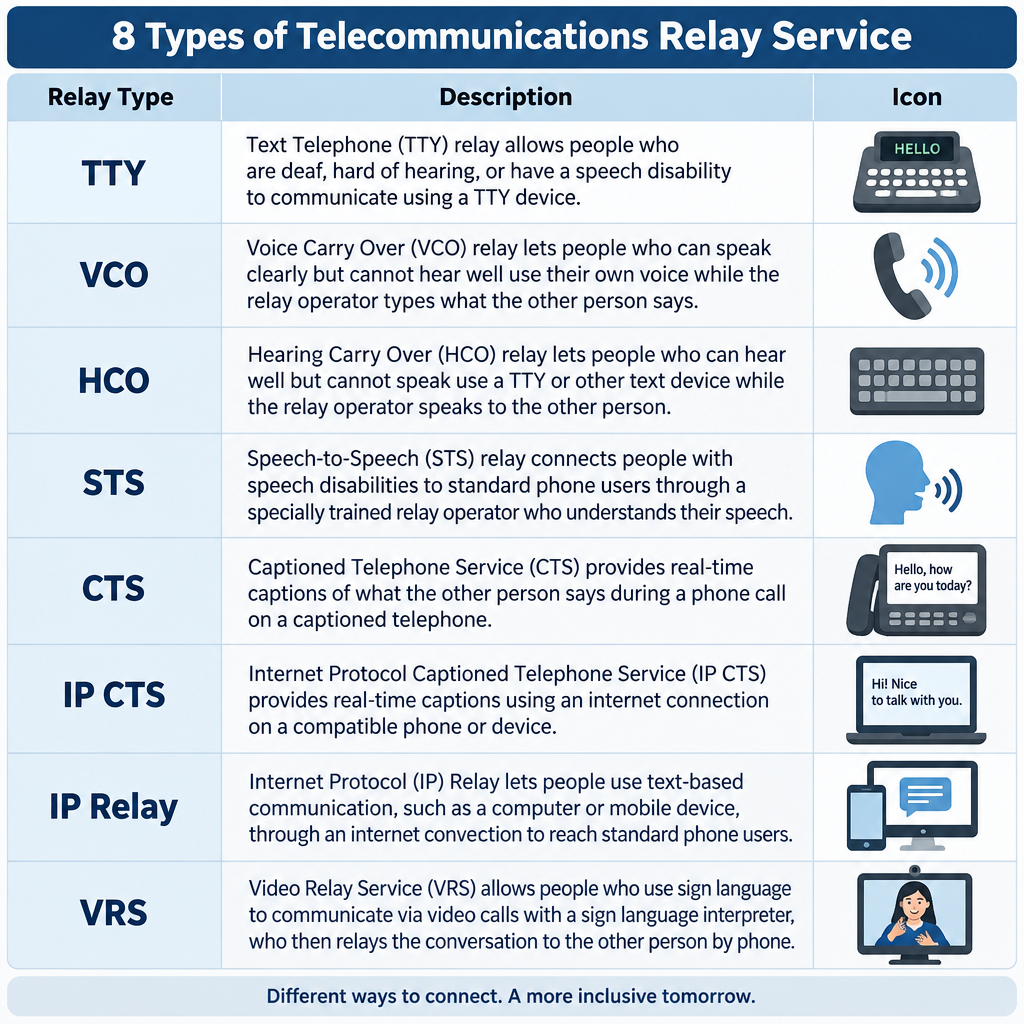
    For captioned phone calls, which follow separate rules, the right route is telecommunications relay service, including captioned telephone services.

    Who Benefits From Closed Captioning

    For people who are Deaf or hard of hearing, captions are often the difference between full access to a program and guessing. Many people with hearing aids or cochlear implants use captions too, because TV audio mixes music, effects, and quick dialogue in ways that are hard to follow even with good amplification.

    See a professional

    If you notice you suddenly need captions to follow speech you used to hear easily, book a hearing test with an audiologist. Sudden hearing loss in one or both ears is a medical emergency, so see a doctor the same day.

    How Closed Captioning Will Evolve

    Automatic speech recognition is reshaping captioning quickly. It’s cheap and instant, so far more content now has captions than ever before. Quality is the catch. ASR still struggles with names, technical terms, overlapping speakers, and accented speech, and it rarely adds meaningful sound descriptions without human editing.

    We expect the best results to keep coming from hybrid workflows, where ASR drafts and trained captioners correct. On the device side, the FCC’s 2024 order on readily accessible caption settings should make it easier to find and customize captions without digging through menus. Broadcast standards are moving too, with ATSC 3.0 (NextGen TV) supporting more flexible caption formats.

    FAQ

    What does closed captioning mean?

    It means on-screen text showing a program’s dialogue and important sounds that viewers can turn on or off. “Closed” refers to that on-off control.

    What is the difference between closed and open captioning?

    Closed captions are hidden until you activate them. Open captions are burned into the video and appear for everyone, with no way to hide them.

    Are subtitles the same as closed captions?

    No. Subtitles usually show dialogue only and assume the viewer can hear. Closed captions also describe sound effects, music, and who is speaking.

    Why are live TV captions delayed and full of errors?

    Live captions are created in real time by stenocaptioners, voice writers, or speech recognition software. They can only caption what they’ve already heard, which adds a lag of a few seconds and leaves no time to fix mistakes.

    Does every online video have to be captioned?

    No. FCC rules require captions on online video only if it aired on US television with captions. Other laws can require captions for specific organizations, such as government agencies and some businesses.

    Is closed captioning free to use?

    Yes. Viewers pay nothing extra to turn on captions on TV, streaming services, or built-in phone and computer features.

  • What Is Telecommunications Relay Service and How It Works

    What Is Telecommunications Relay Service and How It Works

    A telecommunications relay service (TRS) lets people who are Deaf, hard of hearing, DeafBlind or who have a speech disability make phone calls through a trained communications assistant. The assistant converts text, captions, speech or sign language into a form the other caller can use. In the United States, relay is free to use, available 24 hours a day, and you can reach traditional relay by dialing 7-1-1.

    Last checked: October 29, 2026

    TypeFederal phone accessibility service
    Cost to userFree relay service
    AccessDial 711 or app
    Hours24/7, every day
    Overseen byFCC

    What a relay service actually does

    A relay service places a person in the middle of the call. That person is a communications assistant (CA), sometimes called an operator, and their job is to pass your words along as accurately as possible.

    Here is a basic example. You type, “Hi, I’d like to book a table for two at 7.” The CA reads it aloud to the restaurant. When the host answers, the CA types the reply back to you. The call moves in turns, and many users type “GA” (go ahead) to signal that it’s the other person’s turn.

    Title IV of the Americans with Disabilities Act created the nationwide telephone relay services system in 1990. The FCC sets the rules. Interstate and internet-based relay is paid for by a federal fund, and each state runs its own local relay program for calls within the state.

    The 8 main types of relay service

    Phone relay service is a family of services. The right one depends on how you hear, speak and prefer to communicate.

    Relay type How you communicate Typical equipment
    TTY (text-to-voice) You type, CA voices and types replies TTY or computer
    Voice Carry Over (VCO) You speak, read the other side’s replies as text VCO phone or TTY
    Hearing Carry Over (HCO) You type, listen to the other person directly TTY plus listening
    Speech-to-Speech (STS) CA repeats your speech clearly for the listener Any phone
    Captioned Telephone (CTS) You talk and listen, read captions of replies Captioned phone, such as CapTel
    Internet Protocol Captioned Telephone (IP CTS) Same as CTS, over the internet App or captioned phone
    IP Relay Text relay through a web browser or app Computer or smartphone
    Video Relay Service (VRS) You sign with an interpreter on video Videophone, app, or computer

    Federal rules also require interstate relay in Spanish, and many states offer it locally.

    Captioned telephone and CapTel

    Captioned telephone is the most common choice for people with acquired hearing loss who still speak clearly. You talk normally and hear what you can, while captions of the other person’s words appear on a screen. CapTel is a well-known brand of captioned phone, and IP CTS apps put the same feature on smartphones and tablets. To get IP CTS, you have to certify that you have a hearing loss that makes captions necessary. Free equipment programs usually also ask for a signature from a hearing professional.

    Video Relay Service and ASL

    VRS connects you by video to a qualified American Sign Language interpreter. You sign, and the interpreter speaks to the hearing party, then signs their reply back to you. For many Deaf people whose first language is ASL, this is far faster and more natural than typing in English. VRS users get a standard ten-digit phone number, so hearing people can call them like anyone else.

    How to make a relay call with 7-1-1

    8 Types of Relay Service Chart

    Any hearing person can call a relay user. You do not need special equipment.

    Calling through 711

    1. Dial 711 from any landline or mobile phone in the US.
    2. Tell the CA you want to place a relay call.
    3. Give the phone number of the person you’re calling.
    4. Speak directly to that person, using “you” rather than “tell her.”
    5. Say “go ahead” when you finish each turn.
    6. Stay patient during pauses while the CA types or relays.

    To reach someone who uses VRS, just dial their ten-digit number. The call routes to an interpreter automatically.

    Hearing tip

    Don’t hang up when a relay call starts with a short introduction about relay. Legitimate businesses lose real customers this way, especially at reservation desks and doctor’s offices.

    Rules that protect relay users

    FCC rules give relay callers real protections:

    • Confidentiality. CAs cannot share the content of calls or keep records after the call ends.
    • Verbatim relay. CAs must pass along everything said, without editing or adding opinions.
    • Speed standards. Traditional TRS must answer 85% of calls within 10 seconds, and CAs must type at least 60 words per minute.
    • No extra cost. You should never pay more for a relay call than for the same voice call.
    • Any call, any purpose. Relay handles calls to banks, doctors and employers, as well as conference calls and long distance numbers.

    Emergencies and 911

    Dial 711 Relay Call Flow

    You can call 911 through VRS, IP Relay and IP CTS, and these services are required to route you to the right emergency center. A direct TTY call to 911, or text-to-911 where your area supports it, is often faster than going through 711.

    See a professional

    If your hearing drops suddenly in one or both ears, treat it as a medical emergency and get seen the same day. Ongoing changes in hearing are worth an audiologist visit before you choose captioned phone equipment.

    Finding your state’s relay program

    Each state has its own relay provider, customer care line and often a free equipment distribution program for TTYs, amplified phones and captioned phones. Your state’s commission for the deaf and hard of hearing, or its public utility commission, will list the current provider and how to request equipment.

    FAQ

    What is a relay service in simple terms?

    It’s a phone service where a trained assistant helps two people talk when one of them can’t hear or speak on a standard call. The assistant turns speech into text, captions or sign language and back again.

    Is telecommunications relay service free?

    Yes. The relay itself costs you nothing, and you pay no more for the call than a hearing person would. VRS and IP CTS apps are free to download, though you need your own internet or data plan.

    Can a hearing person use relay to call a Deaf person?

    Yes. Dial 711 for text-based relay, or call a VRS user’s ten-digit number directly.

    Does the operator listen to my private calls?

    The CA does hear or read the call in order to relay it. However, the CA is legally bound to keep it confidential and cannot keep a record of what was said after the call ends.

    Can I use relay for work conference calls?

    Yes. VRS and captioning services can join conferencing calls. Ask your provider how to add an interpreter or captions before a long meeting so the session isn’t interrupted.

  • How to Sign More Than, Divide, Square and Approximately in ASL

    How to Sign More Than, Divide, Square and Approximately in ASL

    To sign “more than” in ASL, hold your non-dominant hand flat with the palm down, rest your dominant flat hand on top of it, then lift the dominant hand up and slightly forward so it rises over the base. This guide covers that sign along with less than, divide, square, squared, square root and approximately, and explains how each one maps to the written math symbol.

    Last updated: October 29, 2026

    TopicASL math vocabulary
    Signs covered10 core signs
    LevelBeginner to intermediate
    Best forStudents, parents, tutors

    What the math symbols mean before you sign them

    You can only sign a concept clearly if you understand it, so here is the math first.

    The greater-than symbol (>) means the value on the left is bigger than the value on the right. The less-than symbol (<) means the left value is smaller. In both cases, the open side faces the bigger number and the pointed tip faces the smaller one. So 9 > 4 reads “nine is greater than four,” and 4 < 9 reads “four is less than nine.”

    Those two statements say the same thing. Flipping the numbers to opposite sides also flips the symbol. That matters in ASL, because signers often rearrange a statement for clarity, and you need to keep the meaning intact when you do.

    The other symbols in this guide work like this:

    • ÷ (divide): splits a number into equal parts. 12 ÷ 3 = 4.
    • ² (squared): multiplies a number by itself. 5² = 25.
    • √ (square root): undoes squaring. √25 = 5.
    • ≈ (approximately equal): the values are close but not exact. π ≈ 3.14.

    How to sign more than in ASL

    The sign most often used for “more than” in a comparison is the same sign that means EXCEED or OVER, in the sense of going past a level.

    • Handshape: Both hands flat, fingers together. Some signers bend the fingers slightly at the knuckles.
    • Location: In front of your chest, in neutral signing space.
    • Movement: Your dominant hand starts resting on the back of your non-dominant hand, palms down. Lift the dominant hand upward in a small arc, ending above and a little in front of the base hand.

    The base hand represents the comparison point. The rising hand shows something going past it. That picture makes the sign easy to remember.

    More than vs. MORE

    Learners mix these up constantly. The everyday sign MORE (as in “more food, please”) uses two flat-O hands, fingertips pinched to the thumbs, tapping together in front of you. That sign means “additional.” It does not compare two values. If you are signing 9 > 4, use the rising-hand sign, not MORE.

    Hearing tip

    Let your face carry the size of the gap. A small rise with a neutral face suggests “a bit more than.” A bigger rise with puffed cheeks suggests “way more than.” Non-manual markers like these are part of ASL grammar, so they belong in your signing.

    How to sign less than

    ASL Math Signs Quick Reference Chart

    Less than mirrors more than. Start with the same two flat hands, palms down, dominant hand resting on the back of the base hand. Then move the dominant hand downward, dropping past the edge of the base hand so it ends below it.

    You will also see the plain sign LESS, where the dominant hand starts above the base hand and lowers toward it without passing it. Both show up in classrooms. If your teacher or interpreter uses one consistently, match them.

    Using space to sign a full comparison

    Here is where ASL differs from spoken English. You do not have to sign “nine is greater than four” word by word. Many signers set up the values in space first, then compare them.

    For 9 > 4, you might sign NINE and place it on your left, sign FOUR and place it on your right, then sign MORE-THAN starting from the nine’s side. The location does the work that word order does in English.

    This also makes changing sides painless. If you placed the values once, you can point back to either one and sign LESS-THAN or MORE-THAN without restating the numbers.

    How to sign divide

    • Handshape: Both hands flat, palms facing down or angled slightly toward each other.
    • Location: In front of your chest.
    • Movement: Cross your hands so the pinkie edge of your dominant hand rests across the index-finger edge of your base hand, making an X shape. Then pull both hands apart, moving down and out to the sides.

    The motion looks like breaking something into pieces, which is why the same sign also covers SPLIT and SEPARATE in everyday conversation. For “12 divided by 3,” sign TWELVE, DIVIDE, THREE.

    In written-math contexts, some teachers instead trace the ÷ symbol in the air with an index finger: a short horizontal line, a dot above, a dot below. That is handy when a student needs to copy notation onto paper exactly.

    How to sign square, squared and square root

    “Square” covers three different ideas in math, and each one has its own sign.

    Square (the shape)

    Both index fingers touch at the top center in front of you. Pull them apart horizontally, drop them straight down, then bring them back together at the bottom. You have traced the outline of a square. RECTANGLE uses the same motion with a wider horizontal pull.

    Squared (the exponent)

    To sign x² or 5², sign the base first, then sign the number TWO raised higher and slightly to the side, often with a small upward flick. The raised position echoes the small superscript in written math. CUBED follows the same pattern with THREE.

    Square root

    Most signers draw the radical symbol (√) with the index finger: a short tick down, a longer stroke up, then a line across the top. Then sign the number that sits under it. “Square root of 25” becomes the traced √ followed by TWENTY-FIVE.

    How to sign approximately

    • Handshape: Open hand, either a flat hand or a 5 hand with fingers spread.
    • Location: Near your dominant shoulder, palm facing out.
    • Movement: Make a few small circles.

    This sign covers APPROXIMATELY, ABOUT, ROUGHLY and AROUND in the sense of estimating. Sign it right before the number: APPROXIMATELY FIFTY. A slight squint or tilted head adds to the “give or take” feel.

    For the ≈ symbol in a formula, signers either use this sign or trace two wavy lines in the air.

    Quick reference: core math signs

    Concept Handshape Location Movement
    More than Two flat hands Chest height Dominant hand rises off the base hand
    Less than Two flat hands Chest height Dominant hand drops below the base hand
    Divide Two flat hands, crossed Chest height Hands pull apart, down and out
    Square (shape) Two index fingers In front of chest Trace a square outline
    Squared (x²) Number 2 handshape Raised, to the side Small upward flick after the base
    Square root Index finger In front of chest Trace the √ symbol
    Approximately Flat or 5 hand, palm out Near shoulder Small circles
    Equal Two bent hands, palms down Chest height Tap fingertips together

    Related signs you will need with these

    Inequalities rarely appear alone. These signs fill out most middle-school and algebra work.

    Symbol Meaning How it is commonly signed
    = Equal Two bent hands, palms down, fingertips tap together
    ≠ Not equal NOT, then EQUAL, or trace = with a slash
    ≥ Greater than or equal to MORE-THAN, OR, EQUAL, or trace the symbol
    ≤ Less than or equal to LESS-THAN, OR, EQUAL, or trace the symbol
    + Plus Two index fingers cross to form a plus sign
    − Minus Dominant index finger placed against the base palm
    × Times Two V hands, dominant V brushes across the base V

    Check your classroom's conventions

    Math signs vary by region, school and interpreter. Students taking exams with an interpreter should agree on sign choices for symbols in advance so nothing gets lost in translation.

    A worked example: signing an algebra inequality

    Take the problem x + 3 > 7.

    1. Sign or fingerspell X, sign PLUS, sign THREE.
    2. Sign MORE-THAN.
    3. Sign SEVEN.

    Now solve it. Subtract 3 from both sides and you get x > 4. Sign X, MORE-THAN, FOUR.

    The tricky part comes when you multiply or divide by a negative number. Inequalities flip when that happens. If −2x > 6, dividing both sides by −2 gives x < −3. In ASL, emphasize that switch. Many tutors sign the original MORE-THAN, sign a clear FLIP or CHANGE, then sign LESS-THAN. Seeing the hands literally reverse direction helps the rule stick.

    A real-life example: cutting rope

    Say you have a 10-foot rope and need pieces longer than 3 feet. How many can you cut?

    Signed naturally, that might go: ROPE TEN FOOT. NEED PIECE MORE-THAN THREE FOOT. HOW-MANY?

    The answer is 3 pieces at most, because 10 ÷ 3 ≈ 3.3, and each piece has to exceed 3 feet. Three pieces of about 3.3 feet each works. Four pieces would leave each one at 2.5 feet, which fails the test. That one problem uses MORE-THAN, DIVIDE and APPROXIMATELY together, which makes it great practice.

    How to remember greater than and less than

    Two tricks work well, and one ties directly to ASL handshapes.

    • The hungry mouth. The open side of the symbol always “eats” the bigger number. Kids often draw it as an alligator.
    • The left-hand L. Hold up your left hand with thumb and index finger extended in an L, then tilt it slightly. It looks like <, and L stands for Less than. Your right hand makes a backward L that resembles >.

    Typing the symbols when you write math notes

    Deaf and hard of hearing students often rely on text: chat with an interpreter, captioned lectures, shared notes. Being able to type these symbols quickly saves time.

    Symbol Unicode Windows Alt code (numpad) Mac shortcut
    > U+003E Alt+62 Shift+period
    < U+003C Alt+60 Shift+comma
    ≥ U+2265 Alt+242 Option+period
    ≤ U+2264 Alt+243 Option+comma
    ≈ U+2248 Alt+247 Option+X
    ÷ U+00F7 Alt+246 Option+slash
    √ U+221A Alt+251 Option+V
    ² U+00B2 Alt+253 Character Viewer

    In Microsoft Word, you can also type the Unicode number (for example, 2265) and press Alt+X to convert it to the symbol.

    Practice tips that actually work

    • Drill pairs, not singles. Practice MORE-THAN and LESS-THAN back to back so the direction becomes automatic.
    • Use real numbers. Sign comparisons from your day: prices, temperatures, game scores.
    • Record yourself. Check that your dominant hand clearly rises or drops, and that your face matches the size of the difference.
    • Learn from STEM sources. Projects like ASL Clear and ASLCORE focus on academic and technical vocabulary signed by Deaf content experts.
    • Sign homework aloud. Talking through each step in ASL forces you to understand the math and the grammar at once.

    Hearing tip

    Pick one version of each sign and stay consistent for a few weeks. Switching between variants too early slows down both your math and your signing.

    FAQ

    Is the sign for more than the same as the sign for MORE?

    No. MORE (flat-O hands tapping) means “additional.” The comparison sign uses flat hands, with the dominant hand rising off the base hand. Use the rising sign whenever you compare two values.

    How do you sign greater than or equal to?

    Most signers sign MORE-THAN, then OR, then EQUAL. In a written-math context, tracing the ≥ symbol in the air is also common and avoids ambiguity.

    Does ASL have one standard set of math signs?

    Not fully. Core signs like EQUAL, PLUS and DIVIDE are widely shared, but symbols like ≈, exponents and square roots vary between schools and regions. Ask your teacher or interpreter which version they use.

    How do you sign “about” for a time, like “about 3 o’clock”?

    Use the same APPROXIMATELY sign (open hand, palm out, small circles near the shoulder), then sign the time.

    Is DIVIDE the same sign as SPLIT?

    Yes, the same crossed-hands movement covers DIVIDE, SPLIT and SEPARATE. Context tells the viewer which meaning you intend.

  • Disney Cruise Line adds haptic vests at silent discos for deaf and hard-of-hearing guests

    Disney Cruise Line adds haptic vests at silent discos for deaf and hard-of-hearing guests

    Disney Cruise Line is adding haptic vests to the silent disco on every ship in its fleet, aimed at guests who are deaf or hard of hearing. Disney Experiences confirmed the news in an official announcement on October 27, 2026, alongside new braille and tactile guidebooks for guests with visual disabilities. For many deaf and hard-of-hearing travelers, the bigger question is what this update does and does not cover.

    Haptic vestsCONFIRMED (A), Disney Experiences says they are at the silent disco on all ships
    Braille and tactile guidebooksCONFIRMED (A), Disney Experiences says they are available fleetwide on request
    Captioning and assistive listeningCONFIRMED (A), Disney Experiences lists both as existing offerings
    Vest vendor, cost and quantityNOT ANNOUNCED (A), Disney's press release did not specify
    Visual alerts and interpreter supportCONFIRMED (A), longstanding Disney Cruise Line services through Special Services

    What we know

    Disney Experiences confirmed that the haptic vests are wearable devices that turn music and sound effects into physical sensations. Disney says they are available at the silent disco on all Disney Cruise Line ships and are intended for guests who are deaf or hard of hearing.

    The second new feature is a set of braille and tactile guidebooks for guests with visual disabilities. Disney confirmed they are available fleetwide on request, including at Guest Services, Disney Castaway Cay and Disney Lookout Cay at Lighthouse Point in The Bahamas. Disney’s press material describes the guidebooks as including tactile maps.

    Disney’s announcement also lists the existing offerings these features join. Two of them matter most for hearing access: captioning on Funnel Vision, the outdoor screen, and assistive listening systems. The list also includes accessible staterooms and an accessible transfer option at AquaMouse on Wish-class ships.

    What we don’t know yet

    Disney’s press release leaves several practical questions open. It does not name the company that makes the vests. It does not say whether they cost extra, and it does not say how many are available per ship. If only a handful exist on each sailing, availability on a busy disco night could be a real concern.

    Two things many deaf and hard-of-hearing guests ask about first, visual alerts and sign language interpreter support, are longstanding Disney Cruise Line services. Disney’s Special Services form covers stateroom communication kits with visual alerts, such as flashing door knockers, strobe smoke detectors and bed shakers, and ASL interpretation has been available for years.

    We also found no independent testing or effectiveness data on the vests. Our search turned up no statements from the FDA, NIDCD, HLAA or NAD about them.

    One more item comes secondhand. Laughing Place reports that Consumer Reports gave Disney Cruise Line a 5/5 accessibility rating earlier in 2026. Copdaz Hearing has not verified that rating with Consumer Reports directly.

    What it means

    Haptic vests are a fun, inclusive idea for a specific setting. A silent disco already delivers music through headphones, which leaves out many guests with significant hearing loss. A vest that lets you feel the beat gives those guests a way to join the dance floor instead of watching from the side.

    It helps to keep expectations clear. These vests are an experiential feature, not a medical device or treatment, and Disney does not present them as one. They will not improve your hearing, and they do not replace captioning, assistive listening or interpreters for things like shows, safety briefings and announcements.

    For deaf and hard-of-hearing travelers, the confirmed picture right now looks like this: vests at the silent disco, captioning on Funnel Vision, assistive listening systems, and stateroom visual alert kits and ASL interpretation through Special Services. Everything else you might need is a question to ask before you book.

    If you are planning a cruise, contact Disney Cruise Line Special Services before sailing to confirm the accommodations you need. Ask specifically about visual alerts in your stateroom, interpreter availability for shows and briefings, and whether you should reserve a haptic vest. If you have questions about your own hearing or which assistive technology suits you best, an audiologist is the right person to see.