Blog

  • What Is Auracast and How Broadcast Audio Helps Hearing Loss

    What Is Auracast and How Broadcast Audio Helps Hearing Loss

    Auracast is a Bluetooth feature that lets one audio source, such as a TV, a PA system or a phone, broadcast sound to an unlimited number of nearby earbuds, headphones and hearing aids at the same time. For people with hearing loss, it means you can stream a gate announcement, a lecture or a gym TV directly into your own hearing aids, with your own settings, without borrowing a receiver or wearing a neckloop.

    Last updated: October 29, 2026

    TypeBluetooth broadcast audio
    Built onBluetooth LE Audio
    Listeners per streamUnlimited
    Introduced2022 by Bluetooth SIG
    Best forVenues, TVs, sharing

    What is Auracast?

    Auracast is the consumer name the Bluetooth Special Interest Group (SIG) gave to broadcast audio in June 2022. The SIG is the industry body that writes the Bluetooth standards, so Auracast is an open standard rather than one company’s product. Any manufacturer can build it into a device.

    It runs on Bluetooth LE Audio, the newer generation of Bluetooth audio the SIG announced in 2020. Classic Bluetooth audio, the kind most of us have used for years, connects one source to one listening device in a private pairing. Auracast removes that limit. A transmitter sends out a stream, and anyone with a compatible receiver in range can tune in, much like picking a station on a radio.

    The SIG frames Auracast around three everyday uses:

    • Share your audio: two or more people listen to the same phone or tablet on their own earbuds or hearing aids.
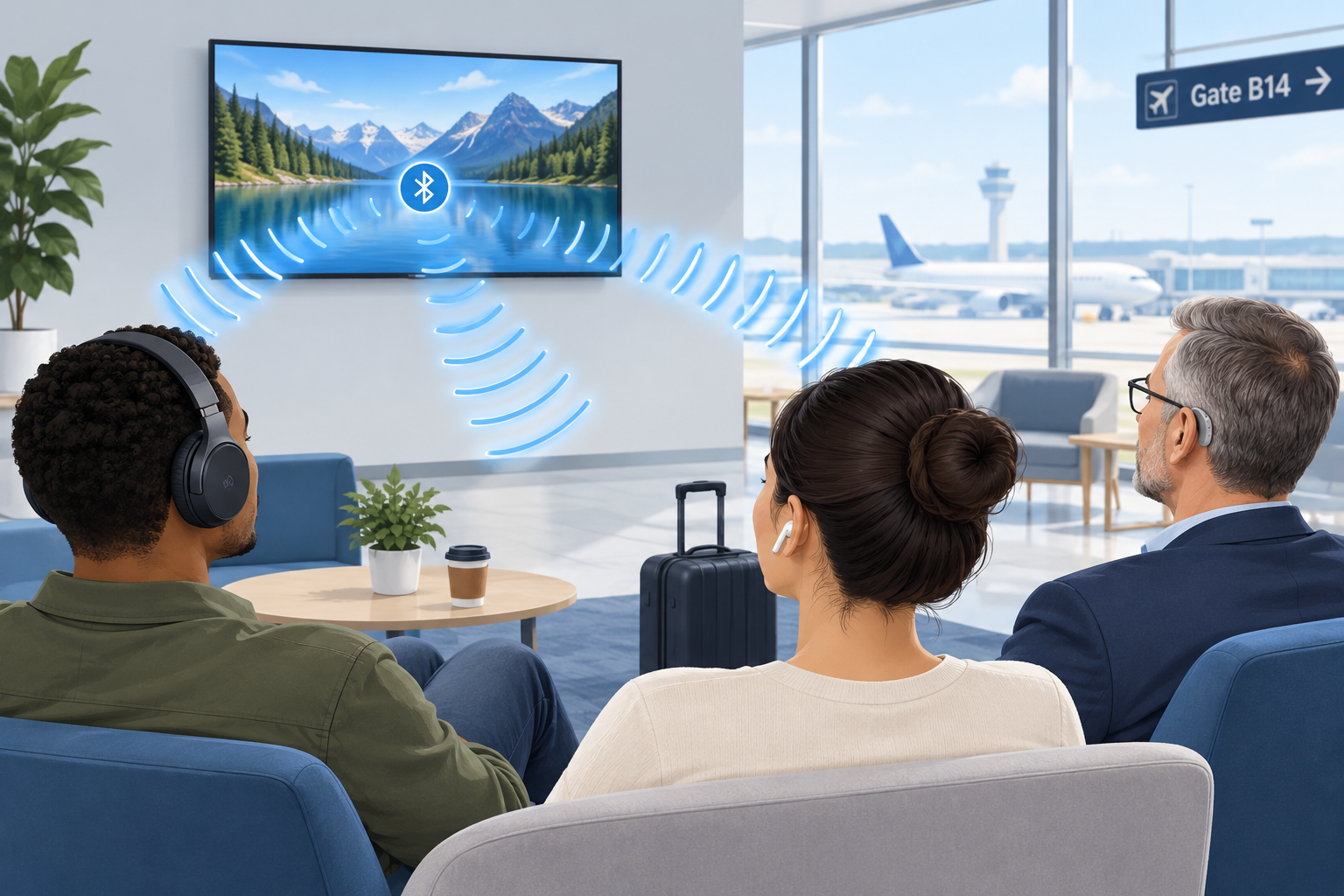
    • Unmute your world: silent TVs in bars, gyms, airports and waiting rooms broadcast their sound to anyone who wants it.
    • Hear your best: venues such as theaters, lecture halls, places of worship and conference centers stream speech directly to visitors’ hearing devices.

    That third category is the one with the biggest implications for people who are hard of hearing. It could eventually replace a lot of the clunky assistive listening hardware venues hand out today.

    How Auracast broadcast works

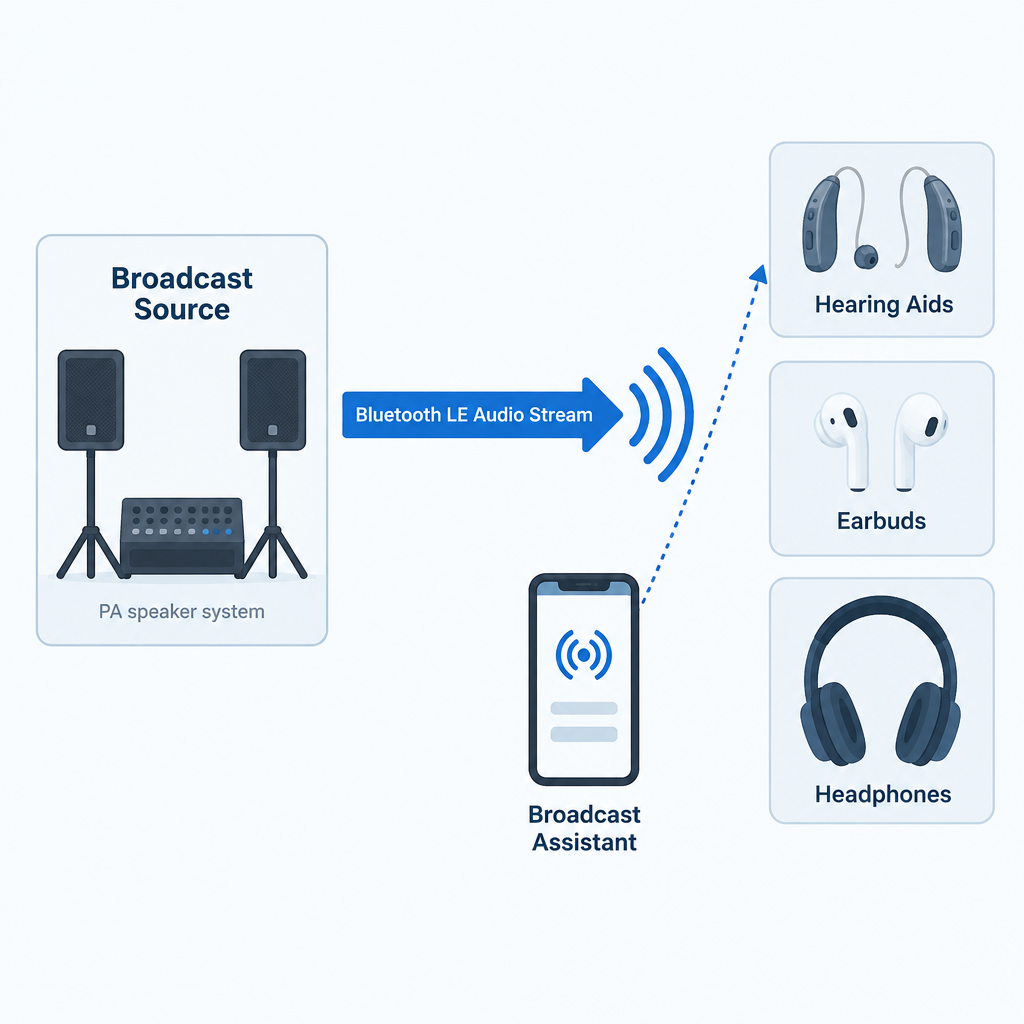
    An Auracast setup has three roles. Sometimes one device plays two of them.

    1. The broadcast source transmits the audio. This might be a smart TV, a dedicated transmitter connected to a venue’s sound system, a laptop or a phone.
    2. The receiver (sink) plays the audio. That’s your earbuds, headphones, speaker or LE Audio hearing aids.
    3. The broadcast assistant helps you find and join a stream. Hearing aids have no screen, so your phone, smartwatch or the hearing aid maker’s app scans for nearby broadcasts, shows you a list, and tells your hearing aids which one to lock onto.

    Each broadcast advertises a name, such as “Gate B12” or “Main Hall English”. A broadcast can be open, so anyone can join, or encrypted with a broadcast code, which works like a Wi-Fi password. A hotel conference room or a private tour group would use the encrypted option. Venues can also post a QR code that you scan to join the right stream with the code already filled in.

    The technical pieces underneath

    If you want to understand why Auracast works when older Bluetooth couldn’t do this, these are the building blocks inside the LE Audio specifications.

    Component What it does Why it matters to you
    LC3 codec Compresses audio efficiently at low data rates Clear speech with less battery drain
    Isochronous channels Deliver time-synchronized audio streams Left and right ears stay in sync; lip sync holds up
    Broadcast Isochronous Stream (BIS) Carries one-to-many audio No pairing limit on listeners
    Broadcast Audio Scan Service (BASS) Lets an assistant device tell a receiver what to join Your phone picks the stream for your hearing aids
    Public Broadcast Profile (PBP) Sets baseline quality rules for public streams Any compliant device can play a public broadcast
    Hearing Access Profile (HAP) Standardizes LE Audio for hearing aids Hearing aids work across brands of phones

    The LC3 codec deserves a special mention. In the SIG’s listening tests, LC3 delivered better quality than the old SBC codec at roughly half the data rate. Lower data rates mean lower power use, which is a big deal for small hearing aid batteries that have to last a full day. LC3 supports sampling rates from 8 kHz up to 48 kHz, so a broadcast can be tuned for speech or for full-range music.

    Auracast Bluetooth vs. classic Bluetooth
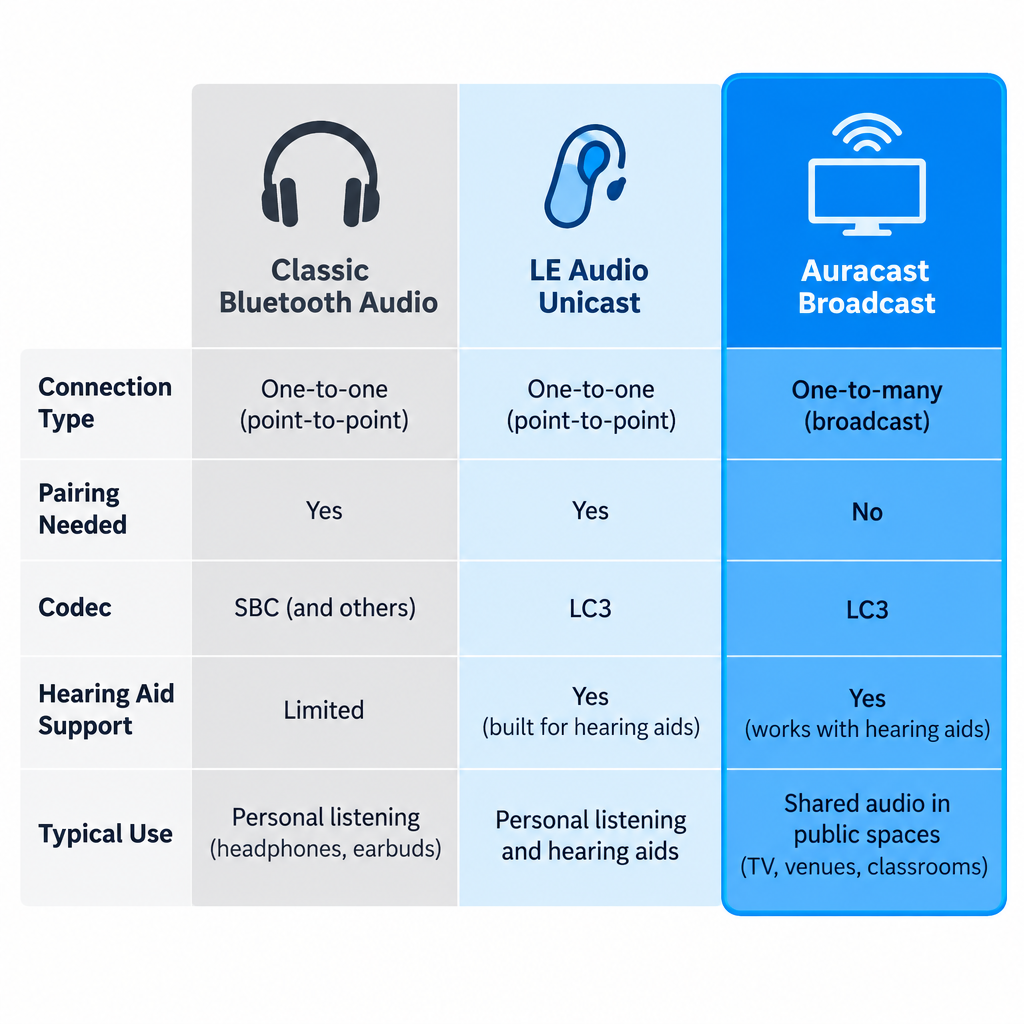
    Auracast vs Classic Bluetooth Comparison Chart

    People often search for “Bluetooth Auracast” because they’re not sure whether it’s a different wireless system. It’s the same Bluetooth radio family with new rules on top. Here is how it compares with the Bluetooth you already know.

    Feature Classic Bluetooth audio LE Audio (unicast) Auracast broadcast
    Connection type One source to one device One source to one device (or a pair) One source to unlimited devices
    Pairing needed Yes Yes No; you join a stream
    Default codec SBC LC3 LC3
    Hearing aid support Proprietary (MFi, ASHA, or a streamer) Standard via Hearing Access Profile Standard via Hearing Access Profile
    Typical use Music and calls from your phone Music and calls, lower power TVs, venues, shared listening

    The hearing aid row is the important one. Until LE Audio, hearing aids streamed using Apple’s Made for iPhone protocol, Google’s ASHA protocol for Android, or a separate clip-on streamer. Those systems were tied to particular phones and didn’t let you join public audio at all. LE Audio gives hearing aids a common language, and Auracast adds the broadcast layer on top.

    Why Auracast matters for people with hearing loss

    Hearing aids are tuned to your specific hearing profile. Any time sound reaches you through the air, it picks up room echo, background noise and distance. Streaming audio directly into the aids skips all of that. Auracast extends direct streaming beyond your own phone to the wider world.

    Here is what that changes in practice:

    • No borrowed equipment. Today, at many theaters you ask at a desk for a receiver and a neckloop or headset, hand over ID as a deposit, and hope the battery is charged. With Auracast, the receiver is already in your ears.
    • Your prescription stays in place. The broadcast plays through your hearing aids’ own processing, so the sound is shaped for your hearing loss, not a generic headset curve.
    • Better signal-to-noise. The voice from a lecturer’s microphone arrives without the coughing, air conditioning and echo between you and the stage. For many listeners this is the single biggest improvement.
    • Discretion. Nobody can tell you’re using an assistive listening system, because you aren’t holding or wearing anything extra.
    • Unlimited capacity. A venue doesn’t have to guess how many receivers to stock. Ten people or ten thousand can join the same stream.
    • Multiple language or audio channels. A venue can run separate streams, for example one for the main speaker and one for a translated version or audio description.

    For public TVs, Auracast fills a gap that closed captioning only partly covers. Captions on a muted gym TV help, but they lag, drop words and are hard to follow during fast dialogue or sports commentary. Being able to hear the actual audio in your hearing aids, alongside captions if you like, is a real step up.

    Auracast vs. hearing loops and other assistive listening systems
    Auracast Venue Streaming Diagram

    Auracast enters a field that already has several assistive listening technologies. Each has strengths, and Auracast is not an automatic replacement for all of them yet.

    System How it reaches you Needs extra gear? Strengths Weaknesses
    Hearing loop (induction loop) Magnetic field picked up by the telecoil in your hearing aid No, if your aid has a telecoil Works with millions of existing aids; no app or pairing Needs a wire installed around the room; quality depends on installation
    FM / RF systems Radio signal to a body-worn receiver Yes, a receiver plus headset or neckloop Long range; mature technology Borrowed hardware; hygiene and battery issues
    Infrared (IR) Light signal to a receiver Yes, a receiver Signal stays inside the room; good for privacy Needs line of sight; sunlight can interfere
    Wi-Fi streaming apps Venue Wi-Fi to an app on your phone Your phone, plus earbuds or a hearing aid connection Uses the phone you already carry Small delays; depends on venue Wi-Fi
    Auracast Bluetooth LE Audio broadcast to your hearing aids or earbuds No, if your devices support LE Audio Direct to your aids; unlimited listeners; open standard Requires newer hearing aids and an assistant device; venue rollout still early

    Our honest view: if you’re buying hearing aids now, ask for both LE Audio and a telecoil. Hearing loops remain installed in many churches, theaters, ticket windows and public buildings, and a telecoil costs you nothing to use. Auracast is the future direction, but loops will stay useful for years, and some of the smallest hearing aid styles drop the telecoil to save space.

    There’s also a regulatory point. In the United States, the 2010 ADA Standards for Accessible Design require assembly areas to provide assistive listening systems, and at least 25 percent of the receivers must be hearing-aid compatible. Those rules were written before Auracast existed, and the Department of Justice has not issued guidance specifically addressing Auracast as a compliant system. Venues installing it today usually run it alongside an existing system rather than in place of one.

    What you need to use Auracast

    To join a broadcast with your hearing aids, three things have to line up.

    1. Hearing aids with LE Audio and Auracast support. This is hardware plus firmware. A hearing aid needs an LE Audio-capable chip, and the manufacturer has to enable broadcast listening in its software. Several makers launched models marketed as “Auracast ready” from 2023 onward, including ReSound Nexia, Oticon Intent and models in Signia’s IX platform. “Ready” usually means the hardware is capable; the full broadcast feature may arrive later through a firmware update, and it may depend on which phone you use.

    2. A broadcast assistant. Usually this is your phone. Google added Auracast support for LE Audio hearing aids in Android 16, starting with recent Pixel phones, and Samsung was an early adopter across Galaxy phones, earbuds and TVs. Apple’s iPhone support has trailed Android here, so if you use an iPhone, check your hearing aid maker’s compatibility list and the current iOS release notes before counting on Auracast. Some hearing aid apps can also act as the assistant.

    3. A broadcast to join. That means an Auracast-enabled TV, transmitter or venue system nearby.

    Devices with Auracast support

    Consumer audio brands have moved faster than venues. These are examples where the manufacturer has announced Auracast features.

    Device type Examples What Auracast does there
    Hearing aids ReSound Nexia, Oticon Intent, Signia IX models Receive broadcasts (feature availability depends on firmware and phone)
    Phones Samsung Galaxy models, Google Pixel on Android 16 Act as assistant; some can also broadcast audio sharing
    Earbuds Samsung Galaxy Buds2 Pro and later Galaxy Buds Receive broadcasts from Samsung TVs and phones
    TVs Samsung TVs from the 2023 lineup onward Broadcast TV sound to compatible earbuds
    Speakers JBL Go 4, Flip 7, Charge 6 Link multiple speakers to one source

    Ask your audiologist or hearing aid provider to confirm two things for any model you’re considering: whether broadcast listening is enabled today, and which phones work as an assistant. Marketing pages don’t always make that distinction clear.

    How to connect your hearing aids to an Auracast broadcast

    Exact menus vary by phone and hearing aid brand, but the process follows the same pattern everywhere.

    Joining an Auracast broadcast

    1. Update your hearing aids to the latest firmware through the manufacturer’s app.
    2. Update your phone to the newest operating system it supports.
    3. Make sure your hearing aids are connected to your phone over Bluetooth.
    4. On a Pixel running Android 16, open Settings, then Connected devices, and look for the audio sharing or broadcast option.
    5. On a Samsung Galaxy, open Bluetooth settings and look for the Auracast option, or use your hearing aid app.
    6. Wait for the list of nearby broadcasts, then tap the name the venue displays.
    7. Enter the broadcast code or scan the venue’s QR code if the stream is protected.
    8. Adjust the stream volume and the mix with surrounding sound in your hearing aid app.

    Hearing tip

    Most hearing aid apps let you blend the broadcast with your aids’ microphones. In a lecture, turn the microphones down to cut room noise; in a sports bar with friends, keep them up enough to hear the people at your table.

    When you leave the venue’s range, your hearing aids drop the stream and return to normal. Your regular program and settings come back automatically.

    Where Auracast is available now

    Auracast is real and shipping, but it’s still early. The consumer side, meaning phones, earbuds, speakers and TVs, is ahead of public infrastructure. Venue adoption depends on transmitters from assistive listening companies, budgets for new installs, and enough visitors arriving with compatible hearing aids to justify the cost.

    The places the SIG and equipment makers are targeting first include airports and train stations for announcements, gyms and bars with muted TVs, cinemas and theaters, universities and lecture halls, places of worship, museums with self-guided tours, and conference centers needing multiple language channels. If you visit any of these regularly, it’s worth asking the venue whether Auracast is on their plans. Requests from visitors are one of the ways venues decide what to fund.

    At home, the most useful setup today is a TV with Auracast or a small Auracast transmitter plugged into your TV’s audio output, so you and your household can listen at different volumes. Check that any transmitter you buy explicitly lists Auracast or LE Audio broadcast support, not only “Bluetooth 5.x”. A Bluetooth version number alone doesn’t tell you a device supports Auracast.

    A quick checklist before you buy hearing aids

    If future Auracast access matters to you, raise these points with your audiologist:

    • Does this model support Bluetooth LE Audio, and is Auracast broadcast listening active now or promised in an update?
    • Which phones work as a broadcast assistant with these aids, including mine?
    • Does it have a telecoil for hearing loops?
    • Is it rechargeable, and how much does streaming cut daily battery life?
    • Can I adjust the mix between streamed sound and room sound in the app?

    See a professional

    Get hearing aids fitted by an audiologist or licensed hearing professional if your loss is more than mild. Sudden hearing loss in one or both ears is a medical emergency, so see a doctor the same day.

    FAQ

    Is Auracast the same as Bluetooth?

    Auracast is a feature of Bluetooth, specifically Bluetooth LE Audio. It uses the same radio technology but adds one-to-many broadcasting, so a single source can stream to unlimited listeners instead of one paired device.

    Do my current hearing aids support Auracast?

    Only if they have LE Audio hardware and the manufacturer has enabled broadcast listening. Most hearing aids sold before 2023 cannot be upgraded with a software update because the chip itself doesn’t support LE Audio. Your hearing aid app or your provider can confirm this.

    Do I need an app to use Auracast?

    You need something to act as a broadcast assistant, because hearing aids have no screen to pick a stream. That’s usually your phone’s Bluetooth settings or your hearing aid maker’s app. Some earbuds and headphones have buttons that join a stream directly.

    Does Auracast work with iPhone?

    Android has moved first, with support in Android 16 and on Samsung Galaxy devices. iPhone support has lagged, so check your hearing aid maker’s compatibility list and Apple’s current release notes before you rely on it.

    Can strangers listen to my Auracast stream?

    Only if you leave it open. Broadcasts can be protected with a broadcast code, so if you share audio from your phone or TV, set a code and only people who have it can join.

    Will Auracast replace hearing loops?

    Not soon. Hearing loops work with the telecoils in millions of existing hearing aids and need no app. Auracast offers direct streaming and unlimited listeners, but it depends on newer hearing aids and venue upgrades. Expect the two to run side by side for years.

    Does Auracast help with tinnitus?

    Auracast is a way to deliver sound, not a treatment. It can make speech and audio easier to follow, but it doesn’t treat tinnitus or hearing loss. Talk to an audiologist about tinnitus management options.

  • What ASL Means and How American Sign Language Began

    What ASL Means and How American Sign Language Began

    ASL stands for American Sign Language, the visual language used by many Deaf and hard of hearing people in the United States and much of English-speaking Canada. It is a complete language with its own grammar, separate from English, and it took shape after America’s first permanent school for deaf students opened in Hartford, Connecticut, in 1817. Below you’ll find what the term means, where the language came from, and how to sign a few core words yourself.

    Full nameAmerican Sign Language
    Took shapeEarly 1800s, Hartford
    Main ancestorFrench Sign Language
    GrammarSeparate from English

    What ASL Means

    A sign language is a natural language that uses the hands, face and body in space instead of sound. In ASL, the meaning of a sign depends on five things: handshape, location, movement, palm orientation, and non-manual markers such as facial expression and head position.

    ASL is not English spelled out on the hands. Systems like Signed Exact English follow English word order, but ASL has its own syntax. To ask “Are you going to the store?” you might sign YOU GO STORE? with your eyebrows raised. Raised eyebrows mark a yes/no question. For a question like “What’s your name?” you would sign YOUR NAME WHAT? with your eyebrows pulled down.

    Your face is grammar in ASL, not decoration. Leave the eyebrows out and the sentence can read as a statement.

    Other Meanings of “asl” Online

    If you found this page through a text message, the letters may mean something else entirely.

    Term Meaning Where you’ll see it
    ASL American Sign Language Schools, the Deaf community, dictionaries
    a/s/l “Age, sex, location?” 1990s chat rooms and early messaging apps
    asl “As hell,” as in “tired asl” Recent texting and social media slang

    Context tells you which one is meant. Capitalized and in a sentence about deaf people or language, it is almost always American Sign Language.

    How American Sign Language Began

    Before 1817, deaf Americans used home signs and local sign systems. One of the best known grew up on Martha’s Vineyard, where hereditary deafness was common enough, especially around Chilmark, that hearing and deaf neighbors alike signed. Historians believe Martha’s Vineyard Sign Language fed into early ASL.

    The turning point came from Hartford. Mason Fitch Cogswell, a local doctor whose daughter Alice was deaf, helped send minister Thomas Hopkins Gallaudet to Europe in 1815 to study deaf education. The Braidwood family schools in Britain kept their methods close. In London, Gallaudet met Abbé Roch-Ambroise Sicard of the Paris school for the deaf and two Deaf teachers, Jean Massieu and Laurent Clerc.

    Gallaudet studied in Paris, and Clerc agreed to come to America in 1816. Together they opened what is now the American School for the Deaf on April 15, 1817. Students arrived with their own home and regional signs, and those blended with Clerc’s French Sign Language (LSF). Comparisons of vocabulary have found that a little over half of core ASL signs share roots with LSF, which is why ASL is grouped in the French sign language family.

    Key Dates in ASL History

    Year Event
    1815 Gallaudet travels to Europe to study deaf education
    1817 American School for the Deaf opens in Hartford
    1864 Abraham Lincoln signs the charter for the college that becomes Gallaudet University
    1880 Milan congress votes for oral-only teaching; the National Association of the Deaf is founded
    1913 George Veditz films “The Preservation of the Sign Language”
    1960 William Stokoe publishes Sign Language Structure
    1965 Stokoe, Casterline and Croneberg publish A Dictionary of American Sign Language on Linguistic Principles
    1988 Deaf President Now protest; I. King Jordan becomes Gallaudet’s first Deaf president
    1990 The Americans with Disabilities Act is signed

    How ASL Survived the Oral Era

    ASL Origins Timeline

    In 1880, a mostly hearing gathering of educators in Milan voted that deaf children should be taught through speech and lipreading alone. Many American schools followed. Signing was banned in classrooms, and Deaf teachers lost their jobs.

    ASL survived anyway. Children passed it on in dormitories, and adults kept it alive in Deaf clubs, churches and Deaf families. In 1913, NAD president George Veditz recorded a signed film defending the language, including the line often quoted today: “As long as we have deaf people on earth, we will have signs.”

    When Linguists Recognized ASL

    William Stokoe, a hearing English professor at Gallaudet, showed in 1960 that signs break down into smaller parts the same way spoken words break into sounds. That work, and the dictionary that followed in 1965, convinced linguists that ASL was a real language. The 1988 Deaf President Now protest then put Deaf leadership in the national spotlight. Today many states accept ASL for high school world language credit.

    How many people use ASL? Nobody knows precisely. The U.S. Census doesn’t ask, and researchers have traced the frequently repeated 250,000 to 500,000 figure back to data from the 1970s.

    ASL Is Not Universal

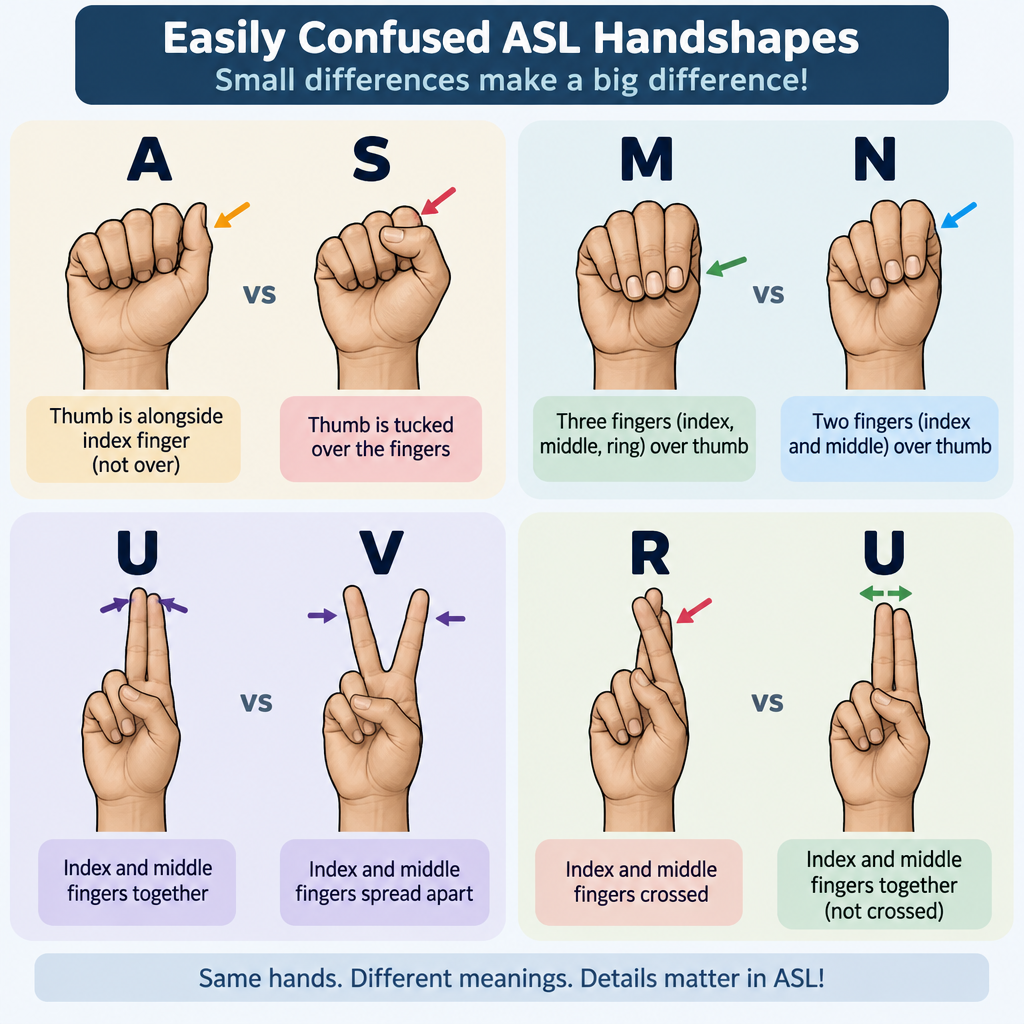
    ASL Basic Handshapes Chart

    Sign language isn’t one global language. The United Nations counts more than 300 sign languages worldwide, and ASL is only one. A British signer and an American signer can’t easily understand each other, even though both countries speak English.

    Sign language Main region Family
    ASL United States, English-speaking Canada French
    LSF France French
    LSQ Quebec French-influenced
    BSL United Kingdom BANZSL
    Auslan Australia BANZSL

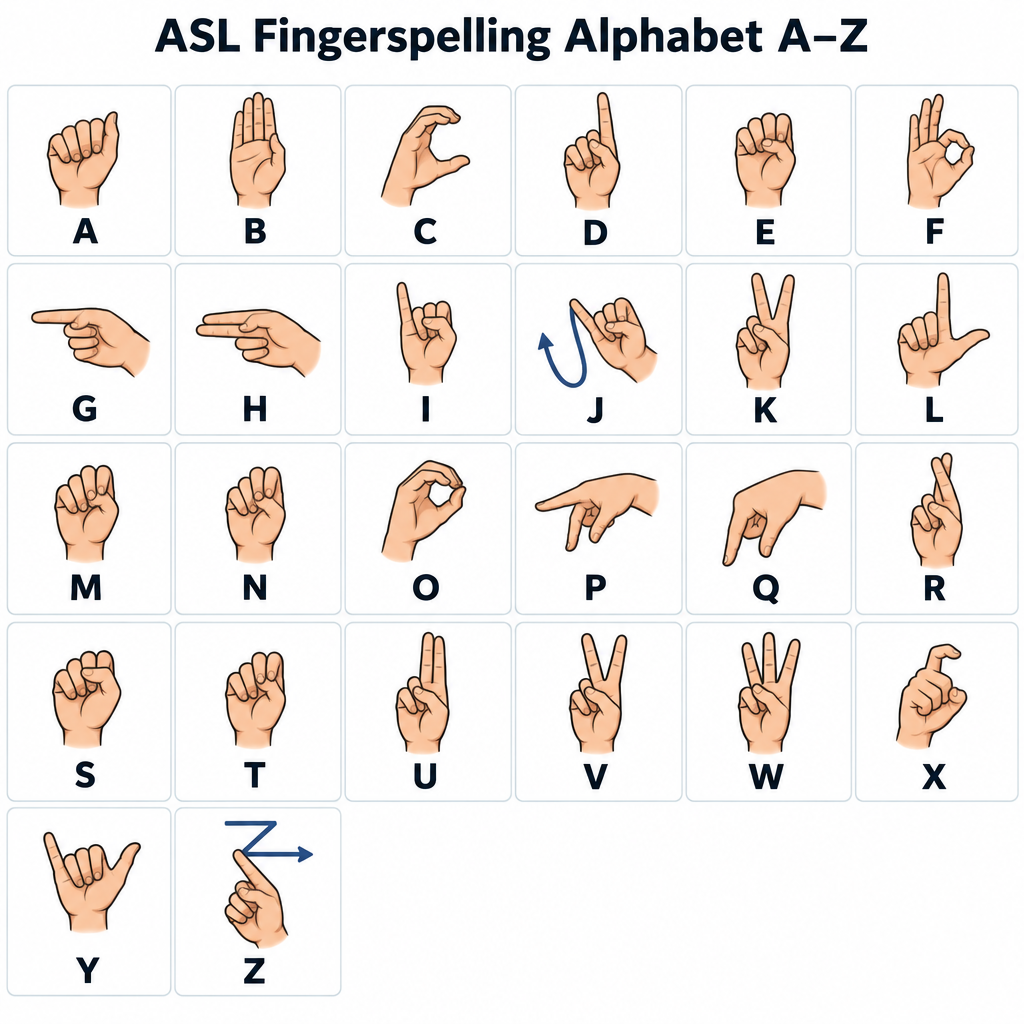
    Even the manual alphabet differs. ASL fingerspelling is one-handed, while BSL uses two hands. Our sign language alphabet guide walks through every ASL letter from A to Z.

    How to Sign a Few Basic Words in ASL

    These descriptions use a right-handed signer. Left-handed signers mirror them.

    Word Handshape Location Movement
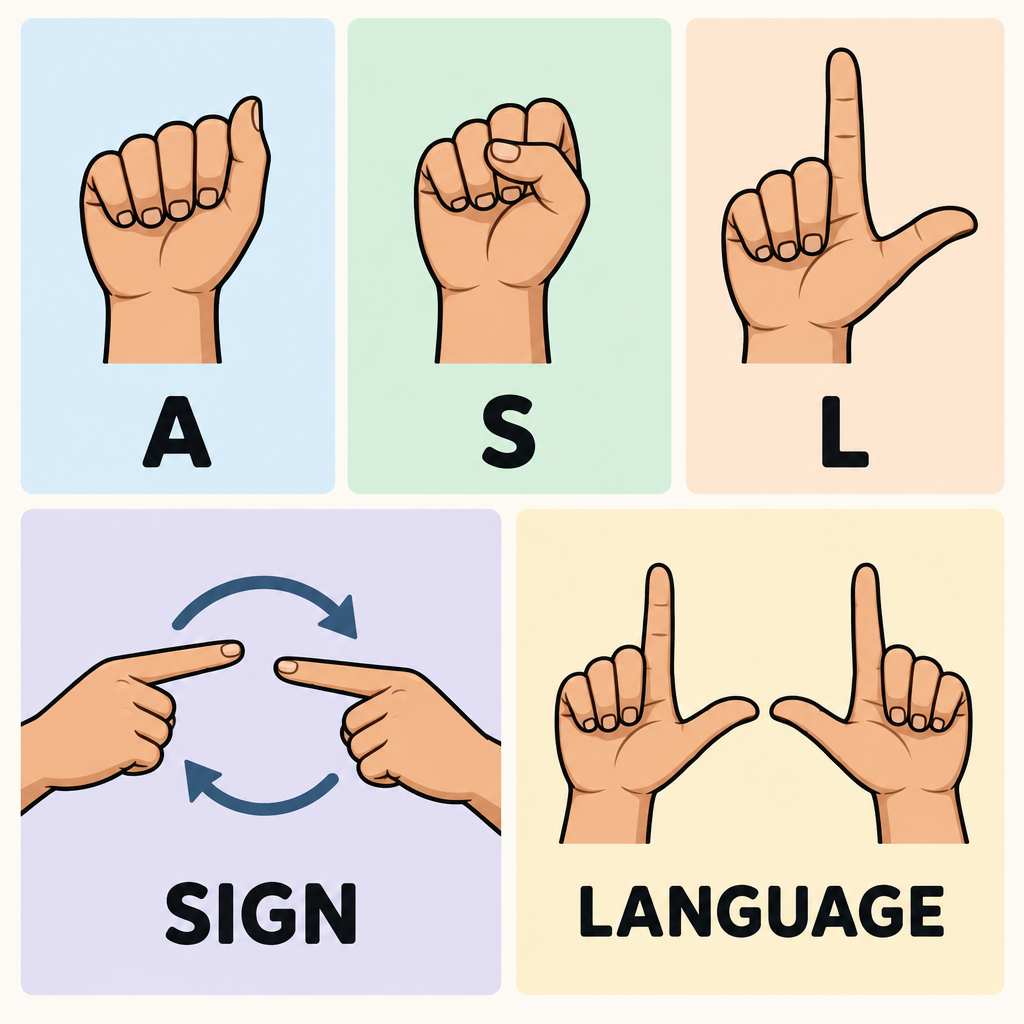
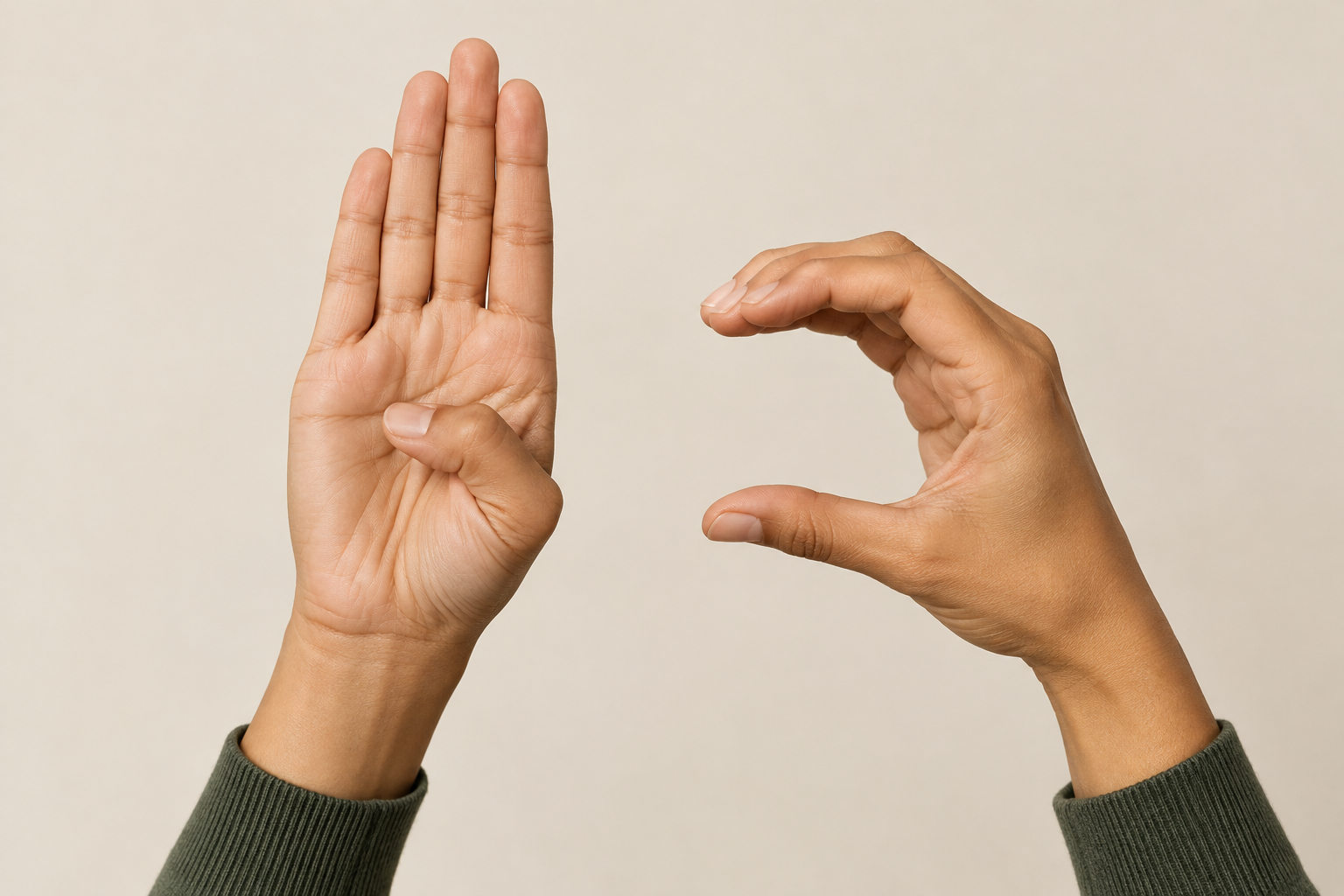
    ASL Letters A, S, L Near your shoulder Fingerspell in quick sequence; many signers trace a small circle
    SIGN Both index fingers extended In front of your chest Hands circle alternately back toward you
    LANGUAGE Both hands in L shape, palms down Thumbs nearly touching in front of you Pull apart while twisting slightly
    DEAF Index finger Cheek near the ear, then near the mouth Two light touches (either order is common)
    HEARING Index finger held sideways In front of your mouth Small forward circles
    MEAN Bent V on right hand, left palm up Right fingertips on left palm Touch, twist the wrist, touch again
    WHAT Both open hands, palms up In front of your body Small side-to-side shake, eyebrows down

    To sign “sign language” in ASL, sign SIGN followed by LANGUAGE.

    Practice steps

    1. Learn the manual alphabet first so you can fingerspell names.
    2. Watch videos made by Deaf signers.
    3. Replay each sign at half speed and copy it.
    4. Practice in a mirror, checking your face.
    5. Join a class or Deaf community event.

    Hearing tip

    You don’t need to unmute an ASL lesson. Turn the sound off and watch the hands and face, the way a Deaf signer would.

    Where You’ll See ASL Today

    ASL is everywhere once you look: interpreters at press briefings, Deaf performers on stage, and video relay calls. Video relay is one form of telecommunications relay service, connecting ASL users with hearing callers through an interpreter. Under the Americans with Disabilities Act, the main U.S. disability rights act, many businesses and public bodies must provide effective communication, which can mean an interpreter. Closed captioning helps many viewers, but it isn’t a full substitute, because English is a second language for many Deaf people whose first language is ASL.

    See a professional

    If you or your child notice hearing changes, book an audiologist. Sudden hearing loss in one or both ears is a medical emergency, so see a doctor right away.

    FAQ

    Is ASL the same as sign language?

    No. ASL is one specific sign language. “Sign language” is the umbrella term for all of them, including BSL, LSF and Auslan.

    Is ASL based on English?

    No. ASL developed largely from French Sign Language mixed with American home and regional signs. Its grammar differs from English.

    How do you sign “I love you” in ASL?

    Raise your hand with the palm facing out, then extend your thumb, index finger and pinky while folding your middle and ring fingers down. This handshape combines the letters I, L and Y.

    How long does it take to learn ASL?

    Basic conversation can come within months of regular classes and practice. Fluency takes years, just as it does with any spoken language.

    What does “asl” mean in a text?

    It usually means “as hell” in current slang. In older chat rooms, “a/s/l” asked for age, sex and location.

  • Best White Noise Machines for Tinnitus Relief at Night

    Best White Noise Machines for Tinnitus Relief at Night

    Last updated: October 29, 2026

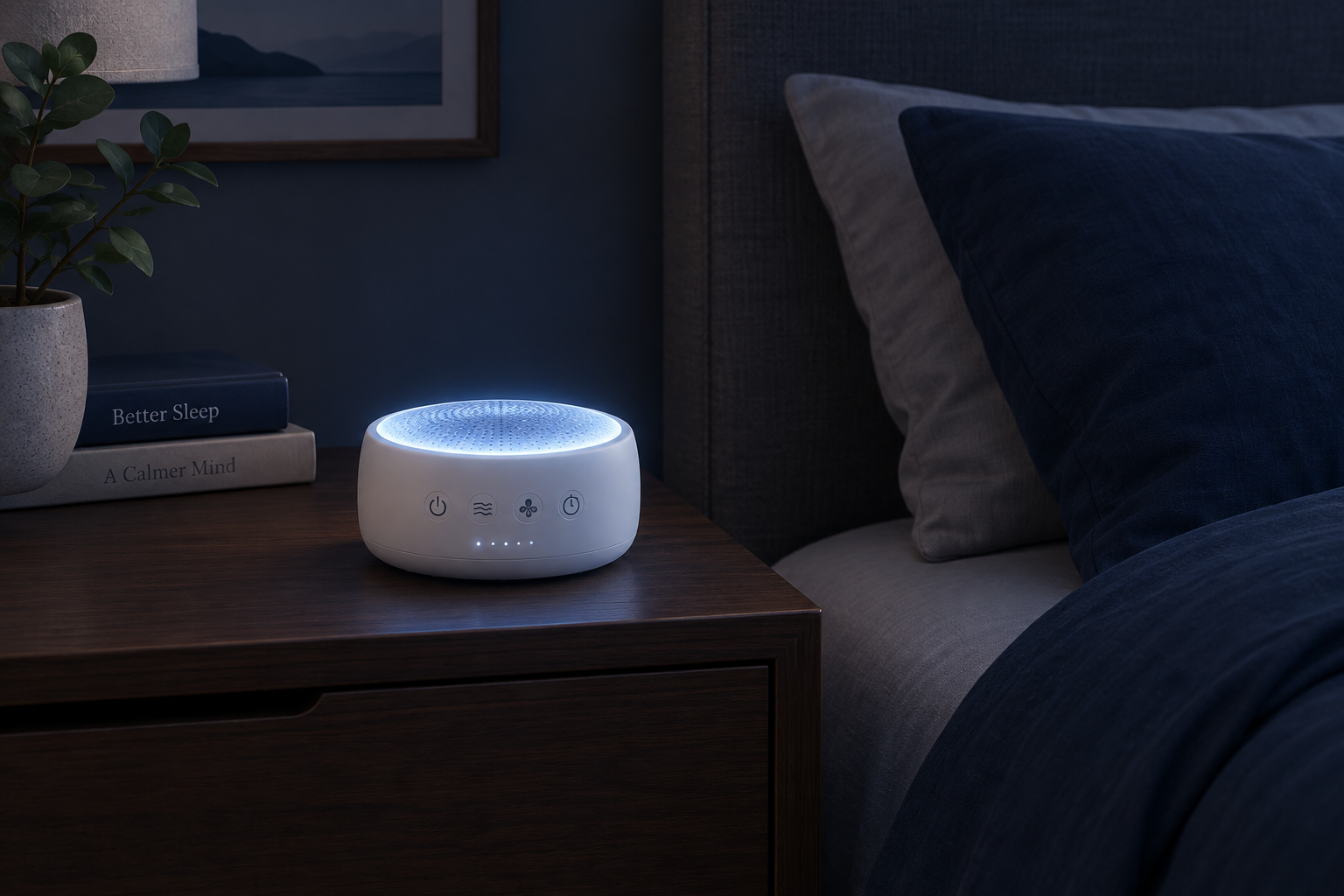
    A white noise maker for tinnitus works by filling the silence of your bedroom so the ringing stands out less, which helps many people fall asleep faster. For most people, the best choice is a non-looping machine with adjustable tone and a very quiet lowest volume. The LectroFan Classic is our top pick, and a real-fan machine like the Yogasleep Dohm suits you if digital noise sounds harsh. None of these devices cures tinnitus, but the right one can make nights much easier.

    Why Sound Helps Tinnitus at Night

    Tinnitus usually feels loudest when you lie down. Daytime noise from traffic, voices, the fridge and the TV partly covers the ringing. At night that background noise disappears, and your brain turns up its attention to the one sound left: the one it produces itself.

    Roughly 1 in 10 US adults reported tinnitus in the past year in a large national survey published in JAMA Otolaryngology in 2016. Trouble sleeping is one of the most common complaints in that group.

    Sound therapy targets that contrast. Steady background sound does three useful things:

    • It lowers the contrast between the tinnitus and the room, so the ringing feels less intrusive.
    • It gives your attention somewhere neutral to rest. A smooth, predictable sound is easy for the brain to ignore, and some of the ringing gets ignored along with it.
    • It supports habituation over time. This is the process of your brain learning to class tinnitus as unimportant. Tinnitus Retraining Therapy uses low-level sound for exactly this reason.

    The American Academy of Otolaryngology–Head and Neck Surgery’s clinical guideline on tinnitus lists sound therapy as an option for people with persistent, bothersome tinnitus. That is a modest endorsement, and an honest one. Sound helps many people cope, especially at bedtime, but research does not show it reduces tinnitus itself.

    When White Noise Isn’t the Right Tool

    The research on white noise and tinnitus has a skeptical side, and you should know about it before you buy anything.

    In 2018, researchers Mouna Attarha, James Bigelow and Michael Merzenich published a review in JAMA Otolaryngology–Head & Neck Surgery titled “Unintended Consequences of White Noise Therapy for Tinnitus–Otolaryngology’s Cobra Effect: A Review.” They argued that long, constant exposure to unstructured noise could encourage unhelpful changes in how the brain processes sound. This was a review built on animal research and theory. It did not include a clinical trial showing harm in people with tinnitus.

    Even so, it supports a sensible middle ground that most audiologists already recommend:

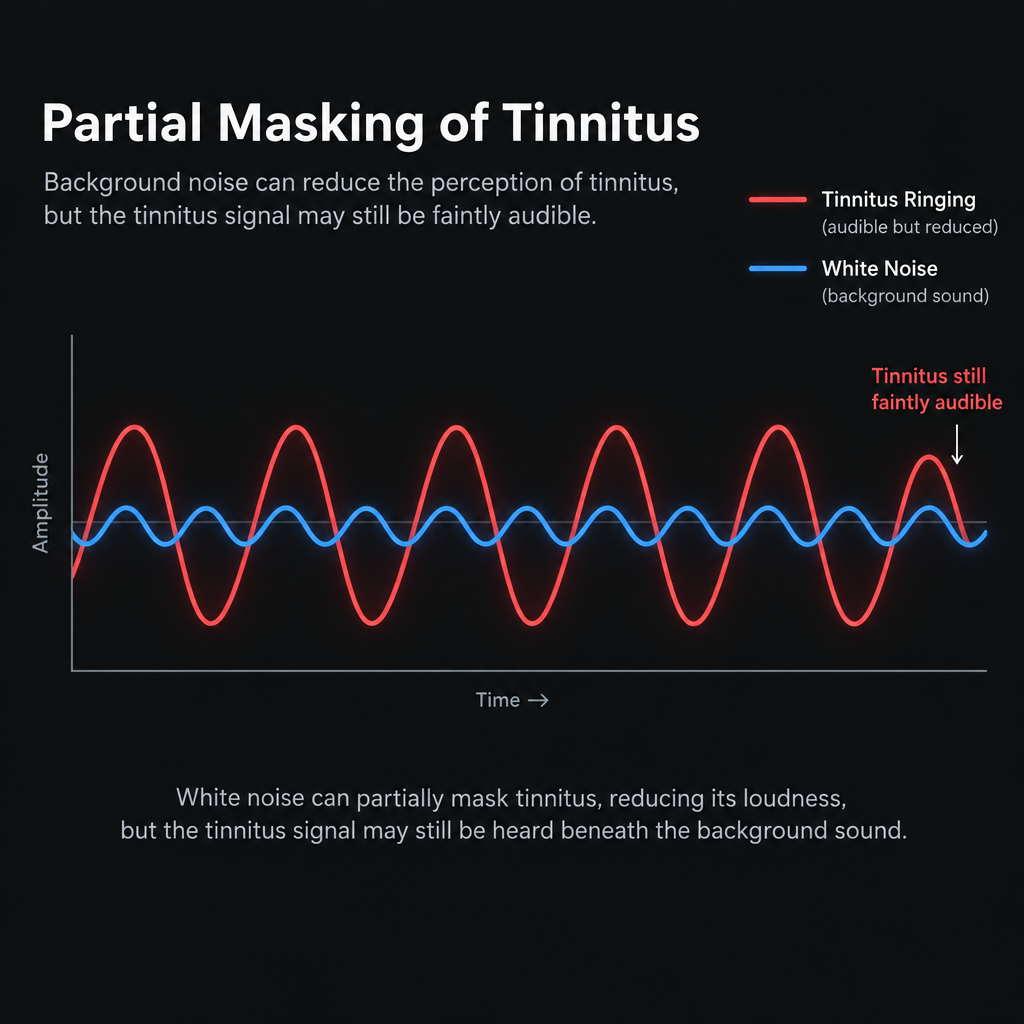
    • Keep the volume low. Set it so you can still faintly hear your tinnitus underneath. Audiologists call this partial masking, or finding the “mixing point.” Drowning the ringing out completely is not the goal.
    • Prefer gentler sounds over harsh hiss if both work for you. Pink noise, fan sounds, rain or ocean are easier to live with for hours.
    • Pair sound with other support. Sound therapy works best alongside good sleep habits and, for bothersome tinnitus, cognitive behavioral therapy (CBT). The AAO-HNS guideline recommends CBT more strongly than sound devices.

    See a professional

    Sudden hearing loss in one ear is a medical emergency, so get seen within a day or two. Also see a doctor if your tinnitus pulses with your heartbeat, affects only one ear, or comes with dizziness.

    Tinnitus that starts after an ear injury, such as a perforated eardrum, also needs a proper check before you rely on a sound machine to manage it.

    What to Look For in a White Noise Maker for Tinnitus

    Noise Color Comparison Chart

    Most sound machines are designed and marketed for babies and light sleepers. People with tinnitus need a few specific things that general reviews often skip.

    Non-looping sound

    Cheap machines play a short recorded clip on repeat. Once you notice the seam where the loop restarts, you can’t stop hearing it. That defeats the whole point, which is giving your brain something it can ignore. Look for machines that generate sound digitally in real time or use a real fan.

    Adjustable tone or noise color

    Tinnitus comes in different pitches. A high-pitched whine and a low hum respond differently to different noise. Machines that offer several noise colors, or let you shift the tone up and down, give you a much better chance of finding the sound that blends with your tinnitus.

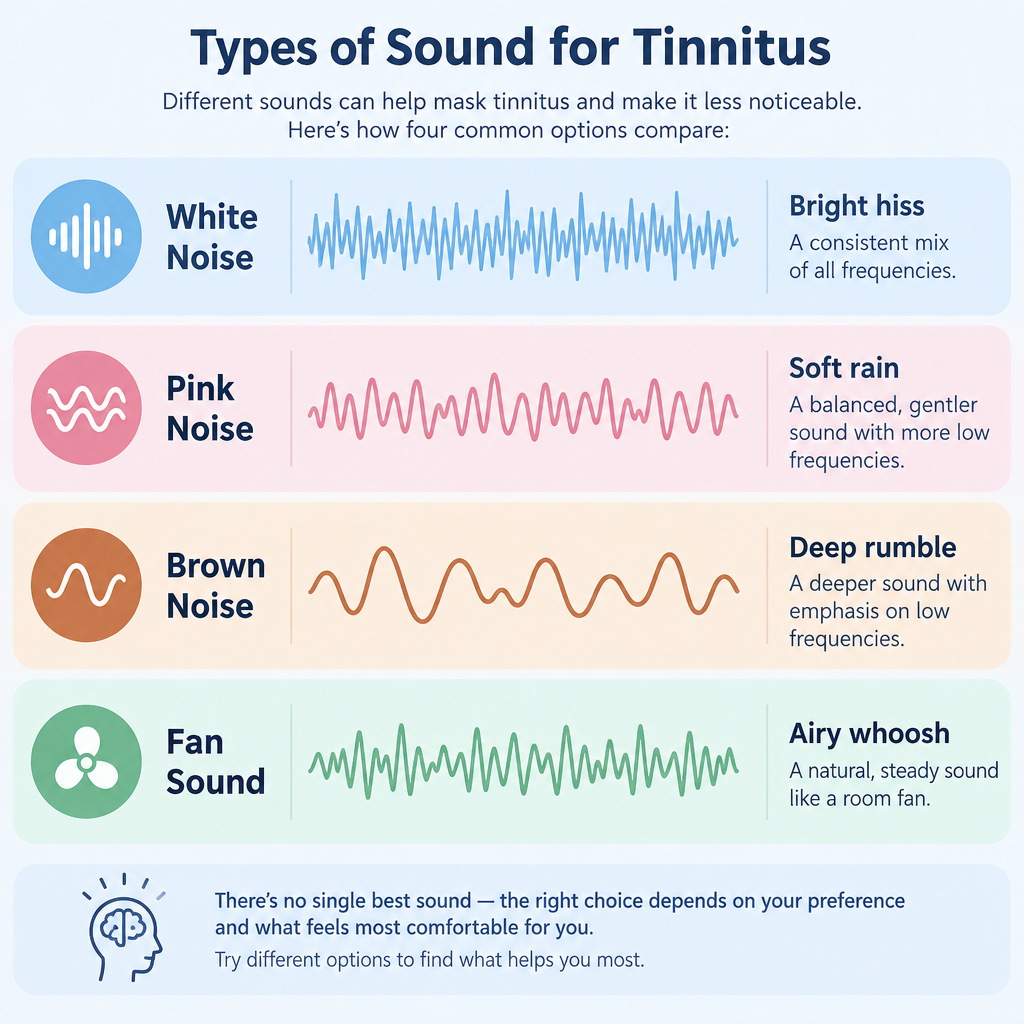
    Noise type How it sounds Where the energy sits Often suits
    White noise Bright hiss, like TV static Equal energy across all frequencies High-pitched ringing or whistling
    Pink noise Softer, like steady rain Energy falls 3 dB per octave Mixed or mid-pitched tinnitus, all-night use
    Brown (red) noise Deep rumble, like a waterfall Energy falls 6 dB per octave Low hums and buzzing; people who find hiss harsh
    Fan sound Airy whoosh with low-end body Varies by fan and speed People who already sleep with a fan
    Nature sounds Rain, surf, stream Varies, with natural variation Those who find pure noise boring or irritating

    These are starting points, not rules. Plenty of people with high-pitched tinnitus prefer brown noise because it feels calmer. Try each option for a few nights before you decide.

    A very quiet lowest setting

    This matters more than how loud a machine gets. With tinnitus you want sound just at or below the level of your ringing, which can be very soft. Some machines jump from silence straight to fairly loud. Check reviews for comments on the minimum volume.

    Timer or all-night play

    Opinions differ, so pick a machine that supports how you sleep. A timer helps if you only struggle to fall asleep. Continuous play helps if you wake at 3 a.m. and the silence makes the ringing roar back. Many people with tinnitus do better with all-night sound at a low level.

    Headphone or pillow speaker output

    If you share a bed, a headphone jack or Bluetooth output lets you send sound to a pillow speaker or sleep earbuds, so your partner sleeps in silence. Few dedicated machines offer this, so it narrows the field quickly.

    Power and portability

    Plug-in machines are fine at home. If you travel, a USB-powered or rechargeable model means you don’t face a silent hotel room. Silent rooms are often the worst nights for people with tinnitus.

    Our 6 Picks at a Glance

    Prices below are typical US retail as of late October 2026. Sound machines go on sale often, so treat these as ballpark figures.

    Pick Best for Typical price (Oct 2026) Sound source
    LectroFan Classic Best overall About $45 to $55 Digital, non-looping
    Yogasleep Dohm Classic Real fan sound About $45 to $55 Mechanical fan
    Snooz Original App control with a real fan About $100 Mechanical fan
    Hatch Restore 3 All-in-one bedside device About $170 Digital library
    LectroFan Micro2 Travel About $40 to $55 Digital, non-looping
    iPhone Background Sounds Free option Free Built into iOS
    Feature LectroFan Classic Dohm Classic Snooz Original Hatch Restore 3 LectroFan Micro2
    Non-looping Yes Yes (real fan) Yes (real fan) Varies by sound Yes
    Noise colors White, pink, brown Fan only Fan only Several White and others
    Tone control Via sound choice Twist collar Twist collar Via sound choice Via sound choice
    Timer 60-minute No In app In app No
    App control No No Yes Yes No
    Battery No No No No Yes, rechargeable

    1. LectroFan Classic: Best Overall

    TypeDigital sound machine
    PriceAbout $45 to $55
    Sounds20 non-looping options
    Best forMost people with tinnitus

    The LectroFan Classic from Adaptive Sound Technologies has stayed popular in tinnitus communities for years, for good reason. It offers 20 sounds: 10 fan sounds and 10 noise variations covering white, pink and brown noise. All of them are generated so they never loop.

    That range matters for tinnitus. You can step through the noise colors in small increments until one sits right on top of your ringing without fighting it. Volume adjusts in fine steps, so finding a soft setting near your mixing point is easy.

    It runs from USB or the included AC adapter and has a simple 60-minute timer. The design is plain. You get no app, no lights to dim and no subscription, which many people prefer for a bedside device.

    Drawbacks: No headphone output on this model, and no nature sounds. If you want ocean sounds, the LectroFan Evo adds them along with a headphone jack.

    Who it suits: Anyone who wants to experiment with noise colors to match their tinnitus, without spending much.

    2. Yogasleep Dohm Classic: Best for Real Fan Sound

    TypeMechanical fan machine
    PriceAbout $45 to $55
    ControlsTwo speeds, twist tone
    Best forPeople who dislike digital noise

    The Dohm (sold for decades under the Marpac name before the brand became Yogasleep) contains an actual fan inside a housing. It moves air you can hear but barely feel. Since the sound comes from a physical fan, it never loops and has a natural, slightly uneven texture.

    You get two speeds. You adjust the tone by twisting the cap and collar to open or close the air vents, which shifts the sound from a higher whoosh to a deeper rumble. That analog tone control works well for tinnitus because you can fine-tune by ear.

    Some people with tinnitus find digital white noise thin or harsh after a few hours. If that’s you, a real fan is worth trying.

    Drawbacks: Only two volume levels, and even the low setting may be louder than ideal in a very quiet room. You get no timer and it must be plugged in.

    Who it suits: Fan sleepers, and anyone bothered by the electronic quality of digital noise.

    3. Snooz Original: Best App-Controlled Fan

    TypeMechanical fan, app control
    Price$99.99
    ConnectivityBluetooth app
    Best forReal fan plus scheduling

    Snooz also uses a real fan, but it pairs with a phone app over Bluetooth. That adds finer volume control, timers and schedules. You can set it to start at bedtime and fade off at your wake-up time without touching the device in the dark.

    The tone adjusts with a rotating collar, much like the Dohm. Finer volume steps are the real advantage for tinnitus. You can bring a fan sound down to a soft background level that the two-speed Dohm can’t match.

    The company also sells a portable Snooz Go and a pricier Snooz Pro with more app features.

    Drawbacks: Costs roughly twice as much as a Dohm. App-dependent devices also rely on the company keeping its software updated.

    Who it suits: People who love fan sound but need quieter low settings or automatic schedules.

    4. Hatch Restore 3: Best All-in-One Bedside Device

    TypeSound machine and sunrise clock
    PriceAbout $170
    SubscriptionOptional Hatch+
    Best forBuilding a full sleep routine

    The Hatch Restore 3 combines a sound machine with a sunrise alarm clock, a reading light and guided wind-down routines. You can build a bedtime sequence: dim light and a calming sound, then a low noise for the night, then a gradual light-based wake-up.

    For tinnitus, the appeal is the structure. Many people find a consistent wind-down helps them stop focusing on the ringing at bedtime. The core sounds and features work without paying, while the optional Hatch+ subscription unlocks a larger library of sounds and content.

    Drawbacks: Expensive if you only want noise. The best content sits behind a subscription, and the device works best with its app.

    Who it suits: People whose tinnitus is tied to a broader sleep struggle and who would use the light and routine features.

    5. LectroFan Micro2: Best for Travel

    TypePortable sound machine
    PriceAbout $40 to $55
    PowerRechargeable battery
    Best forHotels and travel

    The Micro2 is a small, rechargeable version of the LectroFan. It offers a handful of non-looping fan, noise and ocean sounds and doubles as a Bluetooth speaker. It fits in a jacket pocket and charges over USB.

    For tinnitus sufferers, travel nights can be rough. Hotel rooms often have no fan or steady background noise, and unfamiliar surroundings add stress. A pocket machine fixes that cheaply.

    Drawbacks: The small speaker has less low-end depth than a full-size machine, so brown noise and fan sounds feel thinner. Battery life also depends on volume.

    Who it suits: Frequent travelers, or anyone who wants a backup machine in a bag.

    6. iPhone Background Sounds: Best Free Option

    Before you spend anything, try what’s already on your phone. Since iOS 15, iPhones include Background Sounds in the accessibility settings. Apple has expanded the list over time. It now includes Balanced Noise, Bright Noise and Dark Noise (roughly white, brighter and brown), plus rain, ocean, stream and several other ambient sounds.

    Background Sounds can keep playing under other audio, and you can choose whether they stop when the phone locks. That makes it a genuinely useful free test. You’ll find out which noise color suits your tinnitus before you buy a dedicated machine.

    Turn on Background Sounds on iPhone

    1. Open Settings and tap Accessibility.
    2. Tap Audio & Visual, then Background Sounds.
    3. Switch Background Sounds on and tap Sound to choose one.
    4. Adjust the Volume slider to just below your tinnitus.
    5. Turn off Stop Sounds When Locked for all-night play.
    6. Add the Hearing control in Control Center for quick access.

    Drawbacks: Phone speakers are small, and keeping your phone near your pillow can tempt you to scroll. You can pair it with a Bluetooth speaker or pillow speaker to solve both problems.

    Free Tinnitus Apps Worth Trying

    Partial Masking Volume Concept

    Several hearing aid companies offer free tinnitus apps, and most work without their hearing aids. These apps go beyond plain noise. Many include relaxation exercises and education designed around tinnitus specifically.

    App Made by Platforms What stands out
    ReSound Relief ReSound (GN) iOS, Android Mix your own soundscapes; breathing and relaxation exercises
    Widex Zen Widex iOS, Android Zen fractal tones, a chime-like alternative to noise
    Starkey Relax Starkey iOS, Android Simple tinnitus sounds and relaxation content
    myNoise Independent Web, iOS, Android Highly adjustable noise generators you can tune by frequency
    Background Sounds Apple iOS (built in) No download needed; noise and nature options

    The Widex Zen tones are worth a mention. They are gentle, random, chime-like tones rather than noise. Some people with tinnitus find them more relaxing than any hiss, while others find them distracting. Few machines offer anything similar, so an app is the easiest way to try them.

    Hearing tip

    Spend a week with free apps before buying a machine. Note which sound you still like on night five, because the one that sounds best in the first minute is not always the one you can sleep with.

    How to Set Up Your Machine for Better Sleep

    Where you put the machine and how loud you set it matter as much as which one you buy. These steps work for any of the picks above.

    Set up a sound machine for tinnitus

    1. Place it 1 to 2 meters from your head, not on the pillow.
    2. Sit in bed with the room quiet and start at zero volume.
    3. Raise the volume slowly until the ringing blends with the sound.
    4. Stop while you can still faintly hear your tinnitus underneath.
    5. Try each noise color or tone for at least three nights.
    6. Choose all-night play if waking in silence restarts the ringing.

    Keep the volume safe

    The volume needed for tinnitus relief is usually low, which also keeps your ears safe. Problems start when people turn machines up to fully drown out loud tinnitus. A 2014 study in Pediatrics measured infant sound machines and found some could exceed 85 dB at maximum volume. That is the workplace limit set by NIOSH for an 8-hour exposure. Running a machine that loud all night is a bad idea for anyone.

    Aim for a level quieter than a normal conversation. If you want a number, the free NIOSH Sound Level Meter app for iPhone lets you check your machine from your pillow.

    Skip the earplugs at night if they make things worse

    Many people with tinnitus find that sleeping in earplugs makes the ringing louder, because blocking outside sound raises the contrast. If you need earplugs for a snoring partner or street noise, our guide to types of earplugs explains which styles let some sound through. Pairing low-level noise with filtered plugs can be a reasonable compromise.

    Pillow Speakers and Sleep Earbuds for Shared Bedrooms

    A white noise machine works for the room. That’s a problem if your partner hates noise. You have two good workarounds.

    Pillow speakers are thin, flat speakers that slip inside a pillowcase. You hear the sound when your head is on the pillow, and someone beside you barely notices it. You connect one to a machine with a headphone jack, such as the LectroFan Evo, or to your phone.

    Sleep earbuds are small, low-profile buds built for side sleeping. Ozlo Sleepbuds, from a team that previously worked on Bose’s discontinued Sleepbuds, and Anker’s Soundcore Sleep line are two current options. Most can stream any audio from your phone, so you can play Background Sounds or a tinnitus app through them. Check how comfortable they are for side sleeping before you commit, and use the lowest volume that works.

    Hearing Aids With Built-In Tinnitus Sounds

    If you have hearing loss as well as tinnitus, and many people do, a white noise machine may not be your best first step. Hearing aids often reduce tinnitus during the day by restoring the outside sound your brain has been missing. Many prescription models also include a built-in tinnitus sound generator.

    Brand Tinnitus feature
    Phonak Tinnitus Balance sound generator
    Oticon Tinnitus SoundSupport
    ReSound Built-in tinnitus sound generator, controlled with the Relief app
    Widex Zen tinnitus program with fractal tones
    Signia Notch Therapy and tinnitus noise options
    Starkey Multiflex Tinnitus technology

    An audiologist fits these features and adjusts the sound to your tinnitus and hearing. Most people remove hearing aids at night, so these features mostly help during the day. Many people still use a bedside machine for sleep.

    If cost is a barrier, warehouse clubs sell prescription hearing aids at lower prices than many private clinics. Our piece on buying hearing aids at Costco covers what to expect. Over-the-counter hearing aids are another option for adults with perceived mild to moderate hearing loss, though tinnitus features on OTC models vary widely.

    See a professional

    If you notice trouble following conversations, turning the TV up, or ringing that started alongside hearing changes, book a hearing test with an audiologist before relying on a sound machine alone.

    Which White Noise Maker Should You Choose?

    Here is how to narrow it down quickly:

    • You want one solid machine and you don’t know your preferred sound yet: LectroFan Classic. The range of noise colors makes it the best tool for finding your match.
    • Digital noise sounds tinny or irritating: Yogasleep Dohm Classic, or Snooz Original if you need quieter settings and schedules.
    • Tinnitus is part of a bigger sleep problem: Hatch Restore 3, for its wind-down routines and wake light.
    • You travel often: LectroFan Micro2.
    • You share a bed with a light sleeper: A machine with a headphone jack, or your phone, paired with a pillow speaker or sleep earbuds.
    • You’re unsure sound will help at all: Start free with iPhone Background Sounds or ReSound Relief.

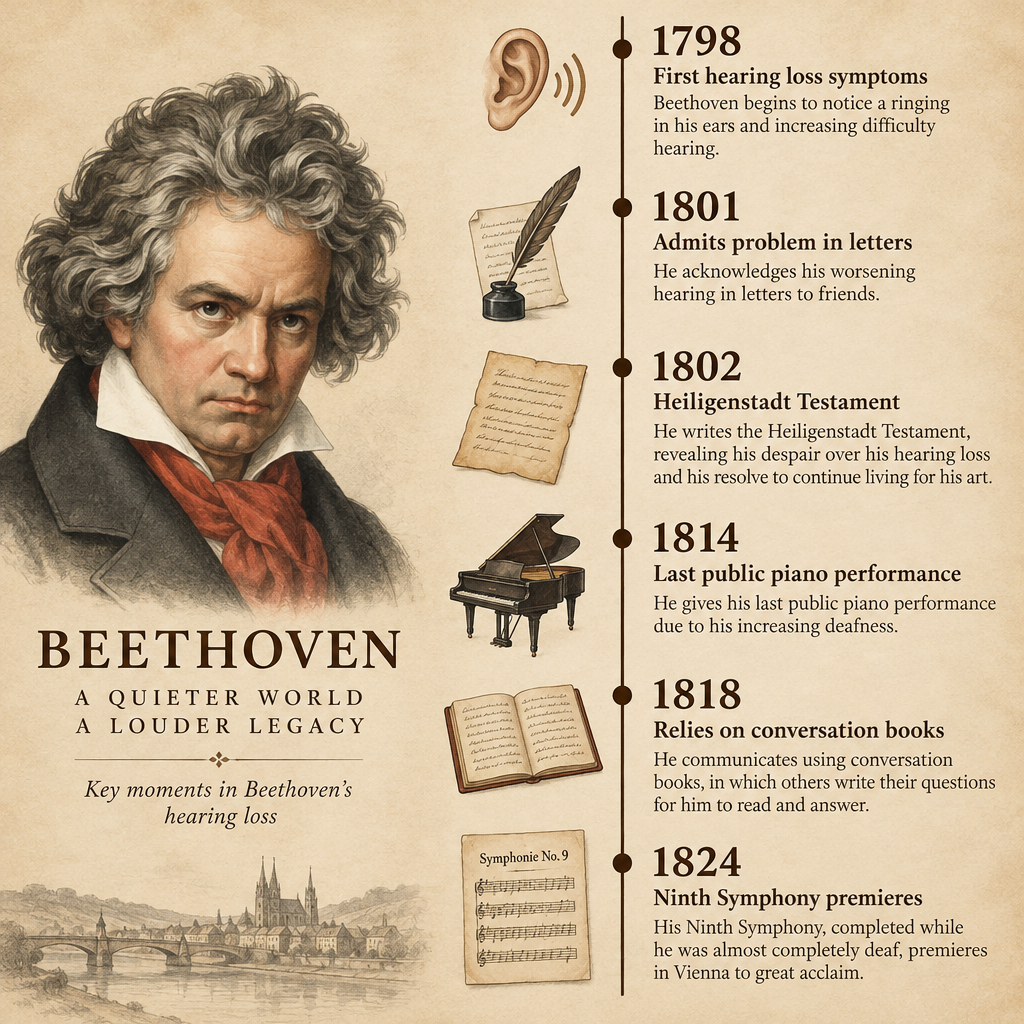
    People have been looking for ways to live with ringing ears for a long time. Beethoven described constant buzzing and humming in a 1801 letter to a friend, years before his hearing failed badly. The tools are far better now. Still, the most effective approach combines a comfortable sound, a sensible volume, and professional help when tinnitus starts affecting your mood, work or relationships.

    FAQ

    Does a white noise maker for tinnitus actually work?

    For many people it helps with sleep, because steady sound lowers the contrast between the ringing and a silent room. It does not cure tinnitus or make it permanently quieter. Clinical guidelines treat sound therapy as a reasonable option, and they rate CBT as better supported for reducing tinnitus distress.

    Is white, pink or brown noise best for tinnitus?

    No single color is best. White noise often blends well with high-pitched ringing, while pink and brown noise feel softer and suit low hums or people who find hiss harsh. Try each one for a few nights at a low volume and pick the one you can tolerate for hours.

    Should I leave my sound machine on all night?

    Leaving it on all night is fine and often helpful, because waking in total silence can make tinnitus feel louder. Keep the volume low, quieter than normal conversation, and avoid placing the machine right next to your head.

    Can white noise make tinnitus worse?

    There is no solid clinical evidence that low-level white noise worsens tinnitus. A 2018 review paper raised a theoretical concern about long-term constant noise, so many audiologists suggest keeping the volume below your tinnitus level and choosing gentler sounds. Very loud noise played all night can damage hearing, which could worsen tinnitus over time.

    Can I just use a fan instead of a sound machine?

    Yes, if it works for you. A household fan provides steady, non-looping sound for free. Dedicated machines are quieter mechanically, offer tone control, and won’t chill you on cold nights, but a fan is a fine first experiment.

    When should I see a doctor about tinnitus?

    See a doctor urgently if you have sudden hearing loss, especially in one ear. Book an appointment if your tinnitus is in one ear only, pulses in time with your heartbeat, comes with dizziness or ear pain, or is affecting your sleep and mood for more than a few weeks.

  • Buying Hearing Aids at Costco: What to Know Before You Go

    Buying Hearing Aids at Costco: What to Know Before You Go

    Costco is one of the cheapest places in the US to buy prescription-grade hearing aids. Members get a free hearing test, a professional fitting, follow-up care and a 180-day return window. Most pairs cost well under typical private-clinic prices. Before you book, you should understand what the warehouse model does well and where it falls short.

    Last updated: October 29, 2026

    TypePrescription-grade hearing aids
    PriceRoughly $1,500 to $3,000 a pair
    Test and fittingFree for members
    Return window180 days
    Best forMild to moderate-severe loss

    How Costco Hearing Aid Centers work

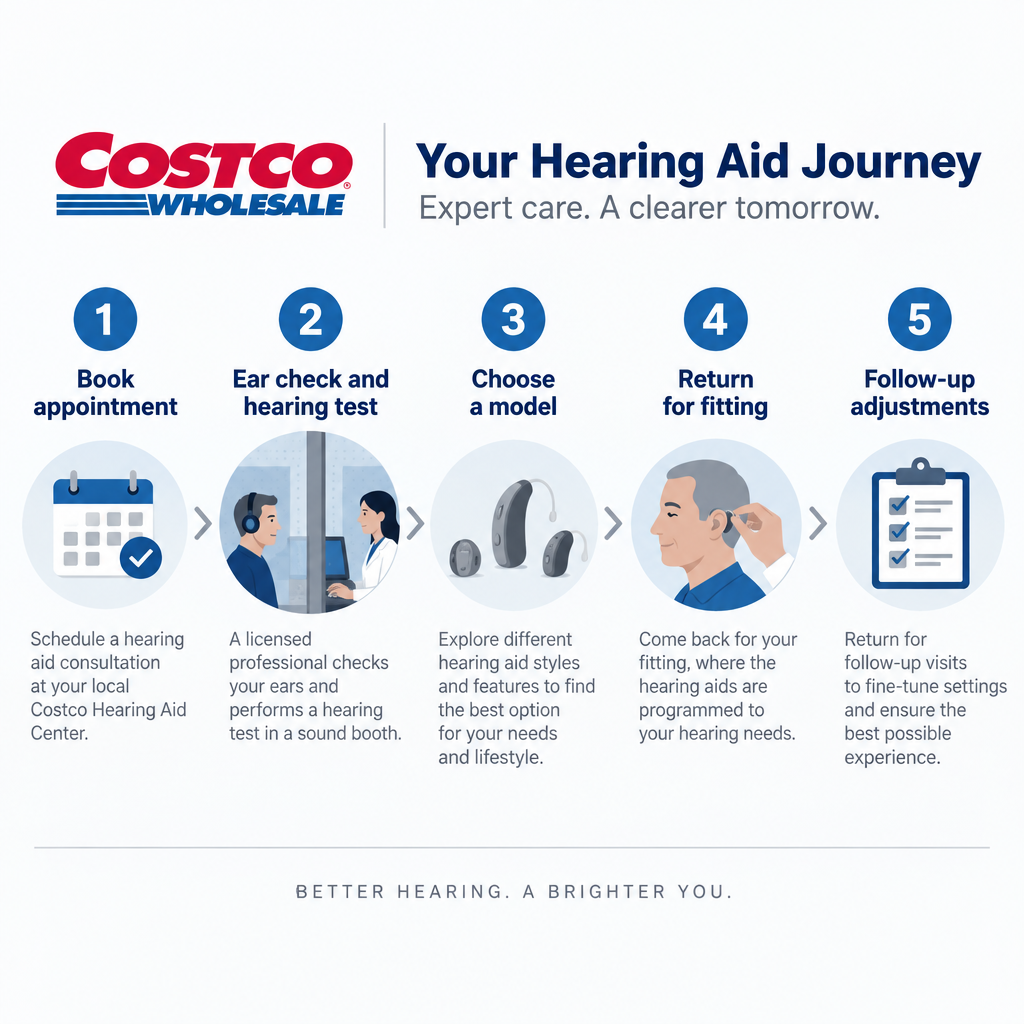
    The hearing aid center sits inside the warehouse, usually near the pharmacy and optical department. Licensed hearing aid specialists run most centers. Some are staffed by audiologists. Either way, the process follows the same steps.

    1. You book appointments by phone, online or at the counter.
    2. A specialist checks your ears and runs a hearing test in a sound booth.
    3. If aids would help, you choose a model and come back for a fitting.
    4. Follow-up visits for adjustments, cleaning and checks are included.

    You need a paid membership to buy, but the hearing test is generally available to non-members as well. Costco sells hearing aids directly, so there’s no separate clinic bill.

    One benefit gets less attention than it should: you can get service at any Costco Hearing Aid Center in the country. That suits people who travel, split the year between two homes or move.

    Brands available at Costco

    Costco carries a short list of brands, and the lineup changes as new technology arrives. Recently it has included:

    • Kirkland Signature, Costco’s own brand, manufactured by Sonova (the parent company of Phonak)
    • Jabra Enhance Pro, from GN
    • Philips HearLink, made by Demant
    • Rexton, from WS Audiology

    The Kirkland Signature line is the big draw. The KS 10.0 launched in 2021 at $1,399.99 a pair, a price that undercut almost every comparable premium aid, but it was discontinued in late 2022 when Sonova ended its supply agreement with Costco. Check what your warehouse stocks now, because models and prices change faster than this article can.

    What Costco hearing aids cost

    Costco vs. Clinic Hearing Aid Price Comparison
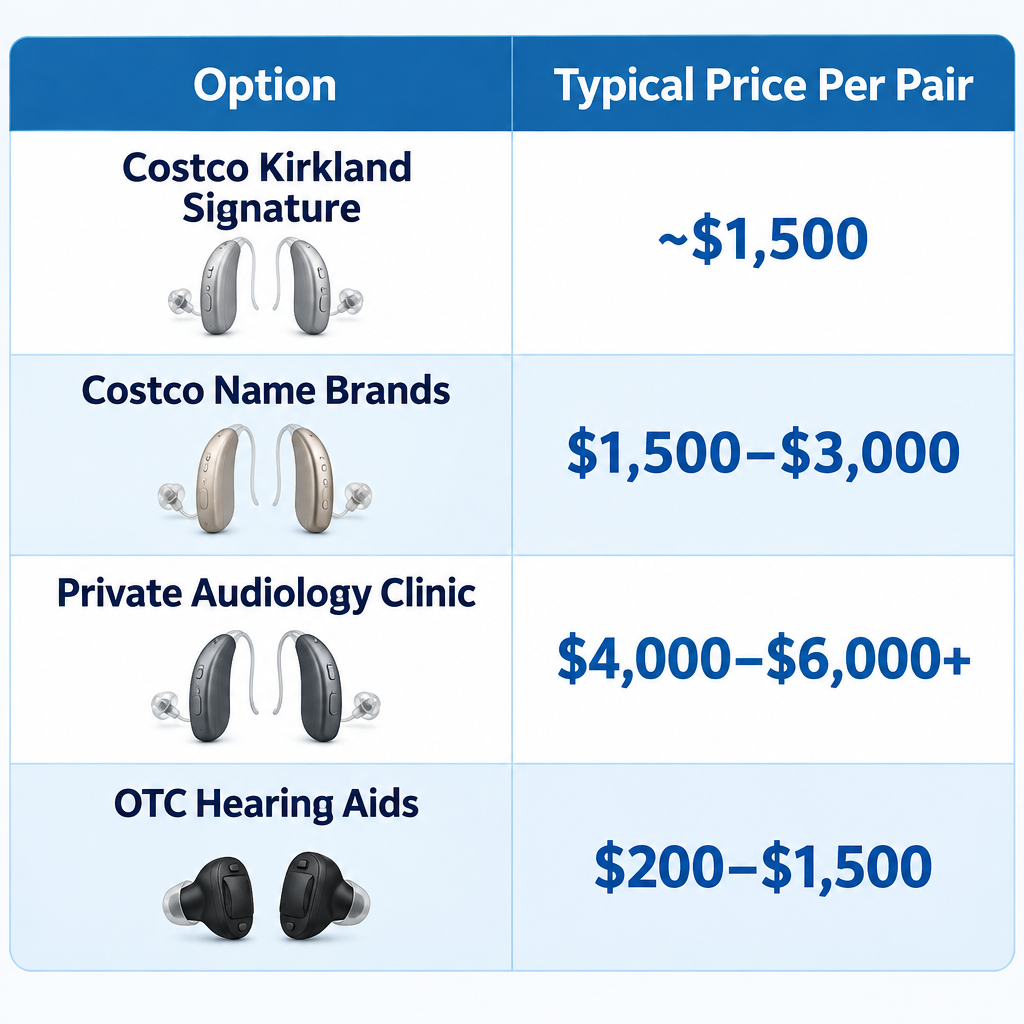
    Option Typical price per pair What’s included
    Costco, Kirkland Signature Around $1,500 Test, fitting, follow-ups
    Costco, name brands About $1,500 to $3,000 Test, fitting, follow-ups
    Private audiology clinic Often $4,000 to $6,000+ Usually bundled care
    OTC hearing aids About $200 to $1,500 Self-fitting, no in-person care

    Costco generally doesn’t bill insurance directly. Ask for an itemized receipt so you can file for reimbursement yourself. Hearing aids are an eligible expense for HSA and FSA funds.

    Features to compare

    Most current Costco models share a core set of smart features. The differences show up in sound processing, size and accessories.

    Feature What to check
    Bluetooth Streaming from iPhone, Android or both
    Rechargeable Battery hours per charge, charger type
    Telecoil Not every model has one. Ask if you use hearing loops
    App control Volume, programs and remote adjustments
    Accessories TV streamers, remote mics, cases

    Hearing tip

    Ask whether the specialist will do real ear measurement during your fitting. It verifies the sound actually reaching your eardrum and makes a noticeable difference in how well the aids work.

    Pros and cons

    Hearing Aid Fitting Process Steps

    Pros
    – Prices far below most clinics, especially for Kirkland Signature
    – The 180-day return window gives you time to test aids in real life
    – Free follow-up care at any US location
    – Warranties are included. Check the length and whether loss and damage are covered

    Cons
    – Appointments can book out weeks at busy warehouses
    – Your specialist may not be an audiologist, which matters for complex cases
    – The brand choice is narrower than at an independent clinic
    – Other clinics may decline to adjust Costco aids, or they may charge for it
    – Costco staff can’t diagnose medical ear problems

    See a professional

    Sudden hearing loss in one or both ears is a medical emergency, so see a doctor within days, not weeks. Ear pain, drainage, dizziness or a suspected perforated eardrum also need a doctor before any hearing aid fitting.

    Who Costco suits, and who should look elsewhere

    Costco is a strong fit for adults with age-related or noise-related loss in the mild to moderate-severe range. It also works well if you want professional fitting without clinic pricing.

    You should look elsewhere in a few situations: profound loss, a possible need for a cochlear implant, uneven loss between ears with no clear cause, or a child who needs hearing aids. An audiologist or ENT should guide those cases.

    If your loss is mild and you’re comfortable with apps, OTC aids are worth comparing. They cost less but come with no in-person support.

    How to get started

    Getting started at Costco

    1. Confirm your membership is active.
    2. Book a hearing test at your nearest warehouse with a hearing aid center.
    3. Bring a list of medications and any past hearing test results.
    4. Bring a family member to help judge sound during the fitting.
    5. Wear the aids daily during the trial and note problem situations.
    6. Book follow-ups for fine-tuning before the 180 days run out.

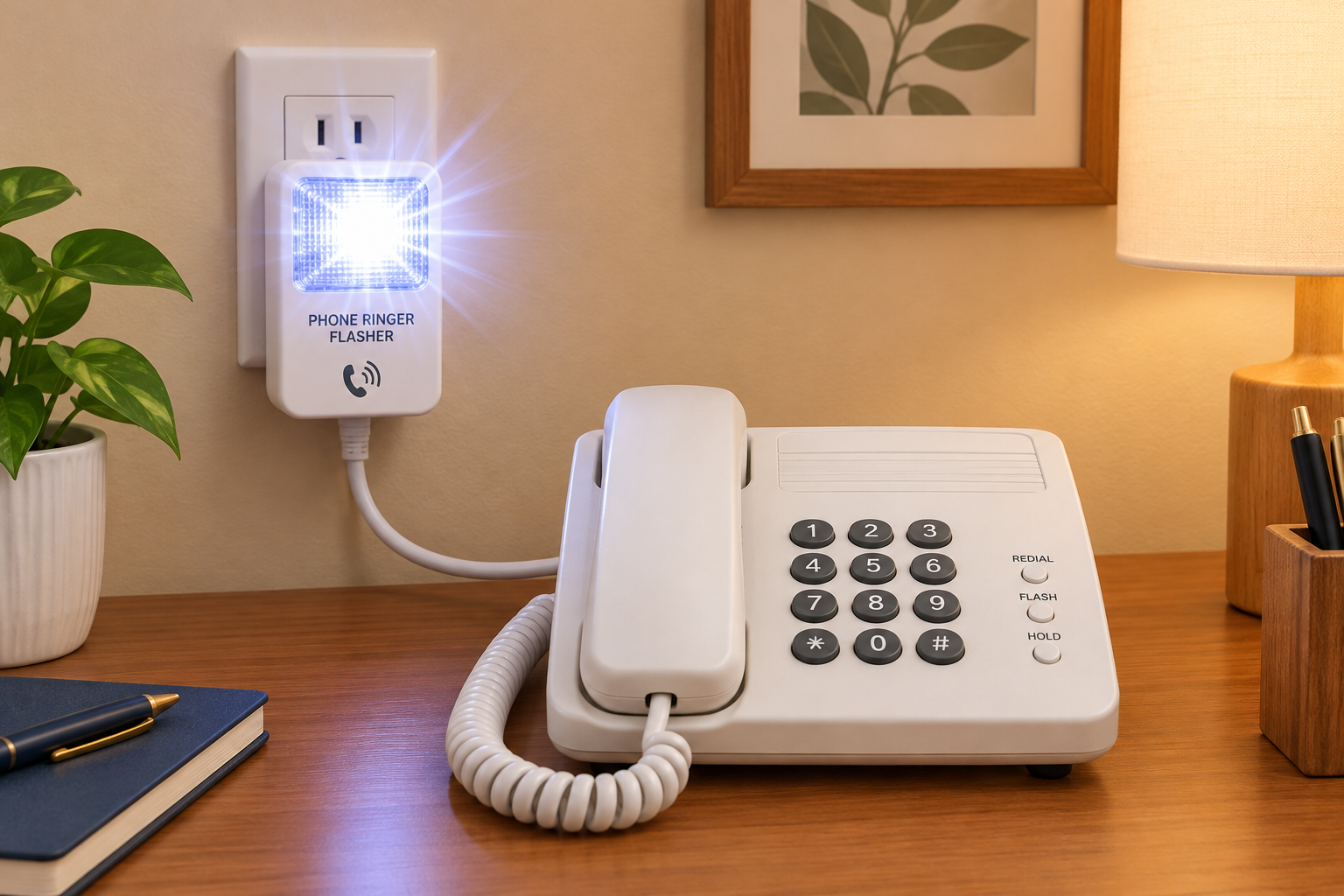
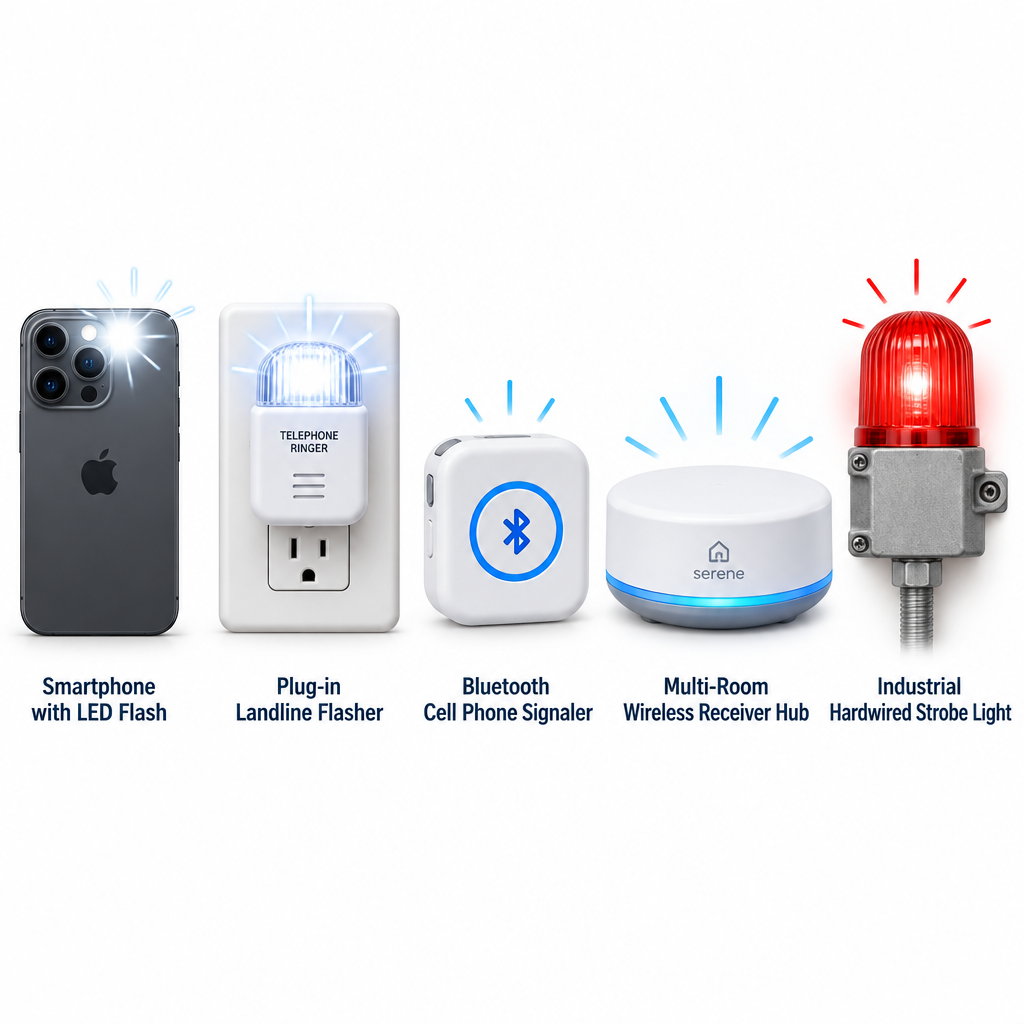
    Hearing aids won’t solve everything. If phone calls are still hard, look at captioned phones, telecommunications relay service or a ringer light for the telephone alongside your new aids.

    FAQ

    How much do hearing aids cost at Costco?

    Most pairs fall between about $1,500 and $3,000. The Kirkland Signature line was discontinued in late 2022, and its last model, the KS 10.0, sold for $1,399.99 a pair. The price includes fitting and follow-up care, while the hearing test is free and separate from the purchase.

    What are the best hearing aids to buy at Costco?

    Kirkland Signature was long the value pick, but the line has been discontinued since late 2022, when Sonova ended its supply agreement with Costco. Name brands like Philips, Jabra Enhance Pro and Rexton make sense if a specific feature or fit matters to you. Your specialist can match a model to your test results and lifestyle.

    Is it worth buying hearing aids from Costco?

    Yes, for most adults with common types of hearing loss. You get professional fitting, free follow-ups and a long return window at a much lower price. Complex or medical cases belong with an audiologist or ENT.

    Is it cheaper to get hearing aids at Costco?

    In most cases, yes. Comparable aids at private clinics often cost twice as much or more. OTC aids are cheaper still, but they don’t include in-person testing or fitting.

  • Earplugs Explained, From Foam to Silicone to Filtered

    Earplugs Explained, From Foam to Silicone to Filtered

    Last updated: October 29, 2026

    Earplugs protect hearing by sealing or filtering the ear canal. They cut the sound reaching your eardrum by roughly 12 to 33 decibels on paper, depending on the type. Foam plugs block the most noise, silicone putty seals best for water and sleep, and filtered plugs lower volume evenly so music and speech stay clear.

    Most protectionFoam, up to NRR 33
    Best for musicFiltered earplugs
    Best for swimmingSilicone putty
    Longest lastingCustom molded
    Typical costCents to $300+

    What Earplugs Actually Do, and What They Cannot

    An earplug is a passive barrier. It blocks or slows sound waves on their way to the eardrum, and it does this without power, apps or batteries. Electronic sleep buds and active hearing protectors are a separate category, which we cover further down.

    Noise damages hearing by overworking the hair cells in the cochlea, the snail-shaped organ of the inner ear. Those cells do not grow back in humans. Noise-induced hearing loss is permanent, and it often arrives together with tinnitus, a ringing, hissing or buzzing that can persist long after the noise stops.

    The World Health Organization estimates that more than a billion young people are at risk of hearing loss from unsafe listening. That includes personal audio and loud venues. Earplugs are the cheapest and most portable defense we have against this kind of damage.

    They have clear limits, too:

    • They do not restore hearing. No earplug repairs existing damage or cures tinnitus.
    • They cannot block bone conduction. Even a perfect seal lets some sound travel through the skull, which caps how much any plug can achieve.
    • A bad fit wipes out most of the benefit. A loosely inserted foam plug can deliver a fraction of its rated reduction.
    • More is not always better. Over-blocking in moderate noise makes speech harder to follow and tempts people to pull the plugs out entirely.

    The best earplug is the one you will actually wear, correctly, for the whole time you are exposed.

    How Noise Reduction Is Rated: NRR, SNR and Real-World Numbers

    Every hearing protector sold in the United States must carry a Noise Reduction Rating label. Europe and many other markets use a different system. The ratings are useful for comparison, but only once we understand what they leave out.

    NRR in the United States

    The Noise Reduction Rating (NRR) is required by the Environmental Protection Agency under a labeling rule dating from 1979. It is measured in a lab, with trained subjects and fittings done under ideal conditions. The number is expressed in decibels.

    The highest NRR on the US market for earplugs is 33. Several disposable foam products reach it, including well-known lines from Howard Leight, Moldex and Mack’s. Earmuffs top out a little lower.

    An NRR of 33 does not mean you hear 33 dB less in daily life. The lab method rewards an expert, deep fit that most people never achieve on their own.

    SNR and the EN 352 standard

    In Europe, earplugs are tested to EN 352-2 and rated with a Single Number Rating (SNR). The test method differs from the US method. For the same product, the SNR figure is usually a few decibels higher than the NRR.

    This matters when shopping online. Many popular concert and lifestyle brands are based in Europe and advertise SNR. Comparing an SNR from one brand with an NRR from another is comparing two different rulers.

    Some European packaging also lists H, M and L values. These show the expected reduction for high, medium and low frequency noise, which is handy for picking a plug for engines (low-frequency heavy) versus whistles or alarms (high-frequency heavy).

    Why your real protection is lower than the label

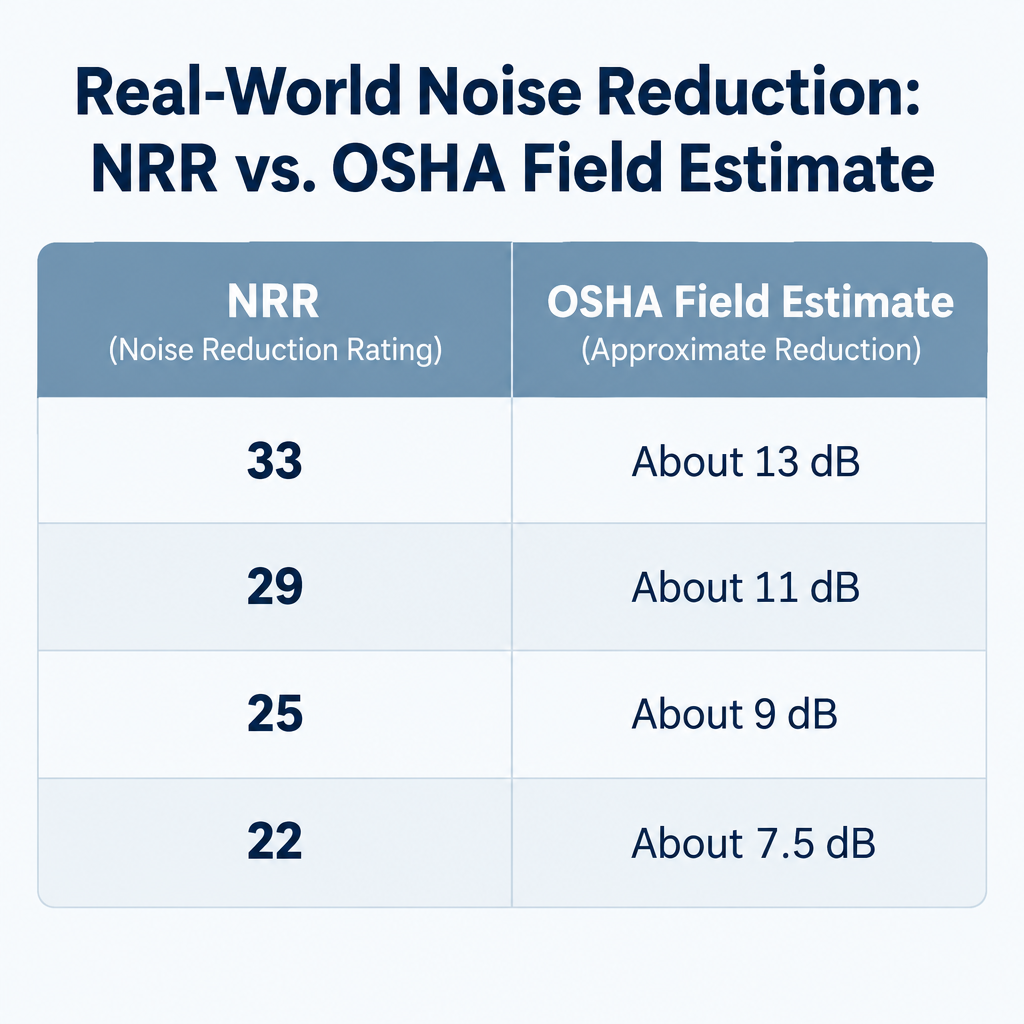
    Occupational safety agencies have long recognized the gap between lab and field. OSHA’s guidance for estimating real protection from a label is to subtract 7 from the NRR and then divide the result by two. NIOSH goes further and recommends derating formable foam plugs by 50 percent and most other earplugs by 70 percent.

    Here is what OSHA’s field method looks like in practice:

    Labeled NRR OSHA field estimate (NRR minus 7, then halved)
    33 About 13 dB
    29 About 11 dB
    25 About 9 dB
    22 About 7.5 dB

    These estimates are deliberately conservative. People who learn proper insertion routinely do much better. Workplaces that run individual fit tests, using systems such as 3M E-A-Rfit or Honeywell VeriPRO, measure a Personal Attenuation Rating (PAR) for each worker. That figure beats any label.

    Hearing tip

    Pairing earplugs with earmuffs does not add the two NRRs together. For this kind of dual protection, OSHA’s guidance is to add only about 5 dB to the NRR of the higher-rated protector.

    How Much Protection You Actually Need

    NRR Field Estimate Chart

    Choosing earplugs starts with knowing how loud your environment is. A free decibel meter app on a phone gives a rough reading. Apple’s Noise app on Apple Watch, and the headphone audio level tracking in the iPhone Health app, are good for spotting trends over a week.

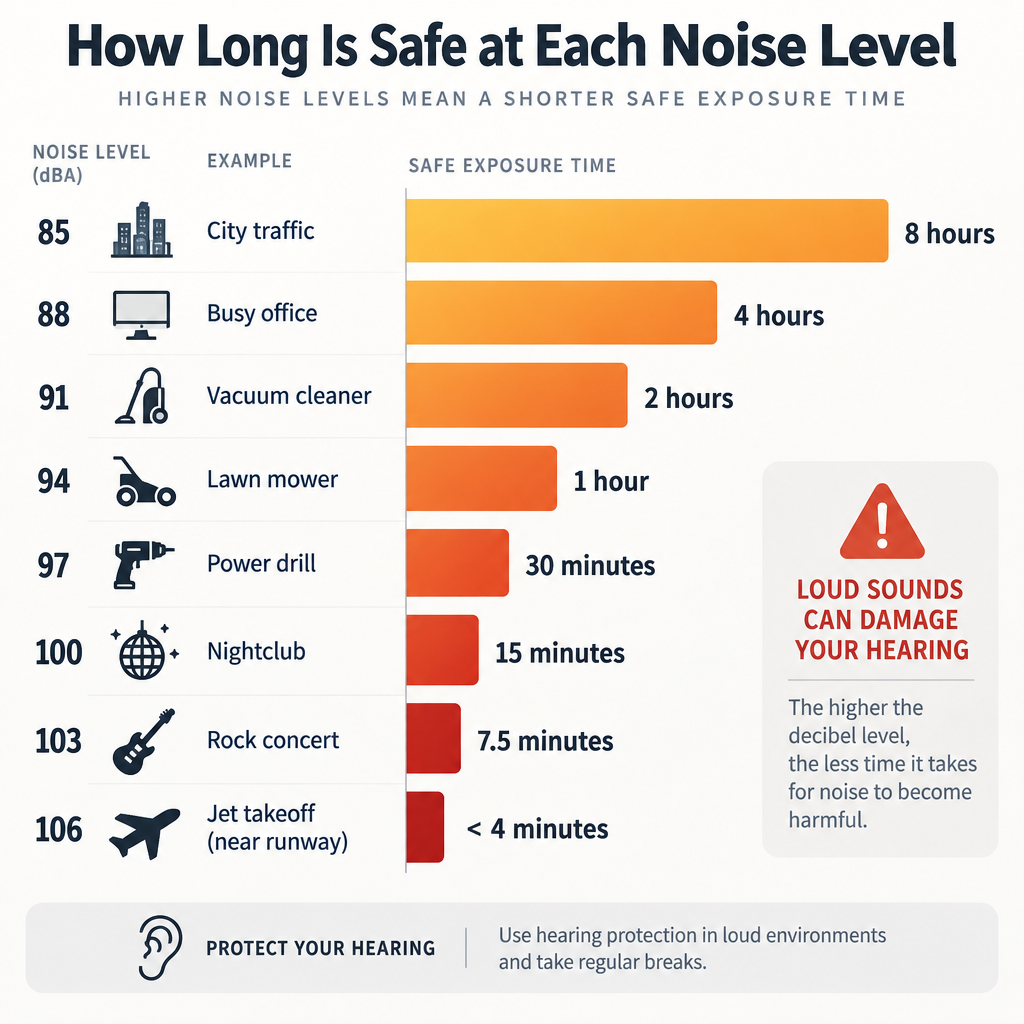
    NIOSH recommends limiting exposure to an average of 85 dBA over eight hours. For every 3 dB increase, the safe time halves. That exchange rate is why a concert hurts hearing so much faster than a busy restaurant.

    Average level NIOSH recommended maximum Common examples (approximate)
    85 dBA 8 hours Heavy city traffic, a loud bar
    88 dBA 4 hours Food blender at close range
    91 dBA 2 hours Gas lawn mower
    94 dBA 1 hour Motorcycle wind noise at speed
    97 dBA 30 minutes Loud sports crowd
    100 dBA 15 minutes Nightclub dance floor, power tools
    103 dBA About 7.5 minutes Rock concert near the front
    106 dBA Under 4 minutes Concert near speaker stacks

    The WHO’s global standard for safe listening venues and events recommends that venues keep levels to no more than 100 dB averaged over 15 minutes. Many concerts and clubs exceed that.

    Once we know the level, the goal is to land comfortably under 85 dBA with the plugs in. At a 103 dBA show, a filtered concert plug giving 15 to 20 dB of real reduction brings us into the low to mid 80s, which is a safe target. On a firing range, where gunshots peak far above 140 dB, no earplug alone is enough.

    Over-protecting is a real problem as well. Dropping a 90 dB environment down to 57 dB with foam plugs makes conversation and warning signals hard to hear. Matching protection to noise is better practice than always grabbing the highest NRR.

    The Main Types of Earplugs

    Each material trades off reduction, comfort, sound quality and cost differently. We group them into seven families.

    Foam earplugs

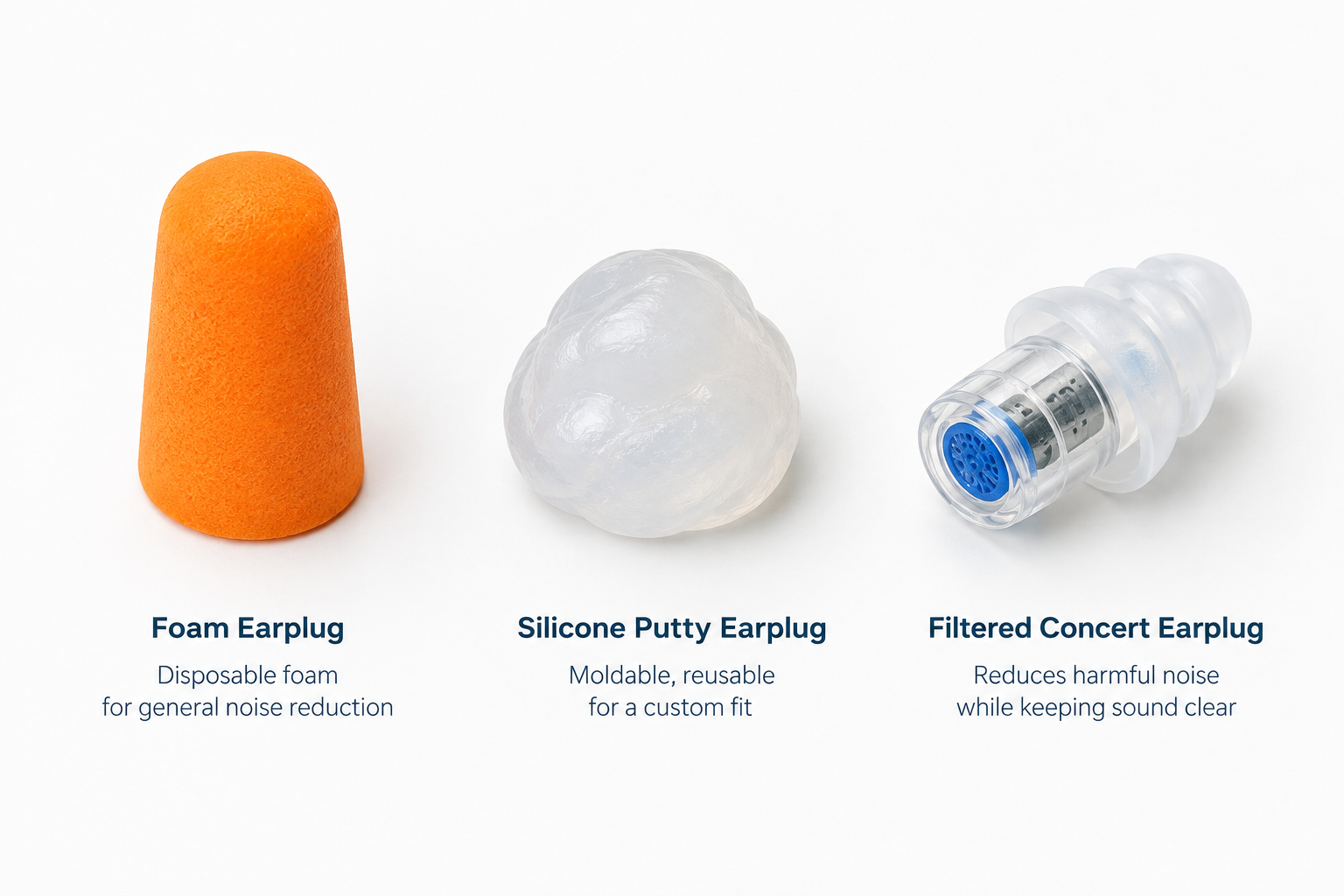
    Disposable foam is the default ear plug for good reason. Slow-recovery polyurethane or PVC foam is rolled into a thin cylinder, inserted, and allowed to expand until it fills the canal. A well-inserted foam plug provides the strongest passive reduction of any earplug type.

    Foam is cheap, widely available and comes in tapered, bell and cylindrical shapes. Smaller sizes exist for narrow canals, and people who find standard plugs painful should try those before giving up on foam.

    Downsides: foam muffles high frequencies more than low ones, so music sounds dull and voices lose clarity. It also absorbs oil and debris, which makes it a poor long-term reusable. Insertion technique matters more with foam than with any other type.

    Best for: sleep, loud work, travel, mowing, short-term heavy noise.

    Silicone putty earplugs

    Moldable silicone putty is shaped into a ball and pressed over the opening of the ear canal, sealing it like a plug in a drain. It does not go deep into the canal. Mack’s Pillow Soft, one of the best-known examples, carries an NRR of 22.

    Putty seals out water extremely well. That makes it the usual choice for swimming, showering and protecting ears after a doctor has advised keeping water out.

    Many side sleepers find putty more comfortable than foam because nothing presses against the canal walls. It can pick up hair and lint, though, and it loses tackiness after a few uses.

    Best for: swimming, bathing, side sleeping, people who dislike deep insertion.

    Pre-molded flanged earplugs

    These are the reusable “Christmas tree” plugs made of silicone or soft thermoplastic, usually with two or three flanges and a stem for handling. They are washable, often come on a cord, and need no rolling.

    Their NRR is typically in the mid-20s. They are popular on job sites where workers remove and reinsert plugs many times a day with dirty hands, since you touch only the stem.

    Fit is less forgiving than foam. A flanged plug either matches your canal size or leaks, which is why many brands sell multiple sizes.

    Best for: repeated on-and-off use at work, people who want something reusable and cheap.

    Wax and cotton blend earplugs

    Wax earplugs have a long history in Europe. The German brand Ohropax, still sold today, is known for its plugs made from wax, cotton wool and petroleum jelly. Body heat softens the wax so it molds over the canal entrance.

    They seal well, block noise solidly, and many light sleepers swear by them. They can feel greasy and may leave residue in hair or on pillowcases.

    Best for: sleep, people who want a moldable seal but find silicone putty too firm.

    Filtered (high-fidelity) earplugs

    Filtered earplugs, often sold as concert or musician earplugs, use an acoustic filter or chamber to lower sound more evenly across frequencies. The aim is a quieter version of the same mix, without the muffled effect of foam.

    This category exploded over the last decade. The Etymotic ER20 (sold as ETY-Plugs) helped popularize it with an NRR of 12. Today the shelves include EARPEACE, Loop, Eargasm, Flare and many more. Several let you swap filters or inserts to change the level of reduction, and limited-edition colors and collaborations are common. EARPEACE, for instance, has partnered with the Rock & Roll Hall of Fame, and Loop has partnered with festivals such as Tomorrowland.

    Real-world reduction varies widely. Many filtered plugs sit between roughly NRR 12 and the low 20s, or a few decibels higher in SNR. Read the label in the units the brand uses, and pay attention to which ear tip size the rating was tested with.

    For a deeper breakdown of one popular brand’s lineup, our guide on loop earplugs compares each model and who it suits.

    Best for: concerts, festivals, clubs, rehearsals, bars, sporting events.

    Custom molded earplugs

    Custom earplugs are made from impressions of your ear canals, taken by an audiologist or hearing professional. The shell is usually medical-grade silicone or acrylic. Because they match your anatomy, they seal consistently and stay comfortable for hours.

    Musicians often pair custom shells with flat-attenuation filters. Etymotic’s long-running ER-9, ER-15 and ER-25 filters, named after their approximate decibels of reduction, are the classic examples. Solid custom plugs without filters are used for industrial work, shooting, motorsport and swimming.

    Some audiologists verify custom musician plugs with probe-microphone equipment similar to what they use for real ear measurement when fitting hearing aids. It is worth asking whether this is included, since it confirms the plugs deliver what they promise.

    Best for: professional musicians, sound engineers, frequent concertgoers, long daily wear.

    Electronic earplugs and sleep buds

    Electronic hearing protectors use microphones and a small amplifier. They let normal sound through at a safe level and clamp down instantly on loud impulses such as gunshots. Shooters and hunters use them so they can hear range commands and wildlife.

    Sleep earbuds are a different idea. They usually provide modest passive blocking and then play masking sounds or white noise to cover snoring and traffic. They need charging, cost far more than passive plugs, and do not provide the reduction of a deep foam seal.

    Best for: shooting and hunting (electronic protectors), light sleepers bothered by irregular noises who dislike silence (sleep buds).

    Comparison at a glance

    Type Typical NRR range Reusable Sound quality Water seal Comfort for sleep
    Foam About 29 to 33 No (a few nights at most) Muffled Poor Good
    Silicone putty About 22 to 23 Several uses Muffled Excellent Very good
    Pre-molded flanged About 24 to 27 Yes, months Muffled Fair Fair
    Wax blend Varies by brand Several uses Muffled Good Very good
    Filtered About 12 to low 20s Yes, months to years Clear and even Poor Fair to good
    Custom molded Depends on filter or design Yes, several years Clear with filters Good with swim design Very good

    Price Guide

    Noise Exposure Time Limits

    Prices shift often and vary between retailers. These are typical ranges we see in the US as of October 2026.

    Type Typical price Approximate cost per pair
    Foam, retail packs $5 to $15 for 20 to 50 pairs 10 to 50 cents
    Foam, bulk industrial boxes $25 to $45 for 200 pairs Under 25 cents
    Silicone putty $5 to $10 for 6 to 12 pairs About $1
    Pre-molded flanged $5 to $20 $1 to $5
    Filtered concert earplugs $20 to $50 Same (lasts months or years)
    Custom molded with filters $150 to $350+, plus fitting fees Same (lasts several years)
    Electronic shooting earplugs $50 to $300+ Same
    Sleep earbuds $150 to $300 Same

    Custom earplug costs vary most by location and clinic. Some audiology practices quote the impressions, shells and filters separately. Check before booking so the total does not surprise you.

    Choosing Earplugs by Use Case

    Most people need more than one type. A pack of foam for sleep and travel plus a pair of filtered plugs for live music covers the majority of everyday situations.

    Concerts, festivals and clubs

    Pick filtered earplugs. They keep vocals intelligible and the bass punchy while bringing levels down to a safe zone. Plugs with interchangeable filters are useful here, since a seated acoustic show and a festival main stage need very different amounts of reduction.

    Foam works in a pinch, and many venues hand it out for free at the bar or merchandise stand. It will still protect you better than nothing at all.

    Wear them from the opening act onward. Damage accumulates across the whole night, and the ringing in your ears on the way home is a warning sign, not a badge.

    Hearing tip

    Keep filtered earplugs on your keyring in their carry case. The best pair is the one you have on you when the support act starts.

    Musicians and sound engineers

    Players who are exposed several times a week benefit most from custom molded plugs with flat filters. Drummers and brass players often need stronger filters than singers or acoustic guitarists.

    Drummers sitting near cymbals, and anyone standing beside a guitar amplifier, should consider the stronger end of the range. Many professional musicians also move to in-ear monitors, which act as hearing protection when set at sensible volumes.

    History offers plenty of cautionary tales about musicians and hearing. Our piece answering the question of whether Beethoven was deaf shows how long the connection between music and hearing loss has fascinated people, even though his case was not caused by stage volume.

    Sleep

    For maximum quiet, foam is hard to beat. Back sleepers usually do well with standard tapered foam; side sleepers often prefer silicone putty, wax or low-profile soft foam that sits flush with the ear.

    A few practical points:

    • Choose the softest foam you can find, because firm foam presses into the canal for hours.
    • Replace foam plugs every few nights, or sooner if they stop expanding properly.
    • Keep an alarm you can still hear. Phone vibration under the pillow, a smartwatch tap alarm or a bed shaker are all options.

    Snoring partners are the most common reason people start sleeping with earplugs. Low-frequency rumble is hard to block completely, so some people combine foam plugs with a fan or white noise machine.

    Loud work and DIY

    For mowing, leaf blowing, power tools, workshops and manufacturing, foam and flanged plugs are standard. Workplaces covered by OSHA must provide hearing protection when noise reaches an eight-hour average of 85 dBA, and must offer a choice of protectors.

    Workers who take plugs in and out all day often prefer flanged or banded plugs. Banded plugs sit on a plastic band around the neck and pop in without being touched.

    If you work in noise regularly, ask whether your employer offers fit testing. A three-minute test tells you exactly how much your plugs are doing.

    Shooting and hunting

    Gunfire is impulse noise. A single unprotected shot from a high-powered rifle can cause immediate, permanent damage. Doubling up, with foam earplugs under earmuffs, is the standard advice for indoor ranges and for shooting large calibers.

    Electronic earplugs and muffs let you hear conversation and range commands at safe levels. They suppress impulses within milliseconds. Hunters often prefer electronic plugs over muffs because they do not interfere with a rifle stock against the cheek.

    Motorcycling

    A helmet does not keep out wind noise, which is often the loudest part of a ride at highway speed. Many riders find that foam plugs make long rides noticeably less tiring, and filtered plugs designed for riders let engine and traffic sounds through at lower levels.

    Check local laws before riding with earplugs. Rules about hearing protection while riding differ between US states and between countries.

    Swimming and surfing

    Use silicone putty, swim-specific flanged plugs or custom swim molds. Noise reduction is not the goal; keeping water out is.

    Regular cold-water surfers face a specific risk called surfer’s ear, a bony growth in the ear canal driven by repeated cold water and wind exposure. Vented surf earplugs block water and wind while letting some sound through so you can still hear other surfers.

    If a doctor has told you to keep water out after ear surgery, an infection or a perforated eardrum, follow their exact instructions on which plugs to use.

    Flying

    Pressure-regulating earplugs, such as EarPlanes, use a filter that slows the rate of pressure change on takeoff and landing. Some travelers with sensitive ears find them helpful. Plain foam also cuts cabin drone on long flights, making it easier to sleep.

    If you have a cold or blocked sinuses, earplugs will not stop the painful pressure that comes from a blocked Eustachian tube. Talk to a pharmacist or doctor about what to do before flying with congestion.

    Focus, study and sensory sensitivity

    Many people use earplugs to work in open-plan offices, study in noisy homes or manage sensory overload. Autistic people and those with sensory processing differences often find that reducing background sound makes busy places like supermarkets and airports more manageable.

    Filtered plugs work well here because they lower clatter without removing speech entirely. Several brands now market specific low-profile models for this purpose.

    Children

    Toddlers and young children are usually better served by kids’ earmuffs, which are easier to fit, harder to lose and do not pose a choking risk. Small foam and putty plugs can be swallowed or pushed too deep.

    Older children can use child-sized silicone putty or small filtered plugs, with an adult checking the fit. Babies at fireworks, motorsport and concerts should wear properly sized infant earmuffs.

    How to Insert Foam Earplugs Correctly

    Most complaints that foam earplugs “do not work” come down to shallow insertion. The roll, pull, hold method fixes this in under a minute.

    How to insert foam earplugs

    1. Wash and dry your hands so you do not push dirt into the canal.
    2. Roll the plug between finger and thumb into a thin, tight crease-free cylinder.
    3. Reach over your head with the opposite hand and pull the top of your ear up and back.
    4. Slide the rolled plug well into the canal while it is still compressed.
    5. Hold it in place with a fingertip for 20 to 30 seconds while it expands.
    6. Check the fit: your own voice should sound deep and hollow.

    When fitted well, most of the plug sits inside the canal and very little shows from the side. If half the plug is sticking out, it is not deep enough. If it hurts, try a smaller or softer foam rather than forcing it.

    To remove foam plugs, twist them gently while pulling slowly outward. Yanking them out quickly can create an uncomfortable suction effect.

    Checking the Seal

    There are three quick checks any earplug wearer can use.

    The voice test. Talk out loud with both plugs in. Your voice should sound louder inside your head and boomy. This is the occlusion effect, and it means the seal is working.

    The hands test. In a steady noise, such as a running fan, cup your hands tightly over your ears. If the sound drops noticeably with your hands in place, your plugs are leaking. Reinsert them.

    The comparison test. Try one ear at a time. Noise should be clearly lower on the plugged side. If both sides sound the same, the plug is not sealing.

    Filtered earplugs need a seal too. They lower sound through the filter, but only if air cannot leak around the tip. Try the different tip sizes that come in the box, and do not assume the medium tip is right.

    Care, Cleaning and Replacement

    Hygiene matters with anything worn in the ear. A dirty earplug can introduce bacteria into the ear canal, and the ear canal stays warm and moist under a plug.

    Type How to clean When to replace
    Foam Not designed for washing After one use, or a few nights for sleep
    Silicone putty Not washable; keep in its case When it loses stickiness or picks up debris
    Pre-molded flanged Mild soap and warm water, air dry When stiff, cracked or discolored
    Filtered Wipe tips with mild soap and water; keep filters dry Tips every few months; whole plug when worn
    Custom molded Mild soap and water, or wipes approved by the maker Usually every few years, or after weight change or ear growth

    Always store reusable earplugs in their carry case rather than loose in a pocket. Spare cases are cheap and save the plugs from lint and crushing. Never share earplugs, and do not use alcohol on filters unless the manufacturer says so, since some filters can be damaged by moisture or solvents.

    Safety: Earwax, Infections and Overuse

    Earplugs are low-risk for most people. Daily, all-night use does carry some well-documented issues, though.

    Earwax buildup. Earwax naturally migrates outward. Pushing a plug in every night can press wax deeper and contribute to blockage, especially for people who already make a lot of wax. Signs include muffled hearing that does not clear after removing the plugs, fullness or itching.

    Outer ear infections. Trapped moisture and dirty plugs raise the risk of otitis externa, a painful infection of the ear canal. Clean or replace plugs regularly and let your ears breathe during the day.

    Irritation or allergy. Some people react to particular foams or silicones. Switching materials usually solves it.

    Over-reliance in quiet places. Wearing earplugs constantly in normal, everyday sound can make the brain more sensitive to sound over time. Audiologists who treat hyperacusis and tinnitus generally advise reserving earplugs for genuinely loud situations.

    Missing alarms. Smoke alarms are loud enough to be heard through most earplugs, but heavy sleepers wearing deep foam may sleep through them. Interconnected alarms with strobe or bed-shaker accessories add a safety layer.

    See a professional

    Sudden hearing loss in one or both ears is a medical emergency. Get seen by a doctor within 24 to 48 hours. See an audiologist or doctor too for ear pain, discharge, persistent ringing or fullness that does not clear.

    Never try to dig out a plug that has gone too deep with tweezers or a cotton swab. A doctor or nurse can remove it safely.

    Earplugs for People Who Already Have Hearing Loss

    It is easy to assume that people who are already hard of hearing no longer need protection. The opposite is true. Remaining hearing is precious, and noise can still damage it further.

    Hearing aid users should take out their hearing aids before putting in earplugs, unless an audiologist has set up a specific protection solution. A hearing aid is not hearing protection. Many modern hearing aids do limit loud sounds, but they are not designed or rated to protect you at concerts or work.

    Some audiologists can make custom earmolds that function as both hearing aid molds and, with a different insert, as protection. Ask about this if you swap between noisy and quiet settings often.

    People who are Deaf or hard of hearing sometimes use earplugs at loud events to reduce physical discomfort or vibration, or to protect any residual hearing they have. If you rely on captions at events, many venues and streaming platforms offer closed captioning, and we explain how it works in a separate guide.

    Common Mistakes With Earplugs

    A few habits undo most of the protection a good earplug offers.

    1. Inserting foam without rolling it tight enough. It expands before it reaches the canal and sits at the entrance.
    2. Choosing by NRR alone. The highest rated plug is useless if it is too uncomfortable to keep in for the whole event.
    3. Putting plugs in only when it already feels too loud. By then your ears may already be fatigued.
    4. Taking them out to talk. At loud venues, speech is usually easier to understand with filtered plugs in, because your ears are not overloaded.
    5. Reusing foam for weeks. Old foam stops expanding properly and harbors bacteria.
    6. Wearing the wrong size. Small canals need small plugs; forcing a regular size causes pain and a poor seal.
    7. Treating earbuds as earplugs. Noise-canceling earbuds are not rated hearing protectors unless the maker has certified them as such. Turning up music to drown out noise adds exposure rather than reducing it.

    FAQ

    Which earplugs block the most noise?

    Disposable foam earplugs with an NRR of 33 block the most noise of any earplug type, provided they are inserted deeply. For extremely loud noise like gunfire, combine foam plugs with earmuffs.

    Are earplugs safe to wear every night?

    For most people, yes. Use soft foam or putty, replace or clean them regularly, and watch for signs of earwax buildup or irritation such as itching, fullness or muffled hearing during the day. If those appear, take a break and see a doctor.

    Do concert earplugs make music sound worse?

    Good filtered earplugs make music quieter rather than duller. Most people find that, after the first few minutes, the sound is clearer than unprotected listening, because their ears are not overloaded and distorting.

    What does NRR mean on earplugs?

    NRR stands for Noise Reduction Rating, a US label required by the EPA and measured under ideal lab conditions. Real-world reduction is usually lower, which is why OSHA suggests subtracting 7 and halving the number to estimate field performance.

    Is a higher NRR always better?

    No. Choose the NRR that brings the noise down to around 70 to 85 dBA. Too much protection in moderate noise makes speech and warning sounds hard to hear, and people are more likely to remove plugs they find isolating.

    Can earplugs cure tinnitus?

    No. Earplugs can help prevent noise from making tinnitus worse, but they do not cure it. Persistent ringing should be checked by an audiologist or doctor, and sudden new tinnitus with hearing loss needs urgent care.

    How long do reusable earplugs last?

    Filtered and flanged earplugs usually last several months to a few years, with replacement tips every few months. Custom molded earplugs often last several years, though they may need remaking if your ears change shape.

    Can I use earplugs with hearing aids?

    Not at the same time in the same ear. Remove your hearing aids and use earplugs in loud situations, or ask your audiologist about custom earmolds and protection options that suit your hearing aids.

    Are earplugs safe for children?

    Older children can use child-sized earplugs under adult supervision. Infants and toddlers should wear properly sized earmuffs instead, since small plugs can be a choking hazard or get pushed too deep.

  • Was Beethoven Deaf? How He Kept Composing Through Hearing Loss

    Was Beethoven Deaf? How He Kept Composing Through Hearing Loss

    Yes, Beethoven was deaf. His hearing began to fail in his late twenties, around 1798, and by about 1818 he could no longer follow conversation at all. He wrote some of his greatest music, including the Ninth Symphony, after he had lost almost all of his hearing.

    First symptomsAround age 27
    Fully deaf byAbout 1818
    Main symptomsTinnitus, muffled sound
    CauseStill unknown

    When Beethoven Started Going Deaf

    Ludwig van Beethoven was born in Bonn in December 1770 and moved to Vienna in 1792 to make his name as a pianist. A few years later, while still in his twenties, he noticed that something was wrong with his ears.

    He kept it secret for several years. A deaf composer sounds like a contradiction, and a deaf piano virtuoso would have lost his income. He finally confessed in letters to two close friends in 1801: the physician Franz Wegeler and the violinist Karl Amenda.

    The letter to Wegeler gives a clear picture of the symptoms. Beethoven described a constant humming and buzzing in his ears, which we would now call tinnitus. He could not hear the high notes of instruments or voices from a distance in the theater. Speech reached him as sound, but he couldn’t make out the words. He also found loud noise painful. If someone shouted, he said, he could not bear it.

    Audiologists recognize that pattern today. When you lose sensitivity to soft sounds, loud sounds can still feel uncomfortably loud. The ear has a narrower comfortable range.

    The Heiligenstadt Testament

    In October 1802, on the advice of his doctor, Beethoven spent months in Heiligenstadt, then a quiet village outside Vienna. There he wrote a long letter to his brothers Carl and Johann. It was never sent. It was found among his papers after his death and is now called the Heiligenstadt Testament.

    It is a painful document. Beethoven describes pulling away from company because he could not bear people noticing that he could not hear. He describes standing beside a companion who heard a distant flute or a shepherd singing when he heard nothing. He admits he came close to ending his life. Only his art held him back, he wrote. He could not leave the world until he had brought out everything he felt was in him.

    He went back to Vienna and into the most productive stretch of his life. The “heroic” middle period followed, including the Third Symphony (Eroica), the Fifth, the Violin Concerto and the opera Fidelio.

    How His Hearing Got Worse Over Time

    Timeline of Beethoven's Hearing Loss

    Beethoven’s deafness came on gradually over about 20 years.

    Year Age (approx.) What happened
    c. 1798 27 First signs of hearing loss and tinnitus
    1801 30 Admits the problem in letters to Wegeler and Amenda
    1802 31 Writes the Heiligenstadt Testament
    c. 1813–1814 42–43 Uses ear trumpets made by Johann Nepomuk Mälzel
    1814 43 Struggles in one of his last public piano performances
    1818 47 Begins relying on written conversation books
    1824 53 Ninth Symphony premieres in Vienna
    1827 56 Dies in Vienna in March

    Performing went first. The composer Louis Spohr heard him rehearse the “Archduke” Trio in 1814. He wrote that the playing was harsh and uneven, too loud in some places and inaudible in others. After that, Beethoven largely stopped appearing as a pianist. Conducting lasted a little longer, but it also became impossible.

    How Beethoven Kept Composing

    You don’t need working ears to write music down. Beethoven had trained since childhood, and he could hear a score in his head the way a skilled reader hears a sentence without saying it aloud. Musicians call this inner hearing. He had decades of sound stored in memory, and he could imagine how a chord or orchestral color would sound before anyone played it.

    He also used every tool available to him:

    • Ear trumpets. Mälzel, the inventor best known for the metronome, built him several brass ear trumpets. A few survive at the Beethoven-Haus museum in Bonn. They helped for a while, then stopped being enough.
    • Louder pianos. In 1818 the London maker Broadwood sent him a piano, and the Viennese builder Conrad Graf later lent him an instrument with four strings per note for extra volume. A sound-reflecting cover is said to have been fitted over it.
    • Vibration. A story often told about Beethoven says he held a rod between his teeth and pressed it against the piano to feel the sound through his jawbone. That is bone conduction, the same principle used in some modern headphones and hearing devices. The story is plausible but secondhand, so treat the details with caution.
    • Conversation books. From around 1818, visitors wrote their side of the conversation in notebooks, and Beethoven usually answered aloud. Over a hundred of these books survive. They are a remarkable record of daily life, although his secretary Anton Schindler later destroyed some and added fake entries to others.

    The conversation books were an early version of something many deaf and hard of hearing people use today. Live closed captioning and text relay services such as telecommunications relay service do the same job of turning speech into something you can read.

    Did Deafness Change His Music?

    Beethoven's Coping Tools

    It did, and researchers have tried to measure it. A 2011 study in the BMJ analyzed the notes in Beethoven’s string quartets across his career. As his hearing worsened in his middle years, he used fewer high notes, which were the frequencies he had the most trouble hearing. In the late quartets, written when he was almost completely deaf, the high notes came back. The authors suggested that once he could no longer hear anything, he relied entirely on his inner ear and stopped writing around his damaged hearing.

    The late works are often described as the most inward and experimental music he wrote. They include the Hammerklavier Sonata, the Missa Solemnis, the Ninth Symphony and the late string quartets, including the Grosse Fuge. You can argue about cause and effect, but isolation from the sounding world clearly didn’t make his music simpler.

    The Ninth Symphony Premiere

    The Ninth Symphony premiered at Vienna’s Kärntnertortheater on May 7, 1824. Beethoven stood on stage beside the official conductor, Michael Umlauf, and indicated the tempos. The musicians had reportedly been told to follow Umlauf.

    The most famous story from that night comes at the end. Beethoven was still facing the orchestra, out of step with the music or simply unaware it had finished. The contralto soloist Caroline Unger turned him around so he could see the audience applauding. Many accounts say people waved hats and handkerchiefs so he could see the ovation he couldn’t hear.

    The “Ode to Joy” finale, a setting of Friedrich Schiller’s poem, became one of the most recognized pieces of music in the world. Beethoven never heard it performed.

    What Caused Beethoven’s Deafness?

    Nobody knows for sure. Theories have included otosclerosis (abnormal bone growth in the middle ear), Paget’s disease of bone, typhus, autoimmune disease, syphilis and lead poisoning. The autopsy in 1827 recorded shrunken auditory nerves and a badly damaged liver. That fits nerve-related hearing loss but doesn’t identify a cause.

    DNA testing has added real evidence. A 2023 study in Current Biology sequenced authenticated locks of his hair. It found a genetic risk for liver disease and signs of hepatitis B infection, but no clear genetic cause for his deafness. The same team showed that one famous lock, long used to support the lead theory, actually came from a woman.

    A 2024 follow-up in Clinical Chemistry tested other authenticated locks and found lead at dozens of times the normal level. The researchers said lead exposure could have contributed to his hearing loss and other illnesses. Possible sources included wine sweetened with lead compounds and lead-glazed tableware. They did not claim lead alone explains everything. The honest answer remains that his deafness probably had more than one cause.

    Other Deaf Musicians After Beethoven

    Beethoven is the most famous deaf composer, but he isn’t the only musician to keep working with hearing loss.

    • Bedřich Smetana lost his hearing at 50. In his String Quartet No. 1, “From My Life,” a long, high-pitched violin note depicts the tinnitus that came before his deafness.
    • Gabriel Fauré struggled with hearing loss and distorted pitch in his final decades and kept composing.
    • Evelyn Glennie, the Scottish percussionist, has been profoundly deaf since childhood and plays barefoot to feel vibrations through the floor.
    • Mandy Harvey, an American singer who lost her hearing at 18, also performs barefoot to sense pitch and rhythm. She reached the finals of America’s Got Talent in 2017.

    Hearing tip

    If you play or listen to loud music regularly, musicians’ earplugs such as Loop earplugs reduce volume without muffling sound the way foam plugs do.

    What Beethoven’s Symptoms Would Mean Today

    Beethoven’s early complaints were ringing in the ears, trouble hearing high pitches, and speech that sounded loud but unclear. Many people describe the same thing to an audiologist today. The difference is that you now have options he never had: a proper hearing test, prescription and over-the-counter hearing aids, cochlear implants for severe loss, and captioning on almost every screen.

    See a professional

    If your hearing drops suddenly in one or both ears, treat it as an emergency and get medical care the same day. Ongoing tinnitus or gradually muffled hearing deserves a visit to an audiologist or doctor.

    FAQ

    At what age did Beethoven go deaf?

    His symptoms began around age 27, in about 1798. His hearing declined over roughly 20 years, and he was essentially deaf by his late forties.

    Was Beethoven completely deaf when he wrote the Ninth Symphony?

    He was profoundly deaf by then. He composed the Ninth mainly between 1822 and 1824, relying on inner hearing and decades of musical training.

    Could Beethoven hear anything at the end of his life?

    Accounts suggest he could still sense some very loud sounds and vibrations, but he could not follow speech or music. That is why visitors wrote in his conversation books.

    Did Beethoven use sign language?

    No. Beethoven relied on written notes, lip reading and his own speech, which he kept throughout his life.

    Is Beethoven the only famous deaf composer?

    No. Bedřich Smetana and Gabriel Fauré also composed with serious hearing loss, and performers such as Evelyn Glennie and Mandy Harvey work as deaf musicians today.

  • How to Turn Off Closed Captioning on Any Device

    How to Turn Off Closed Captioning on Any Device

    To turn off closed captioning, open the subtitles or CC menu during playback and select Off. If captions keep coming back, a second switch in your device’s Accessibility settings is turning them on by default. Below you’ll find the exact paths for TVs, streaming players, cable boxes, phones, computers and the big apps.

    Last checked: October 29, 2026. Menu names shift with software updates. If yours looks different, check Accessibility first.

    The Quick Fix That Works Almost Everywhere

    Turn captions off in under a minute

    1. Start playing any video.
    2. Press the CC, subtitles or speech-bubble button.
    3. Select Off under Subtitles or Captions.
    4. If captions return later, open the device’s Settings, then Accessibility.
    5. Turn off the Captions or Closed Captioning setting there too.

    Most people only need step 3. Steps 4 and 5 fix the stubborn cases.

    Why Captions Keep Coming Back

    Captions can be switched on in several layers at once. Turning off one layer leaves the others active. These are the usual culprits:

    • The TV and the cable box both have captions on. Each one can draw its own captions on screen.
    • A device-level preference overrides the app. On iPhone and Apple TV, the Closed Captions + SDH setting tells apps to show captions every time.
    • “On mute” mode. Some TVs, including Roku models, show captions automatically whenever you mute.
    • Profiles. Netflix and other services save caption choices per profile. A family member’s choice won’t carry over to yours.
    • Updates. A firmware or app update can occasionally reset your settings.

    Smart TVs

    Device Settings Paths Chart

    Your TV’s own caption setting sits in Accessibility. Use the path for your brand.

    TV brand or platform Settings path
    Samsung Settings > General (or General & Privacy) > Accessibility > Caption Settings > Caption off
    LG Settings > All Settings > Accessibility > Subtitles off (older sets: General > Accessibility)
    Vizio Menu > Accessibility > Closed Captions > Off
    Roku TV (TCL, Hisense and others) Settings > Accessibility > Captions mode > Off
    Google TV (Sony, TCL, Hisense) Settings > System > Accessibility > Captions > turn off
    Fire TV Edition (Insignia, Toshiba) Settings > Accessibility > Closed Captioning > Off

    On many Samsung remotes, pressing and holding the Mute button opens Accessibility Shortcuts. That’s a quick way to reach the caption toggle.

    Streaming Players

    Roku. Press the star (*) button during a show to change captions for that video. For the default, go to Settings > Accessibility > Captions mode. You’ll see four options: Off, On always, On replay and On mute. Pick Off. If you choose On mute, captions will appear only while sound is muted.

    Apple TV. Go to Settings > Accessibility > Subtitles and Captioning (on older models, Settings > General > Accessibility > Subtitles and Captioning) and turn off Closed Captions and SDH. During playback, swipe down on the Siri Remote to change subtitles for one video.

    Amazon Fire TV. Go to Settings > Accessibility > Closed Captioning and switch it off. During playback, the Menu button opens subtitle options.

    Google TV Streamer and Chromecast with Google TV. Go to Settings > System > Accessibility > Captions and turn them off.

    Cable and Satellite Boxes

    Boxes from Xfinity, Spectrum, DirecTV and others have their own caption setting. It’s usually under Menu > Settings > Accessibility, or behind a CC or Info button on the remote. Xfinity’s voice remote also responds to “turn off closed captioning.”

    You may still see captions after you turn them off on the box. If so, they’re coming from the TV. Turn them off in the TV’s Accessibility menu as well.

    Streaming Apps

    Netflix, Prime Video, Disney+, Hulu, HBO Max, Peacock and Paramount+ all work the same way. Pause or tap the screen, then select the speech-bubble or Audio & Subtitles icon. Under Subtitles, choose Off.

    The app usually remembers your choice for that profile on that service. If captions return on Apple devices, the device-level setting is the cause (see below).

    YouTube

    • Single video: click the CC button on the player, or press C on your keyboard.
    • Mobile app: tap the video, then the gear icon > Captions > Turn off captions.
    • Account default (desktop): click your profile picture > Settings > Playback and performance. Uncheck “Always show captions.”

    On YouTube TV, open the player options and select the CC icon to switch captions off.

    Phones and Tablets

    iPhone and iPad. Go to Settings > Accessibility > Subtitles & Captioning and turn off Closed Captions + SDH. If text is transcribing all audio on screen, that’s Live Captions. Turn it off under Settings > Accessibility > Live Captions.

    Android. Go to Settings > Accessibility > Caption preferences and turn off Show captions. On Samsung phones, look under Settings > Accessibility > Hearing enhancements > Subtitle settings.

    Android’s Live Caption is a separate feature. To turn it off, press a volume button and tap the Live Caption icon in the volume panel. You can also switch it off in Accessibility settings.

    Computers and Media Players

    Windows 11. Live captions turn on and off with Windows + Ctrl + L. The full settings are under Settings > Accessibility > Captions. Captions inside a video are controlled by the player or website, not Windows.

    Mac. Go to System Settings > Accessibility > Captions and turn off “Prefer closed captions and SDH.” Live Captions has its own toggle under System Settings > Accessibility > Live Captions.

    Chrome. If every video and call shows captions, Chrome’s Live Caption is probably on. Go to Chrome’s menu > Settings > Accessibility and turn off Live Caption.

    Media players:
    – VLC: Subtitle > Sub Track > Disable
    – QuickTime Player: View > Subtitles > Off
    – Windows Media Player: select the CC button and choose Off

    Change Captions Instead of Removing Them

    Many people turn off captions because they’re too large or in the wrong language. You can fix both instead.

    • Language: in the app’s subtitle menu, choose the language you want. You can also select an audio track without subtitles.
    • Size and style: most TVs and phones let you change caption font, size, color and background. Look in the same Accessibility menu covered above.

    For more on how closed captioning works on TV and online, see our explainer.

    Hearing tip

    If a family member relies on captions, give them their own streaming profile. Then their settings and yours won’t keep overriding each other.

    Captions You Can’t Turn Off

    Some text is part of the video itself, so no setting will remove it.

    • Open captions are burned into the picture. Some social clips and older broadcasts use them.
    • Forced narrative subtitles translate brief foreign-language lines or on-screen signs. They appear even with subtitles off, because the creator considers them part of the story.

    See a professional

    If you’ve started needing captions because speech sounds muffled, book a hearing test with an audiologist. Sudden hearing loss in one or both ears is a medical emergency, so get same-day care.

    FAQ

    How do I turn off closed captioning with my TV remote?

    Press the CC or subtitles button during playback and select Off. If your remote has no CC button, press Menu or Settings and open Accessibility.

    Why do captions come back after I shut them off?

    Usually a second layer is still on. That’s often the cable box, a device-level preference, or an “On mute” mode. Turn captions off in each layer you use.

    How do I remove closed captioning on YouTube for good?

    On desktop, go to Settings > Playback and performance and uncheck “Always show captions.” Also check your phone’s or TV’s caption setting, because YouTube follows it.

    Are closed captions the same as subtitles?

    Not quite. Closed captions include sound cues like [door slams] for viewers who are Deaf or hard of hearing. Subtitles usually show dialogue only. Most menus manage both from the same place.

    How can I turn off closed captioning on Netflix everywhere?

    Netflix saves your choice per profile, so switch subtitles off once in your profile. If captions persist on an Apple device, turn off Closed Captions + SDH in that device’s Accessibility settings.

  • Phone Ringer Lights and Flashers for People With Hearing Loss

    Phone Ringer Lights and Flashers for People With Hearing Loss

    A light for your telephone flashes a lamp or strobe every time a call comes in, so you can see the ring when you can’t hear it. You have five practical options: your smartphone’s built-in flash, a plug-in landline flasher, a cell phone signaler, a whole-home alert system, or a hardwired strobe for loud workplaces. Here is how each one works and how to pick.

    TypeVisual ring alerts
    Works withLandline, mobile, VoIP
    CostFree to moderate
    Best forDeaf, hard of hearing

    How a phone ringer light works

    A landline phone flasher sits between your wall jack and your phone. When a call arrives, the line carries a ring signal. The flasher detects it and either fires a built-in strobe or switches on a lamp plugged into it. Most units also have a loud, adjustable-tone ringer.

    Mobile phones don’t send a ring signal down a wire. So mobile options take one of two approaches. They use the phone’s own LED flash or screen, or they use a separate device that pairs over Bluetooth or listens for the ringtone.

    The five main options compared

    Option Works with How it alerts Best for
    Smartphone flash alerts iPhone, Android Camera LED or screen flashes Anyone, at no cost
    Plug-in landline flasher Analog landlines Strobe or plugged-in lamp Home phones
    Cell phone signaler Mobile phones Strobe, lamp or bed shaker Seeing calls across a room
    Whole-home alert system Phone, doorbell, alarms Receivers in several rooms Multi-room homes
    Hardwired phone strobe Business lines Bright industrial strobe Factories, warehouses

    Hardwired strobes such as the Viking BLK-4-EWP are built for noisy commercial spaces, not living rooms. If an employee who is hard of hearing needs one at work, it can count as a reasonable accommodation under the Americans with Disabilities Act.

    Turn on flash alerts on your smartphone

    Five Phone Light Alert Options Compared

    Start here before you buy anything. The feature is free and takes under a minute to set up.

    Setup steps

    1. iPhone: open Settings, then Accessibility, then Audio & Visual.
    2. Tap LED Flash for Alerts and switch it on.
    3. Turn on Flash in Silent Mode if you keep the ringer off.
    4. Google Pixel: open Settings, then Accessibility, then Flash notifications.
    5. Turn on Camera flash notification, Screen flash notification, or both.
    6. Samsung Galaxy: open Settings, then Accessibility, then Advanced settings, then Flash notification.

    The catch is placement. The camera LED is on the back, so the phone needs to lie face down for you to notice it. In a pocket or bag, the flash is useless. That limitation is why many people add a dedicated signaler.

    Hearing tip

    Pair flash alerts with a strong vibration pattern. Then you’re covered when the phone is in your pocket and when it’s across the room.

    Picking a landline or VoIP flasher

    Check three things before you buy:

    • Line type. Classic plug-in flashers expect an analog ring signal. Many VoIP and cable phone services deliver one through a home adapter, but fully digital office systems often don’t. Confirm compatibility with the seller.
    • Lamp output. A built-in strobe is brightest. A lamp outlet lets you use a bedroom lamp you already own, which is easier on the eyes at night.
    • Room coverage. One flasher covers one room. If you move between the kitchen, living room and bedroom, consider a whole-home system with wireless receivers.

    Get equipment free or at low cost

    Smartphone Flash Accessibility Settings

    Most US states run a telecommunications equipment distribution program. These programs give amplified phones, ring signalers and similar devices to eligible residents, often at no charge. Eligibility rules vary by state. Many programs require residency and a form signed by a professional who can confirm your hearing loss.

    If flashing lights still leave you missing parts of calls, a captioned phone or a telecommunications relay service can turn the conversation itself into text.

    See a professional

    If you notice a sudden drop in hearing, even in one ear, treat it as a medical emergency and see a doctor within 24 to 48 hours. Gradual changes are worth a hearing test with an audiologist.

    FAQ

    Where can I buy light for my phone?

    Ring flashers are sold by assistive device retailers, hearing-loss specialty shops and major online marketplaces. Before you pay retail, check your state’s equipment distribution program. You may qualify for one free.

    How do I turn my phone into a blacklight?

    You can’t make a true UV light from a phone. A common trick covers the flashlight with clear tape colored in blue and purple marker. That makes some fluorescent items glow faintly, but it isn’t real ultraviolet and won’t reveal what a genuine UV torch does.

    What is the light from phones called?

    The bright white light on the back of a smartphone is the LED flash, which also works as the flashlight or torch. Some older Android phones also had a small notification LED on the front.

    How do I turn the light on on my telephone?

    On an iPhone, open Control Center and tap the flashlight icon. On Android, swipe down to Quick Settings and tap Flashlight or Torch. To make the light flash for calls instead, use the accessibility settings in the steps above.

  • Sign Language Alphabet With Every Letter From A to Z

    Sign Language Alphabet With Every Letter From A to Z

    The American Sign Language (ASL) alphabet uses 26 one-handed handshapes, one for each letter from A to Z. Twenty-four letters are held still, and two (J and Z) are traced in the air. Below you’ll find a written description of every letter, the pairs beginners mix up most, and how other countries spell with their hands.

    Letters26 handshapes
    Hands usedOne
    Moving lettersJ and Z
    RootsFrench manual alphabet

    What the sign language alphabet is (and isn’t)

    The ASL alphabet is a manual alphabet. It represents the letters of written English on the hand. Signers call using it fingerspelling. It is a small part of ASL, not the whole language.

    Most ASL conversation runs on signs, which stand for whole words and concepts. Each sign has its own handshape, location, movement and facial expression. You fingerspell when no established sign exists or when the exact spelling matters:

    • Personal names and place names
    • Brand names, titles and technical terms
    • Words borrowed from English that a signer wants to show precisely
    • Clarifying a sign the other person doesn’t know

    Some fingerspelled words have been used so often that they’ve worn down into signs of their own. Linguists call these lexicalized fingerspellings. #OK, #NO, #JOB and #BACK are common examples, with the letters blended into a single quick movement.

    Research by linguist Carol Padden found that ASL signers fingerspell more often than users of many other sign languages. That means good fingerspelling skills pay off quickly once you start talking with Deaf people.

    Sign language is not universal

    A common surprise for new learners: there is no single world sign language. The World Federation of the Deaf estimates more than 300 sign languages are in use. Each grew up inside its own Deaf community, with its own grammar and vocabulary.

    Alphabets differ too. British, Australian and New Zealand signers share a two-handed alphabet. The United States and much of English-speaking Canada use the one-handed ASL alphabet. So “sign language alphabet” really means “a sign language’s alphabet.” This article focuses on the American one.

    How to hold your hand for fingerspelling

    ASL Alphabet A-Z Chart

    Before you learn the letters, set up your position. Good form makes you easier to read and saves your wrist during long practice sessions.

    Fingerspelling setup

    1. Use your dominant hand only (right if you’re right-handed).
    2. Hold your hand beside your chin or shoulder, slightly forward.
    3. Keep your elbow relaxed and close to your body.
    4. Face your palm toward the person watching, for most letters.
    5. Hold the hand steady; change only the handshape between letters.

    Avoid bouncing your hand on every letter. A small, deliberate bounce or slide is reserved for double letters, as in BOOK or HELLO.

    The ASL alphabet, letter by letter

    Each description assumes your palm faces outward unless noted.

    A to G

    • A: Make a fist. Rest your thumb against the side of your index finger, pointing up.
    • B: Hold four fingers straight up and pressed together. Fold your thumb across your palm.
    • C: Curve your fingers and thumb into a C shape. Turn your hand slightly so the viewer sees the curve from the side.
    • D: Point your index finger up. Touch the tips of your middle, ring and pinky fingers to your thumb, forming a rounded base.
    • E: Bend all four fingers down so the fingertips rest on or just above your thumb, which is tucked across your palm.
    • F: Touch your index fingertip to your thumb tip to make a circle. Hold the other three fingers up and slightly spread.
    • G: Extend your index finger and thumb parallel to each other, pointing sideways. Curl the other fingers in. Your palm faces you.

    H to N

    • H: Extend your index and middle fingers together, pointing sideways, palm facing you.
    • I: Make a fist with your thumb across the front and raise your pinky.
    • J: Start with the I handshape and draw a J in the air with your pinky, scooping down and curving toward you.
    • K: Raise your index finger, angle your middle finger forward, and place your thumb between them, touching the middle finger.
    • L: Raise your index finger and stick your thumb out to the side, making an L.
    • M: Tuck your thumb under your index, middle and ring fingers, which fold down over it.
    • N: Tuck your thumb under just your index and middle fingers.

    O to U

    • O: Curve all your fingers so the tips meet your thumb, forming an O.
    • P: Make a K, then tip your hand so your middle finger points down.
    • Q: Make a G, then tip your hand so the index finger and thumb point down.
    • R: Raise your index and middle fingers and cross the middle finger over the index.
    • S: Make a fist with your thumb wrapped across the front of your fingers.
    • T: Make a fist with your thumb poking up between your index and middle fingers.
    • U: Raise your index and middle fingers, held together.

    V to Z

    • V: Raise your index and middle fingers, spread apart.
    • W: Raise your index, middle and ring fingers, spread, with your thumb holding down your pinky.
    • X: Raise your index finger and hook it, like a bent finger beckoning. Keep the other fingers closed.
    • Y: Extend your thumb and pinky. Fold the three middle fingers down.
    • Z: Point your index finger and trace a Z in the air, from the viewer’s left to right.

    ASL alphabet quick-reference table

    Common Mix-Up Letter Pairs
    Letter Handshape summary Moves? Often confused with
    A Fist, thumb at side No S, T
    B Flat hand, thumb across palm No 4 (number)
    C Curved C shape No O
    D Index up, others touch thumb No 1 (number)
    E Fingertips bent onto thumb No O, S
    F Index-thumb circle, three fingers up No 9 (number)
    G Index and thumb point sideways No H, Q
    H Two fingers point sideways No G, U
    I Pinky up No J
    J Pinky traces a J Yes I
    K Index up, middle forward, thumb between No P, V
    L Index up, thumb out No None common
    M Thumb under three fingers No N
    N Thumb under two fingers No M
    O Fingertips meet thumb No C, E
    P K pointing down No K
    Q G pointing down No G
    R Index and middle crossed No U
    S Fist, thumb across front No A, E
    T Thumb between index and middle No A, N
    U Two fingers up together No V, R
    V Two fingers up, spread No U, 2 (number)
    W Three fingers up, spread No 6 (number)
    X Hooked index finger No None common
    Y Thumb and pinky out No None common
    Z Index traces a Z Yes 1 (number)

    The letter groups beginners mix up

    Most fingerspelling errors happen inside a few families of closed or near-identical handshapes. Drill these groups side by side until the differences feel automatic.

    Group What separates them
    A, S, T, M, N, E Where the thumb sits: beside the fist (A), across the front (S), between index and middle (T), under three fingers (M), under two (N), under bent fingertips (E)
    U, V, R Fingers together (U), spread (V), or crossed (R)
    G, H One finger with thumb (G) versus two fingers (H)
    K, P Same handshape; P points down
    G, Q Same handshape; Q points down
    I, J J adds a traced movement
    V, W, 2, 6 Letters and numbers share shapes; context tells you which

    Hearing tip

    Practice in front of a mirror, but remember the mirror flips your hand. Better still, record a short video on your phone and watch it back as a viewer would.

    Fingerspell like a pro

    Knowing all 26 letters is the easy part. Reading and producing them at conversational speed takes longer. These habits make the biggest difference.

    Read the word shape, not each letter. Fluent signers recognize the rhythm and outline of a whole word, much like you read printed words without sounding out every letter. Start with common names and short words.

    Don’t say the letters out loud or in your head. Mouthing “B… O… O… K” slows you down. If you mouth anything, mouth the whole word.

    Keep a steady rhythm. Even pacing beats raw speed. A smooth, moderate tempo is easier to read than a fast burst with hesitations.

    Pause slightly between words. A brief hold at the end of each word acts like a space.

    Mark double letters. Slide your hand a little to the side for letters like L or E, or give a small bounce for closed letters.

    Spell what matters, sign the rest. If a sign exists, use it. Fingerspelling every word reads like someone typing every word in capitals.

    Sign language alphabets from around the world

    Many manual alphabets trace back to Spain. In 1620, Juan Pablo Bonet published a book on teaching deaf people to speak that included a one-handed manual alphabet. Later, in the mid-1700s, the Abbé de l’Épée founded a school for deaf children in Paris, building on signs already used by deaf Parisians.

    The French link reached America in 1817. Thomas Hopkins Gallaudet brought Deaf French teacher Laurent Clerc to Hartford, Connecticut, where they founded what is now the American School for the Deaf. French Sign Language blended with local signing to form ASL. That is why the ASL and French alphabets still share many handshapes.

    Sign language Alphabet type Writing system Notes
    American Sign Language (ASL) One-handed Latin Used in the US and much of Canada
    French Sign Language (LSF) One-handed Latin Ancestor of ASL’s alphabet; several letters differ
    Irish Sign Language One-handed Latin Related to the French alphabet
    British Sign Language (BSL) Two-handed Latin Vowels touch the fingertips of the other hand
    Auslan and New Zealand Sign Language Two-handed Latin Share the BSL alphabet, part of the BANZSL family
    Indian Sign Language Two-handed Latin Influenced by the British system
    Russian Sign Language One-handed Cyrillic Spells Russian letters
    Japanese Sign Language One-handed Kana Spells syllables, not single letters

    The two-handed BANZSL alphabet works very differently from ASL. Your non-dominant hand acts as a base. You touch its thumb for A, index for E, middle finger for I, ring finger for O and pinky for U. Consonants combine both hands in set shapes.

    Plains Sign Talk

    Not every signing tradition has an alphabet. Plains Indian Sign Language, also called Plains Sign Talk or Hand Talk, was used across the Great Plains by nations including the Crow, Cheyenne, Kiowa, Arapaho, Lakota and Blackfoot. It served as a shared language between peoples who spoke different tongues and as a primary language for Deaf members of those communities.

    Plains Sign Talk communicates through signs for concepts rather than spelled letters. It is now endangered, though tribal communities and researchers continue to document and teach it.

    Learning American Sign Language beyond the ABCs

    The alphabet is a good first step, but it won’t carry a conversation. Plan your next stages:

    1. Numbers. ASL numbers 1 to 10 use their own handshapes, some identical to letters. After that, many learners pick up math terms such as the sign for more than.
    2. Core vocabulary. Greetings, family, questions (WHO, WHAT, WHERE) and everyday verbs.
    3. Grammar and facial expression. Raised or lowered eyebrows change a statement into a question. Your face carries grammar in ASL.
    4. Real conversation. Deaf events, ASL meetups and classes taught by Deaf instructors teach things no app can.

    Learning ASL also opens your eyes to the wider accessibility picture. You’ll notice how closed captioning, interpreters and phone options such as telecommunications relay service fit together, and how the Americans with Disabilities Act shapes access in US workplaces, schools and public places.

    Free and low-cost ways to learn the ASL alphabet

    Resource What you get Cost model
    Lifeprint (ASL University, Dr. Bill Vicars) Lessons, fingerspelling practice, video dictionary Free
    SignSchool Vocabulary, fingerspelling games Free
    Lingvano app Structured ASL lessons with video Free lessons, paid subscription
    Gallaudet University ASL Connect Courses from the leading Deaf university Some free content, paid courses
    Local Deaf community classes Live practice with fluent signers Varies, often low cost

    Pricing models change, so check current terms before you subscribe to any paid plan.

    See a professional

    If you’re learning sign language because your own hearing has changed, get a hearing test from an audiologist. Sudden hearing loss in one or both ears is a medical emergency, so see a doctor the same day.

    FAQ

    What are the 5 basics of sign language?

    Linguists describe five parameters that make up every sign: handshape, location, movement, palm orientation, and non-manual markers such as facial expression and head movement. Change any one of them and you can change the meaning. The alphabet mainly trains handshape and orientation.

    How do I sign “I’m sorry”?

    Make the A handshape (a fist with your thumb at the side). Place it over the center of your chest and move it in small circles. Pair it with a sincere, apologetic facial expression. You can point to yourself first for “I,” but SORRY with the right expression already reads as “I’m sorry.”

    Has the ASL alphabet changed?

    The core handshapes have been stable for generations, and the alphabet you learn today matches what Deaf adults use. Small variations exist. E has a few accepted forms, and some older or regional signers form letters like T slightly differently. Lexicalized fingerspellings, such as #JOB, keep evolving as everyday usage smooths them out.

    How can I teach myself sign language?

    Start with the alphabet and numbers using free video lessons, then build vocabulary a little each day. Record yourself so you can see your signing from the viewer’s side. Self-study only gets you so far, though. To become conversational, take a class with a Deaf instructor and spend time in Deaf community spaces where ASL is used naturally.

    Can I use the ASL alphabet in the UK or Australia?

    You can, but most Deaf people there use the two-handed BANZSL alphabet. Learn the local system if you plan to sign with British, Australian or New Zealand Deaf communities.

  • What a Perforated Eardrum Is and How It Usually Heals

    What a Perforated Eardrum Is and How It Usually Heals

    A perforated eardrum is a hole or tear in the thin membrane that separates your ear canal from your middle ear. Most heal on their own within a few weeks to a couple of months, with no lasting hearing loss. Some need a doctor’s help, especially if infection, dizziness or hearing changes don’t settle.

    Last updated: October 29, 2026. General information only, not a diagnosis.

    TypeEardrum injury
    Usual healingWeeks to 3 months
    Common causesInfection, pressure, trauma
    Hearing effectUsually temporary
    See a doctorAlways, to confirm

    What is a perforated eardrum?

    Your eardrum is called the tympanic membrane. It is a small, cone-shaped disc about 8 to 10 millimetres across and roughly a tenth of a millimetre thick. It stretches across the end of the ear canal.

    The eardrum has two jobs. When sound waves hit it, it vibrates and passes those vibrations to three tiny bones in the middle ear, which carry them on to the inner ear. It also acts as a barrier, keeping water, bacteria and debris out of the middle ear.

    When that membrane gets a hole in it, doctors call it a tympanic membrane perforation, or eardrum perforation. The hole can be a pinprick or it can cover most of the drum. Size and location both affect how quickly it heals and how much your hearing changes.

    Ripped, popped, burst or punctured: are they the same thing?

    Mostly, yes. People search for the same injury under many names:

    • Ruptured or burst eardrum: common when a middle ear infection builds up pressure until the drum splits.
    • Punctured eardrum: usually used when an object, such as a cotton swab, pokes through.
    • Ripped or torn eardrum: describes a slit-shaped tear, often from a blow or blast.
    • Perforated ear: casual shorthand. “Perforated ear meaning” searches are almost always about the eardrum, since the ear itself can’t be perforated.

    One term causes real confusion. A “popped” ear often just means the normal click you feel when your Eustachian tube opens and equalises pressure, such as when you yawn on a plane. That is healthy and harmless. A popped eardrum, in the sense of a rupture, usually comes with sharp pain, then fluid or a sudden change in hearing.

    Symptoms of a perforated eardrum

    Some people notice almost nothing. Others feel it instantly. Typical signs include:

    • Ear pain that can be sharp, then ease off suddenly. When an infection causes the rupture, the pain often drops right after the drum gives way because the pressure is released.
    • Drainage from the ear. It may be clear, pus-like or tinged with blood.
    • Reduced hearing in the affected ear, often described as muffled or blocked.
    • Ringing or buzzing (tinnitus).
    • Spinning or dizziness (vertigo), sometimes with nausea or vomiting.
    • Itching or a feeling of fullness as the drum starts to heal.

    The hearing loss from a simple perforation is conductive. Sound isn’t being passed through the middle ear efficiently, but the inner ear is still working. That is why hearing usually recovers once the hole closes.

    See a professional

    Get same-day care if you have severe dizziness, sudden major hearing loss, a facial droop, or bloody discharge after a head injury. Sudden hearing loss without an obvious cause is a medical emergency.

    What causes an eardrum to perforate?

    Eardrum Anatomy Cross-Section

    Middle ear infection

    This is the most common cause, especially in children. Fluid and pus build up behind the eardrum during an infection (otitis media). The pressure stretches the membrane until it tears. Many parents first realise what happened when they see crusted discharge on a pillow.

    Pressure changes (barotrauma)

    Your eardrum needs equal pressure on both sides. Rapid changes can overwhelm it. Common triggers include:

    • Descending in a plane, particularly with a cold or blocked nose
    • Scuba diving without equalising properly
    • Driving down steep mountain roads
    • A direct blow that forces air into the canal, such as a slap with an open hand or a fall flat onto water

    Loud blasts (acoustic trauma)

    An explosion, gunshot or very close firework can tear the eardrum with sound pressure alone. Blast injuries often damage the inner ear too, so the hearing loss may be partly permanent even after the drum heals.

    Objects in the ear

    Cotton swabs are a classic culprit. So are bobby pins, pen caps and keys used to scratch an itch. Children sometimes push small toys into their ears. In clinics, a small number of perforations also happen during earwax removal, which is one reason you should never try to clean deep inside your own canal.

    Head injury

    A skull fracture or severe blow to the side of the head can tear the eardrum and damage the middle and inner ear structures. This always needs emergency assessment.

    Risk factors

    You are more likely to get a perforation if you:

    • Have frequent ear infections, or a child who does
    • Have Eustachian tube problems from allergies, colds or sinus issues
    • Fly or dive often, especially while congested
    • Clean your ears with swabs or other objects
    • Work around firearms, explosives or very loud equipment without protection
    • Play contact sports or water sports where the ear can be struck by water

    How a perforated eardrum is diagnosed

    Common Causes of Eardrum Perforation

    You can’t confirm a perforation at home. A GP, urgent care clinician or ear, nose and throat (ENT) specialist will usually:

    1. Look with an otoscope. This lighted scope lets them see the hole directly, although discharge sometimes has to be cleared first.
    2. Check for infection. If there is drainage, they may take a sample to identify the bacteria.
    3. Test your hearing. A tuning fork test can show whether the loss is conductive. An audiologist can run a full hearing test (audiogram) to measure how much you’ve lost and at which pitches.
    4. Run tympanometry. A small probe changes the air pressure in your canal to measure how the eardrum moves. A perforated drum gives a distinctive reading.

    If you have vertigo or the injury came from a blast or head trauma, you may be referred for balance testing or imaging.

    Treatment: how a perforated eardrum usually heals

    Watchful waiting

    Most small perforations close by themselves. The outer skin layer of the eardrum regrows across the gap, a bit like a cut on your hand. Your doctor will usually want to recheck the ear in a few weeks to confirm it has sealed.

    Antibiotic ear drops or tablets

    If the hole came from an infection, or there’s a risk of one, you may be prescribed antibiotic drops. Use only the drops your clinician prescribes. Some over-the-counter ear drops, and some older prescription drops, are not considered safe to put through an open eardrum because they can reach the inner ear. Oral antibiotics may be added for a bad infection.

    Pain relief

    Over-the-counter pain relievers such as acetaminophen or ibuprofen usually control the discomfort. A warm, dry cloth held against the outside of the ear can help too.

    Eardrum patch

    If a perforation isn’t closing, an ENT may place a patch over it in the clinic. They may first irritate the edges of the hole to stimulate growth, then apply a thin patch made of paper or a similar material. It works as scaffolding for new tissue. This sometimes needs to be repeated.

    Surgery (tympanoplasty)

    Larger holes, or ones still open after about three months, may need surgery. In a tympanoplasty, the surgeon takes a small piece of your own tissue, often from near the ear, and uses it to rebuild the drum. It is usually done as a day procedure. Most people go home the same day, with packing in the ear for a couple of weeks.

    Healing timeline

    Healing time varies with the cause, the size of the hole and whether infection is present. This is a typical pattern, not a guarantee.

    Stage What’s usually happening What you might notice
    First few days Pain eases, drainage slows Muffled hearing, possible ringing
    1 to 3 weeks Skin begins growing over small holes Itching, crackling or popping sounds
    3 to 8 weeks Many small perforations fully close Hearing gradually improves
    About 3 months Remaining holes assessed for repair Persistent hearing loss or discharge needs follow-up

    Perforations from infection or pressure tend to heal faster than large traumatic or blast injuries. Repeated infections slow everything down.

    Looking after your ear while it heals

    Keeping water out is the single most useful thing you can do. Water can carry bacteria straight into the middle ear.

    Keeping the ear dry

    1. Coat a cotton ball lightly with petroleum jelly.
    2. Place it gently in the outer ear before showering or washing your hair.
    3. Remove it once you’re dry, and never push it into the canal.
    4. Skip swimming until your doctor confirms the drum has closed.
    5. Blow your nose gently, one nostril at a time.

    Other habits that help:

    • Don’t use cotton swabs or put anything in the canal.
    • Avoid ear drops unless they were prescribed for this injury.
    • Ask your doctor before flying or diving. Flying is often possible, but diving is usually off the table until you’re fully healed.
    • Treat colds and allergies promptly so your Eustachian tubes keep working.

    Hearing tip

    While one ear is muffled, sit with your good ear towards the conversation and turn on closed captioning for TV and video calls. It reduces strain more than turning up the volume.

    Complications to know about

    Most perforations heal cleanly. Possible complications include:

    • Ongoing hearing loss. Usually temporary, but large holes, blast injuries or damage to the middle ear bones can leave a lasting loss.
    • Recurring infections. A chronic perforation lets bacteria in and can cause repeated drainage.
    • Cholesteatoma. Rarely, skin cells grow into the middle ear and form a cyst that can slowly damage bone. It needs surgery, so persistent smelly discharge or worsening hearing should always be checked.
    • Balance problems. Dizziness that lasts may point to inner ear involvement.

    Hearing aids and a perforated eardrum

    This is an angle most guides skip. If you already wear a hearing aid, ask your doctor before putting it back in a healing ear. A device that seals the canal can trap moisture and raise infection risk.

    For people living with a long-term perforation, hearing aids can still work well. An audiologist may choose a vented or open-fit style to let air circulate, and should verify the settings with real ear measurement, since a perforation changes how sound behaves in the canal. Over-the-counter hearing aids are meant for adults with perceived mild to moderate loss and no active ear problems. Ear drainage, pain or a known perforation is a reason to see a professional instead of buying OTC.

    Preventing another perforation

    You can’t prevent every injury, but you can lower the odds:

    • Get ear infections treated, and follow up if symptoms return.
    • Avoid flying or diving with a heavy cold. If you must fly, chewing, swallowing and yawning on descent help, and some people find filtered pressure-regulating earplugs useful.
    • Stop using swabs. Your ear canal cleans itself.
    • Protect your ears around loud noise. Shooting ranges need proper hearing protection. For concerts and noisy venues, musician-style filters or loop earplugs are a reasonable everyday option once your ear has fully healed.
    • Wear protective headgear in contact sports.

    When to see a doctor

    See a doctor whenever you suspect a perforated eardrum. Even mild cases benefit from confirmation, and a clinician can make sure there’s no infection. Seek urgent or emergency care for:

    • Sudden, significant hearing loss
    • Severe vertigo, vomiting or trouble walking
    • Facial weakness
    • Fluid from the ear after a head injury
    • High fever with ear pain

    Book a follow-up if your hearing hasn’t returned, discharge continues, or the ear still feels wrong after six to eight weeks.

    FAQ

    What is a perforated eardrum in simple terms?

    It’s a hole or tear in your eardrum, the thin membrane between your ear canal and middle ear. It can affect hearing and lets germs reach the middle ear until it heals.

    How long does a perforated eardrum take to heal?

    Small perforations often close within a few weeks. Most heal within about two to three months. If the hole is still open after three months, an ENT may suggest a patch or surgery.

    Can you hear with a burst eardrum?

    Yes, usually. Hearing tends to be muffled in the affected ear rather than gone. Total or near-total hearing loss, especially after a blast or head injury, needs urgent assessment.

    Is a popped eardrum the same as a perforated eardrum?

    Sometimes. If “popped” means pain followed by fluid or muffled hearing, it may well be a rupture. If it means the click you feel when pressure equalises, that’s normal and not an injury.

    Can I shower with a perforated eardrum?

    Yes, but keep water out of the ear. A cotton ball lightly coated with petroleum jelly in the outer ear works for most people. Avoid swimming until a doctor says the drum has closed.

    Does a perforated eardrum cause permanent hearing loss?

    Usually not. Most people’s hearing returns once the drum heals. Permanent loss is more likely after large tears, blast injuries, repeated infections or damage to the inner ear, which is why a hearing test after healing is worthwhile.